

B1562 on 2022-2026 Ram 2500: GPS Antenna & Uconnect Service Fixes
This code means your Ram 2500 has a GPS antenna fault, usually a loose connection or a failed antenna. The most common symptom is a "Uconnect Box Requires Service" message. The fix is often to inspect and secure the antenna connections or replace the roof-mounted 'shark fin' antenna assembly.
- Code B1562 on a 2022-2026 Ram 2500 means there's a fault with the GPS antenna circuit.
- The most common symptom is the "Uconnect Box Requires Service" message.
- Before buying parts, check for loose antenna connections at the TBM and the antenna base, as this is a common and free fix.
- Check for any available over-the-air (FOTA) or dealer-installed software updates for the Telematics Box Module (TBM), as this is another common solution.
- If connections and software are good, the roof-mounted 'shark fin' antenna assembly likely needs to be replaced.
What's Unique About the 2022-2026 Ram 2500

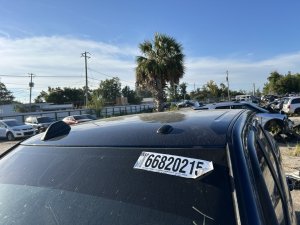
For this generation of Ram trucks, the GPS, cellular, and satellite radio functions are integrated into a single 'shark fin' antenna unit on the roof and are all managed by the Telematics Box Module (TBM). This integrated design means a fault with one antenna can sometimes require replacing the entire assembly. Ram has issued multiple Technical Service Bulletins (TSBs) acknowledging that this code, along with related antenna codes, is a common cause for the "Uconnect Box Requires Service" message, sometimes pointing to software updates or loose connections rather than outright component failure. Unlike prior generations where telematics functions were part of the radio head unit, these newer trucks use a separate, dedicated TBM.
Diagnostic Flowchart
Tap your situation to follow the diagnostic path that matches what you're seeing on this vehicle.
Symptoms You May Notice
- "Uconnect Box Requires Service" message on the infotainment screen
- GPS navigation is inoperative or provides an incorrect location
- Loss of satellite radio (SiriusXM) functionality, as it shares the same antenna assembly
- Potential for the Telematics Box Module (TBM) to stay awake, causing a slow battery drain
- SOS/Assist button features may be disabled
- Replacing the Uconnect radio head unit. The radio is separate from the Telematics Box Module (TBM) that sets this code. The fault lies within the TBM/antenna circuit, not the screen itself.
Most Likely Causes

- Loose GPS Antenna Connection 🔴 High Probability Multiple TSBs explicitly cite 'Antenna loose connection' as a primary reason for this code and the associated Uconnect service message. Connectors can work themselves loose over time due to vibration.
How to confirm: Visually inspect and physically check the antenna cable connections at the back of the Telematics Box Module and at the base of the roof antenna. The TBM is located deep behind the instrument cluster/glove box area 🎬 Watch: How to locate and access the Telematics Box Module. and can be difficult to access. The antenna connection requires lowering the headliner.
Typical fix: Secure the loose connector(s). Ensure they 'click' into place.
Est. part cost: $0 - Failed GPS/Satellite Antenna Assembly 🟡 Medium Probability The roof-mounted 'shark fin' antenna contains sensitive electronics that can fail internally. Water intrusion from a failed gasket or physical damage (e.g., from a car wash or garage door) can also damage the internal components.
How to confirm: After confirming connections are secure, the easiest test is to bypass the roof antenna by plugging a known-good temporary GPS antenna (with a FAKRA C connector) directly into the TBM. If the code clears and GPS function returns, the roof antenna assembly is faulty.
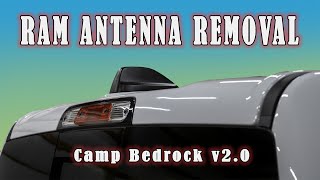
Typical fix: Replace the entire roof-mounted antenna assembly. This requires carefully lowering the headliner to access the mounting nut and connectors. 🎬 See this walkthrough on how to remove the shark fin antenna.
Est. part cost: $75-$150 - Telematics Box Module (TBM) Software Issue 🟡 Medium Probability Ram has issued TSBs, such as 08-139-23, that involve reprogramming the TBM to resolve this and other related codes, indicating that software glitches can falsely trigger the fault or cause connectivity issues.
How to confirm: A dealership or a properly equipped independent shop must check the current software version of the TBM against the latest available version listed in service bulletins. The vehicle may also prompt for an over-the-air (FOTA) update.
Typical fix: Update the TBM software using the dealership's wiTECH scan tool or by accepting an over-the-air update. 🎬 Watch: A quick guide to fixing the Uconnect service message. TSB 08-139-23 specifically addresses updating TBM software to version 5.39.1 to fix service messages.
Est. part cost: $0 if under warranty, otherwise a dealer labor charge for flashing. - Damaged Antenna Cable ⚪ Low Probability The cable runs from the roof, down a pillar, and behind the dashboard. It can be pinched or damaged during other repairs (like a windshield replacement) or if trim is improperly reinstalled.
How to confirm: Perform a resistance test on the antenna cable after disconnecting it from both the antenna and the TBM. An open circuit (infinite resistance) or a short to ground (low resistance to the chassis) indicates a bad cable.
Typical fix: Replace the damaged antenna cable. This is labor-intensive due to the routing.
Est. part cost: $40-$80
Rare But Worth Checking
- Failed Telematics Box Module (TBM): This is rare. The TBM is the module setting the code, but it's usually not the root cause. This should only be considered after all antenna, wiring, and software issues have been ruled out. It often appears with the companion code B22A9-96 (ECU Internal Performance Failure).
Diagnosis Steps
- Verify the "Uconnect Box Requires Service" message is present on the screen.
- Connect a professional scan tool capable of reading B-codes to confirm B1562 is active or stored.
- Check for related TSBs by VIN. A software update for the TBM, like TSB 08-139-23, may be the first recommended step.
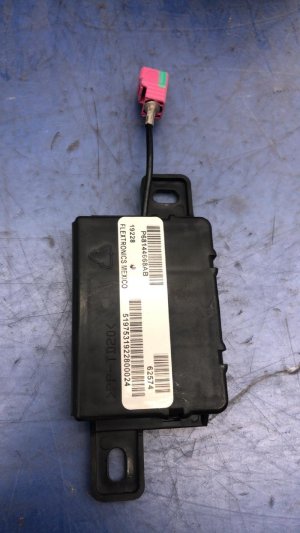
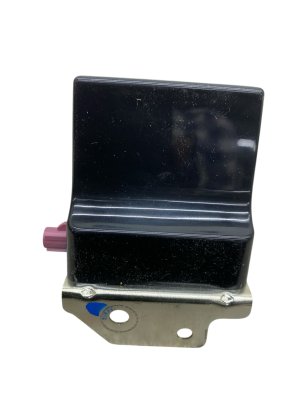
- If no software update is available, locate the Telematics Box Module (TBM). In 5th Gen Rams, it is a black box located deep behind the glove box area, often requiring removal of the glove box assembly and sometimes trim around the Uconnect screen for access.
- Inspect the antenna cable connection at the TBM. It is typically a blue FAKRA connector. Ensure it is clean and securely latched.
- Carefully lower the rear of the headliner to access the base of the roof antenna assembly. This can often be done by removing the third brake light and reaching through the opening, though it is a very tight space.
- Inspect the antenna cable connection at the antenna base. Ensure it is secure.
- If connections are good, disconnect the antenna cable from the TBM and connect a known-good test antenna (a generic GPS antenna with a blue FAKRA C connector will work). Clear the codes and see if B1562 returns. If it does not, the original roof antenna is faulty.
- If the code returns with a test antenna, the issue is likely with the TBM itself. However, this is the least likely cause and all wiring should be checked for shorts or opens before replacing the module.
Parts You'll Likely Need

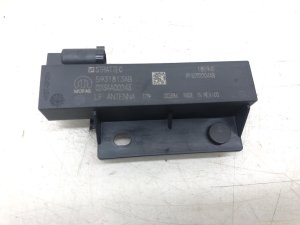
- Roof Mount Antenna Assembly
(OEM #68483909AA)— This is the most common part to fail when the code is not caused by a simple loose connection or software glitch. The internal electronics for the GPS receiver fail, requiring replacement of the whole 'shark fin' unit.
Trusted brands: Mopar
OEM price range: $75-$120
Aftermarket price range: $50-$90
Related Codes That Often Appear With This One
- B1560 — This code is for 'Cellular Antenna 1 - short to ground'. Since the cellular and GPS antennas are in the same housing and connect to the same module (TBM), a fault affecting one can often be related to a fault affecting the other.
- B1561 — This code is for 'Cellular Antenna 2 - short to ground'. Similar to B1560, it points to a problem in the shared antenna assembly or its connection to the TBM.
- B22A9 — This code indicates an 'ECU Internal Performance' failure within the Telematics Box Module. It frequently appears alongside the antenna codes and can suggest either a software issue requiring an update or, more rarely, a hardware failure of the TBM itself.
Technical Service Bulletins (TSBs) & Recalls
- 08-071-26: Defines B1562 as 'GPS Antenna short to ground or open' and lists it with other antenna and TBM codes.
- OTHERDOC_148 / OTHERDOC_132 / OTHERDOC_134: Link B1562 to 'Antenna loose connection' and the 'Uconnect Box Requires Service' pop-up.
- S2508000100: Notes intermittent 'Uconnect Box Requires Service' messages are tied to stored or pending B1562 codes.
- 08-139-23: Details a TBM software update (to version 5.39.1) to resolve 'Uconnect Box Requires Service' messages.
- 08-001-26: Details TBM software updates that address B1562 and other related DTCs causing the service message.
Platform-Specific Known Issues
- Multiple Technical Service Bulletins (TSBs) have been issued by Ram for the "Uconnect Box Requires Service" message, directly linking it to code B1562 and other antenna faults.
- TSB 08-139-23 specifically calls for a Firmware Over The Air (FOTA) update to the TBM to resolve service messages, indicating a known software glitch can cause these codes.
- Owners on forums report that accessing the antenna mounting nut and connectors can sometimes be done by removing the center high-mounted stop lamp (third brake light) and reaching into the cavity, avoiding the need to fully drop the headliner.
- Water intrusion from a failed antenna gasket is a common cause of failure, leading to corrosion and damage to the antenna's internal circuit board.
Mechanic-Grade Diagnostic Values
- GPS Antenna Power Supply Voltage — expected: 3.0V to 5.0V DC. Failure: Voltage below 3.0V or above 5.0V indicates a potential issue with the TBM or wiring.
- GPS Antenna Power Supply Current — expected: 10mA Maximum. Failure: Current draw significantly higher than 10mA could indicate a short circuit in the antenna or cable.
- Antenna Cable Resistance (Open Circuit Test) — expected: Less than 52.5 Ohms. Failure: Resistance significantly above 52.5 Ohms suggests an open or break in the antenna cable.
- Antenna Cable Resistance (Short Circuit Test) — expected: Greater than 47.5 Ohms (when measured between center pin and shield). Failure: Resistance below 47.5 Ohms indicates a short circuit between the cable's core and its outer shielding.
Hidden / Shadow Codes Worth Checking
- B1562-14: GPS Antenna - Circuit Short to Ground or Open. This is the most common variant, provided by manufacturer TSBs. (see via Professional scan tool like wiTECH.)
- B1560-13: Cellular Antenna 1 - Circuit Open. Often appears with B1562 due to the shared antenna assembly. (see via Professional scan tool like wiTECH.)
- B1561-13: Cellular Antenna 2 - Circuit Open. Often appears with B1562 due to the shared antenna assembly. (see via Professional scan tool like wiTECH.)
Scan Tool Commands That Help

- wiTECH: TBM Replacement Routine — This function, found in the 'Misc. Functions' menu, must be run after physically replacing the Telematics Box Module (TBM) to initialize the new unit.
- wiTECH: Restore Configuration and Align Proxi — This critical procedure, found under the 'Diagnostic Procedures' tab, is used to program a new or used module with the vehicle's specific configuration file, ensuring all systems communicate correctly.
- wiTECH: Reprogram Module — Used to flash the TBM with updated software as instructed by a Technical Service Bulletin (TSB) to fix software-related glitches causing the B1562 code.
- wiTECH: Clear All DTCs — This is performed after any reprogramming or repair to clear the fault codes from all modules and verify the fix was successful.
Wiring & Ground Locations
- Telematics Box Module (TBM) — Mounted on a bracket bolted to the instrument panel (IP) carrier, located deep behind the glove box next to the passenger airbag.. This is the module that sets code B1562. Access is required to check its connections and to test or replace the unit.
- Inline Antenna Connector — For roof antennas at the rear of the cab, the inline connector is located behind the passenger side kick panel. For front-mounted antennas, it is behind the passenger A-pillar trim. It is typically a single blue FAKRA-style connector.. This is a common point of failure. A loose connection here will cause an open circuit and trigger code B1562, but is much easier to access and fix than the connections at the TBM or antenna base.
- Frame Rail Ground Point — The 2023 upfitter schematic shows a primary chassis ground point on the frame rail.. While not the direct ground for the TBM, a poor main chassis ground can cause unpredictable floating voltages and communication errors across multiple modules, potentially leading to false codes like B1562.
Real Owner Repair Stories
- YouTube creator (General Chrysler/Dodge/Ram vehicle with Uconnect) — "Uconnect box requires service" message on the radio display.
❌ Tried (didn't work) Ignoring the message, hoping it would resolve with better LTE signal., Considering expensive dealer options like reprogramming all modules for thousands of dollars.
✅ What actually fixed it In the creator's experience, the issue was a loose, poor-quality blue FAKRA connector for the roof antenna where it connects to the telematics module. Reseating the connector resolved the issue. He also notes that a small, internal lithium-ion battery in the TBM can fail after 5-6 years, which would also require accessing the module for replacement.
OEM Part Supersession History
68359011AA→68483909AA— Standard part revision for improved reliability or manufacturing process change.
Heads up: The new part number (68483909AA) is a direct replacement for the old one and should be fully compatible.
Model Year Variations Within This Range
- 2022: The over-the-air (FOTA) software update path for the TBM differs between light-duty and heavy-duty trucks. TSB 08-130-23 notes that the 2022 Ram 1500 (DS) updates from version 5.13 to 5.25 to 5.39.1, while the 2500/3500 models (DJ/D2) update directly from 5.25 to 5.39.1, indicating different base software versions from the factory.
Helpful Videos
We Have This Part in Stock



The information in this article is provided for general reference and educational purposes only. Vehicle specifications, procedures, and part compatibility can vary by production date, trim level, and region. Always consult your vehicle's factory service manual and verify part numbers before purchasing or performing repairs. Safety-critical components such as airbags, seat belts, and braking systems should be installed by a qualified professional.
- Ram 2500:
- 🎬 Helpful Videos
- 🛍️ Shop This Part
- What's Unique About the 2022-2026 Ram 2500
- Diagnostic Flowchart
- Symptoms You May Notice
- Most Likely Causes
- Rare But Worth Checking
- Diagnosis Steps
- Parts You'll Likely Need
- Related Codes That Often Appear With This One
- Technical Service Bulletins (TSBs) & Recalls
- Platform-Specific Known Issues
- Mechanic-Grade Diagnostic Values
- Hidden / Shadow Codes Worth Checking
- Scan Tool Commands That Help
- Wiring & Ground Locations
- Real Owner Repair Stories
- OEM Part Supersession History
- Model Year Variations Within This Range
- 🎟️ Get 5% Off