

2016-2018 Mazda CX-9 Bluetooth & Infotainment Failure: A Buyer's Guide
This guide covers the common failures, replacement costs, and critical programming requirements for the Wireless Communication Module in 2016-2018 CX-9 models.
- A replacement module, whether new or used, MUST be programmed to the vehicle by a Mazda dealer.
- Symptoms often extend beyond Bluetooth, commonly causing infotainment reboots and USB port failure.
- Before replacing the module, eject the navigation SD card, as a corrupt card can cause identical rebooting issues.
- When buying used, get the latest part number revision possible (e.g., TK78-66-9C0D) for potential internal improvements.
Symptoms of a Failing 2016-2018 CX-9 Wireless Communication Module
A failing Wireless Communication Module, or the larger CMU it's part of, can cause a variety of frustrating electronic issues. Because this unit controls most of the infotainment system, symptoms are rarely limited to just one function. Before assuming the hardware has failed, it's wise to perform a soft or hard reset of the system.
🎬 Watch: How to reset your Mazda infotainment system- Constant System Reboots: The most common and disruptive symptom is the MAZDA CONNECT system getting stuck in a reboot loop, where the screen shows the Mazda logo, goes black, and then repeats the cycle every minute or two. This makes using the radio, backup camera, and all other screen functions nearly impossible.
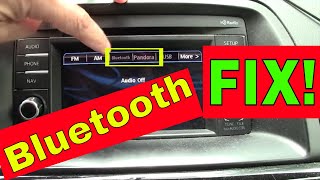
- Bluetooth Connection Failure: The system may be unable to find your phone, or connections will drop frequently. In some cases, the Bluetooth and Pandora options on the screen will appear grayed out and be unselectable. 🎬 See this quick trick to fix Mazda Bluetooth pairing issues
- Non-Functional USB Ports: The USB ports in the center console may stop charging your phone or fail to recognize media devices for music playback. This is because the CMU controls these ports.
- Frozen or Unresponsive Screen: The infotainment screen may freeze, become completely unresponsive to touch or commander knob inputs, or go entirely black.
- "Ghost" or Phantom Touches: The screen may act as if it's being touched when it isn't, causing random selections and menu changes. This specific issue often points to a hardware failure of the screen's digitizer itself.
Pro Tip: Before blaming the module, always check two simple things first: the navigation SD card and the vehicle's 12V battery. A corrupted SD card is a very common cause of reboot loops; simply ejecting the card from its slot in the center console can instantly solve the problem. A weak or aging battery can also cause intermittent electronic glitches, including random reboots and dropped Bluetooth connections.
Known Issues, TSBs, and Recalls
While no specific recalls have been issued for this component, Mazda has released numerous Technical Service Bulletins (TSBs) related to the MAZDA CONNECT system that these modules are part of. TSBs are instructions for dealers on how to diagnose and repair known, common problems.
- TSB 09-022/15 & Others: Mazda has a long history of issuing software updates to fix bugs in the MAZDA CONNECT system. Bulletins like TSB 09-021/21 (which supersedes many older ones) provide updated software (version 74.00.311 or later) to fix various symptoms. If your vehicle has older software, a dealer update may resolve glitches. You can check your software version in the system settings.
- Hardware Failure TSB (Older Models): TSB 09-032/16 for earlier Mazda models notes that if the system shuts down and does not reboot on its own (requiring an ignition cycle to restart), it is caused by an internal hardware malfunction of the CMU. While this TSB is not for the 2016-2018 CX-9 specifically, it shows a history of hardware-level failures in these units.
Warning: A mandatory dealer visit for programming is required after installing a replacement module. This part is not plug-and-play. The module must be configured to your vehicle's specific VIN and options using Mazda's proprietary diagnostic software. Most independent shops cannot perform this programming.
Buying a Used 2016-2018 CX-9 Wireless Communication Module
Given the high cost of a new module from a dealership, a used OEM unit is a popular and cost-effective choice. However, there are critical factors to consider to ensure you get a good part.
- Verify the Part Number: The part numbers for this module have been updated over time. The known sequence is TK78-66-9C0A, TK78-66-9C0B, TK78-66-9C0C, and TK78-66-9C0D. Later letters in the suffix usually indicate a newer, revised part. It is always best to purchase the latest version available (TK78-66-9C0D) as it may contain internal improvements over older versions.
- Match the Audio System: This guide and the listed part numbers are for vehicles with the standard AM/FM/CD audio system. Vehicles equipped with the premium Bose audio system may use a different module. Always confirm compatibility before purchasing.
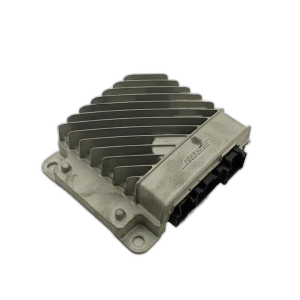
- Physical Inspection: When buying a used module, inspect the casing for any signs of physical damage, cracks, or pry marks. Check the electrical connector pins to ensure they are straight and free of any corrosion or water damage.
- Budget for Programming: Remember that the cost of the part is not the final cost. You MUST factor in the price of having a Mazda dealership program the used module to your vehicle. Call your local dealer beforehand to get a quote for this specific service.
Cost to Replace the CX-9 Wireless Communication Module
Replacing the communication module involves both the part cost and the labor for installation and programming. While the physical swap is straightforward for a DIYer, the mandatory programming makes a dealer visit necessary.
| Item | Estimated Cost |
|---|---|
| New OEM Module | $1200 - $1500+ |
| Used OEM Module | $100 - $250 |
| Shop Labor (Installation & Programming) | $200 - $400 |
Note: Prices are estimates and can vary based on location, supplier, and dealership labor rates. A new module from Mazda is often quoted at over $1,500.
Frequently Asked Questions (FAQ)
Can I replace the wireless communication module myself?
Yes, the physical replacement of the module is relatively simple for someone with basic DIY skills. It is typically located behind the glove box or dashboard trim. However, you cannot complete the job yourself. The vehicle will not recognize the new module until it is programmed by a Mazda dealership using their specific diagnostic tools.
Will a used module work without being programmed?
No. A used module must be programmed to your car's VIN. Without this step, the infotainment system will not function correctly, if at all. Do not install a used module without planning for a dealer visit to have it programmed.
My USB ports and Bluetooth stopped working at the same time. Is this the same part?
Yes, most likely. The Wireless Communication Module is part of the Connectivity Master Unit (CMU), which controls Bluetooth, USB ports, and other infotainment functions. When the unit fails, it's common for multiple features to stop working simultaneously.
Can I just update the software to fix my rebooting screen?
Sometimes. If the issue is a software glitch, a firmware update performed by a dealer can fix it. However, if the system is stuck in a constant reboot loop or exhibits other signs of hardware failure, a software update will not help. A common diagnostic step is that if the CMU reboots on a consistent cycle (e.g., every 30-90 seconds), the unit itself needs to be replaced.
Helpful Videos
Technical Specifications
OEM Part Numbers: TK78669C0A TK78669C0B TK78669C0C TK78669C0D
This module is an integrated part of the MAZDA CONNECT Connectivity Master Unit (CMU) for vehicles with the standard audio system.
We Have This Part in Stock




The information in this article is provided for general reference and educational purposes only. Vehicle specifications, procedures, and part compatibility can vary by production date, trim level, and region. Always consult your vehicle's factory service manual and verify part numbers before purchasing or performing repairs. Safety-critical components such as airbags, seat belts, and braking systems should be installed by a qualified professional.
- Mazda CX-9: