

2024-2026 Cybertruck Wheel Covers: Issues with Rubbing, Damage, and Replacement
This guide covers the common problems with the factory aero wheel covers on the 2024-2026 Tesla Cybertruck, including tire damage, replacement options, and what to check when buying a used set.
- The most critical issue with early 2024 Cybertruck aero covers was a design flaw causing them to rub against and damage the tire sidewalls; Tesla later released a redesigned part.
- When buying a used cover, the most important inspection is checking for cracks in the plastic mounting clips on the back, as this is the primary cause of detachment.
- Replacement is a very easy DIY job that takes only a few minutes and requires no special tools.
- Driving without the covers is safe but may reduce highway driving range by a small percentage (2-5%).
What is the Cybertruck Aero Wheel Cover?


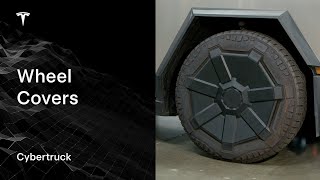
The 2024-2026 Tesla Cybertruck comes standard with distinctive plastic wheel covers known as Aero Wheel Covers. These are not traditional hubcaps; they are a functional component designed to reduce aerodynamic drag. By making the wheel surface smoother, they help the truck cut through the air more efficiently, which can lead to a small but measurable increase in driving range, often estimated around 2-3% at highway speeds. 🎬 Watch: See how these covers impact real-world driving range. Underneath these large covers are the truck's 20-inch alloy wheels, 6 lug nuts, and a small center hub area. The aero covers are held on by a series of clips and a central mounting ring.
Common Problems and Failure Symptoms

Early versions of the Cybertruck aero covers were subject to a design issue that caused them to be temporarily removed from new vehicle deliveries. Owners should be aware of the following common problems:
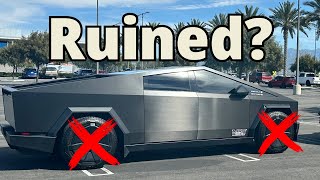
- Tire Sidewall Damage: The most significant known issue with the original aero covers is that the edges, or "fingers," of the cover could rub against the tire's sidewall. This rubbing action, caused by the tire bulging under the truck's weight, could wear down the rubber on the sidewall over time. Tesla addressed this by redesigning the covers with shorter fingers to provide more clearance.
- Scratched Alloy Wheels: Some owners have reported that the plastic clips and contact points on the back of the aero covers can scratch the finish of the underlying alloy wheels. This damage becomes visible only when the covers are removed.
- Detachment or Falling Off: While less common after the redesign, there were early reports and videos of the aero covers detaching from the vehicle while driving, posing a significant safety risk to other motorists. This is typically caused by broken or improperly seated retaining clips.
- Cracking and Curb Rash: Like any wheel cover, the Cybertruck's aero covers are susceptible to cosmetic damage from hitting curbs. The plastic can crack, scuff, or break, particularly around the outer edges and spokes.
- Noise: A loose or damaged cover can create rattling or clicking sounds as the wheel rotates. This usually indicates that one or more of the mounting clips are broken or not fully engaged.
Warning: Although Tesla did not issue a formal NHTSA recall for the tire-rubbing issue, it was widely acknowledged as a "parts containment pending revision." Owners of early-production Cybertrucks should inspect their tire sidewalls for unusual wear marks corresponding to the aero cover spokes.
Buying a Used 2024-2026 Cybertruck Wheel Cover

With the high cost of new OEM replacements, a used aero cover can be a good value. However, a thorough inspection is critical to avoid buying a part that will fail again.
Physical Inspection Checklist
- Inspect All Mounting Clips: This is the most critical step. Flip the cover over and carefully examine every plastic clip that snaps it onto the wheel. Look for hairline cracks, stress marks (white-ish lines in the plastic), or fully broken tabs. A cover with even one compromised clip may not seat securely and could detach while driving.
- Check the Center Mounting Ring: Ensure the separate mounting ring is present (if applicable to the design you're buying) and that its clips are also intact.
- Examine for Cracks and Warping: Check the entire surface, especially along the spokes and outer edge, for cracks. Lay the cover on a flat surface to ensure it is not warped, which could prevent it from sitting flush against the wheel.
- Verify It's the Redesigned Part: If possible, compare the used cover to a known redesigned part. The updated versions have shorter rubber "fingers" on the spokes to prevent tire rubbing. Buying an original-design cover may lead to the same tire-wear issues.
- Assess Cosmetic Damage: Scuffs and light scratches are common on used covers and can often be accepted for a lower price. However, deep gouges or missing chunks of plastic compromise the part's integrity.
Why Used OEM is a Smart Choice
For a component like this, a used Original Equipment Manufacturer (OEM) part is often superior to a new, cheap aftermarket one. The OEM covers are made from a specific grade of plastic (often with UV inhibitors) designed to withstand the elements and road stress. Aftermarket copies may use more brittle plastic that can crack easily or may not fit as precisely, leading to rattles or detachment. A good-condition used OEM cover provides the same fit and durability as a new one at a lower cost.
Cost Comparison: New vs. Used Cybertruck Wheel Covers
Prices can vary based on availability and condition. The aero covers are often sold individually.
| Part Type | Estimated Price (per cover) |
|---|---|
| New OEM | $75 - $180 |
| New Aftermarket | $75 - $300+ (often for a set of 4) |
| Used OEM | $50 - $120 |
| Shop Labor | $0 - $25 (Typically a 5-minute job) |
How to Replace the Cybertruck Aero Wheel Cover
Replacing a wheel cover is a simple DIY task that requires no special tools, though some find certain tools helpful.
- Installation Difficulty: 1 out of 5
- Estimated Time: 5 minutes
Step-by-Step Guide
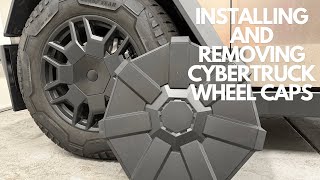
- Removal: Tesla's official method is to grasp the cover firmly with both hands and pull it straight toward you to release the clips. Some owners find this difficult and worry about breaking the plastic. An alternative is to use needle-nose pliers to gently release the clips through the small notches.
- Separate Mounting Ring (If Needed): Sometimes the inner mounting ring will stay attached to the wheel. If so, pull it off in the same manner.
- Installation: First, align the new mounting ring with the wheel spokes and press it firmly into place. Next, align the main aero cover with the design on the tire sidewall. Press firmly in the center to engage the main lock, then work your way around, pressing firmly on each spoke to snap it into place.
- Final Check: Once installed, give each spoke a quick pull to confirm it is securely attached. 🎬 Watch this quick walkthrough of the removal and installation process.
Pro Tip: The aero covers must be removed to access the tire's air valve. Getting familiar with the removal and installation process is something every owner will have to do for routine tire pressure checks.
A Note on Lug Nuts and Center Caps

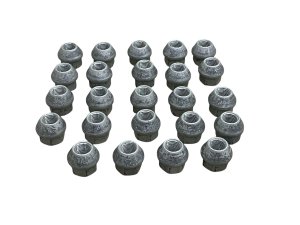
The Cybertruck uses a 6-lug wheel pattern. When the aero cover is removed, the six lug nuts and the center hub are exposed. This is different from other Tesla models (S, 3, X, Y) which use a 5-lug pattern. Aftermarket companies sell kits that include 24 lug nut covers (for all four wheels) and four center caps to give the wheels a more finished look when the aero covers are not being used.
Frequently Asked Questions (FAQ)
Does driving without the aero covers affect the Cybertruck's range?
Yes, but the effect is small. The covers are designed to improve aerodynamics, and removing them can reduce efficiency by a small percentage, typically estimated at 2-5%, especially during highway driving. For short, low-speed trips, the difference is negligible.
Do I need a special tool to remove the aero cover?
No, a special tool is not required. The cover is designed to be pulled off by hand. However, some owners prefer using tools like plastic pry bars or even needle-nose pliers to release the clips more gently to avoid breaking them.
Are the aero covers easy to steal?
Because they are held on by clips and can be pulled off without tools, they can be a target for theft, similar to hubcaps on other vehicles.
Can I repair a cracked or scuffed aero cover?
Minor scuffs can sometimes be polished or painted, but cracks are a more serious issue. A cracked cover, especially near a mounting point, has lost its structural integrity and should be replaced. Repairing it with adhesive is not recommended as it may not hold under the stress of driving, leading to the cover detaching.
Helpful Videos
Technical Specifications
OEM Part Numbers: 1250232-00-C 1250232-00-D 1250232-00-E 1250272-99-D
Fits 20-inch factory Cybertruck wheels. Material: Plastic. Attachment: Snap-on clips with center mounting ring.
We Have This Part in Stock

The information in this article is provided for general reference and educational purposes only. Vehicle specifications, procedures, and part compatibility can vary by production date, trim level, and region. Always consult your vehicle's factory service manual and verify part numbers before purchasing or performing repairs. Safety-critical components such as airbags, seat belts, and braking systems should be installed by a qualified professional.
- Tesla Cybertruck:
- 🎬 Helpful Videos
- 🛍️ Shop This Part
- What is the Cybertruck Aero Wheel Cover?
- Common Problems and Failure Symptoms
- Buying a Used 2024-2026 Cybertruck Wheel Cover
- Physical Inspection Checklist
- Why Used OEM is a Smart Choice
- Cost Comparison: New vs. Used Cybertruck Wheel Covers
- How to Replace the Cybertruck Aero Wheel Cover
- Step-by-Step Guide
- A Note on Lug Nuts and Center Caps
- Frequently Asked Questions (FAQ)
- 🎟️ Get 5% Off