

Audi & VW Backup Camera Failures (2010-2018): Black Screens, Wiring Problems, and Fixes
Diagnosing and fixing common backup camera issues like black screens, flickering, and missing guidelines on the Audi Q7, A6, A8, A7, and VW Touareg.
- The most common cause of failure is broken wires in the harness that runs to the trunk lid or tailgate.
- On the Q7 and Touareg, check for water damage in the rear cargo area from clogged sunroof drains, as this can destroy the control module.
- A replacement camera MUST be calibrated by a professional with special tools to ensure the parking guidelines are accurate.
- Always diagnose the problem with a proper scan tool before buying parts; a black screen can be caused by the camera, wiring, or control module.
Symptoms of a Failing Video Camera

A faulty backup camera system can present several distinct symptoms. Because the camera, control module, and wiring are all connected, a problem in one area can manifest in different ways on your MMI screen.
1. Black or Blue Screen
The most common symptom is a completely black or blue screen when you shift into reverse. The MMI may display a message like "Rear view camera system currently not available." This usually indicates a total loss of signal, which could be caused by a broken wire, a failed camera, or a faulty control module. In some cases, a software glitch can also cause this, which may be resolved by restarting the vehicle.
2. Flickering or Distorted Image
If the image on the screen flickers, rolls, or is filled with static, the most likely culprit is a poor electrical connection or a damaged wire. This often happens in the wiring harness that runs from the vehicle body into the trunk lid or tailgate. The constant opening and closing fatigues the wires, causing them to break internally. The camera may work intermittently at first, often depending on the position of the trunk lid.
3. No Parking Guidelines or Inaccurate Lines
The dynamic parking lines that bend as you turn the steering wheel are generated by the control module and overlaid on the video feed. If the video works but the lines are missing or don't move, it often points to a communication issue between the steering angle sensor and the camera module. If the camera has been replaced without proper calibration, the lines may be present but highly inaccurate, making them unreliable for parking.
4. Foggy or Obstructed View
If the image is blurry, foggy, or looks like it's underwater, it's a clear sign that the camera's weather seal has failed and moisture has gotten inside the lens assembly. This is a physical failure of the camera unit itself and requires replacement. This can be a common issue on VW Touaregs, especially in humid or rainy conditions.
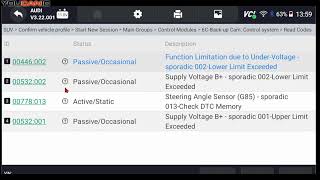
Pro Tip: Before assuming the camera is bad, check for related faults. On these vehicles, a flashing park assist button and a fault code for a parking sensor or buzzer can sometimes disable the camera display. Scanning the vehicle with a diagnostic tool like VCDS is essential for an accurate diagnosis.
🎬 Watch: How to troubleshoot your camera using a diagnostic scanner.Known Issues, TSBs, and Recalls

While many recalls for blank screens affect newer 2019+ models, the underlying issues of wiring and software faults are also present in the 2010-2018 generation.
- Technical Service Bulletin 2041430/1: This TSB specifically addresses an intermittently inoperative rearview camera on the 2013-2015 Audi Q7 and 2013-2016 Audi A8. It points to a problem in the wiring harness causing an "open circuit" or "implausible signal" fault (DTC 02203). The recommended fix 🎬 See this comprehensive guide for troubleshooting Audi and VW camera faults. is to inspect and repair the wiring.
- Wiring Harness Failure: The most common real-world failure is breakage in the wiring loom where it passes through the rubber boot between the body and the trunk lid/tailgate. This affects all listed models. The constant flexing from opening and closing the trunk eventually breaks the small-gauge video and power wires.
- Water Intrusion (Q7 & Touareg): On the Audi Q7 and VW Touareg, clogged sunroof drains are a known problem. The rear drains can get blocked, causing water to overflow and run down the inside of the D-pillar, right onto the camera control module and other electronics located in the rear right-hand side of the cargo area. This water damage can fry the module, causing a total system failure.
Buying a Used Video Camera: What to Check

A used OEM camera can be a great value, but careful inspection is key to avoiding a bad part. New aftermarket cameras often have lower image quality and can cause compatibility issues.
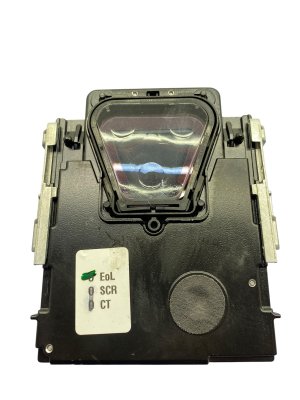
- Verify the Part Number: This is the most critical step. Match the part number on your old camera exactly. While several numbers may work, using the exact original part number guarantees compatibility with your vehicle's software and control module. The most common part number for this group of vehicles is 7P6980551C.
- Inspect the Lens: Check the camera lens for deep scratches, haziness, or any sign of moisture inside. A clear, scratch-free lens is essential for good image quality.
- Check the Connector Pins: Look closely at the electrical connector. The pins should be straight, clean, and free of any green or white corrosion. Corroded pins are a red flag for water damage.
- Examine the Housing: Look for cracks or damage to the plastic housing. A cracked housing can allow water to enter and destroy the internal electronics.
- Ask About the Donor Vehicle: If possible, find out the mileage of the vehicle the part came from. A lower-mileage part is generally preferable. More importantly, ask if the camera was tested and confirmed to be working before removal.
Cost Comparison
Replacing the rear video camera can have a wide range of costs depending on the parts you choose and who does the labor.
| Part/Service | Estimated Cost |
|---|---|
| New OEM Camera | $850 - $1,250 |
| New Aftermarket Camera | $80 - $250 |
| Used OEM Camera | $100 - $300 |
| Shop Labor (Replacement) | $150 - $300 |
| Shop Labor (Calibration) | $150 - $250 |
Warning: These prices do not include the potential cost of replacing a faulty control module, which can be several hundred dollars more. Always diagnose the problem fully before buying parts.
Replacement Overview & Calibration

Replacing the camera is a moderately difficult job that a skilled DIYer can perform, but the final calibration step often requires professional tools.
- Difficulty Rating: 3 out of 5
- Estimated Time: 1.5 - 2.5 hours (not including calibration)
- General Steps:
- Disconnect the vehicle's battery.
- Remove the interior trim panel from the trunk lid or tailgate. This is usually the most time-consuming part.
- Locate the camera and disconnect its electrical harness.
- Unbolt the camera from its mounting bracket (it's often part of the trunk release handle assembly).
- Install the new camera, reconnect the wiring, and reassemble the trim.
Calibration is Not Optional
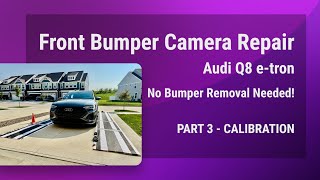
After the camera is replaced, it must be calibrated. This procedure uses a special patterned mat placed behind the vehicle and diagnostic software to teach the system the exact position and angle of the new camera. Without calibration, the parking guidelines will be inaccurate or may not appear at all, which is a safety risk. While some advanced DIYers with tools like VCDS can attempt this, it's often best left to a dealer or a qualified independent shop with the proper equipment.
🎬 Watch: A DIY walkthrough of the camera calibration process using mats.Frequently Asked Questions (FAQ)
My screen is black. Is the camera definitely broken?
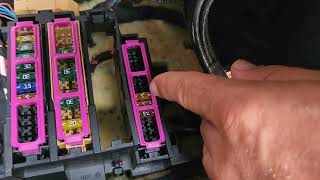
Not necessarily. A black screen is the most common symptom of failure, but it can be caused by a broken wire in the trunk hinge, a blown fuse, a software glitch, or a bad control module. The first step should always be to scan the vehicle for fault codes to narrow down the possibilities before replacing the camera itself.
Can I use a cheap aftermarket camera from Amazon or eBay?
While it's possible, it's often not recommended. Many cheap aftermarket cameras have poor image quality, lack the correct viewing angle, and may not be fully compatible with the vehicle's control module, leading to flickering or software issues. A used OEM camera is often a more reliable and cost-effective choice that ensures proper integration.
Why did my camera stop working after I replaced my car's battery?
Sometimes, disconnecting the battery can cause various electronic modules to lose their settings. It's possible the camera system needs to be re-initialized. Try performing a full MMI system reset. If that doesn't work, the system may need to be re-coded or calibrated with a diagnostic tool.
Do I really need to calibrate the new camera? The picture looks fine.
Yes. Even if the video image appears, the calibration is what ensures the colored parking guidelines are accurate. Without it, the lines on the screen will not match the actual path of the car, which could cause you to hit an obstacle you thought you were clearing. It is a critical safety step.
Helpful Videos

Technical Specifications
OEM Part Numbers: 7P6980551C 4S0907441B 8K0980551
The system integrates with the vehicle's CAN bus network and MMI display. Requires professional calibration after replacement.
We Have This Part in Stock





The information in this article is provided for general reference and educational purposes only. Vehicle specifications, procedures, and part compatibility can vary by production date, trim level, and region. Always consult your vehicle's factory service manual and verify part numbers before purchasing or performing repairs. Safety-critical components such as airbags, seat belts, and braking systems should be installed by a qualified professional.
- Audi Q7:
- Audi A6:
- Audi A8:
- Audi A7:
- Volkswagen Touareg:
- 🎬 Helpful Videos
- 🛍️ Shop This Part
- Symptoms of a Failing Video Camera
- 1. Black or Blue Screen
- 2. Flickering or Distorted Image
- 3. No Parking Guidelines or Inaccurate Lines
- 4. Foggy or Obstructed View
- Known Issues, TSBs, and Recalls
- Buying a Used Video Camera: What to Check
- Cost Comparison
- Replacement Overview & Calibration
- Calibration is Not Optional
- Frequently Asked Questions (FAQ)
- 🎟️ Get 5% Off