

2008-2018 Audi A4, Q5, A5 & More Rear Camera Failure: Black Screens and Flickering Explained
This guide covers the common causes of rear view camera failure on many popular Audi models and how to diagnose and replace the faulty camera.
- The most common symptom of failure is a black screen when in reverse, even if parking sensor beeps still work.
- This camera (5N0827566AA) is ONLY for vehicles with the standard backup camera (Option Code GP1), not the 360-degree surround view system.
- Failure is often caused by broken wires in the flexible harness between the trunk/tailgate and the car body, not the camera itself. Inspect this area first.
- A used OEM camera is often a better choice than a cheap new aftermarket one due to superior image quality and durability.
Symptoms of a Failing Rear View Camera


When the rear view camera on your Audi begins to fail, the symptoms are typically easy to spot. Because these vehicles share similar electronics, the failure modes are consistent across the A4, Q5, A5, S5, SQ5, A4, RS5, S4, Q3, RS7, and S7 models.
- Black or Blue Screen in Reverse: This is the most common symptom. When you shift into reverse, the MMI screen will switch over, but instead of a video feed, you'll see a blank black or blue screen. Often, the parking sensor graphic may still appear, or you will continue to hear the audible beeps.
- Intermittent or Flickering Video: The camera feed may cut in and out, flicker, or show a distorted image. This can be caused by temperature changes, moisture, or simply the vibration of opening and closing the trunk or tailgate, which can affect a loose wire.
- "No Signal" Message: The MMI screen may display a "No Signal" error, indicating a complete breakdown in communication between the camera and the head unit.
- Blurry or Foggy Image: A blurry image can be caused by a dirty lens, but if cleaning it doesn't help, it could be due to moisture getting inside the camera housing itself, indicating a failed seal.
- Parking Aid System Malfunction Message: The vehicle's onboard diagnostics may detect a fault in the camera system and display an error on the instrument cluster or MMI screen.
Pro Tip: In some cases, a failure of the front parking aid buzzer can cause the entire parking system, including the rear camera, to stop working. If you have a diagnostic tool like VCDS, scan for a fault code related to the front parking aid warning buzzer before assuming the camera is the problem.
Known Issues, TSBs, and Recalls

While the specific vehicles in this guide are older, Audi has issued recalls for newer models due to backup camera software issues. For example, recall 90TV and 91DF affected many 2019 and newer models where a software glitch could prevent the rearview camera image from displaying. While these specific recalls do not apply to the 2008-2018 model years, they highlight that camera issues can be software-related. Before replacing hardware, it's always a good idea to perform an MMI system reset by pressing and holding the volume knob for about 10 seconds.
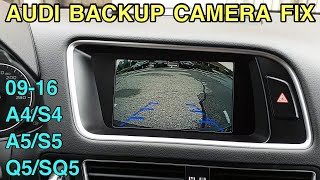
🎬 Watch this guide on resetting a car backup cameraThe most common hardware failure is not the camera itself, but the wiring. The wires that run from the body into the trunk lid or tailgate are constantly flexed, and over time they can fray and break. Inspecting the wiring harness in the rubber boot between the body and trunk is a critical diagnostic step.
Warning: This camera, part numbers 5N0827566AA and 5N0827566C, is for vehicles with the standard backup camera system, known as Option Code GP1. It is NOT compatible with vehicles that have the 360-degree or surround view camera system. Always verify your vehicle's options before purchasing.
Buying a Used Rear View Camera
A used OEM camera is an excellent way to save money on this repair. Aftermarket cameras can have lower image quality, poor night vision, and may not integrate perfectly with the car's electronics. A quality used OEM part provides the same performance as a new one at a fraction of the price.
What to Check Before Purchasing:
- Verify the Part Number: Ensure the part is 5N0827566AA or the compatible 5N0827566C. While other cameras look similar, they may not work.
- Inspect the Lens: Look for deep scratches, haziness, or any sign of moisture inside the lens. A clean, clear lens is essential.
- Check the Connector: The electrical connector pins should be straight and free of any green or white corrosion. Corrosion indicates water intrusion, and the camera should be avoided.
- Examine the Housing: Check for any cracks or damage to the plastic housing, which could compromise its waterproof seal.
- Ask About the Source Vehicle: If possible, confirm the camera came from a vehicle without the 360-degree camera system.
Cost Comparison

| Part Type | Estimated Cost |
|---|---|
| New OEM | $810+ |
| New Aftermarket | $40 - $120 |
| Used OEM | $75 - $200 |
| Shop Labor | $150 - $400 |
Replacement Overview
Replacing the rear view camera is a manageable DIY job for most home mechanics. The process generally involves removing the interior trim panel from the trunk lid or tailgate to access the camera, which is integrated into the trunk release handle.
- Difficulty: 2 out of 5
- Estimated Time: 1-1.5 hours
- Tools Needed: Plastic trim removal tools, socket set (typically 8mm and 10mm), screwdriver.
The general steps involve disconnecting the battery, carefully prying off the plastic trim panel, unplugging the electrical connector from the camera/handle assembly, and unbolting the handle from the tailgate. Installation is the reverse of removal. The process is very similar for sedans like the A4/S4 and SUVs like the Q5/SQ5, with the main difference being the shape and attachment points of the interior trim panel.
🎬 See this step-by-step Audi backup camera replacement videoFrequently Asked Questions
My screen is black. How do I know if it's the camera or the MMI screen?
If other MMI functions like Radio, Navigation, and Media are working correctly, and the screen only goes black when you put the car in reverse, the problem is almost certainly within the camera system (camera, wiring, or control module) and not the MMI screen itself. You can also try a system reset first.
Do I need to program or calibrate the new camera?
For a direct replacement with the same part number on a standard (GP1) system, programming is not typically required. The system is plug-and-play. However, some sources indicate that for perfect alignment of the on-screen parking guidelines, calibration with dealer tools may be necessary, though it's often not needed for a simple camera swap.
Why do my parking sensors still beep if the camera screen is black?
The ultrasonic parking sensors and the rear view camera are related but separate systems. The sensors can function and provide audible warnings even if the camera or its video feed has failed. This is a strong indication that the fault lies with the camera or its wiring.
Can I just install a cheap aftermarket camera from Amazon?
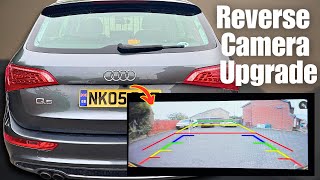
While you can, it's often not recommended. OEM cameras are designed for superior image quality, low-light performance, and durability. Many cheap aftermarket cameras have lower resolution, poor color accuracy, and can be prone to water failure or electrical interference that causes flickering. 🎬 Watch how to install a rear view camera on an Audi A used OEM camera is often a more reliable and higher-quality choice.
Helpful Videos

Technical Specifications
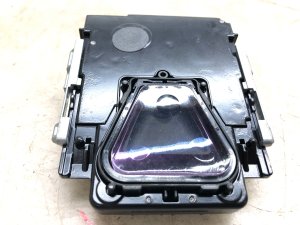
OEM Part Numbers: 5N0827566AA 5N0-827-566-AA 5N0827566C 5N0-827-566-C
Dimensions: 112.5mm x 49.8mm
We Have This Part in Stock



The information in this article is provided for general reference and educational purposes only. Vehicle specifications, procedures, and part compatibility can vary by production date, trim level, and region. Always consult your vehicle's factory service manual and verify part numbers before purchasing or performing repairs. Safety-critical components such as airbags, seat belts, and braking systems should be installed by a qualified professional.
- Audi A5:
- Audi Q5:
- Audi S5:
- Audi SQ5:
- Audi A4:
- Audi RS5:
- Audi S4:
- Audi Q3:
- Audi RS7:
- Audi S7:
- Audi allroad:
- Audi A7 Quattro: