

2015 Lincoln MKC Sync 2 Module (APIM): Solving Black Screens and Programming a Replacement
This guide covers the common failures of the Sync 2 connectivity module in the 2015 Lincoln MKC, including black screens, and explains the critical programming required for a replacement.
- A replacement APIM module MUST be programmed to your Lincoln's VIN to function; it is not a plug-and-play part without this step.
- The most common failure symptoms are a completely black screen, constant rebooting, or an unresponsive touchscreen.
- Buying a used OEM module that has been pre-programmed by the seller is the most cost-effective and practical solution for most owners.
- Before replacing the module, ensure your vehicle's battery is in good health, as low voltage can cause similar electronic issues.
Symptoms of a Failing 2015 Lincoln MKC APIM Module
A failing APIM module can cause a range of frustrating issues that disrupt the use of your vehicle's touchscreen and media functions. While some problems can be intermittent at first, they often worsen over time, leading to a complete system failure.
- Black or Blank Screen: This is the most common and definitive sign of a failed APIM. The screen may fail to turn on, or it might display the Lincoln logo upon startup and then go black.
- Unresponsive or Frozen System: The touchscreen may freeze, lag significantly, or stop responding to touch inputs altogether.
- Phantom Touches: The system may seem to have a mind of its own, randomly changing radio stations, making calls, or navigating menus without any input. This specific issue, however, can also be caused by a failing touchscreen digitizer, not just the APIM.
- Constant Reboots or 'System Maintenance' Messages: The system may get stuck in a loop of restarting or displaying messages about performing system maintenance.
- Bluetooth and Phone Connectivity Failure: You may experience frequent Bluetooth disconnections, or the system may be unable to pair with your phone at all.
- Loss of Features: Functions like navigation, the backup camera display, or onscreen climate controls may become unavailable or work incorrectly.
Associated OBD-II Trouble Codes
A failing APIM often stores specific Diagnostic Trouble Codes (DTCs) that can be read with an advanced scan tool like FORScan. These codes are typically 'U' (network) or 'B' (body) codes. Common codes include:
- U3000: Control Module Failure.
- B108E: Display Malfunction.
- U2100: Initial Configuration Not Complete (often seen after a failed replacement attempt).
- B1087: LIN Bus 'A' Failure.
Pro Tip: Before condemning the APIM, check the vehicle's battery. A weak or failing battery can cause low voltage during startup, leading to communication errors and symptoms that mimic a bad module.
Known Issues and Warranty Information
The Sync 2 APIM modules used in this era are known for a high failure rate. Ford previously issued a Customer Satisfaction Program (12M02) that extended the warranty on the APIM to five years with unlimited mileage for many 2011-2014 vehicles. While the 2015 MKC was not officially included in that specific program, it uses the same fundamental Sync 2 technology and is prone to the same failures, confirming this is a widespread hardware issue. There are no specific recalls for the 2015 MKC APIM, but Technical Service Bulletin (TSB) ASI-45254 was issued for unresponsive touchscreens on similar models, highlighting the known problems.
Warning: Programming is NOT optional. A replacement APIM, whether new or used, must be programmed to your vehicle’s unique Vehicle Identification Number (VIN) and factory options. Failure to program the module will result in it not functioning correctly, if at all.
Programming a Replacement APIM Module
This is the most critical part of replacing the APIM. You have three main options for programming:
- DIY with FORScan: This is the most cost-effective method for experienced DIY mechanics. It requires a laptop, a compatible OBD-II adapter (a USB version like the OBDLink EX is highly recommended for programming), and the FORScan software with an extended license. You will need to download your vehicle's 'As-Built' data from Ford's Motorcraft Service website and write it to the replacement module.
- Dealer or Independent Shop: A Lincoln dealership or a qualified independent shop with the right diagnostic tools can program the module for you. This is the most straightforward but also the most expensive option.
- Purchase a Pre-Programmed Module: Many online sellers of used OEM parts offer a service to pre-program the APIM to your VIN before shipping it to you. This turns the job into a simple 'plug-and-play' hardware swap and is an excellent option for most DIYers.
Buying a Used 2015 Lincoln MKC Connectivity Module
Given the high cost of a new APIM, a used OEM module is a very popular and practical choice. Here’s what to look for:
- Verify the Part Number: Match the part number on your original module if possible. The key part number for the 2015 MKC is EJ7T-14F239-CF. You may also see compatible numbers like ES7T-14D212-CA.
- Choose a Pre-Programmed Unit: The best way to ensure a successful repair is to buy from a reputable seller who will program the module to your VIN before shipping. This saves you the time, expense, and headache of programming it yourself or paying a dealer.
- Check Seller Reputation: Look for sellers with a strong history of positive feedback for selling and programming these specific modules.
- Why Used OEM is a Good Choice: There are virtually no new aftermarket APIM modules available. A used, tested, and properly programmed OEM module provides the exact same factory functionality at a fraction of the cost of a new part from a dealer.
Cost Comparison
The cost to fix a failing APIM can vary dramatically based on the path you choose.
| Part or Service | Estimated Cost |
|---|---|
| New OEM Module (Part Only) | $650 - $800 |
| Used OEM Module (Not Programmed) | $100 - $200 |
| Used OEM Module (Pre-Programmed) | $125 - $250 |
| Shop Labor (Installation) | $150 - $250 |
| Shop Labor (Programming Only) | $150 - $300 |
Frequently Asked Questions (FAQ)
Can I replace the APIM module myself?
Yes, the physical replacement is straightforward for a DIYer. It involves carefully removing the center dash trim and unbolting the screen assembly to access the module on the back. The main challenge is the mandatory programming. If you buy a pre-programmed module, the entire job is very feasible at home.
Is a black screen always a bad APIM module?
Most of the time, yes. However, it can also be a loose connection, a problem with the separate touchscreen display, or even a low vehicle voltage issue caused by a bad battery. If symptoms like 'ghost touch' are present, the problem might be the touchscreen digitizer layer and not the APIM itself.
Can I upgrade my 2015 MKC from Sync 2 to Sync 3?
Yes, upgrading from Sync 2 to the more modern Sync 3 system is a popular modification. It requires replacing the APIM, the touchscreen, and the USB hub. It is a more involved and expensive process than simply replacing a failed Sync 2 module.
Do I need the VIN from the donor vehicle?
No, you do not need the donor vehicle's VIN. The replacement module needs to be programmed with your vehicle's VIN and As-Built data to ensure all features (like heated seats, climate control, backup camera, etc.) work correctly.
Technical Specifications
OEM Part Numbers: EJ7T-14F239-CF EJ7T-14F239-CE ES7T-14D212-CA ES7Z-14D212-CA
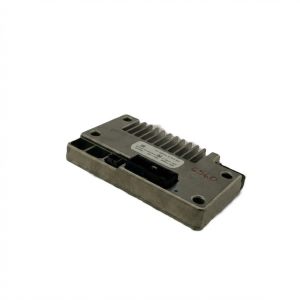
This is the central computer for the Lincoln Sync 2 (MyLincoln Touch) system with an 8-inch display.
We Have This Part in Stock


The information in this article is provided for general reference and educational purposes only. Vehicle specifications, procedures, and part compatibility can vary by production date, trim level, and region. Always consult your vehicle's factory service manual and verify part numbers before purchasing or performing repairs. Safety-critical components such as airbags, seat belts, and braking systems should be installed by a qualified professional.
- Lincoln MKC: