

2011-2013 Honda Odyssey Bluetooth Module: Solving Battery Drain & Connectivity Issues
This guide covers the diagnosis, replacement, and compatibility of the HandsFreeLink (Bluetooth) module for the 2011-2013 Honda Odyssey, focusing on the common parasitic battery drain problem.
- The most common failure symptom is a parasitic battery drain that kills the battery when the van is parked.
- This module is ONLY for non-navigation models (LX, EX trims). It is not compatible with EX-L or Touring models with factory navigation.
- A replacement module does NOT need to be programmed by a dealer; it is a plug-and-play installation.
- Buying a used OEM module is the most cost-effective solution, as new units are extremely expensive.
Symptoms of a Failing 2011-2013 Odyssey Bluetooth Module
When the HandsFreeLink (HFL) module begins to fail, it can cause some of the most confusing and frustrating problems for Odyssey owners. While some symptoms are obvious, the most significant one can easily be misdiagnosed as a bad battery or alternator.
1. Unexplained Dead Battery (Parasitic Drain)
This is the most common and serious symptom of a failing HFL module. The module can fail internally in a way that prevents it from entering its low-power "sleep mode" when the vehicle is turned off. It remains active, drawing a constant current that drains the battery, often overnight or within a few days of sitting. Many owners replace their battery multiple times, only to have the problem return. The module itself may feel warm or hot to the touch even long after the van has been shut off.
2. Bluetooth Connection Problems
More straightforward symptoms involve the function of the Bluetooth system itself. This can include:
- Inability to pair a new phone.
- The "Phone" or "HandsFreeLink" option being grayed out or unavailable on the radio screen.
- Frequent and random disconnection of a paired phone.
- Poor audio quality, static, or dropped calls when using the system.
- The system freezing or becoming unresponsive when you try to make or receive a call.
3. No Response from Steering Wheel Controls
The phone control buttons on the steering wheel (the talk and hang-up buttons) may stop responding entirely. When you press them, nothing happens on the radio display, and no voice prompts are heard. This indicates the system is not active.
Diagnosing the Problem
If you suspect the HFL module is causing a parasitic battery drain, the diagnosis is straightforward. You will need a multimeter capable of measuring DC amps.
- Perform a Parasitic Draw Test: With the vehicle off and all doors closed, disconnect the negative battery terminal. Set your multimeter to measure amps (usually the 10A setting) and connect it in series between the negative battery cable and the negative battery post.
- Wait for the Vehicle to Sleep: It can take up to 30 minutes for all modules in the vehicle to go into sleep mode. A normal draw should be very low, typically under 50 milliamps (0.05A).
- Isolate the Module: If you see a high draw (often 100mA to over 200mA with a bad HFL module), the next step is to isolate the circuit. The HFL module is located behind the radio in the center dash stack. Accessing it to unplug it is difficult, so the easiest first step is to locate the fuse for the HFL/audio system in the fuse box and pull it.
- Confirm the Cause: If pulling the fuse causes the parasitic draw on your multimeter to drop to a normal level, you have confirmed the HFL module (or something on that circuit) is the culprit. Given how common this failure is, the module itself is the prime suspect.
Pro Tip: Before buying a replacement, you can simply leave the HFL module unplugged (or its fuse pulled) to stop the battery drain. You will lose Bluetooth functionality, but your van will start reliably. This is a free, temporary fix while you source a replacement part.
Buying a Used 2011-2013 Odyssey Bluetooth Module
Given the extremely high cost of a new OEM module, a used part is the most practical and economical solution for this repair.
Verify Compatibility: Trim Level is Everything
Warning: This is the most critical step. The Bluetooth module for the 2011-2013 Odyssey is specific to the trim level. The part numbers covered in this guide are ONLY for models with a cloth interior and without the factory navigation system (typically LX and EX trims). Models with leather, navigation, or rear entertainment systems (EX-L, Touring, Touring Elite) use a different, incompatible module.
- Correct Module: Fits LX, EX (non-navi). Part number starts with 39770-TK8-A0...
- Incorrect Module: Fits EX-L, Touring (with navi). Part number is often 39770-TK8-A12.
Always match your original part number to the replacement. Do not purchase a module from a navigation-equipped van for your non-navigation van, or vice-versa. It will not work.
Part Numbers to Look For
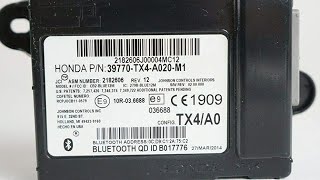
The primary part number is 39770-TK8-A02. Honda often uses suffixes for minor revisions, so any of the following part numbers are correct and interchangeable for the non-navigation models:
- 39770-TK8-A02
- 39770-TK8-A020-M1
- 39770-TK8-A021-M1
- 39770-TK8-A022-M1
Inspection Tips for Used Modules
When buying a used module, inspect the connector pins for any signs of corrosion or damage. The casing should be free of cracks or signs of water intrusion. Since the failure is internal, there are often no external signs of a problem, so buying from a reputable seller with a warranty is highly recommended.
Programming and Installation
Does the module need to be programmed?
No. A replacement HFL module for this generation of Odyssey is plug-and-play. It does not need to be programmed or flashed by a dealer. Once installed, you will simply need to pair your phone to the new module as if it were a new vehicle.
Replacement Overview
Replacing the module is moderately difficult due to its location. It is located behind the factory radio. The process involves:
- Disconnecting the negative battery terminal.
- Carefully prying off and removing several pieces of dash trim around the center stack and shifter.
- Removing the four 8mm bolts that secure the radio assembly.
- Pulling the radio assembly forward to gain access to the space behind it.
- The HFL module is a small black box held in by two Phillips head screws.
- Unplug the single electrical connector, remove the screws, and swap the module.
A first-timer should budget 1.5 to 2 hours for the job, taking care not to break any plastic trim clips.
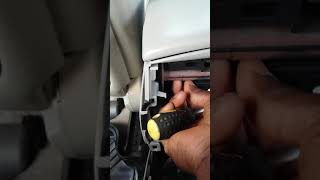
🎬 Watch this video to see the exact removal process.Cost of Replacement
| Part Type | Estimated Cost |
|---|---|
| New OEM | $700 - $1,060 |
| New Aftermarket | Not Available |
| Used OEM | $50 - $100 |
| Shop Labor | $150 - $300 |
Frequently Asked Questions (FAQ)
Does the 2011-2013 Odyssey Bluetooth module need to be programmed?
No, it does not. It is a plug-and-play part. After installation, you will just need to go through the standard phone pairing process.
Why did my Bluetooth module kill my car battery?
This is a very common failure mode for this part. An internal electronic fault prevents the module from going into a low-power sleep mode when the car is off. It stays active, continuously drawing power and draining the battery.
Can I just unplug the module instead of replacing it?
Yes. If your primary concern is the battery drain and you don't need Bluetooth, you can simply disconnect the module and leave it unplugged. This will solve the parasitic draw issue at no cost, but you will lose all HandsFreeLink functionality.
Will a module from an Odyssey with navigation work in my van?
No. The modules are specific to the vehicle's factory equipment. This part (39770-TK8-A02) is for non-navigation models. Navigation-equipped models use a different part number (like 39770-TK8-A12) that is not interchangeable.
Helpful Videos
Technical Specifications
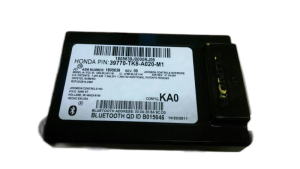
OEM Part Numbers: 39770-TK8-A02 39770TK8A020M1 39770TK8A021M1 39770TK8A022M1
Handles Bluetooth (HandsFreeLink) connectivity for non-navigation models. Located behind the radio head unit.
We Have This Part in Stock


The information in this article is provided for general reference and educational purposes only. Vehicle specifications, procedures, and part compatibility can vary by production date, trim level, and region. Always consult your vehicle's factory service manual and verify part numbers before purchasing or performing repairs. Safety-critical components such as airbags, seat belts, and braking systems should be installed by a qualified professional.
- Honda Odyssey:
- 🎬 Helpful Videos
- 🛍️ Shop This Part
- Symptoms of a Failing 2011-2013 Odyssey Bluetooth Module
- 1. Unexplained Dead Battery (Parasitic Drain)
- 2. Bluetooth Connection Problems
- 3. No Response from Steering Wheel Controls
- Diagnosing the Problem
- Buying a Used 2011-2013 Odyssey Bluetooth Module
- Verify Compatibility: Trim Level is Everything
- Part Numbers to Look For
- Inspection Tips for Used Modules
- Programming and Installation
- Does the module need to be programmed?
- Replacement Overview
- Cost of Replacement
- Frequently Asked Questions (FAQ)
- 🎟️ Get 5% Off