

2015-2019 Ford Edge, Explorer & Transit SYNC 3 APIM Module: Solving Black Screens and Failures
This guide covers common failures, programming requirements, and replacement costs for the SYNC 3 APIM in the Ford Edge, Explorer, and Transit models.
- This module, the APIM, is the brain of the SYNC 3 system and its failure causes black screens, freezing, and loss of features.
- A replacement APIM MUST be programmed to your vehicle's VIN and features; it is not a plug-and-play part.
- DIYers can program the module using FORScan software, or buy a pre-programmed unit from an online seller for an easier installation.
- Before replacing the module, always try a master reset and check for SYNC software updates, as many issues can be fixed without new hardware.
Symptoms of a Failing APIM Module

A failing APIM can cause a wide range of frustrating issues. Because it controls the entire SYNC 3 system, symptoms are usually obvious and directly impact the usability of the center screen. Many owners first notice minor glitches that get progressively worse, culminating in a total failure.
Common Failure Symptoms:
- Black or Unresponsive Screen: The most common and definitive sign of failure is a screen that remains black and will not turn on. It may happen intermittently at first and then become permanent.
- System Freezing or Lagging: The touchscreen may become extremely slow to respond to inputs, or freeze completely, requiring a vehicle restart to temporarily fix.
- Constant Re-booting: The SYNC system may get stuck in a reboot loop, or randomly restart while you are driving.
- Loss of Bluetooth and USB: The system may fail to recognize or pair with your phone, and USB ports may stop working for charging or data.
- Navigation and GPS Problems: The GPS may show the wrong location, navigation can stop working, or the system may get stuck on a message like "In Michigan" when selecting a destination.
- Apple CarPlay / Android Auto Failure: These features may fail to launch, disconnect randomly, or display a black screen when a phone is connected.
- Incorrect Camera Display: The backup camera might stay on the screen at forward speeds or the screen may turn blue.
In many cases, a simple soft reset (holding the Power and Seek-Right buttons) 🎬 Watch: How to perform a quick soft reset on your screen or a hard reset (pulling the fuse) may provide a temporary fix, but a module that is truly failing will continue to have these problems.
Associated OBD-II / DTC Codes
While many APIM failures don't trigger a check engine light, a technician using a diagnostic tool like FORScan can often find specific Diagnostic Trouble Codes (DTCs) stored in the module. Common codes include:
- U0184: Lost Communication With Radio
- U0151: Lost Communication With Restraints Control Module
- U2101: Control Module Configuration Incompatible
These codes often point to internal hardware failure or communication breakdowns on the vehicle's network caused by the faulty APIM.
Known Issues, TSBs, and Recalls

Ford has issued several Technical Service Bulletins (TSBs) related to SYNC 3 performance issues that can mimic a failing APIM. It's crucial to check if a software update might solve your problem before replacing the hardware.
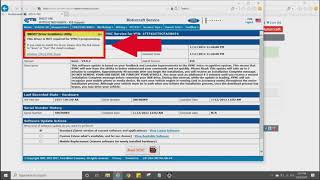
- TSB 20-2363 / 21-2342 / 20-2255: These bulletins address a wide range of SYNC 3 issues on numerous Ford vehicles, including the Edge, Explorer, and Transit. Symptoms include a frozen screen, black screen, Wi-Fi pop-up messages, inoperative apps, and CarPlay issues. The prescribed fix is to update the APIM software, not replace the module. Ford explicitly notes that many modules returned under warranty were found to be functional and only needed a software update.
- Early Module Unreliability: Forum users and technicians note that APIMs manufactured in 2016 and early 2017 are more prone to failure. When buying a used module, it's often recommended to find one from a newer vehicle if possible.
Warning: Always try performing a master reset and checking for available SYNC software updates via the Ford owner website before condemning the APIM. Many performance problems can be resolved with a software update, saving you hundreds of dollars.
Buying a Used Vehicle Connectivity Module (APIM)

Purchasing a used APIM is a popular and cost-effective repair, but it requires careful attention to detail to ensure you get a compatible, functional part. The #1 most important factor is programming.
Programming is Required
An APIM is not a plug-and-play part. It must be programmed with your vehicle's specific configuration data, known as "As-Built" data. This data tells the module about your vehicle's features, such as the screen size, whether you have navigation, a backup camera, satellite radio, specific climate controls, etc. Failure to program the module correctly will result in missing features or a system that doesn't work at all.
Options for Programming:
- DIY with FORScan: This is the most popular method for enthusiasts. Using a laptop, a compatible OBD-II adapter, and the FORScan software, you can download your vehicle's original As-Built data and write it to the replacement module. This is the most affordable but also the most technical option.
- Pre-Programmed Modules: Many online sellers on sites like eBay or dedicated Ford SYNC specialists offer used APIMs that are pre-programmed to your vehicle's VIN before they are shipped. This is a great plug-and-play option for DIY installers who don't want to deal with programming.
- Dealer Programming: A Ford dealership can program a replacement APIM using their Integrated Diagnostic System (IDS). However, this is often the most expensive option, and some dealers may be hesitant to program a used part you supply.
Pro Tip: Before removing your old APIM (if it's still partially functional), use FORScan to back up its As-Built data. This will make programming the replacement module much easier.
What to Look For When Buying Used:
- Part Number: While many APIMs look identical, their internal hardware can differ (e.g., navigation vs. non-navigation). The part number FR3Z-14D212-LA is a common service part. However, APIMs from many different Ford and Lincoln models from 2016 and newer can be used as long as they are programmed correctly.
- Navigation vs. Non-Navigation: A non-navigation APIM cannot be upgraded to have navigation through software alone; it requires different internal hardware. Ensure you buy a navigation-equipped module if your vehicle has that feature.
- Seller Reputation: Buy from reputable sellers who guarantee the module is tested and functional. Look for sellers who offer VIN programming as a service.
Cost of Replacement
Replacing the APIM can range from a moderately priced DIY job to a very expensive dealership repair.
| Part or Service | Estimated Cost |
|---|---|
| New OEM (Dealer) | $550 - $1200+ |
| Used OEM (Pre-Programmed) | $200 - $450 |
| Used OEM (DIY Programming) | $50 - $200 |
| Shop Labor for Replacement & Programming | $150 - $400 (1-2 hours) |
Frequently Asked Questions (FAQ)
Do I have to go to the dealer to program a new APIM?
No, a dealer visit is not required if you or the seller can program the module. Many DIYers use a tool called FORScan to program the module themselves with their vehicle's specific data. Alternatively, many online sellers will pre-program a used module to your VIN for a plug-and-play installation.
Will a used APIM from a different Ford model work in my car?
Yes, in many cases. APIM modules from various 2016+ Ford and Lincoln vehicles are physically and electrically compatible. The key is that the module must be properly programmed with the As-Built data for your specific vehicle's options (screen size, navigation, climate controls, etc.).
What's the difference between an APIM and the screen?
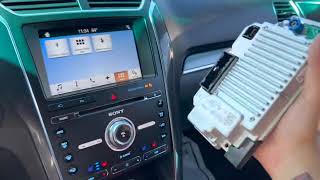
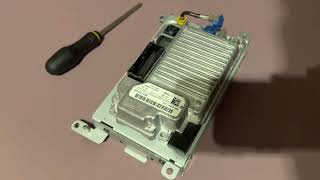
The APIM is the silver computer module, typically bolted to the back of the touchscreen. The touchscreen is just a display and input device. They are separate parts, though they are often sold together as a single assembly. A black screen can be caused by a failure of either the APIM or the screen, but APIM failure is more common.
Can I upgrade from SYNC 2 to SYNC 3 with this module?
Yes, but it requires more than just this module. Upgrading from the older MyFordTouch (SYNC 2) system to SYNC 3 requires a SYNC 3 APIM, a compatible 8-inch capacitive touchscreen, a new GPS antenna, and a new media hub in the center console. This module is a key component of that upgrade.
Helpful Videos

Technical Specifications
OEM Part Numbers: FR3T14D212LA FR3Z14D212LA FR3Z-14D212-D
This is the Accessory Protocol Interface Module (APIM) for the Ford SYNC 3 system. It requires programming (As-Built data configuration) to match the vehicle's specific options.
We Have This Part in Stock



The information in this article is provided for general reference and educational purposes only. Vehicle specifications, procedures, and part compatibility can vary by production date, trim level, and region. Always consult your vehicle's factory service manual and verify part numbers before purchasing or performing repairs. Safety-critical components such as airbags, seat belts, and braking systems should be installed by a qualified professional.
- Ford Explorer:
- Ford Edge:
- Ford Transit-250:
- Ford Transit-150:
- Ford Transit-350:
- 🎬 Helpful Videos
- 🛍️ Shop This Part
- Symptoms of a Failing APIM Module
- Common Failure Symptoms:
- Associated OBD-II / DTC Codes
- Known Issues, TSBs, and Recalls
- Buying a Used Vehicle Connectivity Module (APIM)
- Programming is Required
- Options for Programming:
- What to Look For When Buying Used:
- Cost of Replacement
- Frequently Asked Questions (FAQ)
- 🎟️ Get 5% Off