

2017-2025 Ford & Lincoln USB Port Failure: Diagnosing Dead Ports and CarPlay/Android Auto Issues
This guide covers the common reasons your USB ports fail in many Ford F-150, Expedition, Explorer, Super Duty, Maverick, Lincoln Navigator, and Police Interceptor Utility vehicles, and how to fix them.
- Liquid spills are the #1 killer of these USB modules; even a small amount can cause permanent damage.
- Before replacing the part, always try a different high-quality cable and perform a soft reset of the SYNC system by holding the power and forward track buttons.
- Replacement is extremely easy and requires only a plastic trim tool, making it an ideal DIY repair that takes less than 15 minutes.
- Many different part numbers exist. Always match the part number from your original module to ensure compatibility with features like USB-C and wireless charging.
Symptoms of a Failing USB Port

When the USB media hub begins to fail, the symptoms are usually straightforward and directly impact your ability to connect and charge devices. Here’s what to look for:
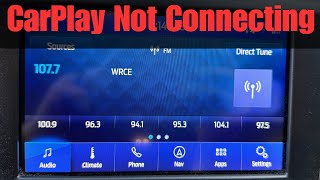
- No Connection for Apple CarPlay or Android Auto: The most common symptom is the inability to launch CarPlay or Android Auto. The system may not recognize that a phone is plugged in at all, or it may display an error message.
- Device Not Charging: The port fails to provide power to a connected device. In some cases, it may provide a very slow, insufficient charge.
- Intermittent Connectivity: The connection may repeatedly drop and reconnect. This is especially noticeable with CarPlay or Android Auto, where the screen might flicker or return to the native SYNC interface without warning.
- Complete Port Failure: Neither charging nor data transfer works on one or more ports. Sometimes the backlight illumination around the port will also go out.
- "USB Device Not Recognized" Error: The SYNC screen may display an error message indicating it cannot read the connected device, even if the same device and cable work elsewhere.
- Burning Smell or Smoke: In rare cases of an electrical short, a burning smell or even smoke may come from the port area. This is a serious issue that requires immediate attention.
Known Issues, TSBs, and Recalls

As of early 2026, there are no widespread recalls or Technical Service Bulletins (TSBs) specifically for USB port failure across all of these models. However, the issue is widely documented by owners in online forums. The failures can be grouped into a few common causes:
- Liquid Damage: Spilling drinks like coffee or soda into the USB port is a leading cause of permanent failure. The sugar and acids in these liquids corrode the delicate circuit board inside the module.
- Software Glitches: Sometimes, the SYNC system's main computer (APIM) will shut down the USB ports after detecting a fault, such as a power surge from a faulty cable. This can often be resolved without replacing any parts.
- Internal Component Failure: The electronics within the module can simply wear out or fail over time due to heat cycles and repeated use.
- Damaged Cable: In some vehicles, particularly the Ford Expedition, owners have found that the cable connecting the USB module to the back of the radio head unit was the point of failure, not the module itself.
- Unplugged from Factory: On some models like the Ford Ranger (which shares a similar electrical architecture with the Maverick), owners have found rear USB ports were never plugged in at the factory. The connector was found tucked away under the center console carpet.
Vehicle-Specific Notes
- Ford F-150 & Super Duty (2017-2023): The open-top design of the center console media bin makes this module highly susceptible to liquid spills.
- Ford Expedition & Lincoln Navigator (2018-2025): Some owners have resolved persistent issues by replacing the main USB cable that runs from the module to the APIM, which requires more disassembly of the center console.
- Ford Explorer & Police Interceptor Utility (2020-2024): It's common for these models to experience intermittent issues that sometimes resolve on their own after the vehicle is turned off for an extended period, suggesting a software-based fault. Decommissioned Police Interceptor vehicles may have had their ports removed or wiring modified.
Step-by-Step Diagnosis
Before buying a replacement part, follow these steps to rule out simple fixes. The problem is often not the USB module itself.
- Test a Different Cable and Device: Use a high-quality, certified cable (not a cheap gas station cable) and a different phone or USB device to rule out a faulty cable or device issue.
- Inspect and Clean the Port: Use a flashlight to look inside the USB port for lint, food crumbs, or other debris. Use compressed air or a non-metallic tool like a toothpick to gently clean it out.
- Perform a SYNC Soft Reset: With the vehicle running, press and hold the Power button (volume knob) and the Track Forward (>>) button on the steering wheel or dash simultaneously for about 10 seconds until the screen goes black and the Ford/Lincoln logo appears. This reboots the system and often restores port functionality.
- Check Fuses: While less common, a blown fuse can cause the issue. Check your owner's manual for the fuse panel diagrams and locate the fuses for "USB Ports" or "SYNC". Visually inspect the fuse and test it with a multimeter if possible.
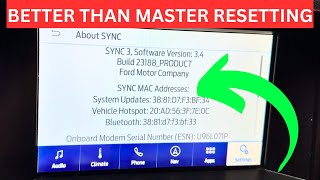
- Perform a SYNC Master Reset: This is a last resort before replacing parts, as it will erase all your saved settings, paired phones, and navigation history. Go to Settings > General > Master Reset on your SYNC screen. After the reset, you will need to re-pair your phone.
Buying a Used USB Port
If diagnosis points to a faulty module, a used OEM part is a cost-effective and reliable option. Aftermarket modules are available, but an OEM part ensures perfect fitment and compatibility.
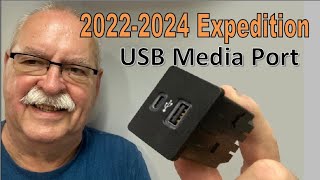
Pro Tip: Many different part numbers exist for these modules, which may feature different combinations of USB-A and USB-C ports. The safest bet is to remove your existing module first and order a replacement with the exact same part number printed on the label.
- Physical Inspection: When you receive the used part, look closely inside the USB ports with a flashlight. Avoid any units with bent pins, corrosion, or a sticky residue, which indicates past liquid damage.
- Verify the Part Number: The part number is critical. A module for a vehicle without a wireless charging pad may not work correctly in a vehicle that has one. Match the number on your original part (e.g., HC3T-14F014-AC, JL1T-14D202-FA) exactly.
- Connector Integrity: Check the plastic connectors on the back of the module. Ensure they are not cracked or damaged and that the locking tabs are intact.
- Why Used OEM is a Good Choice: These modules are simple electronic components with no moving parts. As long as they haven't been damaged by liquid or a major electrical surge, they are generally very reliable. A used OEM unit is often identical in quality to a new one, but at a fraction of the price.
Replacement Procedure (Difficulty: 1/5)
Replacing the USB module is one of the easiest repairs you can do on these vehicles. It typically takes less than 15 minutes.
- Get a Trim Removal Tool: Use a plastic pry tool to avoid scratching your dashboard or center console.
- Pry Out the Module: Carefully insert the pry tool around the edge of the USB module assembly and gently pry it out. It is held in by clips.
- Disconnect the Connectors: Pull the module out just enough to access the two electrical connectors on the back. Press the release tab on each connector and pull them straight out. One is typically a mini-USB style plug and the other is a larger power connector.
- Install the New Module: Plug the two connectors into the back of the new module until they click into place.
- Test and Reinstall: Before snapping the module back into the console, turn on the vehicle and test the ports with your phone to ensure they work. Once confirmed, simply push the module back into its opening until the clips engage.
Warning: When disconnecting the electrical plugs, do not pull on the wires themselves. This can damage the wiring harness, creating a much more difficult and expensive repair.
Cost Breakdown
| Part or Service | Estimated Cost |
|---|---|
| New OEM USB Module | $60 - $120 |
| New Aftermarket USB Module | $50 - $95 |
| Used OEM USB Module | $25 - $75 |
| Shop Labor for Replacement | $50 - $100 (approx. 0.5 hours) |
Frequently Asked Questions
Why does my phone charge but CarPlay/Android Auto won't connect?
This usually means the data transfer pins inside the port or cable are damaged, or there's a software issue. The power pins are separate and can continue to function even when the data connection is lost. Try a soft reset of the SYNC system first.
Can I upgrade my older USB-A module to a newer one with USB-C?
Yes, in many cases this is a direct swap. As long as the module is physically the same shape and uses the same connectors, you can often replace a dual USB-A port with a newer USB-A/USB-C combination module. Ensure the part you buy is listed as compatible with your vehicle model and year.
Do I need to have the dealer reprogram anything after replacing the module?
No, the USB module is a plug-and-play component. No programming or special tools are required for replacement.
The USB ports work intermittently. What's the most likely cause?
Intermittent issues are often caused by a faulty or low-quality phone cable, a loose connection on the back of the module, or a software glitch in the SYNC system. Try a SYNC soft reset before assuming the module itself is bad.
Helpful Videos
Technical Specifications
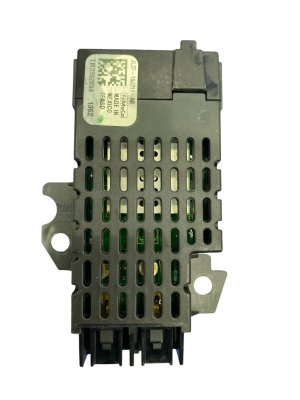
OEM Part Numbers: JL1B-78045M68 JL1T-14D202-FA JL1T-14D202-FAW JL1T-14D202-MA JL1Z-14D202-MA JU5T-14G332-AA LL1T-19J235-AA LL1Z-19J235-C HC3Z-19A387-H HC3T-14F014-AC ML3T-14F014-AC ULB5T-14F014-CC PC3Z-19A387-A
Connects to the main SYNC APIM module via a Mini-USB and a separate power connector. Available in USB-A and USB-C configurations.
We Have This Part in Stock

The information in this article is provided for general reference and educational purposes only. Vehicle specifications, procedures, and part compatibility can vary by production date, trim level, and region. Always consult your vehicle's factory service manual and verify part numbers before purchasing or performing repairs. Safety-critical components such as airbags, seat belts, and braking systems should be installed by a qualified professional.
- Ford Expedition:
- Lincoln Navigator:
- Ford F-150:
- Ford Explorer:
- Ford F-250 Super Duty:
- Ford F-350 Super Duty:
- Ford Maverick:
- Ford Police Interceptor Utility: