

BMW F-Series USB & AUX Port Failure (2012-2020): Why It Fails and How to Fix It
A complete guide to diagnosing and replacing the faulty center console USB/AUX port in many popular 2012-2020 BMW models like the 2, 3, 4, and 5 Series, X1, X3, and more.
- First, try resetting iDrive by holding the volume knob for 30 seconds; this often fixes software glitches causing USB issues.
- This guide is for F-chassis BMWs (approx. 2012-2020). Newer G-chassis models use different USB-C ports.
- A faulty cable is a very common cause. Test with a new, high-quality cable before replacing the port.
- Replacement is extremely easy (1/5 difficulty), requiring only a plastic trim tool, making a used OEM part a very cost-effective DIY repair.
Vehicle Fitment: F-Chassis vs. G-Chassis Warning

Important Compatibility Note: This guide and the part numbers listed apply specifically to BMW's F-chassis vehicles, generally built between 2012 and 2020. Newer models, known as the G-chassis (e.g., 2019+ 3 Series G20, 2018+ X3 G01), use different USB ports, often USB-C types with different part numbers. Before purchasing, always verify the part number on your existing port to ensure compatibility.
This USB/AUX port is a shared component across a wide range of F-chassis models, including:
- 2012-2018 BMW 3 Series (F30, F31, F34)
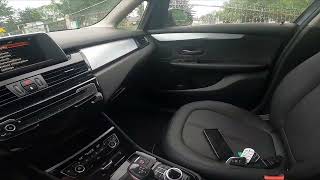
- 2014-2020 BMW 2 Series (F22, F23) 🎬 Watch: How to find the USB port location in a 2 Series
- 2014-2020 BMW 4 Series (F32, F33, F36)
- 2016-2022 BMW X1 (F48)
- 2018 BMW X3 (F25 generation)
- 2017 BMW 5 Series (F10 generation)
- 2016-2022 BMW 740i (G11/G12 may use different parts, verify)
- 2015-2020 BMW M4 (F82, F83)
- 2016-2021 BMW M2 (F87)
- 2019 BMW X4 (F26 generation)
Common Symptoms of a Failing USB Port

When the USB port begins to fail, the symptoms are usually consistent and frustrating. Here are the most common signs, from most to least likely.
1. Intermittent Connection or Disconnection
Your phone or USB drive constantly connects and disconnects. This is often triggered by moving the phone or cable and is extremely disruptive when using navigation or listening to music. This can be caused by a worn-out USB cable, debris in the port, or physically worn/bent contact pins inside the port itself.
2. USB Option is Grayed Out or "Not Connected"
The iDrive system shows the USB input, but you can't select it. No matter what device or cable you use, the car refuses to recognize that anything is plugged in. This often points to a complete failure of the port's data connection or a software glitch in the iDrive head unit.
3. No Charging or Power
The port is completely dead. Plugging in a device results in no charging and no data connection. This is often caused by a blown fuse, a disconnected cable behind the port, or a total failure of the port's internal electronics.
4. Physical Damage
A visual inspection reveals bent or broken pins inside the USB port. This is common and can be caused by inserting the cable forcefully, at an angle, or using a damaged cable. Once the pins are bent, the port is usually unrepairable and must be replaced.
Diagnosis: Simple Steps to Try Before Replacement

Don't rush to buy a new part. Many USB issues can be solved with simple troubleshooting. Follow these steps in order.
- Reset the iDrive System: This is the easiest and most common fix for a software glitch. With the car running or in accessory mode, press and hold the volume knob for 20-30 seconds. The screen will go black and then reboot, showing the BMW logo. Once it's fully restarted, test the port again.
- Use a Different, High-Quality Cable: Cheap or worn-out cables are a primary cause of connection problems. BMW has even issued a Technical Service Bulletin (TSB SI B65 25 16) warning that non-approved third-party USB cables can cause a host of electrical problems. Test with a new, original cable from your phone's manufacturer.
- Test a Different Device: Plug in a different phone or a simple USB flash drive with music on it to determine if the problem is with your specific device.
- Clean the Port: Use a can of compressed air and a non-metallic tool like a wooden or plastic toothpick to gently clean out any lint, dust, or debris from inside the port.
- Check the Fuses: If the port has no power, a blown fuse is a likely culprit. The fuse box location can vary, but it's often in the trunk or front passenger footwell. Check your owner's manual for the correct fuse diagram.
Buying a Used USB Port: What to Look For

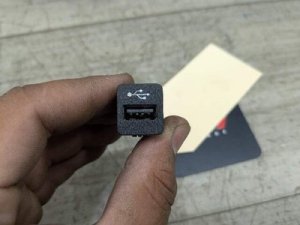
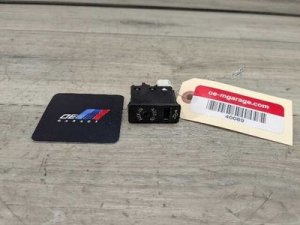
A used OEM USB/AUX port is a smart and economical choice for this repair. These modules have no moving parts and are very reliable. A tested unit from a reputable source is just as good as a new one at a fraction of the price.
- Verify the Part Number: This is the most critical step. You must match the part number from your old port. The most common part number is 84109229247, but others like 51169207357 or 84109229246 are also used. Remove your old part first to be certain.
- Inspect the Pins: Look directly into the USB and AUX ports. The metal contact pins inside the USB port should be straight, clean, and uniform. Avoid any port with bent, corroded, or missing pins.
- Check the Housing: Ensure the plastic housing is not cracked or broken, especially around the clips that hold it in place.
- Why Used OEM is Better: For a simple electronic part like this, a used OEM unit guarantees perfect fitment, correct electronic communication with the iDrive system, and proper power output. Cheap, unbranded aftermarket copies can have issues with data transfer speeds or charging, causing the same problems you're trying to fix.
Replacement Guide (DIY)
Pro Tip: You only need one tool for this job: a plastic trim removal tool (also called a bone tool). Using a screwdriver will scratch and damage the surrounding console trim.
Replacing the USB/AUX port is one of the easiest repairs you can do on these cars.
- Insert a plastic trim removal tool into the seam between the USB/AUX module and the center console trim.
- Gently pry upwards. The module is held in by clips and will pop out.
- Once loose, pull the module out to expose the wiring.
- Press the tabs on the electrical connectors and unplug them from the back of the old module.
- Plug the connectors into your new replacement module. They only fit one way.
- Push the new module back into the console until it clicks securely in place.
That's it. The entire process takes less than five minutes. No coding or special programming is required.
Cost of Replacing a BMW USB Port
The cost varies significantly depending on the path you choose.
| Part Source | Estimated Cost | Notes |
|---|---|---|
| New OEM (Dealer) | $75 - $100 | Brand new part from a BMW dealership. |
| New OEM (Online) | $60 - $80 | Same genuine part, but from online retailers at a discount. |
| Used OEM (Recycled) | $15 - $40 | A tested, working part from a salvage vehicle. Excellent value. |
| Shop Labor | $75 - $125 | Typically 0.5 hours of labor. Unnecessary for this simple DIY job. |
Frequently Asked Questions (FAQ)
Do I need to code or program the new USB port?
No. This part is plug-and-play. The vehicle will recognize it immediately after installation.
Will replacing the USB port fix my Apple CarPlay / Android Auto?
If the port itself was the cause of the connection failure (e.g., bad pins, no data), then yes, a new port should restore function. However, if the issue is with your iDrive software, phone, or cable, a new port will not solve it.
My phone charges, but music won't play. Is the port bad?
It could be. The USB port has separate pins for power and data. It's possible for the data pins to fail while the charging pins still work. First, confirm you are using a high-quality data-capable cable, not a cheap 'charging-only' cable. If the cable is good, the port's data circuit has likely failed.
Can I upgrade my old USB-A port to a newer USB-C port?
This is not a simple swap. The newer USB-C ports used in G-chassis cars have different connectors and may have different communication protocols with the head unit. It would require custom wiring and potentially coding, and is not a recommended DIY modification.
Helpful Videos
Technical Specifications
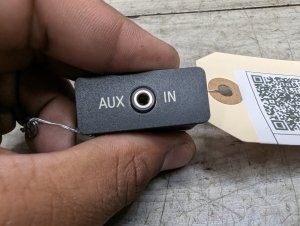
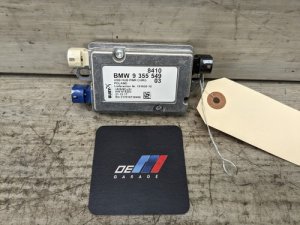
OEM Part Numbers: 84109229247 9229247 51169207357 9207357 84109229246 9229246 84109229294 9229294 84109355549 9355549
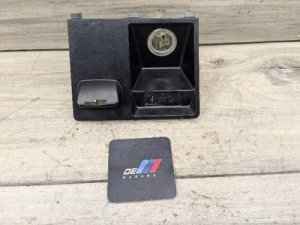
Combined USB Type-A (Data and Charging) and 3.5mm Auxiliary audio input jack. Mounts in center console or armrest.
We Have This Part in Stock


The information in this article is provided for general reference and educational purposes only. Vehicle specifications, procedures, and part compatibility can vary by production date, trim level, and region. Always consult your vehicle's factory service manual and verify part numbers before purchasing or performing repairs. Safety-critical components such as airbags, seat belts, and braking systems should be installed by a qualified professional.
- BMW 2 Series:
- BMW 3 Series:
- BMW 4 Series:
- BMW X1:
- BMW X3:
- BMW 5 Series:
- BMW 740i:
- BMW M4:
- BMW M2:
- BMW X4:
- BMW 4 Series Gran Coupe:
- BMW X5:
- BMW X6:
- BMW M5:
- BMW M3:
- BMW 435i:
- BMW 435i xDrive:
- 🎬 Helpful Videos
- 🛍️ Shop This Part
- Vehicle Fitment: F-Chassis vs. G-Chassis Warning
- Common Symptoms of a Failing USB Port
- 1. Intermittent Connection or Disconnection
- 2. USB Option is Grayed Out or "Not Connected"
- 3. No Charging or Power
- 4. Physical Damage
- Diagnosis: Simple Steps to Try Before Replacement
- Buying a Used USB Port: What to Look For
- Replacement Guide (DIY)
- Cost of Replacing a BMW USB Port
- Frequently Asked Questions (FAQ)
- 🎟️ Get 5% Off