

2025 Mazda CX-50 Telematics Module: Decoding the 'Malfunction' Warning and Replacement Guide
This guide covers the common 'Telematics Malfunction' error, part compatibility, and the mandatory dealer programming required for the 2025 Mazda CX-50.
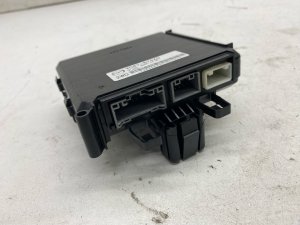
- This module (VC85-67-CM0) is ONLY for 2025 CX-50 models WITHOUT the 'Private eCall' / SOS button feature.
- A replacement module, whether new or used, MUST be programmed by a Mazda dealer to function. It is not a plug-and-play part.
- The common 'Telematics Malfunction' warning is often caused by a software glitch that can be fixed with a dealer-installed update per a TSB.
- Failure of this module does not prevent the vehicle from being driven, but all remote app features will be disabled.
Symptoms of a Failing Telematics Module

Failure of the telematics module is typically not subtle. The most common sign is a specific warning message that appears on the instrument cluster.
- "Telematics Malfunction" Warning: This is the most direct indicator of a problem with the TCU. This message can sometimes appear intermittently due to temporary software glitches or poor cellular reception, and may even resolve on its own. However, if the message is persistent, it points to a harder fault.
- Diagnostic Trouble Code (DTC) U3000:04: If you scan the vehicle's computer with an OBD-II tool, a failing TCU will often store the code U3000:04, which translates to "Telematics communication unit internal malfunction".
- MyMazda App Features Don't Work: Remote features like engine start, door locks, and vehicle status updates will fail to execute or the app will show outdated information.
- Inability to Enroll in Connected Services: If you are trying to set up Mazda Connected Services for the first time and it repeatedly fails, it could indicate an issue with the TCU.
Known Issues, TSBs, and Recalls

Software Glitch (TSB 09-001/23)
Mazda has identified a software problem that can cause the "Telematics Malfunction" message to appear and log the DTC U3000:04. This is not necessarily a hardware failure. Mazda released a Technical Service Bulletin (TSB) with a procedure for dealerships to update the TCU's software to a newer, more stable version. If your vehicle is experiencing this symptom, a trip to the dealer for a software flash may be all that is needed.
2025 Mazda CX-50 Recalls
As of mid-2026, there are a few active recalls for the 2025 Mazda CX-50, but none of them are for this specific Telematics Interface Module (VC85-67-CM0). The existing recalls include:
- Recall 7925J / NHTSA 25V737000: Concerns improperly tightened front suspension bolts that could lead to a loss of vehicle control.
- Incorrect Airbag Module Software: A very small recall for incorrect software on the airbag control unit, affecting only two vehicles.
- Hybrid Model Transmission Issue: A recall for a small number of hybrid models that could be shifted into drive without pressing the brake pedal.
Warning: A replacement Telematics Interface Module MUST be programmed by a Mazda dealership to function. This is not a plug-and-play part. The module is linked to the vehicle's unique Vehicle Identification Number (VIN) and immobilizer system. Attempting to install a used or new module without dealer programming will result in it not working.
Buying a Used Telematics Interface Module

Buying a used OEM module can be a cost-effective option, but careful verification is essential due to the programming requirements and specific vehicle options.
1. Verify the Part Number and Options
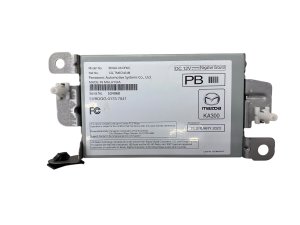
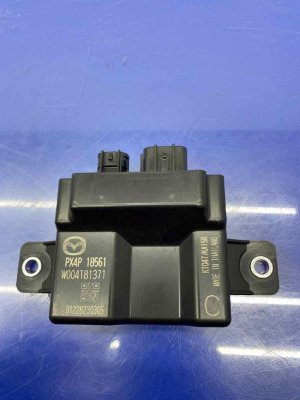
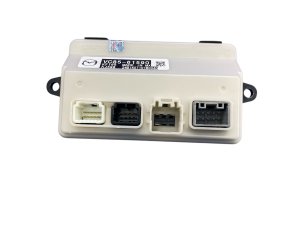
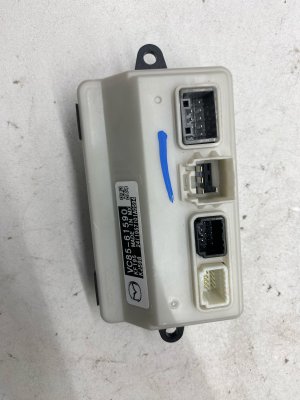
The most critical step is to match the part number. For this specific application, you need VC85-67-CM0 (or VC8567CMO). Equally important is the description: "without emergency call". This module is for CX-50 models that are not equipped with the "Private eCall" or SOS button feature, which connects you to an emergency response center. Check your vehicle's overhead console; if it does not have an SOS button, this part is likely the correct one for your vehicle. Ordering the wrong module will result in incompatibility.
2. Physical Inspection
When you receive the used module, inspect it carefully before installation:
- Connector Pins: Check the electrical connector pins. They should be straight, clean, and free of any corrosion or green residue.
- Casing Integrity: Look for any cracks, signs of being pried open, or heat damage on the plastic housing.
- Water Damage: Look for any water marks or mineral deposits. Spills on the center console can sometimes drip down onto modules located below. A module with any signs of water intrusion should be avoided.
3. Factor in Programming Costs
Remember that the price of the used part is not your final cost. You must factor in the cost of having a Mazda dealership program the module to your vehicle's VIN. Call your local dealer's service department beforehand to get a quote for this specific service.
Cost Comparison
The cost for a Telematics Interface Module can vary significantly between new and used options. Programming by the dealer is a required additional cost for any replacement.
| Part Type | Estimated Cost |
|---|---|
| New OEM (Dealer MSRP) | ~$405 |
| New OEM (Online) | $275 - $320 |
| Used OEM | $150 - $250 |
| New Aftermarket / Remanufactured | Not Available |
| Shop Labor (Installation & Programming) | $150 - $300 |
Frequently Asked Questions (FAQ)

Does a replacement telematics module need to be programmed?
Yes, absolutely. The Telematics Control Unit (TCU) is VIN-locked to the vehicle it came from. A new or used replacement must be coded to your vehicle's VIN using Mazda's proprietary diagnostic equipment. This service can only be performed by an authorized Mazda dealer.
Can I replace the telematics module myself?
While the physical replacement might be possible for an experienced DIY mechanic, it is not recommended. The module is often located behind the glove box or under the center console, which can be difficult to access. More importantly, the vehicle will not recognize the new module until it is programmed by a dealer, making a trip to the dealership unavoidable.
What causes the "Telematics Malfunction" warning?
The most common cause is a software glitch, which Mazda can fix by updating the module's firmware. Other causes include a dead internal backup battery (especially in cars that have been sitting for a long time), corrosion on the electrical connector from water intrusion, or complete hardware failure of the unit itself.
Can I disable the telematics module and stop it from collecting data?
Yes. While you cannot disable it through the vehicle's settings permanently, you can call Mazda's Customer Experience Center at 1-800-222-5500 and request to have your vehicle's TCU deactivated. This will turn off all connectivity from your vehicle and stop the collection of both Connected Services data and default vehicle data.
Technical Specifications
OEM Part Numbers: VC85-67-CM0 VC8567CMO
Also known as: Telematics Control Unit (TCU), Data Communication Module (DCM), Mobile Phone Control Module.
We Have This Part in Stock


The information in this article is provided for general reference and educational purposes only. Vehicle specifications, procedures, and part compatibility can vary by production date, trim level, and region. Always consult your vehicle's factory service manual and verify part numbers before purchasing or performing repairs. Safety-critical components such as airbags, seat belts, and braking systems should be installed by a qualified professional.
- Mazda CX-50:
- 🛍️ Shop This Part
- Symptoms of a Failing Telematics Module
- Known Issues, TSBs, and Recalls
- Software Glitch (TSB 09-001/23)
- 2025 Mazda CX-50 Recalls
- Buying a Used Telematics Interface Module
- 1. Verify the Part Number and Options
- 2. Physical Inspection
- 3. Factor in Programming Costs
- Cost Comparison
- Frequently Asked Questions (FAQ)
- 🎟️ Get 5% Off