

2017-2024 Mazda CX-5 Telematics Module: Solving 'Malfunction' Warnings and Battery Drain
This guide covers common failures of the Telematics Communication Unit (TCU), including Mazda Connected Services errors, parasitic battery drain, and critical programming information for replacement.
- A faulty Telematics Module often causes parasitic battery drain, leading to a dead battery.
- This module MUST be programmed by a Mazda dealer or a specialized shop after installation; it is not a plug-and-play part.
- Modules from early models (approx. 2017-2020) may be 3G-only and are now obsolete for connected services due to the 3G network shutdown.
- Many 'Telematics Malfunction' errors are caused by software glitches that can be fixed with a dealer-installed update, which should be attempted before replacing the hardware.
Symptoms of a Failing Telematics Module

A faulty Telematics Communication Unit (TCU) can cause a range of electronic issues, from minor annoyances to problems that can leave you with a dead battery. Because the TCU is integrated with the vehicle's communication network, its failure can sometimes trigger warnings in seemingly unrelated systems.
1. 'Telematics Malfunction' or 'In-Vehicle Network Malfunction' Message
The most direct symptom is a warning message appearing on the instrument cluster or center infotainment display. 🎬 Watch: What the Mazda telematics malfunction warning looks like This message indicates that the TCU has an internal fault or cannot communicate with other modules in the vehicle. Often, this is caused by a software glitch that can be resolved with a dealer-performed update. In some cases, the warning may appear intermittently and disappear on its own.
2. Mazda Connected Services and MyMazda App Inoperative
If the TCU fails, all functions related to the MyMazda app will stop working. You will be unable to remote start the engine, lock or unlock the doors, or check the vehicle's status from your smartphone. You may see a "Communication Error" message within the app itself. This can also be a symptom of the 3G cellular network shutdown on earlier models, which has rendered the original telematics hardware obsolete for connected services.
3. Parasitic Battery Drain
A very common and frustrating symptom is a dead battery after the vehicle has been parked, sometimes for as little as a day. A malfunctioning TCU can fail to enter its low-power "sleep mode" when the car is turned off, causing a continuous power draw that drains the battery overnight. This issue has been noted in several Mazda models and is sometimes addressed by a software update. If you experience a dead battery along with multiple, seemingly random warning lights (like for the parking brake or stability control) upon jump-starting, a faulty TCU is a likely suspect.
4. SOS Light Flashing or On / Emergency Call Malfunction
The TCU controls the vehicle's e911 or SOS feature, which automatically contacts emergency services after a crash. A fault in the module will disable this safety feature and typically illuminate a warning light for the SOS system on the overhead console or dashboard.
5. Associated Diagnostic Trouble Codes (DTCs)
A professional scan tool may reveal specific trouble codes stored in the vehicle's memory. A common code associated with an internal TCU failure is U3000:04. Other communication error codes, often starting with a "U," may also be present, such as U2142:00 (microphone communication error) or U2050:55 (remote control activation not implemented), which can be triggered during failed software updates or after replacement.
Known Issues, TSBs, and Recalls

While there have been no major safety recalls specifically for the TCU in the 2017-2024 CX-5, Mazda has issued several Technical Service Bulletins (TSBs) to address common problems.
The 3G Cellular Network Shutdown
Like many automakers, Mazda used 3G cellular modems in its earlier telematics units. As of 2022, major carriers in North America have shut down their 3G networks, making the connected services on these older vehicles permanently inoperable. Vehicles from approximately 2017-2020 may be affected. While the car will still run fine, features like remote start via the app and automatic 911 calling will not work. Upgrading to a later 4G-compatible module is the only way to restore these functions.
Software Glitches and Updates
Many of the common "Telematics Malfunction" warnings are due to software bugs, not hardware failure. Mazda has released multiple software updates for the TCU to improve stability and fix issues like communication errors and battery drain. If you experience these symptoms, the first step at a dealership will often be to attempt a software update before recommending a hardware replacement.
Replacement and Programming Requirements

Warning: A Telematics Interface Module replacement is not a simple plug-and-play repair. Programming by a Mazda dealer or a qualified independent shop with specialized equipment is mandatory.
The TCU is a security-related component that is linked to your vehicle's unique Vehicle Identification Number (VIN). When a new or used module is installed, it must be activated and programmed to the vehicle using the Mazda Diagnostic and Repair Software (MDARS). Failure to perform this activation will result in the connected services not functioning.
Furthermore, Mazda explicitly warns against swapping TCUs between vehicles. A module is VIN-locked upon activation, and installing a used, activated module from another car can disable connected services on both the donor and recipient vehicles. Therefore, a brand-new module or a properly reset used module is required.
- DIY Feasibility: While the physical replacement of the module (typically located under the center console) is possible for a skilled DIYer, the mandatory software programming makes it impractical without access to professional tools.
- Independent Shops: An independent repair shop can only perform the programming if they have a subscription to Mazda's software and a compatible J2534 pass-through device or the official Mazda VCM-II tool.
Buying a Used Telematics Interface Module
Purchasing a used TCU can be a cost-effective option, but it comes with significant risks due to the programming requirements. Here’s what you need to know to make an informed purchase.
1. Match the Part Number Exactly
The most critical step is to match the OEM part number on your original module. Mazda has released many revisions of this part, indicated by the final letter in the part number (e.g., KJK9-67-CM0A, KJK9-67-CM0B, etc.). While later versions often supersede earlier ones, compatibility is not guaranteed. The safest bet is to find a module with the identical part number as the one you are replacing.
2. Prioritize 4G LTE Modules
If you have an earlier CX-5 (approx. 2017-2020) and want to use Mazda Connected Services, you MUST ensure your replacement module is a 4G-capable unit. Modules from later model years (e.g., part numbers ending in D, E, F) are more likely to be 4G. Buying an older 3G module will not restore connected services.
3. Understand the VIN-Lock Risk
As mentioned, these modules are VIN-locked. Ask the seller if the module has been reset or if they can guarantee it is not locked to a previous vehicle. Buying from a reputable recycler who understands modern electronics is crucial. A module pulled from a wreck that is still VIN-locked may be unusable.
4. Physical Inspection
The TCU is located under the center console, an area prone to spills. When you receive the used part, inspect the housing and connectors for any signs of corrosion, water damage, or physical damage. A compromised connector can cause the same communication issues as a faulty module.
Cost Comparison
Prices can vary based on your location and the specific part number required. Labor costs for diagnosis and programming are a significant part of the total expense.
| Part Type | Estimated Cost |
|---|---|
| New OEM | $950 - $1,350 |
| Used OEM | $100 - $300 |
| Shop Labor (Installation & Programming) | $200 - $400 (Typically 1.5-2.5 hours) |
Frequently Asked Questions (FAQ)

Will my car start or drive if the telematics module is bad?
Yes. A faulty TCU should not prevent your car from starting or driving normally. However, important safety features like the automatic emergency call (SOS) system will be disabled.
Can I just unplug the telematics module to fix a battery drain?
You can, and this will stop the parasitic draw. However, unplugging the module will create a permanent break in the vehicle's communication network, which may cause other persistent warning lights or error messages to appear. It is a temporary fix at best.
Why did my Mazda Connected Services suddenly stop working in my 2019 CX-5?
This is almost certainly due to the nationwide shutdown of 3G cellular networks, which occurred in 2022. Your vehicle's original telematics module used a 3G modem that can no longer connect to a network. The only solution is to have a dealer upgrade the hardware to a newer 4G module.
The dealer says my TCU just needs a software update. Can I do this myself?
No. While some infotainment updates can be done via USB, TCU software updates require the dealer's proprietary MDARS diagnostic system. The procedure involves specific steps to prevent damage to the module and is not designed for DIY execution.
Helpful Videos

Technical Specifications
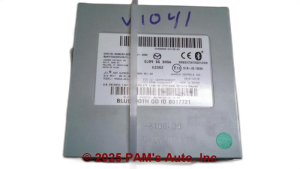
OEM Part Numbers: KJK9-67-CM0 KJK9-67-CM0A KJK9-67-CM0B KJK9-67-CM0C KJK9-67-CM0D KJK9-67-CM0E KJK9-67-CM0F
Also known as: Telematics Communication Unit (TCU), Data Communication Module. Location: Under the center console.
We Have This Part in Stock




The information in this article is provided for general reference and educational purposes only. Vehicle specifications, procedures, and part compatibility can vary by production date, trim level, and region. Always consult your vehicle's factory service manual and verify part numbers before purchasing or performing repairs. Safety-critical components such as airbags, seat belts, and braking systems should be installed by a qualified professional.
- Mazda CX-5:
- 🎬 Helpful Videos
- 🛍️ Shop This Part
- Symptoms of a Failing Telematics Module
- 1. 'Telematics Malfunction' or 'In-Vehicle Network Malfunction' Message
- 2. Mazda Connected Services and MyMazda App Inoperative
- 3. Parasitic Battery Drain
- 4. SOS Light Flashing or On / Emergency Call Malfunction
- 5. Associated Diagnostic Trouble Codes (DTCs)
- Known Issues, TSBs, and Recalls
- The 3G Cellular Network Shutdown
- Software Glitches and Updates
- Replacement and Programming Requirements
- Buying a Used Telematics Interface Module
- 1. Match the Part Number Exactly
- 2. Prioritize 4G LTE Modules
- 3. Understand the VIN-Lock Risk
- 4. Physical Inspection
- Cost Comparison
- Frequently Asked Questions (FAQ)
- 🎟️ Get 5% Off