

2018-2023 Wrangler & 2020 Gladiator Telematics Module: Fixing SOS & Uconnect Errors
This guide covers the common failures of the Telematics Interface Module, why it triggers SOS and service warnings, and the critical programming required after replacement.
- A failing Telematics Module causes "Uconnect box error" messages and red SOS lights on the overhead console.
- Crucially, after replacement with a new or used part, a "Proxi Alignment" procedure is mandatory for the module to function. A flashing odometer indicates this step was skipped.
- The module's location depends on your radio: it's a separate box under the driver's dash on 7-inch Uconnect systems, but integrated into the head unit on premium 8.4-inch systems.
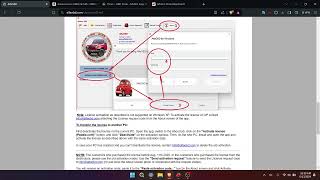
- Advanced DIYers can perform the Proxi Alignment using tools like AlfaOBD, but it requires a Security Gateway (SGW) bypass module.
Symptoms of a Failing Telematics Module

A failing Telematics Interface Module in a 2018-2023 Jeep Wrangler or 2020 Jeep Gladiator typically makes itself known through very specific and persistent warning messages on the dashboard and radio screen. Since this module is tied to safety systems, the vehicle will clearly alert you to a problem.
- "Uconnect box error, see dealer" Message: This is one of the most common messages to appear on the infotainment screen at startup.
- "Connected services requires service" Message: Another frequent pop-up on the Uconnect display.
- Red Lights on Overhead Console: The lights on the SOS and ASSIST buttons near the rearview mirror will illuminate and stay solid red. Normally, these lights are off or briefly green.
- Spontaneous SOS Calls: In some cases of hardware failure, the system may erroneously trigger an emergency call, sometimes every time a door is opened.
- Non-Functional Remote Features: The Jeep mobile app will fail to communicate with the vehicle, making remote start, lock, and unlock commands inoperative.
- Flashing Odometer: While not a direct symptom of the telematics module itself, a flashing odometer after a module has been replaced is a classic sign that the mandatory Proxi Alignment procedure was not performed.
Associated OBD-II Codes
While many symptoms appear on the screen without a check engine light, a professional scan tool can pull specific Body (B) and Network (U) codes related to this module. The most common are:
- B1E21-96: Backup Battery Component Internal Failure. This code specifically points to the failure of the small, internal lithium-ion battery inside the telematics module.
- U0142: Lost Communication with Body Control Module "B". This is a general network code indicating the module is not communicating correctly with the rest of the vehicle's systems.
Known Issues, TSBs, and Recalls
While there are no direct recalls for widespread failure of the Telematics Interface Module itself on these specific models, its function is tied to other service campaigns.
- Software Update TSBs: Jeep has issued several Technical Service Bulletins (TSBs) that involve reprogramming the Telematics Box Module (TBM) with updated software. These updates can resolve issues like unresponsive remote commands from the mobile app or incorrect service messages.
- Recall 25V710 (2023-2025 Wrangler 4xe): A recall was issued for some plug-in hybrid models where a Firmware-Over-The-Air (FOTA) update caused a communication breakdown between the Telematics Box Module (TBM) and the Hybrid Control Processor (HCP). This could lead to the HCP resetting while driving, causing a loss of motive power. This highlights the module's deep integration into critical vehicle functions, though the fault was in the software, not the module hardware itself.
Replacement and Programming Requirements

Replacing the Telematics Interface Module is not a simple plug-and-play repair. It requires a specific programming step to make the new module work with your vehicle.
Step 1: Locating the Module
The physical location of the module depends on the vehicle's original radio option. This is the most important factor in determining the difficulty of the repair.
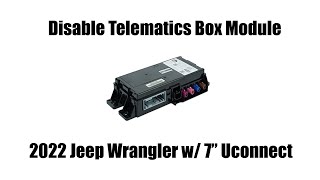
- For vehicles with the standard 7-inch Uconnect system: The Telematics Interface Module is typically a separate, standalone black box. It is located under the driver's side dashboard, mounted to a bracket near the steering column and above the OBD-II port. Access involves removing the lower dash panel, which is held in by clips.
- For vehicles with the premium 8.4-inch Uconnect system: The telematics functions are often integrated directly into the main radio head unit. In this case, there is no separate module to replace. If the telematics portion fails, the entire head unit may need to be repaired or replaced, which is a much more involved and expensive job requiring removal of the center dash stack.
Pro Tip: Before buying a replacement module, confirm your vehicle's configuration. If you have the 8.4-inch screen, your problem is likely with the head unit itself, not a separate telematics box.
Step 2: Proxi Alignment (Mandatory Programming)
After a new or used Telematics Interface Module is installed, it must be introduced to the vehicle's network using a procedure called a Proxi Alignment (also spelled Proxy Configuration).
The Proxi Alignment synchronizes the new module with the Body Control Module (BCM), which acts as the master list of all installed components on the vehicle. If this step is skipped, the vehicle will not recognize the new module, resulting in a flashing odometer and the module not functioning.
How to Perform a Proxi Alignment:
- Dealer Tool: A Jeep dealership can perform the Proxi Alignment using their proprietary wiTECH diagnostic software. This is the most straightforward option but will involve a labor charge.
- DIY Tools (Advanced): Tech-savvy owners and independent shops can perform the procedure using third-party software like AlfaOBD or JScan. This requires three components: a compatible OBD2 interface (like the OBDLink MX+), a Security Gateway (SGW) Bypass Module (required for all 2018+ models), and the software itself running on a laptop or Android device. The SGW bypass temporarily disconnects the factory security module to allow the diagnostic software to make configuration changes.
Warning: A replacement module, new or used, will not work until a Proxi Alignment is successfully completed. There is no way to bypass this requirement.
Buying a Used Telematics Interface Module
Given the high cost of new electronics, a used OEM module is a cost-effective and reliable option. Unlike many mechanical parts, there are no wear items to worry about, but there are critical details to verify.
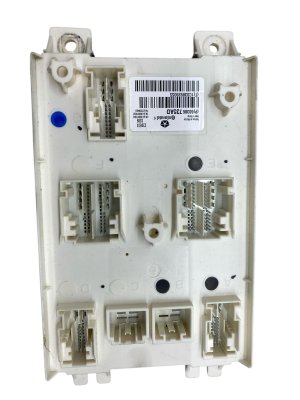
- Verify the Part Number: Match the part number from your original module exactly. While some part numbers supersede others, matching is the safest way to ensure compatibility. The initial data for this guide lists several valid OEM part numbers: 68379839AA, 68379839AB, 68436273AJ, and 68646092AA. Note that 68436273AJ is superseded by 68646092AA.
- Physical Inspection: When inspecting a used module, check for any signs of water intrusion, corrosion on the pins, or physical damage to the case or connectors. Any of these are red flags.
- Source Vehicle Information: If possible, get the VIN of the vehicle the part came from. This can sometimes help in verifying compatibility, though the part number is the most important factor.
- Why Used OEM is a Good Choice: There are no reputable aftermarket versions of this module. A used OEM part was designed and built by Mopar for your Jeep. It will have the correct hardware and firmware base to integrate properly after a Proxi Alignment. Cheap knock-offs do not exist for this type of complex communication module.
Cost of Replacement
The cost to fix a telematics issue can vary significantly based on the root cause and the parts required.
| Part or Service | Estimated Cost |
|---|---|
| New OEM Module | $160 - $250 |
| Used OEM Module | $75 - $150 |
| New Aftermarket Module | Not Available |
| Shop Labor (Module Replacement) | $100 - $200 |
| Shop Labor (Proxi Alignment) | $75 - $150 |
Note: Labor costs are estimates and will vary by location and shop. If your module is integrated into the 8.4-inch radio, replacement costs will be significantly higher.
Frequently Asked Questions (FAQ)

Do I have to take my Jeep to the dealer for programming?
Not necessarily. While a dealer can perform the required Proxi Alignment with their wiTECH tool, an independent shop with advanced diagnostic tools (like a high-end Snap-on scanner) or a DIYer with AlfaOBD software and an SGW bypass module can also complete the programming.
Will a used telematics module work?
Yes, a used OEM module with the correct part number will work perfectly, but only after it has been properly programmed to your vehicle using the Proxi Alignment procedure. The module is not permanently locked to the original vehicle's VIN.
Can I just unplug the module to stop the error messages?
You can unplug the module, which will stop its functions and may stop the error messages, but it will also disable all connected services, including the critical SOS emergency call feature. This may also set communication fault codes in other modules that expect to see the telematics module on the network.
Is the telematics module related to the anti-theft system?
The telematics module provides vehicle location services which can be used for stolen vehicle tracking, but it is not the primary immobilizer or anti-theft module. Replacing it does not require programming keys, but it does require the Proxi Alignment to communicate with the rest of the vehicle's systems.
Helpful Videos


Technical Specifications
OEM Part Numbers: 68379839AA 68379839AB 68436273AJ 68646092AA
Contains a cellular modem, GPS receiver, and an internal backup battery. Connects to the vehicle's CAN bus network.
We Have This Part in Stock



The information in this article is provided for general reference and educational purposes only. Vehicle specifications, procedures, and part compatibility can vary by production date, trim level, and region. Always consult your vehicle's factory service manual and verify part numbers before purchasing or performing repairs. Safety-critical components such as airbags, seat belts, and braking systems should be installed by a qualified professional.
- Jeep Wrangler:
- Jeep Gladiator:
- 🎬 Helpful Videos
- 🛍️ Shop This Part
- Symptoms of a Failing Telematics Module
- Associated OBD-II Codes
- Known Issues, TSBs, and Recalls
- Replacement and Programming Requirements
- Step 1: Locating the Module
- Step 2: Proxi Alignment (Mandatory Programming)
- Buying a Used Telematics Interface Module
- Cost of Replacement
- Frequently Asked Questions (FAQ)
- 🎟️ Get 5% Off