

2017-2021 Grand Cherokee, Pacifica & Gladiator Telematics Module: Uconnect Service, Programming & 3G Sunset Issues
This guide covers the common failures, programming requirements, and critical compatibility warnings for the Telematics Interface Module in these Chrysler and Jeep vehicles.
- This module is NOT plug-and-play and requires professional programming by a dealer or qualified shop to function.
- For 2017-2018 models, connected services are permanently disabled due to the 3G network sunset; replacing the module will not restore them.
- Compatibility is critical; this part only fits vehicles with Option Code RF3. Always verify your vehicle's build sheet.
- Symptoms are limited to connected services (SOS, remote app, GPS); failure does not affect the vehicle's ability to drive safely.
What the Telematics Interface Module Does

The Telematics Interface Module is the electronic brain that powers your vehicle's connected features. It acts like a built-in cell phone for your car, enabling communication for safety, security, and convenience services. This includes the overhead SOS and Assist buttons, which can automatically contact emergency services after a crash by sending your GPS location. It also enables remote features through the Uconnect app, such as starting your engine, locking or unlocking the doors, and finding your vehicle in a parking lot. For vehicles equipped with it, this module also provides the data connection for the in-car Wi-Fi hotspot. Essentially, if a feature relies on communicating with the outside world over a cellular network, it runs through this module.
Symptoms of a Failing Telematics Module

When the telematics module begins to fail, you will primarily notice a loss of connected services. The vehicle itself will usually remain safe to drive, but communication-based features will become inoperable.
- "Uconnect Box Requires Service" Message: A common symptom is a persistent message on the infotainment screen telling you to visit a dealer.
- SOS/Assist Button Malfunction: The lights on the overhead SOS or Assist buttons may stay lit constantly or not light up at all, and the buttons will not function if pressed.
- Mobile App Failure: Remote features like remote start, lock/unlock, and vehicle location will stop working through the phone app.
- GPS and Navigation Issues: The vehicle's GPS may become inaccurate, showing your location as being far from where you actually are, or you may get a "GPS Signal Lost" message.
- Wi-Fi Hotspot Inoperative: The in-car Wi-Fi hotspot will fail to establish a connection.
Associated OBD-II and Diagnostic Trouble Codes (DTCs)
A failing telematics module often stores specific communication or body codes. While a standard OBD-II scanner might not read them, a more advanced tool may find codes such as:
- U0198: Lost Communication With Telematics Control Module.
- B1570-93: Telematics Box Module Backup Battery - No Operation.
- B1498-13 & B1498-19: Emergency Call Button Circuit Open or Overcurrent.
Sometimes, the issue isn't the module itself but a related component like the shark fin antenna on the roof, which can allow water to leak in and corrode the wiring.
Known Issues, Recalls, and Technical Service Bulletins (TSBs)

The 3G Cellular Network Sunset (2017-2018 Models)
Warning: For the 2017 Jeep Grand Cherokee and 2017-2018 Chrysler Pacifica, the most significant issue is the nationwide shutdown of 3G cellular networks, which was completed in 2022. These vehicles were equipped with 3G telematics modules. As a result, all connected services (SOS, remote app features, etc.) have been permanently disabled. Replacing the module with another 3G unit will not restore functionality. Stellantis offered an aftermarket OBD-II dongle solution for some vehicles to restore some features, but the original integrated system no longer works. The 2021 Jeep Gladiator is equipped with a 4G/LTE module and is not affected by the 3G shutdown.
Recalls and TSBs
- 2017 Jeep Grand Cherokee: There are no specific recalls for the telematics module itself. However, a broad recall (NHTSA 18V-332) was issued for a cruise control software issue that required a dealer to re-flash the Powertrain Control Module.
- 2017-2018 Chrysler Pacifica: These models were also included in the cruise control software recall (NHTSA 18V-332). Hybrid models had a separate recall (NHTSA 18V-634 / FCA U94) for a powertrain control module software update to prevent engine restart issues. Several TSBs exist for software updates to the radio and other modules to fix various glitches, some of which can mimic telematics issues.
- 2021 Jeep Gladiator: TSB 08-053-21 involves a software update for the Telematics Box Module to correct an issue where CarPlay audio would not mute during an emergency call.
The Most Important Step: Programming and Activation

Warning: A replacement Telematics Interface Module, whether new or used, is not a plug-and-play part. It must be programmed by a dealership or a qualified independent shop with manufacturer-level tools. The module needs to be configured to your vehicle's specific VIN and option codes. After installation, a procedure called a "proxy alignment" is required to sync the new module with all other computers on the vehicle's network. Failure to program the module will result in it not functioning and may cause other communication errors in the vehicle.
The programming process also involves downloading a security certificate to the module to allow it to connect to the Uconnect network for the first time. This often requires the vehicle to be in an area with good cellular reception. While some advanced independent shops can perform the necessary programming, many owners will find a dealership visit is required to ensure full functionality. Always confirm with your chosen repair shop that they have the capability to program a replacement telematics module for your specific vehicle before purchasing the part.
Buying a Used Telematics Interface Module: What to Know
Purchasing a used OEM telematics module can be a cost-effective solution, especially for a 2021 Jeep Gladiator where the part is still functional. For 2017-2018 models affected by the 3G sunset, replacing the module is generally not recommended unless you are simply trying to clear a related fault code.
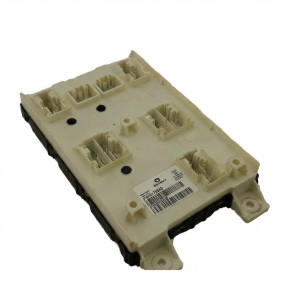
- Verify Part Numbers: Ensure the part number on the used module (e.g., 68235892AA) matches your original part. While interchangeable numbers may exist, an exact match is the safest bet.
- Check Option Codes: This module is only compatible with vehicles that have Option Code RF3. You can find your vehicle's build sheet and option codes on Mopar's owner website by entering your VIN.
- Factor in Programming Costs: Remember that the price of the used part is not the final cost. You must budget for professional programming, which can cost between $100 and $250.
- Physical Inspection: When you receive the used module, inspect it for any signs of damage, particularly to the plastic casing and the connector pins. Ensure the pins are straight and free of corrosion.
- Why Used OEM is a Good Choice: For complex electronics like this, a used OEM module is often superior to non-existent or unreliable aftermarket alternatives. It was designed to communicate perfectly with your vehicle's systems, and as long as it is programmed correctly, it should function like new.
Replacement Cost Comparison
Prices can vary based on your location and the supplier. The costs below are estimates to help you understand the value of a used OEM part.
| Part Source | Estimated Cost |
|---|---|
| New OEM | $250 - $400 |
| New Aftermarket | Not Generally Available |
| Used OEM | $50 - $150 |
| Shop Labor & Programming | $150 - $300 |
Frequently Asked Questions (FAQ)
Can I replace the telematics module myself?
Physically replacing the module is feasible for a DIYer with moderate experience, as it is often located behind the glove box or radio. However, the vehicle will not recognize the new module until it is professionally programmed with dealer-level software. You cannot complete this repair without this final, critical step.
Why did my Uconnect remote start app stop working on my 2017 Pacifica?
This is almost certainly due to the 3G cellular network shutdown in 2022. The telematics module in your vehicle uses a 3G modem, which can no longer connect to the network to receive commands from the app. Replacing the module will not fix this issue.
Will a new telematics module fix my slow or freezing Uconnect screen?
No, probably not. A slow, freezing, or rebooting infotainment screen is typically a failure of the radio head unit itself, not the telematics module. The telematics module only handles external communications.
What is Option Code RF3?
RF3 is a sales code used by Chrysler/Jeep to designate a specific package of Uconnect features, likely related to the 8.4-inch touchscreen with connected services. This part is only designed to work in vehicles originally built with that option. You can verify your vehicle's sales codes by looking up your VIN on the Mopar owner's portal or requesting a build sheet from a dealer.
Technical Specifications
OEM Part Numbers: 68235892 68235892AA
Requires Option Code RF3. Connects to vehicle CAN bus network. Contains integrated cellular (3G or 4G/LTE depending on year) and GPS receivers.
We Have This Part in Stock




The information in this article is provided for general reference and educational purposes only. Vehicle specifications, procedures, and part compatibility can vary by production date, trim level, and region. Always consult your vehicle's factory service manual and verify part numbers before purchasing or performing repairs. Safety-critical components such as airbags, seat belts, and braking systems should be installed by a qualified professional.
- Jeep Grand Cherokee:
- Chrysler Pacifica:
- Jeep Gladiator:
- 🛍️ Shop This Part
- What the Telematics Interface Module Does
- Symptoms of a Failing Telematics Module
- Associated OBD-II and Diagnostic Trouble Codes (DTCs)
- Known Issues, Recalls, and Technical Service Bulletins (TSBs)
- The 3G Cellular Network Sunset (2017-2018 Models)
- Recalls and TSBs
- The Most Important Step: Programming and Activation
- Buying a Used Telematics Interface Module: What to Know
- Replacement Cost Comparison
- Frequently Asked Questions (FAQ)
- 🎟️ Get 5% Off