

2019-2022 Pilot & Passport Telematics Module Failure: Fixing HondaLink and SOS System Problems
Diagnose and replace the faulty telematics unit in your 2019-2022 Honda Pilot or Passport and understand the critical programming steps required for it to work.
- A replacement Telematics Module (new or used) MUST be programmed to the vehicle by a dealer or a shop with Honda's i-HDS software.
- Symptoms include failed HondaLink remote commands, SOS system errors, and incorrect GPS location.
- Before replacing the module, have a dealer check for software updates (TSB #ABOM01142022) which might fix the issue for free.
- The latest part number is 39870-TG7-A13, which replaces older versions 39870-TG7-A11 and 39870-TG7-A12.
Symptoms of a Failing Telematics Module

A problem with the telematics module can cause a range of frustrating issues, primarily related to the vehicle's connected services. Here are the most common signs of failure:
- HondaLink App Not Working: Remote commands sent from your smartphone app, such as remote start, lock, or unlock, will fail to work. The app may show that it cannot communicate with the vehicle.
- "Telematics System Problem" Message: A warning message may appear on the multi-information display in the instrument cluster.
- SOS/Emergency System Malfunction: The overhead console button for emergency assistance may have a red indicator light, or it may not respond when pressed.
- GPS and Navigation Errors: The vehicle's navigation system may show an incorrect location or fail to get a GPS signal, as the telematics unit often contains the GPS receiver.
- Audio System Problems: While often caused by a related network issue (see TSBs below), problems like popping/crackling speakers or a "Network Loss" message can sometimes be linked to telematics system faults.
- Diagnostic Trouble Codes (DTCs): A professional scan tool may find communication fault codes stored in the vehicle's memory. A common code is U1A34, indicating a communication fault with the telematics control unit.
Known Issues, Recalls, and Service Bulletins

For the 2019-2022 Honda Pilot and Passport, several factory communications address issues with the telematics and related systems. It's important to know whether your vehicle's issue is a simple software fix or a hardware failure.
Product Improvement Campaign: TCU Software Update
Honda issued a product improvement campaign (NHTSA ID: #10206649, TSB #ABOM01142022) for certain 2019-2022 Pilot and 2019-2021 Passport models to update the telematics control unit (TCU) software. Some vehicles also had incorrectly programmed TCUs from the factory, which could cause remote commands to fail (TSB #A19-017). Before replacing the module, a dealer should check if this software update is needed, as it may resolve your issues free of charge.
Related Issue: MOST Bus Network Failure (TSB 20-058 / 21-012)
Many owners experience popping or crackling speakers, no sound at all, or a "Network Loss" message. This is often caused by a loose connection in the MOST bus network, which connects the audio and information components. Honda released Technical Service Bulletin 20-058 (later superseded by 21-012) to address this by installing improved connectors and cables. Honda also issued a recall for this issue. While not a direct failure of the telematics module, the symptoms can seem related, so it's a critical diagnostic step to rule this out.
Related Recall: Instrument Panel Software
A recall was issued for 2019-2021 Pilot and 2019-2020 Passport vehicles for a software flaw in the main instrument panel. This could cause the display to not function, increasing the risk of a crash. Dealers will reprogram the instrument panel control module software for free. This is separate from the telematics module but is another important software-related fix for these vehicles.
Important: A replacement Telematics Interface Module, whether new or used, will require programming by a Honda dealer or a properly equipped independent shop to function correctly with your vehicle.
Buying a Used Telematics Module: Programming is Required

Given the high cost of a new OEM telematics module, a used unit from a reputable recycler is an excellent value. However, you cannot simply swap the part and expect it to work. This is the single most important thing to understand before you buy.
- Programming is Mandatory: The replacement module must be programmed to your vehicle's specific VIN and configuration. While some new Honda modules are pre-programmed, a used one is not. This process requires Honda's diagnostic software (i-HDS) and a J2534 pass-thru device. This is not a DIY job without access to this professional equipment and software subscription.
- Part Number Compatibility: The latest part number for this module is 39870-TG7-A13. This part supersedes, or replaces, the older versions 39870-TG7-A11 and 39870-TG7-A12. Any of these three part numbers will physically fit, but it is always best to use the newest version (A13) if possible.
- Physical Inspection: When buying a used module, inspect it for any signs of water damage, corrosion on the pins, or cracks in the plastic housing. These are red flags that indicate the part may be faulty.
- Factor in Labor Costs: Remember to include the cost of diagnosis and programming from a qualified shop when comparing the price of a used part to a new one. Even with this added cost, a used OEM module is typically a significant saving.
Replacement Cost Comparison
The cost to replace the telematics module can vary widely based on the price of the part and local labor rates. Programming is a required additional cost.
| Item | Estimated Cost |
|---|---|
| New OEM Module (Part Only) | $450 - $560 |
| Used OEM Module (Part Only) | $150 - $250 |
| Shop Labor (Installation & Programming) | $250 - $500 |
| Total Estimated Cost (Used) | $400 - $750 |
| Total Estimated Cost (New) | $700 - $1,060 |
Replacement Overview

The Telematics Interface Module is typically located behind the dashboard, often accessible after removing the glove box. The replacement process generally involves:
- Disconnecting the vehicle's 12-volt battery.
- Removing trim panels and the glove box assembly to gain access.
- Unplugging the electrical connectors from the old module.
- Unbolting the module from its mounting bracket.
- Installing the new module and reconnecting everything in reverse order.
- Connecting a battery charger/maintainer to ensure stable voltage during programming.
- Using the Honda i-HDS software to program the new module to the vehicle.
Due to the required programming, this repair is best left to a professional technician or an advanced DIYer with the correct software and tools.
Frequently Asked Questions
Does a used telematics module need to be programmed?
Yes, absolutely. A replacement telematics module, whether new or used, must be programmed to your vehicle's VIN and configuration using Honda's diagnostic software. It is not a plug-and-play part.
Why did my HondaLink app suddenly stop working?
This can be caused by several things: a failed telematics module, a TCU software issue that needs an update, a problem with the cellular network, or an expired subscription. A dealer should first check for any applicable software updates or TSBs before recommending module replacement.
Can I just unplug the telematics module if I don't use the features?
It is not recommended. The telematics module is part of the vehicle's CAN bus communication network. Unplugging it can cause communication errors with other modules, unpredictable issues, and persistent dashboard warning lights.
What is the difference between part numbers 39870-TG7-A11, A12, and A13?
These are different versions of the same part. The number 39870-TG7-A13 is the newest, and it supersedes the A11 and A12 versions. This means it is the current replacement part offered by Honda. While all should be compatible, it's best practice to use the latest available version.
Technical Specifications
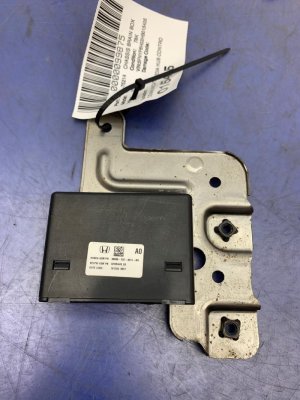
OEM Part Numbers: 39870-TG7-A13 39870-TG7-A12 39870-TG7-A11 39870TG7A13 39870TG7A12 39870TG7A11
Also known as Telematics Control Unit (TCU) or Mobile Phone Control Module. Operates on the vehicle's B-CAN and MOST communication networks.
We Have This Part in Stock



The information in this article is provided for general reference and educational purposes only. Vehicle specifications, procedures, and part compatibility can vary by production date, trim level, and region. Always consult your vehicle's factory service manual and verify part numbers before purchasing or performing repairs. Safety-critical components such as airbags, seat belts, and braking systems should be installed by a qualified professional.
- Honda Pilot:
- Honda Passport:
- 🛍️ Shop This Part
- Symptoms of a Failing Telematics Module
- Known Issues, Recalls, and Service Bulletins
- Product Improvement Campaign: TCU Software Update
- Related Issue: MOST Bus Network Failure (TSB 20-058 / 21-012)
- Related Recall: Instrument Panel Software
- Buying a Used Telematics Module: Programming is Required
- Replacement Cost Comparison
- Replacement Overview
- Frequently Asked Questions
- 🎟️ Get 5% Off