

2018 Honda Odyssey Telematics Module: Solving Connectivity and HondaLink Issues
This guide covers common failures, replacement programming needs, and costs for the telematics control unit in the 2018 Honda Odyssey.
- A replacement telematics module, new or used, MUST be programmed by a dealer or a properly equipped independent shop.
- Always match the OEM part number exactly. 39870-THR-A11 and 39870-THR-A13 are common for this model.
- Before replacing the module, ensure the MOST bus recall (for the communication cable) and all other software updates have been completed.
- A faulty telematics module is a known cause of parasitic battery drain on modern vehicles.
Symptoms of a Failing Telematics Module

When the telematics module in a 2018 Honda Odyssey begins to fail, you'll notice issues with connected services. Because the module is tied into the vehicle's communication network (the B-CAN bus), its failure can sometimes cause seemingly unrelated electrical problems.
- HondaLink System Inoperative: Features like remote start, remote door lock/unlock, and vehicle status checks through the smartphone app will stop working.
- "Telematics Malfunction" Message: A warning may appear on the instrument cluster or infotainment screen.
- SOS Light On: The red indicator light for the emergency assistance service may stay illuminated.
- GPS and Navigation Errors: The vehicle's navigation system may show an incorrect location or fail to acquire a GPS signal.
- No Connection to OnStar/Emergency Services: Pressing the OnStar or SOS button may result in no connection or continuous ringing.
- Audio System Glitches: Intermittent popping or static sounds from the speakers, even when the radio is off, have been reported by some owners. This can be related to issues on the MOST (Media Oriented Systems Transport) network, which the telematics module communicates on.
- Potential Battery Drain: A faulty module can fail to shut down properly, creating a parasitic draw that can drain the 12-volt battery when the vehicle is parked.
Known Issues, Recalls, and Technical Service Bulletins (TSBs)

While there are no direct recalls for the telematics module itself on the 2018 Odyssey, several related software updates and recalls are important to be aware of.
🎬 Watch: Common issues on the 2018-2023 Honda OdysseyRecall: Media Oriented System Transport (MOST) Communication Failure
In June 2023, Honda issued a recall for over a million vehicles, including the 2018-2023 Odyssey, for a faulty MOST communication coaxial cable. An improper connection between the audio display unit and the cable could cause intermittent or total loss of communication. This would lead to the rearview camera not displaying, which was the primary safety risk cited. However, this communication loss can also affect other systems on the network, potentially causing symptoms similar to a failing telematics module. The fix involves installing an improved cable harness.
Software Glitches and Updates
The 2018 Odyssey has been subject to several software-related recalls and updates for various control modules. For example, recall T89 addressed incorrect instrument panel software that could prevent critical information from displaying. While not directly for the TCU, it highlights the importance of ensuring all vehicle software is up-to-date, as module interactions are complex. Honda provides software updates via its i-HDS diagnostic system, and a dealer or qualified shop can check if any updates are needed for the TCU.
Important: Before replacing the telematics module, ensure all related recalls and software updates have been performed. A simple software update might resolve communication issues that mimic a hardware failure.
Buying a Used Telematics Interface Module

A used OEM telematics module can be a cost-effective alternative to a new part, but there are critical factors to consider to ensure a successful repair.
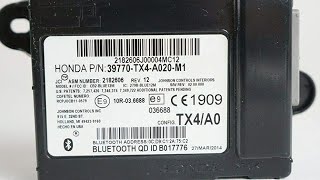
- Match Part Numbers Exactly: The most important step is to match the OEM part number from your original module. For the 2018 Odyssey, common part numbers include 39870-THR-A11 and 39870-THR-A13. Part number 39870-THR-A13 is listed as a replacement for 39870-THR-A11. Always verify with the seller by providing your vehicle's VIN.
- Programming is Required: A replacement telematics module, whether new or used, must be programmed and initialized to your specific vehicle. A Honda dealer or an independent shop with access to Honda's TechLine Connect (TLC) and a J2534 pass-thru device can perform this service. Many sellers of used modules explicitly state that dealers will not program used parts, so it is crucial to find an independent specialist who is willing to do so.
- Physical Inspection: When you receive the used module, inspect it for any signs of physical damage, especially water intrusion. On some vehicles, TCUs are vulnerable to leaks from roof-mounted antennas or seals, which can cause corrosion and failure. Check the connectors for any bent or corroded pins.
- Source from a Reputable Supplier: Purchase from a recycled parts seller that offers a warranty and has good reviews. This provides some protection if the part is dead on arrival.
Pro Tip: Before purchasing a used module, call local independent auto repair shops that specialize in Honda vehicles. Ask them if they have the capability (i-HDS software, J2534 device) and willingness to program a customer-supplied used telematics module. Securing a technician first can save you from buying a part you can't get installed.
Cost Comparison
Prices can vary based on location and supplier, but here is a general cost breakdown for replacing the 2018 Odyssey telematics module:
| Part/Service | Estimated Cost |
|---|---|
| New OEM Module | $600 - $870 |
| Used OEM Module | $75 - $150 |
| Shop Labor (Replacement & Programming) | $200 - $400 |
Frequently Asked Questions (FAQ)
Does a replacement telematics module need to be programmed?
Yes, absolutely. A replacement Telematics Control Unit (TCU) must be initialized and programmed to the vehicle using Honda's diagnostic software (i-HDS or TechLine Connect). This process links the module to your vehicle's VIN and enables its communication with other systems. Failure to program the module will result in it not functioning correctly.
Can an independent mechanic program a Honda telematics module?
Yes, an independent shop can program the module, provided they have the right tools. This includes a subscription to Honda's service information, a J2534 pass-thru device, and the appropriate software like i-HDS. However, some shops may be unwilling to work with used or customer-supplied parts, so it's essential to confirm with them beforehand.
Where is the telematics module located on a 2018 Honda Odyssey?
The telematics module is typically located behind the main infotainment display and radio unit in the center of the dashboard. Accessing it requires removing several dash trim pieces, the upper display, and the main radio/HVAC control head unit.
🎬 See how to access and remove the moduleCan a bad telematics module cause a dead battery?
Yes. A common failure mode for electronic modules is an internal fault that prevents them from entering a low-power 'sleep' mode when the car is off. This can create a parasitic drain on the 12-volt battery, causing it to go dead overnight or after a few days of not being driven. If you are experiencing a dead battery and telematics system issues, the module is a likely suspect.
Helpful Videos

Technical Specifications
OEM Part Numbers: 39870-THR-A11 39870-THR-A13 39870THRA110M1
Fits 2018 Honda Odyssey models, typically Touring and Elite trims with the 8-inch display audio system.
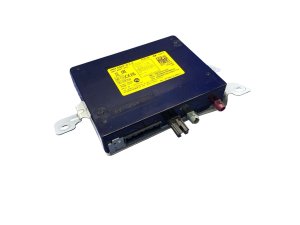
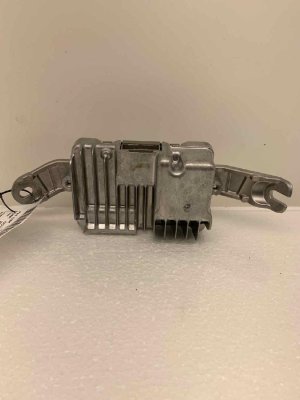
We Have This Part in Stock




The information in this article is provided for general reference and educational purposes only. Vehicle specifications, procedures, and part compatibility can vary by production date, trim level, and region. Always consult your vehicle's factory service manual and verify part numbers before purchasing or performing repairs. Safety-critical components such as airbags, seat belts, and braking systems should be installed by a qualified professional.
- Honda Odyssey:
- 🎬 Helpful Videos
- 🛍️ Shop This Part
- Symptoms of a Failing Telematics Module
- Known Issues, Recalls, and Technical Service Bulletins (TSBs)
- Recall: Media Oriented System Transport (MOST) Communication Failure
- Software Glitches and Updates
- Buying a Used Telematics Interface Module
- Cost Comparison
- Frequently Asked Questions (FAQ)
- 🎟️ Get 5% Off