

Audi SOS Malfunction: Your Guide to the J949 Telematics Module (2018-2025 A4, Q5, A6, Q7 & More)
Diagnosing the common 'Emergency call function fault' warning and understanding the critical programming requirements for replacement on modern Audi vehicles.
- The most common failure symptom is the 'SOS Malfunction' warning on the dash, caused by a software glitch, antenna issue, or internal battery failure.
- This module is protected by Audi's 'Component Protection' (CP) anti-theft system. A replacement module (new or used) MUST be programmed by a dealer or a specialist with online access to Audi's servers.
- A simple DIY swap is not possible. The module will not work until the Component Protection is removed.
- Before buying a used module, verify the part number on your original unit matches exactly to ensure compatibility.
Symptoms of a Failing Telematics Module

Failure of the J949 Telematics Module typically presents with very clear and specific warnings on the instrument cluster or MMI screen. Unlike some electronic issues, the symptoms are rarely subtle.
- "SOS Malfunction" or "Emergency call function fault" Warning: This is the most common symptom. A message will appear on the dashboard, often accompanied by a loud, persistent beep, indicating the emergency call system is not operational.
- Red SOS Light: The small indicator light next to the SOS button in the overhead console may illuminate solid red or not at all, instead of the normal green.
- Loss of Audi Connect Services: You may find that navigation loses real-time traffic data, the car's Wi-Fi hotspot stops working, and other online features become unavailable.
- MyAudi App Fails to Connect: You will be unable to communicate with your vehicle remotely using the smartphone app. Functions like checking vehicle status or sending navigation destinations to the car will fail.
- Bluetooth Malfunctions: In some cases, users report that Bluetooth connectivity for phone calls and audio streaming also stops working when the telematics module fails.
Common Diagnostic Trouble Codes (DTCs)
A professional scan tool will likely find one or more of the following codes stored in the vehicle's memory:
- U142100: Control module for emergency call module and communication unit no communication. This code means the module has become completely unresponsive.
- U153E00: SOS Emergency call function deactivated. This code points to a specific fault within the eCall system.
- B105413: GPS antenna - open circuit. This suggests a fault with the antenna or its wiring, which connects to the telematics module.
Known Issues, TSBs, and Recalls

Several Technical Service Bulletins (TSBs) have been issued by Audi to address common failures with this module. There are no widespread recalls as of late 2024, but these TSBs cover the most frequent problems.
TSB 2056076: Module Unresponsive / No Communication
This is the most prevalent issue. A software bug can cause the telematics module (J949) to freeze and become completely unresponsive, often after a cold start. This triggers the U142100 'no communication' fault code. The official Audi procedure to resolve this involves a 'power reset'.
The service procedure requires a technician to physically access the module, disconnect its internal backup battery, and also pull the main fuse for the module for approximately 20 minutes. This forces a hard reboot of the unit. In many cases, this restores functionality. If the issue persists after the reset, Audi advises replacing the module.
🎬 Watch: 3 cheap fixes for Audi B9 SOS system faultsTSB for Antenna Faults
Another known issue involves the antenna system connected to the module. A technical service bulletin describes how water ingress into the roof-mounted 'shark fin' antenna can cause the antenna cable to fail, leading to an 'open circuit' or 'short to ground' fault. This will trigger the SOS malfunction warning, even if the module itself is fine. The fix involves replacing the faulty antenna cable that runs from the module to the roof antenna.
Internal Backup Battery Failure
The telematics module contains a small, non-rechargeable internal battery to ensure the SOS system can make a call even if the main vehicle battery is disconnected in a crash. This battery has a finite lifespan, typically around 5-7 years. As the battery degrades, it can fail its internal self-test and trigger an SOS malfunction warning. In these cases, the battery itself can be replaced, which is a much cheaper alternative to replacing the entire module.
Important: The 3G cellular network shutdown in the US (completed in 2022) has disabled telematics features on many older Audi models. However, the vehicles covered in this guide (2018+) are equipped with 4G/LTE hardware and are not directly affected by the 3G sunset, though software updates may be required for continued functionality.
Buying a Used Telematics Interface Module
Due to the high cost of a new OEM module, a used unit is a very popular and cost-effective option. However, there are critical factors to consider before buying.
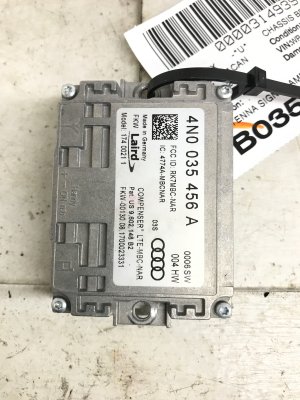
- Verify the Part Number: This is the most important step. You MUST match the part number from your original module exactly. While several part numbers may look similar and fit in the same plug, they can have different hardware or software intended for different vehicle options. Installing the wrong part number will lead to programming failures. Check the sticker on your existing module before ordering.
- Physical Inspection: When you receive the used module, inspect it for any signs of physical damage, especially around the connectors. More importantly, check for any evidence of water intrusion. These modules are often located in areas that can be susceptible to water leaks (like the trunk or under seats), and water damage is a common cause of failure.
- Component Protection (CP): A used module cannot be simply swapped into the vehicle. It will be locked by Audi's anti-theft 'Component Protection' system. You must have a plan for programming the module *before* you purchase it. (See next section).
- Source and Warranty: Purchase from a reputable auto recycler that offers a warranty. This protects you in case the module is faulty or cannot be programmed to your vehicle.
Programming and Component Protection: The #1 Challenge

This is the single biggest hurdle when replacing an Audi Telematics Module. You cannot simply install a new or used module and expect it to work. It must be programmed and adapted to your specific vehicle's VIN and configuration.
This process involves removing an anti-theft lock called Component Protection (CP). This procedure requires an online connection to Audi's factory servers using their proprietary ODIS diagnostic software.
- Audi Dealership: A dealership can always perform the programming and remove Component Protection on a new or used OEM module. This is the most straightforward, but often most expensive, option.
- Independent Specialist: Some high-level independent shops that specialize in Audi/VW may have the licensed ODIS tools and online subscription required to perform this task. However, many independent shops do NOT have this capability. You must confirm with the shop specifically that they can remove Component Protection on a J949 module.
- Remote Programming Services: A growing number of companies offer remote programming. A technician from the service connects to your vehicle over the internet (through a laptop and a specific interface cable) and performs the necessary coding and CP removal. This can be a viable option for DIYers or shops without the necessary tools.
Warning: Do not attempt to install a used module without having a confirmed appointment or plan for Component Protection removal. The module will not function, and you will still have the SOS error on your dash until it is properly programmed.
Replacement Overview & Module Location

The physical replacement difficulty varies by model, as the module is located in different places.
- Audi A4 / A5 / A6: The module is typically located in the trunk, under the floor panel, often near the toolkit area just behind the rear seats. Access is relatively easy, requiring removal of the trunk floor and some trim panels.
- Audi Q7 / Q8: In many of the SUV models, the module is located under one of the front seats (typically the passenger seat in left-hand-drive cars). This makes replacement much more difficult, as it requires unbolting and tilting or completely removing the front seat to access the module under the carpet.
- Audi Q5: Location can vary, with some sources pointing to under the rear seat bench or in the rear cargo area. Always verify the location on your specific vehicle before beginning work.
Cost to Replace Telematics Module
| Part or Service | Estimated Cost |
|---|---|
| New OEM Module | $1,000 - $1,400 |
| Used OEM Module | $100 - $250 |
| Shop Labor (Physical Swap) | $150 - $450 (Varies greatly by module location) |
| Shop Labor (Programming & CP Removal) | $150 - $300 |
Frequently Asked Questions
Can I just pull a fuse to disable the annoying SOS malfunction beep?
While some online forums suggest pulling fuses, this is not recommended. It may disable other critical vehicle systems and will not solve the underlying problem. The proper fix is to diagnose and repair the fault.
Does a used telematics module need to be from the exact same model and year?
The most important thing is to match the OEM part number exactly. A module with the same part number could be used across several models and years. Do not buy a module based only on the vehicle model; you must verify the part number on your original unit.
Can I replace the internal backup battery myself?
Yes, if you are comfortable with the procedure to remove the module from the vehicle. The module has a small door to access the battery. After replacing the battery and reinstalling the module, you may need to use a scan tool to clear stored fault codes related to the battery disconnect.
Is an independent mechanic able to program a new or used module?
Only if they are a specialist with a paid subscription to Audi's online ODIS system. A standard independent mechanic shop will not have the ability to remove the Component Protection lock. You must ask specifically if they can perform this service before bringing them the car.
Helpful Videos

Technical Specifications
OEM Part Numbers: 4KE035282H 4KE035283B 8W0035284A 4KE035283C 4KE035283F 4K1035283C 992035286C
Also known as J949 Control Module or 'ConBox'. Contains cellular (4G/LTE) and GPS transceivers. Includes an internal, non-rechargeable backup battery.
We Have This Part in Stock



The information in this article is provided for general reference and educational purposes only. Vehicle specifications, procedures, and part compatibility can vary by production date, trim level, and region. Always consult your vehicle's factory service manual and verify part numbers before purchasing or performing repairs. Safety-critical components such as airbags, seat belts, and braking systems should be installed by a qualified professional.
- Audi A4:
- Audi Q5:
- Audi A6:
- Audi Q7:
- Audi A7:
- Audi Q8:
- 🎬 Helpful Videos
- 🛍️ Shop This Part
- Symptoms of a Failing Telematics Module
- Common Diagnostic Trouble Codes (DTCs)
- Known Issues, TSBs, and Recalls
- TSB 2056076: Module Unresponsive / No Communication
- TSB for Antenna Faults
- Internal Backup Battery Failure
- Buying a Used Telematics Interface Module
- Programming and Component Protection: The #1 Challenge
- Replacement Overview & Module Location
- Cost to Replace Telematics Module
- Frequently Asked Questions
- 🎟️ Get 5% Off