

2019-2020 Acura TLX Telematics Module: Solving AcuraLink and Programming Problems
This guide covers common failures, replacement costs, and the critical programming requirements for the Telematics Interface Module in 2019-2020 Acura TLX models.
- A replacement Telematics Module MUST be programmed to the vehicle by a dealer or specialist with Acura-specific software.
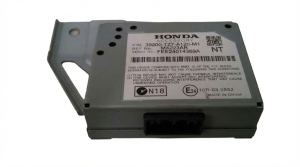
- When buying used, you must match the part number (39770-TZ3-A61) and ensure it has a blue label, not a white one.
- Failure of this module disables AcuraLink features like remote start and emergency SOS, but does not prevent the car from being driven.
- Used modules are significantly cheaper ($85-$150) than new OEM parts ($1000+), but the mandatory programming cost must be factored in.
Symptoms of a Failing Telematics Module
Failure of the Telematics Interface Module in a 2019-2020 Acura TLX primarily affects the AcuraLink connected services. The vehicle will still drive normally, but you will lose access to important safety and convenience features.
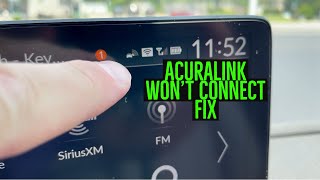
- AcuraLink App Not Connecting: 🎬 Watch this quick video on how to fix AcuraLink connection issues The most common symptom is the inability for the AcuraLink smartphone app to communicate with the vehicle. Commands like remote start, lock, or unlock will fail, often with a generic error message.
- Red AcuraLink Status Light: The status indicator light near the overhead console may turn from green to red, indicating a system fault.
- SOS or Emergency System Malfunction Warning: A message may appear on the instrument cluster or infotainment screen indicating a problem with the emergency call system.
- GPS and Navigation Issues: The vehicle's GPS may show an incorrect location or fail to update, and real-time traffic data will be unavailable.
- Bluetooth Connectivity Problems: Since the telematics module is often integrated with Bluetooth functions, you may experience issues pairing your phone or maintaining a connection.
Associated Diagnostic Trouble Codes (DTCs)
A professional scan tool may reveal specific trouble codes related to the Telematics Control Unit (TCU). While generic code readers may not see these, a dealer-level tool can identify them.
- B1403: Indicates a telematics GPS receiver error, often linked to an intermittent internal failure of the TCU.
- U1A34: A general communication fault with the Telematics Control Unit, meaning it is not responding on the vehicle's data network.
- RT 0xF00: This is not a standard OBD-II code but an internal fault code seen in the self-diagnostic menu, pointing to a failure in the Remote Transmitter (Telematics) module.
Known Issues, Recalls, and Technical Service Bulletins (TSBs)
While there are no specific recalls for the telematics module itself on the 2019-2020 TLX, these models are included in other significant recalls and the telematics system has been the subject of service bulletins.
Recalls
- Low-Pressure Fuel Pump Recall (NHTSA 21V215000): This major recall affects 2019-2020 TLX models. The fuel pump impeller can deform, causing the fuel pump to fail, which could lead to an engine stall while driving. This is unrelated to the telematics module but is a critical safety issue for these vehicles.
- Connecting Rod Bearing Recall: Certain 2015-2020 Acura TLX models with the V6 engine are subject to a recall for a manufacturing defect that can cause premature connecting rod bearing wear, potentially leading to engine seizure and failure.
Technical Service Bulletins (TSBs)
- TSB 17-003: While for slightly earlier models, this TSB addresses a relevant issue where the TCU sends false signals, causing excessive "low power mode" notifications through the AcuraLink app. The fix is a software update for the TCU performed by a dealer.
- TSB 15-017: This bulletin addresses an intermittent failure in the TCU that causes a loss of GPS location and sets DTC B1403. The corrective action is to inspect and, if necessary, replace the TCU.
- CDMA to LTE Transition: Earlier Acura models used telematics units based on 3G (CDMA) cellular technology, which has been phased out. The 2019-2020 TLX should have the newer 4G LTE module, identifiable by a blue label. It is critical not to install an older white-label (CDMA) unit in these vehicles.
Replacement and Programming
Replacing the Telematics Interface Module is a task that involves both physical installation and electronic programming.
Installation
The module is located behind the dashboard, often accessible by removing the glove box assembly. It is held in place by a few bolts. While the physical swap is straightforward for a DIY mechanic, the electronic setup that follows is more complex.
Important: A replacement Telematics Control Unit (TCU) must be registered with the vehicle's immobilizer system. Failure to do so will prevent the unit from functioning. This registration process requires specialized dealer-level diagnostic tools like the Honda Diagnostic System (HDS).
Programming Requirements
This is not a plug-and-play part. While some forum users have had success swapping a used module and waiting for the system to initialize, official procedures and many user experiences indicate that dealer intervention is required. The new or used TCU's serial number needs to be registered to the vehicle's VIN and your AcuraLink account. An independent shop with advanced Honda/Acura diagnostic software may be able to perform the programming, but a dealer is the most reliable option. One seller claims their rebuilt module is plug-and-play, but this is an exception and not the general rule.
Buying a Used Telematics Interface Module
Purchasing a used telematics module can offer significant savings over a new OEM part, but careful verification is essential.
- Match Part Numbers Exactly: The most critical step is to match the part number from your original module. For the 2019-2020 TLX, the primary part number is 39770-TZ3-A61. The number 39770-TZ3-A610-M1 is also associated with this part. Do not substitute with a module from a different model or year range unless compatibility is certain.
- Verify the Label Color: Ensure the replacement module has a blue label, indicating it is the modern LTE version. A white-label unit is for older 3G CDMA networks and will not work.
- Factor in Programming Costs: A used module will almost certainly require programming by a dealer or specialist. Contact your local dealer for a quote on programming a customer-supplied used module before you buy. This cost should be added to the price of the used part to determine your total savings.
- Inspect for Damage: Check the connectors for any signs of corrosion, bent pins, or physical damage to the casing.
Cost Breakdown
The cost to fix a faulty telematics module can vary widely depending on the parts source and labor.
| Item | Estimated Cost | Notes |
|---|---|---|
| New OEM Part | $1,080 - $1,610 | Price from Acura dealerships and online OEM suppliers. |
| Used OEM Part | $85 - $150 | Common price range on used parts sites and eBay. |
| Shop Labor (Installation & Programming) | $200 - $400 | Estimated 1.5-2.5 hours of labor. This can vary based on shop rates and whether programming is straightforward. |
Frequently Asked Questions (FAQ)
Does a replacement telematics module for a 2019-2020 TLX need to be programmed?
Yes, in almost all cases. The replacement module, whether new or used, must be electronically registered to the vehicle's immobilizer system and your AcuraLink account using dealer-level diagnostic tools. Do not expect a replacement unit to be plug-and-play.
Can I replace the telematics module myself?
A skilled DIYer can physically replace the module, which is typically located behind the glove box. However, the final, mandatory programming step requires specialized equipment, so a trip to a dealer or a well-equipped independent shop will still be necessary to make the part functional.
Will a used module from a different Acura model work?
No, this is not recommended. You must match the part number exactly (e.g., 39770-TZ3-A61) to ensure compatibility with your TLX's specific systems. Using a module from an RDX or MDX, even if it looks similar, will likely cause communication problems.
My AcuraLink app stopped working. Is the telematics module definitely bad?
Not necessarily. The problem could be a temporary network outage with Acura's service, an issue with your subscription, or a problem with the app on your phone. First, check for service outages and ensure your app is up to date. If the problem persists and you see a red status light in the car, a faulty module is a strong possibility.
Helpful Videos
Technical Specifications
OEM Part Numbers: 39770-TZ3-A61 39770TZ3A61 39770-TZ3-A610-M1 39770TZ3A610M1
Cellular Technology: 4G LTE (indicated by a blue label)
We Have This Part in Stock


The information in this article is provided for general reference and educational purposes only. Vehicle specifications, procedures, and part compatibility can vary by production date, trim level, and region. Always consult your vehicle's factory service manual and verify part numbers before purchasing or performing repairs. Safety-critical components such as airbags, seat belts, and braking systems should be installed by a qualified professional.
- Acura TLX:
- 🎬 Helpful Videos
- 🛍️ Shop This Part
- Symptoms of a Failing Telematics Module
- Associated Diagnostic Trouble Codes (DTCs)
- Known Issues, Recalls, and Technical Service Bulletins (TSBs)
- Recalls
- Technical Service Bulletins (TSBs)
- Replacement and Programming
- Installation
- Programming Requirements
- Buying a Used Telematics Interface Module
- Cost Breakdown
- Frequently Asked Questions (FAQ)
- 🎟️ Get 5% Off