

2017-2018 Mazda CX-5 Stereo Issues: Ghost Touch, Reboots, and VIN-Locked Replacements
Diagnose and fix common Mazda Connect failures like screen delamination and random reboots, and understand the critical programming requirements for replacement units.
- The most common failure is 'ghost touch' caused by screen delamination; this can be fixed cheaply by replacing only the screen digitizer ($30-$90 part) instead of the whole unit.
- Replacement stereo units (CMUs) are VIN-locked to the original car. A used unit will not be fully functional if swapped into another vehicle without specialized reprogramming, which dealers typically cannot do.
- You MUST match a replacement unit to your vehicle's sound system (Bose or non-Bose), as they are not interchangeable.
- If your system is stuck in a reboot loop, remove the navigation SD card from the center console first. A corrupt card is a very common cause and is a simple fix.
Symptoms of a Failing Stereo / Receiver
Failures in the 2017-2018 Mazda CX-5's infotainment system, or Connectivity Master Unit (CMU), can range from minor annoyances to issues that make the system completely unusable. The problems are almost always electronic and can often be traced to a few common causes.
1. Ghost Touch / Phantom Inputs
This is the most widely reported problem for this generation of CX-5. The screen acts as if it's being touched when it's not. Symptoms include the radio changing stations on its own, the navigation map zooming or moving, random menu items being selected, or unwanted phone calls being placed. This issue is almost always caused by the delamination of the touchscreen's top layer, known as the digitizer. Heat and humidity cause the adhesive layers to fail, creating false touch signals. The problem often gets worse as the vehicle's interior warms up. A diagnostic trouble code (DTC) B108E:04, indicating abnormal touchscreen input, may be stored in the CMU.
2. Constant Rebooting or Boot Loop
Another common complaint is the Mazda Connect system getting stuck in a continuous reboot cycle, where the Mazda logo appears and the system restarts every minute or so. In many cases, this is caused by a corrupted or failing navigation SD card. Before assuming the head unit has failed, the first and easiest diagnostic step is to remove the navigation SD card from its slot in the center console and see if the rebooting stops. If it does, replacing the SD card will solve the problem. If the rebooting continues without the card, it may indicate a software glitch or an internal hardware failure of the CMU.
3. Black or Unresponsive Screen
A screen that remains black can have several causes. The simplest is that the system was accidentally turned off with the volume knob; pressing it should turn it back on. If that doesn't work, a soft reset can often resolve a temporary software glitch. However, a persistent black screen can also point to a more serious hardware failure, such as a dead backlight, a problem with the power supply, or a critical internal fault in the CMU itself. In some cases, a dying vehicle battery can cause intermittent black screens or other electronic gremlins due to low voltage during startup. A DTC U3000:42 may be stored for a general memory failure within the CMU.
4. Bluetooth, USB, or Apple CarPlay/Android Auto Connectivity Issues
Problems with connecting devices can be related to the CMU's software. These issues can sometimes be resolved by updating the Mazda Connect firmware to a newer version. Outdated firmware is known to cause issues with Bluetooth pairing, USB device recognition, and the stability of Apple CarPlay and Android Auto. Before suspecting a hardware fault, ensure your phone's software is up to date and try a different, high-quality USB cable.
Pro Tip: To perform a soft reset of the infotainment system, press and hold the Back, Nav, and Mute buttons simultaneously for about 10 seconds until the screen reboots. This simple procedure can fix many temporary glitches, freezes, and unresponsiveness without erasing your saved settings.
Known Issues, TSBs, and Recalls
There are no open safety recalls for the stereo/receiver unit on the 2017-2018 Mazda CX-5. However, Mazda has issued several Technical Service Bulletins (TSBs) to address the most common complaints.
- TSB for Ghost Touch/Screen Delamination: Mazda acknowledged the ghost touch, peeling, and spider-cracking screen issue and issued TSBs like 09-003/22. This bulletin provides a procedure for technicians to replace only the affected screen lens/digitizer using a specific repair kit, rather than replacing the entire expensive CMU.
- TSBs for Software Updates: Mazda has released numerous firmware updates over the years to fix bugs, improve performance, and enhance compatibility with new phones. TSBs like 09-021/21 instruct dealers to update the CMU software to the latest version to resolve issues like unexpected reboots, frozen screens, and connectivity problems.
Buying a Used Stereo / Receiver (CMU)
Buying a used CMU for a 2017-2018 CX-5 is complicated and requires careful consideration. Due to the electronic nature of this part, compatibility is about more than just physical fit.
Warning: The Connectivity Master Unit (CMU) is VIN-locked to the original vehicle. Swapping a used CMU from another vehicle is not a plug-and-play procedure. The unit will likely have limited or no functionality and will disable certain features. Dealer diagnostic tools (MDARS) are designed to program new modules, and they generally cannot re-program a used, VIN-locked CMU to a different vehicle. Purchase a used unit with the expectation that you may need a specialist in automotive electronics to 'virginize' it, or that you are buying it for its physical components (screen, casing, buttons).
What to Check Before You Buy
- Verify the Audio System: The single most important compatibility check is whether your CX-5 has the standard 6-speaker audio system or the premium 10-speaker Bose system. The non-Bose system has an amplifier built into the CMU, while the Bose system uses a separate, external amplifier. The head units are not interchangeable. A Bose head unit will not work in a non-Bose car, and vice-versa.
- Match the Part Number: While secondary to the Bose/non-Bose check, matching the OEM part number is always best practice. The known part number for the non-navigation unit is KB7W669R0.
- Navigation vs. Non-Navigation: The factory navigation system is enabled by an SD card inserted into a slot in the center console. The head unit itself is generally the same. You do not need a special 'navigation' unit, but you will need a valid Mazda navigation SD card to use that feature.
- Physical Inspection: Carefully inspect the screen for any signs of bubbling, peeling, or 'spider cracks' under the surface. These are clear indicators of the delamination that causes ghost touch. If you are buying the unit to fix your own ghost touch problem, ensure the replacement screen is in perfect condition.
The Best Repair: Replace the Digitizer, Not the Whole Unit
For the common 'ghost touch' issue, the most economical and effective repair is to replace only the touchscreen digitizer. This involves disassembling the screen unit and replacing the top touch-sensitive layer. Replacement digitizers are widely available online and are far cheaper than a complete used or new CMU. This repair fixes the root cause of the problem without needing any programming or dealing with VIN-locking issues. Numerous video guides are available online showing the step-by-step process.
Cost Comparison
The cost to fix a failing infotainment system can vary dramatically depending on the problem and the solution you choose.
| Part or Service | Estimated Cost |
|---|---|
| New OEM Unit (Part Only) | $825 - $1,250 |
| Used OEM Unit (Part Only) | $100 - $350 |
| Remanufactured / Repair Service | $500+ |
| DIY: Replacement Touchscreen Digitizer (Part Only) | $30 - $90 |
| Shop Labor: Full Unit Replacement | $120 - $200 (approx. 0.5-1.0 hour) |
| Shop Labor: Digitizer Replacement | $200 - $400 (approx. 1.5-2.5 hours) |
| Dealer Replacement (Parts & Labor) | $800 - $1,700+ |
Frequently Asked Questions (FAQ)
Does a used 2017-2018 CX-5 radio need to be programmed?
Yes, but it's more complicated than that. The main computer of the radio, the CMU, is VIN-locked to the original car. Simply installing a used unit in a new car will result in limited functionality. A Mazda dealer cannot typically 're-program' a used unit to a new VIN; their tools are for installing new parts. You would need to find a third-party electronics specialist who can potentially clear the VIN lock.
Can I fix the 'ghost touch' screen problem myself?
Yes, this is a very common and feasible DIY repair. The problem is caused by a faulty touchscreen digitizer, which is the top layer of the screen. You can buy a replacement digitizer online for under $100 and replace it yourself by disassembling the screen assembly. This is the most cost-effective permanent fix and avoids all programming and VIN-lock issues.
What's the difference between the Bose and non-Bose stereos?
The systems are fundamentally different. The standard non-Bose system has its amplifier inside the main head unit (CMU). The premium Bose system uses a separate, more powerful amplifier located elsewhere in the vehicle. Because of this, the head units are not interchangeable between the two systems. You must buy a replacement that matches the system originally installed in your car.
My radio reboots constantly. Is it broken?
Not necessarily. The most common cause for a reboot loop in the Mazda Connect system is a corrupted or failing navigation SD card. Before you do anything else, eject the SD card from the slot in your center console. If the rebooting stops, you just need a new navigation card, not a whole new radio.
Technical Specifications
OEM Part Numbers: KB7W669R0
7-inch touchscreen display, integrates with console commander control, supports AM/FM, HD Radio, Bluetooth, USB audio. Navigation enabled via SD card. Separate versions for Bose and non-Bose audio systems.
We Have This Part in Stock
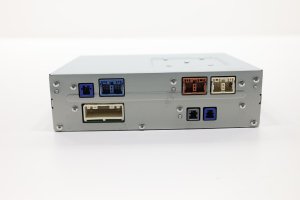



The information in this article is provided for general reference and educational purposes only. Vehicle specifications, procedures, and part compatibility can vary by production date, trim level, and region. Always consult your vehicle's factory service manual and verify part numbers before purchasing or performing repairs. Safety-critical components such as airbags, seat belts, and braking systems should be installed by a qualified professional.
- Mazda CX-5:
- 🛍️ Shop This Part
- Symptoms of a Failing Stereo / Receiver
- 1. Ghost Touch / Phantom Inputs
- 2. Constant Rebooting or Boot Loop
- 3. Black or Unresponsive Screen
- 4. Bluetooth, USB, or Apple CarPlay/Android Auto Connectivity Issues
- Known Issues, TSBs, and Recalls
- Buying a Used Stereo / Receiver (CMU)
- What to Check Before You Buy
- The Best Repair: Replace the Digitizer, Not the Whole Unit
- Cost Comparison
- Frequently Asked Questions (FAQ)
- 🎟️ Get 5% Off