

2020-2021 Mazda CX-30 Stereo Receiver: Solving Faults, Programming, and Compatibility
This guide details common Mazda Connect issues, the critical turbo vs. non-turbo parts difference, and the mandatory dealer programming required for replacement.
- A replacement stereo/CMU absolutely requires programming by a Mazda dealer to function.
- For 2021 models, units from turbo and non-turbo vehicles are not interchangeable due to different audio systems.
- Many common problems like freezing or a black screen can be software-related; always diagnose and check for TSBs before replacing the hardware.
- The new OEM part is very expensive, making a verified, warrantied used part a much better value, provided you budget for dealer programming.
Symptoms of a Failing Stereo Receiver (CMU)
Failures in the Mazda Connect unit can range from minor software glitches to complete hardware failure. Before assuming the unit needs replacement, it's important to identify the specific symptoms, as many can be resolved with a system reset or software update.
- Blank or Black Screen: The center display does not turn on at all, even though audio might still play from a connected phone.
- Constant Rebooting or Freezing: The system gets stuck on the Mazda logo, freezes on a screen, or randomly reboots while driving.
- No Audio or Loud Static: The system appears to function correctly on screen, but there is no sound from the speakers, or a loud, persistent static noise is heard.
- Apple CarPlay / Android Auto Issues: The phone fails to connect, or the connection drops frequently, sometimes resulting in a black screen.
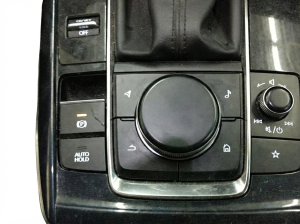
- Unresponsive Commander Knob/Buttons: The physical controls on the center console stop responding, making it impossible to navigate the system.
Pro Tip: For many software-related issues like freezing or a black screen, a hard reset can provide a temporary fix. Press and hold the Back, Nav, and Mute/Volume buttons simultaneously for about 10 seconds until the system reboots. If this resolves the issue, it points to a software glitch that a dealer update may permanently fix.
Known Issues, Recalls, and Technical Service Bulletins (TSBs)
There are no active recalls for the stereo/receiver unit in the 2020-2021 Mazda CX-30. However, Mazda has issued several TSBs to address common complaints, which should be investigated before replacing the entire unit.
TSB for No Audio / Static from Speakers
A known issue can cause intermittent loss of all audio or static from the speakers. This may be triggered by tapping on the dashboard near the center display. It is caused by a pin backing out of the main harness connector attached to the CMU. This issue may store diagnostic trouble codes (DTCs) such as U0186:08 (communication error with audio amplifier) or U2145:08 / U2145:02 (communication error with remote tuner). A dealership can perform a simple repair by reseating the connector pin, which is much cheaper than replacing the unit.
TSB for Loud Static in Bose® Systems
For vehicles equipped with the Bose® premium audio system, some owners may experience a loud static noise from some or all speakers. According to Mazda TSB 09-038/20, this is caused by faulty audio amplifier software. A Mazda dealer can resolve this by performing a software update on the amplifier module.
Programming and Anti-Theft Requirements
Warning: A replacement stereo receiver (CMU) MUST be programmed by a Mazda dealership or a highly specialized independent shop with access to Mazda's proprietary software.
The CMU is linked to the vehicle's specific configuration and VIN. Installing a used or new unit without programming will result in it not functioning correctly. This is part of the vehicle's integrated security and systems management. When a dealer replaces a CMU, they use their diagnostic tools (MDARS) to configure the new unit to the vehicle. All settings, pairings, and user data are stored on the original unit and will be lost when it is swapped. Buyers of a used CMU must factor the cost of dealer programming into the total repair cost.
Important Compatibility Warning: 2021 Turbo vs. Non-Turbo
The initial data is correct and critical for buyers: the stereo receiver for a 2021 Mazda CX-30 with the naturally aspirated (non-turbo) engine is different from the one used in models with the turbo engine. All 2020 models use the same type.
The primary reason for this difference is the audio system. Higher-tier turbo models often came standard with the 12-speaker Bose® premium sound system, while non-turbo models typically had the standard 8-speaker audio system. The head unit (CMU) is designed to communicate with a specific amplifier (Bose® or standard). Using the wrong unit will result in communication errors and likely a lack of audio. Always match the OEM part number from your original unit to ensure compatibility.
Buying a Used 2020-2021 CX-30 Stereo Receiver
Purchasing a used OEM receiver is a cost-effective alternative to a brand-new unit, which can be prohibitively expensive. However, careful verification is essential.
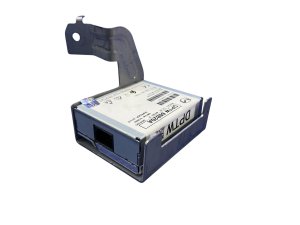
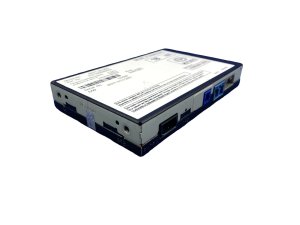
- Verify the Part Number: Before purchasing, you must remove your original unit to get the exact OEM part number printed on its label. Match this number precisely. Known part numbers include DFR557K30C, DGH9669C0D, DGH9669C0E, DGH9669C0G, and DGH9669C0H, but others may exist.
- Confirm 2021 Engine Compatibility: If you have a 2021 model, double-check that the donor vehicle had the same engine (turbo or non-turbo) as yours.
- Inspect for Damage: Check all connectors for bent or broken pins. Look for any signs of water intrusion or case damage, which could indicate internal problems.
- Budget for Programming: Remember that you will have to pay a Mazda dealership for 1-2 hours of labor to program the used unit to your vehicle. Call ahead for a quote.
- Buy From Reputable Sellers: Purchase from an auto recycler that offers a warranty. This protects you if the unit is dead on arrival or has issues that weren't apparent upon inspection.
Cost Breakdown
The cost to replace the CX-30's stereo receiver can vary significantly depending on the path you choose. Here are some estimated costs:
| Item | Estimated Cost |
|---|---|
| New OEM Unit (Part Only) | $1,400 - $2,100 |
| Used OEM Unit (Part Only) | $300 - $700 (estimate) |
| Shop Labor (Physical Installation) | $150 - $300 (1.0-1.5 hours) |
| Dealer Programming | $150 - $350 (1-2 hours) |
Frequently Asked Questions (FAQ)
Do I have to take my CX-30 to a dealer after installing a used radio?
Yes, almost certainly. The replacement Connectivity Master Unit (CMU) needs to be programmed to your vehicle's VIN and specific configuration. While some very high-end independent shops may have the licensed Mazda software, a dealership is the most reliable option for this service.
My radio screen is black. Does the whole unit need to be replaced?
Not necessarily. First, try a hard reset by holding the Back, Nav, and Mute buttons for 10 seconds. If that doesn't work, the issue could be a software glitch requiring a dealer update, a loose connection, or a blown fuse. Replacement should be the last resort after proper diagnosis.
Can I install a radio from a 2021 CX-30 Turbo into my 2021 non-turbo model?
No, this will likely not work. The turbo and non-turbo models often have different audio systems (e.g., Bose® vs. standard), and the head units are not interchangeable. You must match the part number from your original unit.
Can I update the Mazda Connect software myself?
Yes, firmware updates (not to be confused with module programming) can often be performed by the owner using a FAT32 formatted USB drive and update files found online. However, this process carries a risk; if it fails or is interrupted, it can damage the CMU. For many owners, having the dealer perform software updates is the safest option.
Technical Specifications
OEM Part Numbers: DFR557K30C DGH9669C0D DGH9669C0E DGH9669C0G DGH9669C0H
Controls 8.8-inch non-touch center display. Integrates with commander knob controls. Connects to vehicle CAN bus for settings and diagnostics.
We Have This Part in Stock




The information in this article is provided for general reference and educational purposes only. Vehicle specifications, procedures, and part compatibility can vary by production date, trim level, and region. Always consult your vehicle's factory service manual and verify part numbers before purchasing or performing repairs. Safety-critical components such as airbags, seat belts, and braking systems should be installed by a qualified professional.
- Mazda CX-30:
- 🛍️ Shop This Part
- Symptoms of a Failing Stereo Receiver (CMU)
- Known Issues, Recalls, and Technical Service Bulletins (TSBs)
- TSB for No Audio / Static from Speakers
- TSB for Loud Static in Bose® Systems
- Programming and Anti-Theft Requirements
- Important Compatibility Warning: 2021 Turbo vs. Non-Turbo
- Buying a Used 2020-2021 CX-30 Stereo Receiver
- Cost Breakdown
- Frequently Asked Questions (FAQ)
- 🎟️ Get 5% Off