

2018 Lincoln Navigator Radio Problems: Fixing Black Screens & No-Sound Issues
This guide covers the common SYNC 3 failures in the 2018 Navigator, explains the critical build-date difference, and details the required programming for replacement.
- A replacement radio (ACM) or SYNC module (APIM) MUST be programmed to the vehicle's 'As-Built' data to function correctly.
- A black screen usually means the APIM (SYNC module) has failed, while no sound usually points to the ACM (radio module) or amplifier.
- There was a mid-year production change; you must match your vehicle's build date (on or before Feb 3, 2018) when buying a used part.
- DIY programming is possible using FORScan software, but requires technical skill. Otherwise, a dealer or specialized shop visit is necessary.
Understanding the 2018 Lincoln Navigator Audio System
The 2018 Lincoln Navigator uses the sophisticated SYNC 3 infotainment system. When troubleshooting issues, it's important to know that the system relies on two key components: the Audio Control Module (ACM) and the Accessory Protocol Interface Module (APIM). The ACM is the traditional 'radio' and audio processor, while the APIM is the 'SYNC module' that runs the software on the main screen. A problem that appears to be a 'radio' failure might actually be an issue with the APIM, or vice-versa.
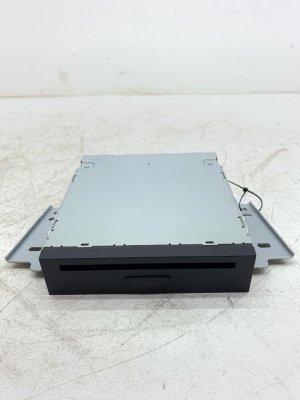
Critical Compatibility Warning: There was a mid-year production change for this part. A specific version of the radio/CD player assembly fits 2018 Lincoln Navigator models built on or before February 3rd, 2018. You MUST verify your vehicle's production date (found on the sticker in the driver's side door jamb) before ordering a replacement part. Using a part from the wrong build period will result in compatibility issues.
Symptoms of a Failing Stereo / Receiver
Failures can manifest in different ways depending on whether the ACM or the APIM is the source of the problem.
Common APIM (SYNC Module) Failure Symptoms
- Black or Blank Screen: This is the most common failure. The screen may be completely black or backlit but show no information. Often, audio from the radio or a Bluetooth-connected phone will continue to work, but you cannot see or control anything on the screen. This is frequently caused by a failed software update that corrupts the APIM's firmware.
- System Freezing or Lagging: The touchscreen becomes slow to respond to inputs or freezes entirely.
- Constant Reboots: The SYNC 3 system crashes and restarts unexpectedly while driving.
- Bluetooth and Navigation Issues: Difficulty pairing a phone, maintaining a connection, or inaccurate GPS directions are common software-related problems.
Common ACM (Audio Control Module) or Amplifier Symptoms
- No Sound From Any Source: The screen and all controls work perfectly, but there is no audio from AM/FM, SiriusXM, or any connected device.
- Popping, Crackling, or Static: Unwanted noise from the speakers, which may occur intermittently or constantly, can point to a failing ACM or external amplifier.
- Audio Cuts Out: Sound works for a while and then cuts out, sometimes returning if the vehicle is turned off and on again.
- Only One Speaker Works: In some cases, a failure in the amplifier or ACM can cause sound to come from only a single speaker, often the center dash speaker.
Known Issues, TSBs, and Recalls
While there are no major recalls specifically for radio failure on the 2018 Navigator, several Technical Service Bulletins (TSBs) and software-related issues are relevant:
- TSB SSM 50375: Some vehicles may experience inoperative navigation voice prompts after a SYNC map update.
- Revel Audio System Sibilance: Some owners of Navigators with the premium Revel Ultima audio system have reported overly harsh and sharp treble sounds (sibilance), especially with vocals. This is often considered a characteristic of the system's tuning rather than a component failure.
- Seat Belt Chime Recall (Other Models): On other Lincoln models with Revel audio systems, a recall was issued because a software issue in the audio head unit could mute the seat belt warning chimes. The fix was a software update to the Audio Control Module.
The 2018 Navigator has been subject to numerous other safety recalls for issues unrelated to the radio, such as transmission problems and seat belt pretensioners. It is always advisable to check your vehicle's VIN on the NHTSA website for any open recalls.
Programming and Installation Requirements
Warning: This is NOT a plug-and-play part. A replacement Audio Control Module (ACM) or SYNC Module (APIM) must be programmed to your vehicle's specific configuration. Failure to program the module will lead to issues like no audio, incorrect features displaying on screen, or loss of climate controls.
Programming involves loading the vehicle's 'As-Built' data into the new module. This data file tells the module which features your Navigator is equipped with, such as the type of audio system (base, Revel, or Revel Ultima), whether it has navigation, HD radio, and more. You have three main options for programming:
- DIY with FORScan: Tech-savvy owners can perform the programming themselves using a Windows laptop, a compatible OBD-II adapter (such as the OBDLink EX), and software called FORScan. This involves saving the As-Built data from your original module (if it's still communicating) and writing it to the replacement. If the original module is dead, you can download the factory As-Built data using your vehicle's VIN.
- Independent Repair Shop: Many independent shops that specialize in automotive electronics have the tools to program Ford and Lincoln modules.
- Lincoln Dealership: Any Lincoln dealer can program a replacement module using their proprietary diagnostic tools. This is typically the most expensive option.
Buying a Used Stereo / Receiver
Purchasing a used OEM module is a cost-effective way to fix your system, but careful selection is crucial for success.
- Verify the Build Date: First and foremost, confirm your Navigator's production date. Ensure the donor vehicle for the used part falls into the same production period (built on or before Feb 3, 2018, or after).
- Match the Part Number EXACTLY: The ACM is the most likely part to need replacement for 'no sound' issues. Find the engineering ID number printed on your original ACM (e.g., JL7T-18C830-AD) and buy a used part with the identical number.
- Match the Features: For the best results, source a module from a Navigator with the exact same options as yours (e.g., Revel Ultima system, Navigation). While programming can often correct for differences, starting with a matched part simplifies the process.
- Inspect the Unit: Check for any physical damage, especially to the connectors and pins. Bent pins or a cracked casing are major red flags.
- Why Used OEM is a Good Choice: A used OEM module, when correctly programmed, ensures perfect integration with all vehicle systems, including steering wheel controls, climate functions, and the premium Revel amplifier. Aftermarket 'Tesla-style' units can be problematic and may cause you to lose factory-integrated features.
Cost Comparison
Prices for replacement parts and labor can vary significantly. Here are some approximate costs:
| Part/Service | Estimated Cost |
|---|---|
| New OEM ACM (Dealer) | $500 - $700+ |
| New OEM CD Player | $600+ |
| Used OEM ACM | $100 - $250 |
| Aftermarket Head Unit | $900 - $1,500+ |
| Shop Labor (Replacement & Programming) | $200 - $400 |
Frequently Asked Questions (FAQ)
Does a replacement 2018 Navigator radio have to be programmed?
Yes, absolutely. The replacement Audio Control Module (ACM) or SYNC Module (APIM) must be programmed with your vehicle's specific 'As-Built' data to ensure all features, especially the sound system and climate controls, function correctly.
My screen is black but the radio still plays. What part is broken?
This is a classic symptom of a failed APIM (SYNC Module), not the ACM (radio module). The APIM controls the display, and a common cause of failure is a corrupted software update. The APIM board can often be replaced separately from the screen itself.
Can I upgrade my standard audio system to the Revel system by swapping the radio?
No, this is not a simple swap. The Revel and Revel Ultima systems use a different amplifier, additional speakers, and specific wiring. Simply changing the ACM or APIM will not work without also installing the other required hardware components and performing complex programming.
Can I fix a black screen by doing a soft reset?
You can try a soft reset as a first step. Press and hold the Power button (center of the volume knob) and the Right-Seek button at the same time for about 5-10 seconds until the screen resets. If this does not resolve the black screen, it likely indicates a hardware failure in the APIM.
Technical Specifications
OEM Part Numbers: JL7T-18C830-AD JL7T18C830AC JL7T18C830AD JL7Z18D806AC
System consists of an Audio Control Module (ACM) and an Accessory Protocol Interface Module (APIM) running SYNC 3 software. Compatible with standard, Revel, and Revel Ultima sound systems. Requires programming with vehicle-specific As-Built data upon installation.
We Have This Part in Stock



The information in this article is provided for general reference and educational purposes only. Vehicle specifications, procedures, and part compatibility can vary by production date, trim level, and region. Always consult your vehicle's factory service manual and verify part numbers before purchasing or performing repairs. Safety-critical components such as airbags, seat belts, and braking systems should be installed by a qualified professional.
- Lincoln Navigator:
- 🛍️ Shop This Part
- Understanding the 2018 Lincoln Navigator Audio System
- Symptoms of a Failing Stereo / Receiver
- Common APIM (SYNC Module) Failure Symptoms
- Common ACM (Audio Control Module) or Amplifier Symptoms
- Known Issues, TSBs, and Recalls
- Programming and Installation Requirements
- Buying a Used Stereo / Receiver
- Cost Comparison
- Frequently Asked Questions (FAQ)
- 🎟️ Get 5% Off