

2019-2021 Kia Stinger Base Stereo: Diagnosing Intermittent Sound and Screen Failures
This guide covers common problems, part number verification, and replacement requirements for the non-navigation radio in the 2019-2021 Kia Stinger.
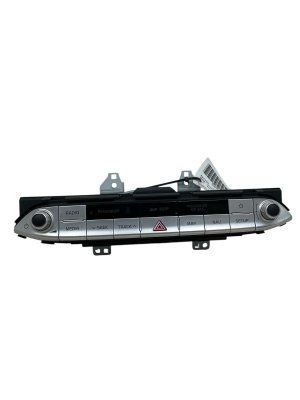
- This guide is for the non-navigation stereo, part number 96160-J5160FHV. You must match this number exactly.
- Intermittent loss of sound is the most common failure, often fixed by disabling the 'QuantumLogic Surround' feature in the sound settings.
- A used replacement unit may require programming by a Kia dealer to function correctly in a new vehicle; it is not guaranteed to be plug-and-play.
- Before replacing the unit, try a system reset using the small pinhole button to rule out a simple software glitch.
Symptoms of a Failing Stereo Receiver
When the stereo receiver in a 2019-2021 Kia Stinger begins to fail, it can cause a variety of frustrating electronic issues. These problems are often intermittent, making them difficult to diagnose.
- Intermittent or No Sound: This is the most common complaint. Audio from all sources (radio, Bluetooth, USB) may suddenly stop working. In some cases, restarting the car temporarily resolves the issue. Forum users have noted that sometimes navigation voice prompts will work even when music audio does not, pointing to a specific fault within the audio processing part of the unit or a related software glitch.
- Blank or Flickering Screen: The infotainment display may go completely black, though the system might still respond to touch commands (you can hear beeps). This can happen randomly or when driving over bumps, which suggests a loose internal connection or a failing display driver.
- System Freezing or Rebooting: The unit may become unresponsive to any button presses or touch inputs, requiring a manual reset or a full vehicle restart to restore function.
- Poor Radio Reception: You might experience excessive static or a weak signal on AM/FM bands, even in areas with strong reception. This can be caused by a fault in the receiver's tuner or an issue with the vehicle's antenna system.
- Bluetooth Connectivity Problems: The unit may fail to pair with devices, or frequently disconnect from a paired phone.
Known Issues, TSBs, and Recalls
While there are no major safety recalls specifically for this stereo unit, Kia has acknowledged some software-related problems.
Software Glitches and a Simple Fix
Many owners have successfully resolved the 'no sound' issue by performing a simple software fix. The problem is often linked to a feature called QuantumLogic Surround. Disabling this sound setting has been shown to immediately restore audio.
- Press the [SETUP] button on the dash.
- Select [Sound] on the touchscreen.
- Scroll down to [Advanced].
- Turn the QuantumLogic Surround setting to OFF.
For other software-related freezes, a system reset can often provide a temporary solution. You can do this by pressing the small pinhole reset button, typically located near the radio controls, with a paperclip for about 5-10 seconds until the system reboots.
Technical Service Bulletins (TSBs)
Kia has issued technical service bulletins to address software problems. Notably, TSB ELE303 was released to provide a software update for certain 2020-2023 models experiencing a non-responsive or inoperative radio icon (AM, FM, SXM). If your vehicle exhibits these specific symptoms, a dealer can perform this software update.
Important: In some cases of intermittent audio loss, the fault may lie with the external factory amplifier and not the head unit itself. This is more common in vehicles with the premium sound system, but proper diagnosis is key before replacing the receiver.
Buying a Used Stereo: What You Must Know
Purchasing a used OEM stereo receiver can be a cost-effective solution, but compatibility is critical. Follow these guidelines to ensure you get the right part.
1. Verify the Part Number
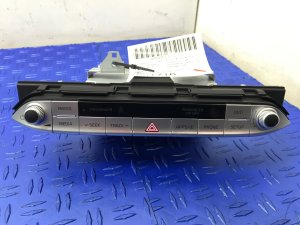
The most important step is to match the part number exactly. This guide covers part number 96160-J5160FHV (or 96160J5160FHV). This unit is specifically for 2019-2021 Kia Stinger models without the factory navigation system. Do not purchase a unit from a vehicle with navigation, as it is not compatible and will not work correctly. Physically inspect your original unit to confirm the part number before ordering a replacement.
2. Programming and Anti-Theft Considerations
This is the biggest variable when swapping electronic modules.
- Anti-Theft Code: After a loss of power (like a battery change), your original radio may ask for a 4-digit anti-theft code to reactivate. This is a simple security measure. A used unit may also be locked and require its original code, which is often impossible to get. However, many modern Kia units do not use this system.
- VIN Programming: More importantly, modern car modules are often programmed to the vehicle's specific VIN and options. While there is no definitive search result stating this unit requires it, it is a strong possibility. Swapping in a used receiver may result in some features not working, or the unit not working at all, without being reprogrammed by a Kia dealer or a specialized automotive electronics shop with a J2534 pass-thru tool. To maximize your chances of a plug-and-play swap, source a used unit from a vehicle with the exact same year and trim level. Be prepared for the possibility that a dealer visit for programming may be necessary.
3. Physical Inspection
When buying a used unit, check for any physical damage. Ensure all connectors on the back are intact, with no bent or broken pins. Check that the faceplate, buttons, and knobs are in good condition and operate smoothly.
Cost of Replacement
The cost to replace a Kia Stinger stereo receiver can vary significantly depending on the source of the part.
| Part Source | Estimated Cost |
|---|---|
| New OEM | $1,250 - $1,950 |
| Used OEM | $175 - $400 |
| New Aftermarket | $450 - $1,050 (includes head unit, dash kit, and wiring interface) |
| Shop Labor | $150 - $300 (1-2 hours) |
Pro Tip: An aftermarket stereo requires a new head unit, a dash kit to make it fit, and a special wiring interface to retain factory features like steering wheel controls. While offering modern features, the total cost can approach that of a new OEM unit. A used OEM receiver is often the most economical choice if it is compatible.
Frequently Asked Questions (FAQ)
Does a used 2019-2021 Stinger radio need to be programmed by the dealer?
It might. While a simple swap of the exact same part number from an identical vehicle may be plug-and-play, it is not guaranteed. Modern infotainment systems are often tied to the car's VIN and specific options. If you install a used unit and features are missing or it doesn't work, you will likely need a Kia dealer or a specialized shop with OEM tools to program the unit to your vehicle.
My radio has no sound. What's the first thing I should check?
Before assuming the radio has failed, check the 'QuantumLogic Surround' setting. Go to Setup > Sound > Advanced and turn this feature off. This is a very common software glitch that causes the audio to cut out, and disabling the feature often restores sound immediately.
How do I know if I have the navigation or non-navigation stereo?
The easiest way to tell is by the physical buttons on the control panel. The navigation-equipped models will have a [MAP] or [NAV] button. The non-navigation unit, part number 96160-J5160FHV, will not have these buttons. Always verify the part number on your original unit before ordering a replacement.
Can I upgrade my non-navigation stereo to the factory navigation unit?
This is not a simple swap. The navigation and non-navigation systems use different wiring, connectors, and may rely on different external components like amplifiers and antennas. Attempting this upgrade requires extensive rewiring and component replacement and is not recommended for most users.
Technical Specifications
OEM Part Numbers: 96160-J5160FHV 96160J5160FHV
For vehicles without factory navigation system.
We Have This Part in Stock


The information in this article is provided for general reference and educational purposes only. Vehicle specifications, procedures, and part compatibility can vary by production date, trim level, and region. Always consult your vehicle's factory service manual and verify part numbers before purchasing or performing repairs. Safety-critical components such as airbags, seat belts, and braking systems should be installed by a qualified professional.
- Kia Stinger:
- 🛍️ Shop This Part
- Symptoms of a Failing Stereo Receiver
- Known Issues, TSBs, and Recalls
- Software Glitches and a Simple Fix
- Technical Service Bulletins (TSBs)
- Buying a Used Stereo: What You Must Know
- 1. Verify the Part Number
- 2. Programming and Anti-Theft Considerations
- 3. Physical Inspection
- Cost of Replacement
- Frequently Asked Questions (FAQ)
- 🎟️ Get 5% Off