

2014-2015 Kia Cadenza Radio Guide: Fixing No Sound & Black Screen Issues
Diagnose common failures with the Cadenza's UVO infotainment system and learn what you need to know before buying a used replacement radio.
- A replacement radio for a 2014-2015 Cadenza does NOT need to be programmed; it is plug-and-play if the part number matches.
- The most common failure, 'no sound,' can often be fixed for free by performing a hard reset (disconnecting the battery for 15 minutes).
- Always check the 'Multimedia' fuse before assuming the radio is broken, especially if the screen is completely dead.
- Buying a used OEM unit is significantly cheaper (around $100-$250) than a new one from the dealer (over $2,900).
Key Issues & Quick Fixes for Cadenza Radio Problems
Before assuming your radio has failed, try these two simple steps. Many common issues with the 2014-2015 Cadenza's UVO system are caused by simple software glitches or a blown fuse, not a complete hardware failure.
- Check the Fuses: The most common cause of a completely dead screen is a blown fuse. Check the fuse panel located in the driver's side dashboard. Look for a 15-amp fuse labeled "Multimedia." If it's blown, replacing it may restore power immediately.
- Perform a Hard Reset: If the screen is on but you have no sound from any source (radio, CD, Bluetooth), a software glitch is the likely culprit. To perform a hard reset, disconnect the vehicle's negative battery terminal for 15 minutes, then reconnect it. This forces the system to reboot and often resolves audio loss issues. You can also try the small pinhole reset button, typically located near the volume knob.
Symptoms of a Failing Cadenza Stereo Receiver
If the quick fixes above don't work, your head unit may have a more serious internal problem. Here are the most common symptoms of failure:
- No Sound: The most frequently reported issue is a sudden loss of all audio output. The screen and all controls appear to work normally, but no sound comes from the speakers for radio, navigation, or phone calls. This can start intermittently before becoming permanent.
- Black or Blank Screen: The display may fail to turn on at all, even if the button backlights are on. This could be a fuse issue or an internal failure of the unit.
- Stuck on Boot Screen: The unit may get stuck in a perpetual boot loop, constantly showing the UVO loading bar but never fully starting up. This points to a software corruption or internal hardware problem.
- Unresponsive Touchscreen: The screen may light up but not respond to any touch inputs, making it impossible to control any functions.
- Bluetooth Connectivity Problems: Frequent dropping of Bluetooth connections or an inability to pair devices can be a sign of a failing radio, though this can also be caused by outdated software.
Warning: While there are several recalls for the 2014-2015 Kia Cadenza, none directly address the stereo receiver. However, be aware of safety recalls for the Hydraulic Electronic Control Unit (HECU) which can cause an engine fire, fracturing wheels, and improperly bonded windshields. You can check if your vehicle is affected by entering your VIN on the NHTSA website.
Buying a Used 2014-2015 Cadenza Receiver
Due to the extremely high cost of a new OEM unit, a used radio is the most practical solution for a failed head unit. Here’s what you need to know to get the right part.
Confirm Compatibility by Part Number
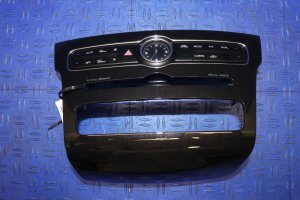
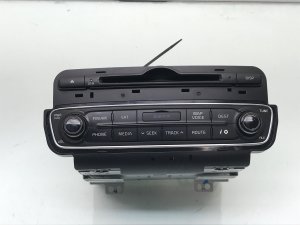
This is the most important step. The 2014-2015 Cadenza was available with different audio systems (e.g., base vs. premium Infinity sound with navigation). These units look similar but are not interchangeable. To ensure compatibility, you must match the part number on your original radio with the part number of the used unit.
- Known Part Numbers: 965603R107, 965603R105, 965603R116.
- How to Verify: The part number is printed on a sticker on the radio's metal chassis. You will need to remove the radio from the dash to see it. Do not buy a replacement based on looks alone.
Programming and Anti-Theft
Pro Tip: The 2014-2015 Cadenza radio receivers are plug-and-play. They do not require an anti-theft code and are not locked to the vehicle's VIN. As long as you purchase a used unit with the exact same part number as your original, it should function correctly immediately after installation without needing a trip to the dealer for programming.
What to Inspect on a Used Unit
- Connectors: Check for any bent or broken pins on all rear connectors.
- Screen Condition: Look for deep scratches, delamination (peeling), or cracks in the display.
- Casing: Ensure the metal housing is not bent or dented, which could indicate it was dropped or damaged during removal.
- Seller Guarantee: Buy from a reputable seller that offers a warranty and guarantees the unit has been tested and is functional.
Cost Comparison
Replacing the Cadenza's radio shows a stark difference in cost between new and used options, making a used OEM part the clear choice for most owners.
| Part Type | Estimated Cost |
|---|---|
| New OEM | $2,900 - $4,600 |
| Used OEM | $100 - $250 |
| Remanufactured | $200 - $300 |
| Shop Labor for Installation | $100 - $200 |
Software Updates & Technical Service Bulletins (TSBs)
For some glitches, like Bluetooth issues or problems with voice recognition, a hardware replacement may not be necessary. Kia has released several software updates for its UVO systems to fix bugs. If you are experiencing minor software-related problems, a Kia dealer can perform a software update using a USB flash drive, which may resolve the issue without needing to replace the entire unit.
Frequently Asked Questions (FAQ)
Does a replacement 2014-2015 Cadenza radio need to be programmed by a dealer?
No. As long as the part number on the replacement unit is an exact match to your original radio, it is a plug-and-play installation. It does not require dealer programming, VIN-locking, or an anti-theft code.
Why is my Cadenza radio screen on but there is no sound?
This is a very common software glitch. The first and most effective solution is to perform a hard reset by disconnecting the car's negative battery terminal for about 15 minutes. This forces the internal amplifier and radio software to reboot, which usually restores the sound.
What should I do if my radio screen is completely black?
First, check the fuse labeled "Multimedia" in the interior fuse panel. If the fuse is good, try the pinhole reset button near the volume knob. If neither of those steps work, the unit has likely suffered an internal hardware failure and will need to be replaced.
Can I install an aftermarket radio in my 2014-2015 Cadenza?
Yes, but it can be complex. The factory radio is integrated with the climate controls, steering wheel controls, and potentially the factory amplifier. While aftermarket installation kits and wiring harnesses are available from companies like Crutchfield, it is not a simple swap. Some owners have reported difficulty finding shops willing to do the custom work. For most people, a used OEM unit is a simpler and more reliable option.
Technical Specifications
OEM Part Numbers: 965603R107 965603R105 965603R116 96560-3R107 96560-3R105
Kia UVO Infotainment System with options for navigation and premium Infinity audio. Controlled via touchscreen and physical buttons.
We Have This Part in Stock



The information in this article is provided for general reference and educational purposes only. Vehicle specifications, procedures, and part compatibility can vary by production date, trim level, and region. Always consult your vehicle's factory service manual and verify part numbers before purchasing or performing repairs. Safety-critical components such as airbags, seat belts, and braking systems should be installed by a qualified professional.
- Kia Cadenza:
- 🛍️ Shop This Part
- Key Issues & Quick Fixes for Cadenza Radio Problems
- Symptoms of a Failing Cadenza Stereo Receiver
- Buying a Used 2014-2015 Cadenza Receiver
- Confirm Compatibility by Part Number
- Programming and Anti-Theft
- What to Inspect on a Used Unit
- Cost Comparison
- Software Updates & Technical Service Bulletins (TSBs)
- Frequently Asked Questions (FAQ)
- 🎟️ Get 5% Off