

2021 Ford Mustang Mach-E Audio Module: Fixing No-Sound Issues and Navigating Programming
This guide covers the common failures, replacement costs, and critical programming requirements for the 2021 Mach-E's Audio Control Module (ACM).
- This part is NOT plug-and-play. A replacement Audio Control Module (ACM) must be professionally programmed to your car's VIN using dealer-level software (FDRS).
- Many 'no sound' issues on early 2021 models are caused by a software glitch in the DSP (amplifier), not a failed ACM. Refer your mechanic to Ford TSBs 49737 and 50739.
- There are two non-interchangeable audio systems: a standard 6-speaker system and a premium 10-speaker B&O system. You must buy a part that matches your original system.
- Before replacing hardware, always perform a SYNC reboot and a 12-volt battery disconnect/reconnect, as these simple steps fix many software-related audio problems.
Variant Differences: Standard vs. B&O Premium Audio
The 2021 Mustang Mach-E was offered with two distinct audio systems, and their main components are not interchangeable. It is critical to identify which system your vehicle has before purchasing a replacement module.
- Standard 6-Speaker System: In this configuration, the Audio Control Module (ACM) is responsible for both processing the audio signals and directly powering all six speakers. Replacement modules for this system are often described as being for vehicles "without branded sound system".
- Premium B&O 10-Speaker System: This upgraded system was standard on Premium and GT trims. It can be easily identified by the 'B&O' logos on the door speaker grilles and a unique, heathered grey fabric that covers the speaker array spanning the dashboard. In this system, the ACM only powers the three dashboard speakers. A separate amplifier, known as the Digital Signal Processor (DSP), is located in the rear cargo area and powers the remaining seven speakers, including the subwoofer.
Warning: The ACM and DSP modules for the Standard and B&O systems are different and cannot be swapped. You must install a module that matches your vehicle's original factory-installed system.
Common Symptoms of a Failing Audio Module
Failure of the audio system in the Mach-E can be caused by a software glitch, a hardware fault in the ACM, or a problem with the separate DSP amplifier in B&O models. Symptoms are often similar regardless of the cause:
- Complete Loss of Audio: The most common symptom is no sound from any source (radio, Bluetooth, Apple CarPlay/Android Auto), even though the SYNC 4A touchscreen appears to be working correctly.
- Intermittent Audio Cutouts: Sound may cut in and out randomly, sometimes for several seconds at a time.
- Warning Chimes Sound Different: System chimes (for seatbelts, parking sensors, etc.) may suddenly sound tinny or play through the instrument cluster speaker instead of the main audio system. This happens when the vehicle's network loses communication with the ACM.
- Popping or Static: Loud, unexpected popping or static noises from the speakers can indicate a module failure.
- Specific Sources Fail: You might lose a specific input, like SiriusXM which may display a "Hardware Problem" message, while other sources continue to work.
- Audio Settings Unresponsive: The "Sound" menu on the touchscreen may be greyed out or inaccessible.
Known Issues, TSBs, and Recalls
While there are no specific recalls for the ACM itself, Ford has issued several Special Service Messages (SSMs) and Technical Service Bulletins (TSBs) related to audio problems in early-build 2021 Mach-E vehicles. Many issues that seem like a hardware failure are actually software-related.
- SSM 49737 / SSM 50739: These bulletins address conditions where there is no audio, and the system cannot communicate with the ACM or DSP. They apply to vehicles built on or before November 22, 2021. The cause is identified as a software issue in the Digital Signal Processor (DSP) module. The official fix is for a dealer to perform a hard reset and reprogram the DSP module with the latest software using the Ford Diagnostic & Repair System (FDRS).
- Diagnostic Trouble Codes (DTCs): The above TSBs are associated with communication error codes, including U0184 (Lost Communication With Radio), U0237 (Lost Communication With Digital Signal Processor Module), and U0238 (Lost Communication With Digital Audio Control Module B).
Diagnosing a Faulty Audio System
Before assuming the ACM has failed and needs replacement, follow these diagnostic steps. Many audio issues can be resolved with a simple reset.
- SYNC System Reboot: The first and easiest step is to reboot the SYNC system. Press and hold the 'Volume Down' button and the 'Next Track' button on the steering wheel simultaneously for about 10 seconds until the screen goes black and reboots. This can solve many temporary software glitches.
- Check for Software Quirks: Some owners have reported that intermittent audio cutouts can be caused by the 'Navigation Suggestions' feature. Try disabling this in the navigation settings menu.
- Check Fuses: A blown fuse can cause a complete loss of power to the audio modules. There are several fuses to check:
- Passenger Compartment Fuse Box (under dash): Fuse F13 (Audio unit).
- Under-Hood Fuse Box: Fuse F30 (Amplifier) and Fuse F42 (Amplifier).
- 12-Volt Battery Reset: If a SYNC reboot doesn't work, a hard reset by disconnecting the 12-volt battery can often restore communication with the audio modules. Disconnect the negative terminal of the 12V battery (located in the front trunk/frunk) for at least 10 minutes, then reconnect it. This is the first step recommended in official Ford service bulletins for this issue.
- Professional Diagnosis: If none of the above steps work, the vehicle needs to be diagnosed with a professional scan tool like the Ford FDRS. A technician will check for communication codes (U-codes) to determine if the ACM, DSP, or another module is offline.
Pro Tip: A software problem in the DSP (amplifier) can make the ACM appear to be faulty. If your vehicle was built before late 2021, insist that your technician investigate TSBs related to reprogramming the DSP module before they recommend replacing the entire ACM.
Buying a Used 2021 Mach-E Audio Module
Purchasing a used ACM can be a cost-effective solution, but careful verification is essential to avoid compatibility problems.
- Verify Your System: First, confirm if you have the standard or B&O system. Check for B&O logos on the speaker grilles. A used module must be from the same type of system.
- Match the Engineering Part Number: The most critical step is to match the engineering part number printed on the label of your original module. This number typically starts with 'LJ8T' (e.g., LJ8T-18K810-DHE). Service part numbers (like LJ8Z-18K810-K) can cover multiple engineering numbers, but the engineering number ensures an exact hardware match. Do not buy a part without confirming this number.
- Inspect for Damage: Physically inspect the used module for any signs of damage, especially bent pins on the connectors or signs of water intrusion or corrosion on the case. One documented failure showed a burn mark and corrosion on the internal circuit board.
- Buy from Reputable Sellers: Purchase from an established auto recycler that offers a warranty and has good reviews. This provides protection if you receive a defective part.
Programming and Installation
Warning: The Audio Control Module is NOT a plug-and-play part. It must be professionally programmed to your vehicle's VIN and specific configuration after installation.
Why is Programming Necessary?
A replacement ACM, whether new or used, must be configured to the vehicle's network. This process, called Programmable Module Installation (PMI), ensures the module knows which features your car has (B&O vs. standard, SiriusXM, etc.) and allows it to communicate correctly with other modules in the vehicle. Without programming, the module will not function.
Who Can Program the Module?
- Ford/Lincoln Dealers: This is the most reliable option. Dealers have the required Ford Diagnostic & Repair System (FDRS) software and trained technicians to perform the PMI process.
- Independent Repair Shops: Some high-end independent shops that specialize in modern vehicle electronics may have an FDRS license and a J2534 pass-thru device, allowing them to program modules. You must confirm they have specific experience with late-model Fords.
- DIY with FORScan: While the FORScan tool is popular for making small configuration changes, it is generally not recommended for performing a full PMI on a replacement ACM for this vehicle. An incorrect procedure can brick the module. The proper tool is FDRS.
Replacement Location and Procedure
The ACM is located deep within the dashboard. Ford's official service procedure requires the complete removal of the instrument panel to access it. However, some experienced technicians have successfully replaced the module without full dash removal by accessing it from below, though this is extremely difficult. Due to the difficult access and mandatory programming, this is not considered a DIY-friendly job for most home mechanics.
Cost to Replace a 2021 Mach-E Audio Module
| Part Type | Estimated Cost |
|---|---|
| New OEM (Standard System) | $775 - $1,160 |
| Used OEM | $195 - $300 |
| Shop Labor (Physical Swap) | $300 - $600+ (Varies greatly by shop and procedure) |
| Shop Labor (Programming) | $150 - $300 |
Note: Labor costs can vary significantly. A dealer following the official procedure to remove the dashboard could quote a much higher labor cost, potentially over $1,000.
Frequently Asked Questions (FAQ)
Can I upgrade from the standard audio to the B&O system by just swapping the ACM?
No. An upgrade from the standard system to the B&O system is a complex and expensive project. It would require changing the ACM, adding the separate DSP amplifier, replacing all the speakers, and modifying the vehicle's wiring harnesses. It is not a simple module swap.
My touchscreen is black. Is that the audio module?
A black or non-responsive main screen is typically not caused by the ACM. That issue is more likely related to the APIM (SYNC module) or the display screen itself. The ACM's primary function is sound generation, and it can fail even when the screen appears to be working normally.
The dealer says my ACM is bad, but I've read it could be a software issue. What should I do?
If your 2021 Mach-E was built on or before November 22, 2021, you should ask the service advisor to specifically reference Special Service Messages (SSM) 49737 and 50739. These bulletins point to a known software issue in the DSP module that causes the exact symptoms of a failed ACM. Reprogramming the DSP is a much less expensive fix than replacing the ACM hardware.
Will a used ACM from another Mach-E work in my car?
Yes, provided two critical conditions are met: 1) The used module must be from a vehicle with the exact same audio system (Standard or B&O) as yours, and you should match the engineering part number. 2) The used module MUST be professionally programmed to your vehicle's VIN after it is installed.
Technical Specifications
OEM Part Numbers: LJ8T18K810DHB LJ8T18K810DHC LJ8T18K810DHD LJ8T18K810DHE LJ8T-18K810-DHG LJ8T-18K810-DHJ LJ8Z-18K810-B LJ8Z-18K810-K LJ8Z18K810B
Communicates via HS3 CAN bus and A²B (Automotive Audio Bus). Requires programming via Ford Diagnostic & Repair System (FDRS).
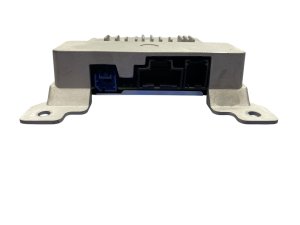
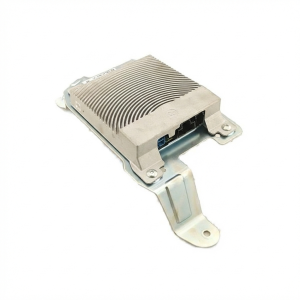
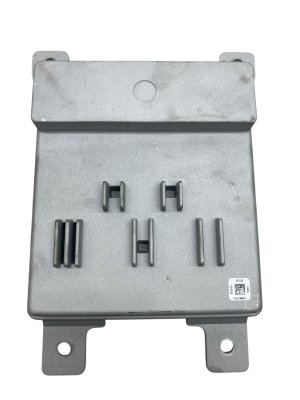
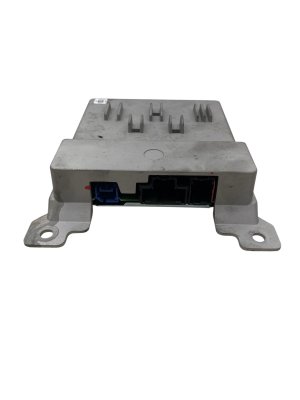
We Have This Part in Stock
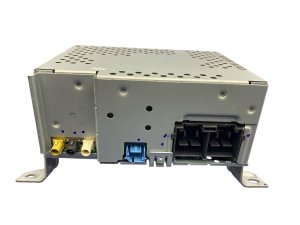


The information in this article is provided for general reference and educational purposes only. Vehicle specifications, procedures, and part compatibility can vary by production date, trim level, and region. Always consult your vehicle's factory service manual and verify part numbers before purchasing or performing repairs. Safety-critical components such as airbags, seat belts, and braking systems should be installed by a qualified professional.
- Ford Mustang Mach-E:
- 🛍️ Shop This Part
- Variant Differences: Standard vs. B&O Premium Audio
- Common Symptoms of a Failing Audio Module
- Known Issues, TSBs, and Recalls
- Diagnosing a Faulty Audio System
- Buying a Used 2021 Mach-E Audio Module
- Programming and Installation
- Why is Programming Necessary?
- Who Can Program the Module?
- Replacement Location and Procedure
- Cost to Replace a 2021 Mach-E Audio Module
- Frequently Asked Questions (FAQ)
- 🎟️ Get 5% Off