

2015-2019 Ford Mustang Radio (ACM): Solving No Sound, Programming, and Compatibility
This guide covers common failures like no audio, flashing clocks, and the critical programming steps required when replacing the base model stereo receiver.
- This is the base model radio (ACM) for 4-inch screen cars ONLY. It is not compatible with Shaker, B&O, or 8-inch SYNC 3 systems.
- The most common failure symptom is the radio display working but having no sound from the speakers.
- A replacement ACM, new or used, MUST be programmed to the vehicle using FORScan software or by a dealer to function correctly.
- Before replacing the ACM, always check fuses 5, 27, 32, and 33 in the passenger footwell fuse box.
Symptoms of a Failing Mustang ACM

A faulty Audio Control Module in a 2015-2019 Mustang can cause a range of frustrating issues. While a simple software glitch can sometimes be fixed by disconnecting the car's battery for a few minutes to reset the system, a persistent problem usually points to internal failure of the ACM itself.
- No Sound from Speakers: This is the most common symptom. The display may look completely normal, allowing you to change stations and see volume adjustments, but no audio comes out of any speaker.
- Radio Will Not Power On: The unit is completely dead, and the screen may stay black. This can sometimes be a fuse issue, but if fuses are good, it often points to a power regulation problem inside the ACM.
- Loud Popping or Static: A loud pop may occur when the car starts, or you may hear persistent crackling and static during playback.
- Flashing Clock: The time on the 4-inch display blinks continuously and cannot be set correctly. This is a well-documented symptom of an internal ACM fault.
- Unresponsive Controls: The volume knob or buttons to change the source (AM, FM, CD) stop working.
- Warning Chimes from Dash: Vehicle warning chimes (for seatbelts, door ajar, etc.) that normally play through the speakers start coming from a small speaker in the instrument cluster instead. This happens when the main computer can no longer communicate with the ACM.
Known Issues, TSBs, and Recalls

While the ACM itself is a common failure point, other issues can cause similar symptoms.
- TSB 19-2273 (2015-2017 models): Addresses poor satellite radio reception, an inoperative trunk lamp, or a non-working rear camera. This is caused by a damaged wiring harness near the right-side trunk lid hinge. Diagnostic Trouble Codes (DTCs) associated with this issue include B115E, C1001, and B1A89.
- Recall 19C03 (Select 2019 models): Ford issued a recall for some 2019 Mustangs where the instrument panel cluster could go blank at startup. Dealers will perform a software update to fix this.
- Fuse Issues: Before assuming the ACM is bad, always check the fuses first. In the passenger compartment fuse panel (located in the passenger-side footwell), fuses 32 and 33 are related to the radio. If you have no sound, fuses 5 and 27 for the amplifier should also be checked.
Compatibility Warning: This guide is for the base model Audio Control Module (ACM) with a single CD slot, designed for vehicles with the 4-inch screen. It is NOT compatible with vehicles that came from the factory with the 8-inch SYNC 3 touchscreen, navigation, or a premium sound system like Shaker or B&O. You cannot use this base ACM to upgrade a premium system, nor can you use a premium ACM in a base model car without extensive wiring and programming changes.
Buying a Used Stereo / Receiver

A used OEM Audio Control Module is an excellent, cost-effective solution for a failed unit. Because these units are electronic and require programming, there are several key factors to consider to ensure you get a good, compatible part.
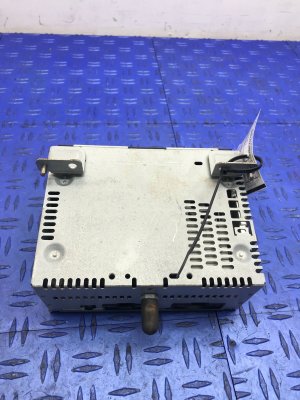
- Verify the Part Number: The most important step is to match the part number. The engineering number is printed on a sticker on the unit's metal case. For this generation, it will start with 'FR3T-19C107-'. The last two letters are the suffix (e.g., -JJ, -SE). While suffixes may vary slightly, you must get a unit from the same family (FR3T-19C107). Do not buy a unit from a premium sound system.
- Inspect the Connectors: Ask for clear photos of the rear of the unit. Ensure the connector ports are clean, with no bent or corroded pins. Water intrusion is not common for this part, but damage from a careless removal is possible.
- Understand Programming is Required: A used ACM is not plug-and-play. It must be programmed to your vehicle's specific configuration. If you don't program it, you may have issues like incorrect speaker output, missing chimes, or features that don't work. Plan for this step before you buy.
- Source Vehicle Information: If possible, get the Vehicle Identification Number (VIN) of the car the used ACM came from. This can be extremely helpful for programming if your original module is completely dead and its data cannot be read.
Programming and Installation

Replacing the ACM requires removing the center stack trim to access the module. Once installed, the new module must be programmed. This syncs the ACM with the other computers in your car and tells it what features your vehicle has (e.g., number of speakers, type of chimes).
Programming Options:
- DIY with FORScan: This is the most popular method for enthusiasts. FORScan is a software program that, when paired with a compatible OBD-II adapter, allows you to access and modify the configuration data of modules in your Ford. The basic process is to back up the 'as-built' data from your original ACM and then restore it to the replacement unit. If your old module is dead, you can find the as-built data from a similar vehicle using its VIN and program that to the new module.
- Ford Dealership: A Ford dealer can program a replacement ACM using their proprietary diagnostic tools. This is the most straightforward but also the most expensive option.
- Qualified Independent Shop: Some independent auto repair shops that specialize in electronics or a specific make may have the tools and subscriptions necessary to program Ford modules.
Pro Tip: Before you remove your old ACM, if it powers on at all, connect to it with FORScan and save a backup of the module's 'as-built' data. This small step will make programming the replacement unit significantly easier.
Cost Comparison
| Part or Service | Estimated Cost |
|---|---|
| New OEM (Dealer) | $650+ |
| Used OEM | $100 - $200 |
| Aftermarket Upgrade (Full Screen) | $800 - $1,200+ |
| Repair Service (Mail-in) | $150 - $300 |
| Shop Labor (Installation) | $100 - $200 |
| Shop Labor (Programming) | $100 - $200 |
Frequently Asked Questions (FAQ)
Do I have to take my car to the dealer to program a new radio?
No, a dealer is not your only option. While they can certainly do the programming, you can do it yourself using an OBD-II adapter and FORScan software. Many independent shops specializing in auto electronics can also perform the programming.
Can I upgrade my 4-inch screen to an 8-inch touchscreen using a used radio?
This article's part, the base ACM, is not part of that upgrade. Upgrading from the 4-inch system to the 8-inch SYNC 3 system is a complex project that requires a new screen (FDIM), a new control module (APIM), a different ACM, and often custom wiring harnesses and extensive programming.
My radio works but I have no sound. Are the speakers bad?
While possible, it's highly unlikely that all speakers would fail at once. The most common cause for total audio loss when the radio display still works is a failure of the internal amplifier circuit within the Audio Control Module (ACM).
Will a radio from a 2020 Mustang work in my 2016 Mustang?
It might, but it can be complicated. While the units may look identical, later model year ACMs can have different internal hardware and software ('X40' units) that may not be compatible with the APIM (SYNC module) in an older car, leading to issues like no volume control. It is safest to use a replacement ACM from a vehicle of a similar year (e.g., 2015-2018).
Technical Specifications
OEM Part Numbers: FR3T-19C107-JA FR3T-19C107-JB FR3T-19C107-JC FR3T-19C107-JD FR3T-19C107-JE FR3T-19C107-JF FR3T-19C107-JG FR3T-19C107-JH FR3T-19C107-JJ FR3T-19C107-SA FR3T-19C107-SB FR3T-19C107-SC FR3T-19C107-SD FR3T-19C107-SE FR3Z-18C869-JA FR3Z18C869SA
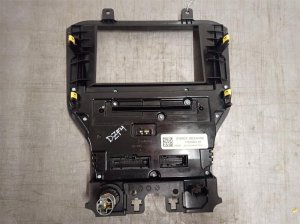
Fits 2015-2019 Ford Mustang with the base audio system and 4-inch display screen. Contains AM/FM tuner and single-disc CD player.
We Have This Part in Stock




The information in this article is provided for general reference and educational purposes only. Vehicle specifications, procedures, and part compatibility can vary by production date, trim level, and region. Always consult your vehicle's factory service manual and verify part numbers before purchasing or performing repairs. Safety-critical components such as airbags, seat belts, and braking systems should be installed by a qualified professional.
- Ford Mustang: