

2015-2016 Ford Focus Radio Problems: Programming, Part Numbers, and Fixes
This guide covers common radio failures, required programming, and how to choose the right used Audio Control Module (ACM) for your 2015-2016 Ford Focus.
- A replacement Audio Control Module (ACM) MUST be programmed to your car's VIN and features using dealer software or a DIY tool like FORScan.
- Always try a soft reset (Power + Seek-Forward buttons) or a fuse pull to fix glitches before replacing the hardware.
- Match the part number beginning with FM5T-19C107. These are for standard HD radio systems and are NOT for cars with factory navigation.
- Common failure symptoms include no sound, a blank screen, and loud, random popping noises from the speakers.
Symptoms of a Failing Ford Focus Radio
A faulty Audio Control Module (ACM) in a 2015-2016 Focus can cause a variety of frustrating issues. Before you rush to replace it, see if your problem is on this list. Many symptoms can be resolved with a simple reset.
- No Sound: The display may turn on and appear to function normally, but no audio comes from the speakers on any source (FM, AM, CD, Bluetooth).
- Black or Blank Screen: The radio display screen is completely black and unresponsive. The buttons may not light up or work. In some cases, the backup camera may still function when the vehicle is in reverse, even if the rest of the system is dead.
- Intermittent Power / Random Shutdowns: The entire radio system (screen and sound) may shut off and restart on its own while driving.
- Loud Popping or Static: A very common and alarming symptom is a loud popping or static burst from the speakers. This can happen randomly, even when the radio is turned off or when a door is opened.
- Bluetooth Not Connecting: The phone may fail to connect to SYNC, or the Bluetooth audio option may be unavailable.
- System Freezes: The screen may become frozen or unresponsive to touch and button presses.
Easy Fixes to Try First
Before spending money on a replacement part, try these simple reset procedures. They resolve a surprising number of software-related glitches with the SYNC and audio systems.
1. System Soft Reset
This is the quickest and easiest first step for a frozen screen, no sound, or connectivity issues.
- Turn the vehicle on.
- Press and hold the Power button (volume knob) and the Right-Seek button (fast forward) simultaneously.
- Continue holding for about 10-15 seconds until the screen goes black and the Ford logo reappears.
- Release the buttons and allow the system to reboot completely. This does not erase any of your saved settings or paired phones.
2. Fuse Pull (Hard Reset)
If a soft reset doesn't work, the next step is to completely cut power to the module by pulling its fuse. This forces a full reboot and can clear more persistent faults.
- Turn the vehicle off.
- The fuse box is located behind the glove compartment. You'll need to squeeze the sides of the glove box to release it and let it drop down.
- Consult your owner's manual for the specific fuse numbers for the "Audio Control Module," "SYNC," or "Radio." Common fuses to check are F67 (7.5A) and F79 (15A) in the passenger compartment fuse panel.
- Using a fuse puller, remove the correct fuse. Wait for at least one minute to allow the module's internal capacitors to fully discharge.
- Reinstall the fuse and start the car to see if the issue is resolved.
Pro Tip: Sometimes, a failing battery or a recent battery change can cause these radio issues. If the problem started after replacing the battery, a fuse pull reset is often the solution.
Known Issues, TSBs, and Recalls
As of mid-2026, there are no specific NHTSA recalls for the Audio Control Module (ACM) itself in the 2015-2016 Ford Focus. Most recalls for these model years concern the powertrain's canister purge valve, door latches, or clutch assembly in manual transmission cars. However, software glitches in the SYNC system are a well-documented issue, and Ford has issued various Technical Service Bulletins (TSBs) over the years for the broader SYNC platform, which often involve software updates or reset procedures.
Buying a Used 2015-2016 Focus Stereo Receiver
If resets don't solve your problem, a replacement ACM is likely needed. Buying a used OEM module is the most cost-effective solution, but compatibility is critical.
1. Match Your Part Number EXACTLY
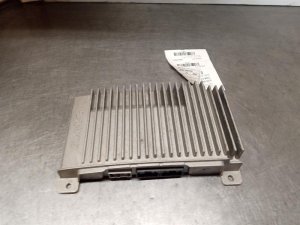
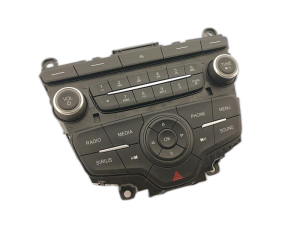
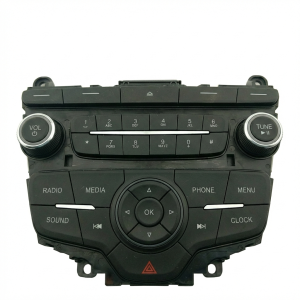
This is the most important rule. The part you are replacing is the silver metal box, not the plastic faceplate with the buttons. You must remove the unit to see the part number sticker. For this generation of Focus, you are looking for a part number that starts with FM5T-19C107. The last two letters (the suffix) are important.
- Compatible Part Numbers: FM5T-19C107-KA, FM5T-19C107-KB, FM5T-19C107-KC, FM5T-19C107-KD.
These units are generally interchangeable, but they MUST be programmed to your vehicle's features after installation.
Warning: These part numbers are for the standard AM/FM/CD/HD Radio audio system. They are NOT compatible with vehicles that came from the factory with the larger MyFord Touch navigation screen.
2. Physical Inspection
When buying a used ACM, inspect it for:
- No Water Damage: Look for any signs of corrosion or water stains on the metal casing or in the electrical connectors.
- Intact Connectors: Ensure none of the plastic connector ports are cracked or have bent pins.
- Unbroken Seals: Check that the factory seals/stickers on the case haven't been broken, which could indicate a failed repair attempt.
Replacement and Programming Requirements
Physically swapping the ACM is straightforward, but the electronic setup after installation is the crucial part.
Difficulty: 2/5
The mechanical removal and installation is easy, requiring only basic trim removal tools and a screwdriver/socket. The challenge comes from the mandatory programming step.
Programming IS Required
You cannot simply swap in a used ACM and expect it to work correctly. The replacement module must be programmed with your car's specific "As-Built" data. This data tells the module what features your car has (e.g., HD radio, number of speakers, etc.) and allows it to communicate properly with other modules in the vehicle. Without programming, you may experience issues like no sound, incorrect features, or error messages.
How to Program the New Module:
- Dealer Option (PMI): A Ford dealership can perform a "Programmable Module Installation" (PMI) using their proprietary IDS software. They will download your car's original configuration from Ford and load it onto the new module. This is the most straightforward but also the most expensive option.
- DIY Option (FORScan): For the tech-savvy DIYer, programming can be done using a laptop, a compatible OBD-II adapter (like an OBDLink EX), and software called FORScan. The process involves downloading your vehicle's As-Built data from Ford's public motorcraftservice.com website and using FORScan to write that data to the newly installed ACM. This is very cost-effective but requires careful execution.
Anti-Theft: This generation of Focus does not use a simple 4-digit radio code. The anti-theft is integrated into the module programming. If the module is not correctly programmed to the vehicle's VIN, it will not function.
Cost Comparison
Prices can vary, but here is a general breakdown of what to expect:
| Part Type | Estimated Cost |
|---|---|
| New OEM | $600 - $900 |
| New Aftermarket (requires dash kit) | $300 - $500+ |
| Used OEM | $50 - $125 |
| Remanufactured OEM | $100 - $250 |
| Shop Labor (Replacement & Programming) | $150 - $300 |
Frequently Asked Questions (FAQ)
Does a replacement radio for a 2015-2016 Focus have to be programmed?
Yes, absolutely. The Audio Control Module (ACM) must be programmed with your vehicle's As-Built data to ensure all features work correctly and to satisfy the anti-theft system. This can be done by a dealer or with DIY tools like FORScan.
Can I upgrade my standard radio to a factory navigation touchscreen?
Yes, it is possible to upgrade from the basic 4-inch screen system to the larger 8-inch SYNC 2 or SYNC 3 touchscreen system, but it is a complex project. It requires not only the new screen and module (APIM), but also a custom wiring harness adapter, a new dash bezel, and extensive programming with FORScan. It is not a simple plug-and-play swap.
What is the difference between the ACM and the APIM?
The ACM (Audio Control Module) is the radio itself—the box with the CD player, tuner, and amplifier. The APIM (Accessory Protocol Interface Module) is the SYNC module; it's the brain that runs the software for Bluetooth, voice commands, and the user interface on the screen. They are two separate parts that work together. The part numbers in this guide (FM5T-19C107-Kx) are for the ACM.
Why did my radio stop working after changing the car battery?
A sudden loss and re-application of power can sometimes cause a software glitch in the radio module. Before assuming the radio is broken, perform a soft reset (holding Power + Seek Forward) or pull the radio fuse for 60 seconds to force a hard reset. This often restores normal operation.
Technical Specifications
OEM Part Numbers: FM5T-19C107-KA FM5T-19C107-KB FM5T-19C107-KC FM5T-19C107-KD FM5T19C107KA FM5T19C107KB FM5T19C107KC FM5T19C107KD FM5Z-18C869-KA FM5Z18C869KA
This is the Audio Control Module (ACM) for the standard, non-navigation audio system, typically equipped with AM/FM, single CD, MP3, and HD Radio capabilities.
We Have This Part in Stock




The information in this article is provided for general reference and educational purposes only. Vehicle specifications, procedures, and part compatibility can vary by production date, trim level, and region. Always consult your vehicle's factory service manual and verify part numbers before purchasing or performing repairs. Safety-critical components such as airbags, seat belts, and braking systems should be installed by a qualified professional.
- Ford Focus:
- 🛍️ Shop This Part
- Symptoms of a Failing Ford Focus Radio
- Easy Fixes to Try First
- 1. System Soft Reset
- 2. Fuse Pull (Hard Reset)
- Known Issues, TSBs, and Recalls
- Buying a Used 2015-2016 Focus Stereo Receiver
- 1. Match Your Part Number EXACTLY
- 2. Physical Inspection
- Replacement and Programming Requirements
- Difficulty: 2/5
- Programming IS Required
- Cost Comparison
- Frequently Asked Questions (FAQ)
- 🎟️ Get 5% Off