

Audi A6, A7, S6, S7 & RS7 Radio Receiver Guide (2012-2017): Solving No Sound and Component Protection
This guide explains common failures for the trunk-mounted radio in C7 platform Audis and walks you through the critical 'Component Protection' issue you'll face after replacement.
- Replacing this radio requires mandatory programming ('Component Protection' removal) by a dealer or specialist, which costs extra.
- Failure is often caused by water leaks in the trunk from clogged sunroof drains or bad taillight seals. Always fix leaks before replacing the part.
- Common symptoms include no sound, a black or frozen MMI screen, and intermittent audio popping.
- A used OEM part offers huge savings, but you must budget for the additional cost of programming to make it work in your car.
Symptoms of a Failing Radio Receiver

A bad radio receiver in your Audi A6, A7, S6, S7, or RS7 can cause a range of frustrating issues. Because it's part of a networked system, its failure can affect more than just the radio.
- No Sound: The most common symptom is a complete loss of audio from all speakers. The MMI screen might still turn on and appear to function, but no sound is produced for any media source (radio, CD, Bluetooth).
- MMI System Won't Boot: The main MMI screen may be black, stuck on the Audi logo splash screen, or constantly freeze and reboot. The control panel buttons around the gear shifter may also be unlit and unresponsive.
- Intermittent Audio with Popping: You might hear a loud "pop" from the speakers, followed by silence. The audio may or may not return on its own after a few seconds.
- "Component Protection Active" Message: If the unit has been replaced with a used part without proper programming, the MMI will display this message, and audio will be muted or restricted to a single speaker.
- Parasitic Battery Drain: In some cases, a failing module doesn't shut down correctly and continues to draw power when the car is off, leading to a dead battery.
Known Issues, TSBs, and Recalls

While this specific radio module has not been subject to a recall, there are several well-known problems and service bulletins associated with the MMI system in these vehicles.
Common Cause of Failure: Water Intrusion
The number one killer of this trunk-mounted radio receiver is water damage. The electronics rack where the radio and amplifier are located is vulnerable to moisture.
Warning: Before replacing a failed radio module, you MUST find and fix the source of any water leak. If you don't, the replacement part will also fail. Common leak points include clogged sunroof drains and deteriorated taillight seals.
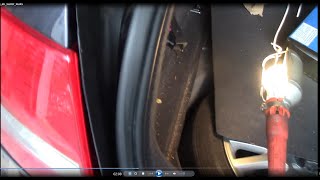
🎬 Watch: How to find and fix Audi water leaksDiagnosis with a MOST Bypass Loop
The MMI system's components are connected in a fiber-optic circle, 🎬 See this step-by-step MMI bypass loop diagnostic guide or loop. If one component fails, the entire loop is broken, and nothing works. To find the broken link, technicians use a simple fiber-optic bypass loop. By unplugging a module and inserting the loop in its place, you can complete the circuit. If the rest of the MMI system comes back to life, you've found the failed part. This is the most effective way to confirm the radio receiver is the true cause of the problem.
Technical Service Bulletin (TSB) for MMI Software
Audi released TSB 2030465/10 to address numerous software glitches in the MMI 3G+ system. Symptoms covered by this update include:
- System randomly freezing or resetting
- Audio popping or dropping out
- Bluetooth connectivity problems
- Google Earth maps not loading correctly
If you are experiencing these software-related issues, a dealer can perform a software update. If your vehicle is out of warranty, expect to pay for this service, which can cost around $200 or more.
Buying a Used Stereo / Receiver: The Component Protection Problem

This is the most important section for anyone buying a used radio module for these Audis. You cannot simply swap in a used unit and expect it to work.
Critical Warning: Component Protection (CP)
Audi uses an anti-theft system called Component Protection that electronically links the radio to the car's unique Vehicle Identification Number (VIN). When you install a used radio from another vehicle, the system will detect the mismatch and activate Component Protection. This will disable most of the radio's functions, primarily the audio output. A used radio module MUST be adapted to your vehicle after installation.
How to Remove Component Protection
You have two main options to remove Component Protection from a used radio:
- Dealer or Qualified Independent Shop: This is the official and most reliable method. An Audi dealer or a specialist shop with a licensed ODIS diagnostic tool and an online connection to Audi's servers (known as GeKo) can perform the adaptation. They connect to your car, log in to Audi's system, and authorize the "new" part for your VIN. This service is not free and should be factored into your repair budget. Costs can range from $150 at a specialist to over $500 at a dealership.
- EEPROM Swap (Expert DIY): For highly skilled technicians with micro-soldering experience, it is possible to physically transfer a small memory chip (the EEPROM) from your original, failed radio board to the replacement board. This chip contains your car's VIN information. By moving it to the donor unit, you trick the car into thinking it's the original radio, bypassing Component Protection entirely. This is extremely delicate work and can permanently damage both units if done incorrectly.
When purchasing a used unit, always inspect it for signs of corrosion or water damage. A clean, dry part from a reputable seller is essential, but remember to budget for the mandatory programming.
Replacement Overview
Physically replacing the radio module is straightforward for a DIYer with basic tools.
- Location: The radio is in the trunk on the left side, behind a removable trim panel.
- Access: Remove the panel to expose the electronics rack. The radio is one of several modules in this rack.
- Removal: Disconnect the negative battery terminal. Carefully unplug the electrical harnesses and the orange fiber-optic cables from the old unit. Unbolt the module from the rack.
- Installation: Bolt the new unit in place and reconnect all cables. Be very careful not to bend or kink the fiber-optic cables.
- Programming: After installation, the vehicle must be taken to a dealer or specialist for Component Protection removal.
Cost Comparison
Repairing your Audi's MMI system can be expensive, but buying a used OEM part can offer significant savings if you budget correctly for programming.
| Part or Service | Estimated Cost |
|---|---|
| New OEM Receiver | $1,600 - $2,200 |
| Used OEM Receiver | $150 - $400 |
| Shop Labor (Replacement Only) | $100 - $200 |
| Shop Labor (Component Protection Removal) | $150 - $550 |
Frequently Asked Questions (FAQ)
Do I have to go to an Audi dealer to get a used radio to work?
Not necessarily, but you must go to a facility with the right tools. Many independent European auto repair shops have the official Audi ODIS diagnostic tool and the online subscription required to remove Component Protection. Always call ahead and confirm they can perform this specific service.
Will a bad radio receiver stop my car from starting?
No. Failure of the radio module or activation of Component Protection will not prevent the car from starting or driving. It only affects the infotainment system.
My screen is black and there's no sound. How do I know if it's the radio or the amplifier?
Both can cause similar symptoms. The most reliable way to diagnose the issue is to use a fiber-optic bypass loop. By systematically bypassing each module in the trunk's electronics rack (radio, amplifier), you can identify which one is breaking the MOST bus loop. 🎬 Watch: How to inspect and diagnose faulty MMI modules If you bypass the radio and the system starts working (without sound, of course), the radio is the faulty component.
Can I use a radio from an A8 or Q7 in my A6?
No, you should match the part number as closely as possible. While some modules look similar across different Audi models, they often have different software and hardware configurations. Stick to a replacement from an A6, S6, A7, S7, or RS7 of the same platform generation (C7) to ensure compatibility.
Helpful Videos
Technical Specifications
OEM Part Numbers: 4G0035080A 4G0035080B 4G0035080C 4G0035080D 4G0035080E 4G0035080F 4G0035080G
Trunk-mounted radio and satellite receiver for MMI 3G+ systems with MOST fiber-optic interface. For vehicles with MMI touchpad and satellite radio.
We Have This Part in Stock



The information in this article is provided for general reference and educational purposes only. Vehicle specifications, procedures, and part compatibility can vary by production date, trim level, and region. Always consult your vehicle's factory service manual and verify part numbers before purchasing or performing repairs. Safety-critical components such as airbags, seat belts, and braking systems should be installed by a qualified professional.
- Audi A6:
- Audi S6:
- Audi S7:
- Audi RS7:
- Audi A7:
- 🎬 Helpful Videos
- 🛍️ Shop This Part
- Symptoms of a Failing Radio Receiver
- Known Issues, TSBs, and Recalls
- Common Cause of Failure: Water Intrusion
- Diagnosis with a MOST Bypass Loop
- Technical Service Bulletin (TSB) for MMI Software
- Buying a Used Stereo / Receiver: The Component Protection Problem
- How to Remove Component Protection
- Replacement Overview
- Cost Comparison
- Frequently Asked Questions (FAQ)
- 🎟️ Get 5% Off