

Audi & VW MMI 3G+ Unit Failure: A6, A7, S6, S7, RS7 & Touareg (2011-2017)
This guide explains common failures in the MMI 3G+ infotainment system and walks you through the critical 'Component Protection' issue you must solve when replacing the unit.
- A replacement unit MUST have 'Component Protection' removed by a dealer or specialist with online ODIS tools to function correctly.
- Common failures include a black screen (often just screen wiring), constant rebooting, and no audio.
- Always match the OEM part number from your original unit exactly to ensure compatibility with features like satellite radio or Audi Connect.
- The car is perfectly drivable with a failed MMI unit, but you will lose all infotainment, navigation, and vehicle setting functions.
The #1 Thing to Know: Component Protection

Warning: A replacement MMI/RNS unit, whether new or used, will not fully function after installation until a procedure called 'Component Protection' (CP) removal is performed. This is an anti-theft feature that electronically links the module to the original vehicle. When a unit with active CP is installed, you will see a message like "Component Protection Active" and experience symptoms like no audio, or navigation and media functions being disabled.
Removing Component Protection requires special diagnostic tools (like ODIS) with an online connection to Volkswagen/Audi's servers to authorize the 'new' part for your vehicle. This process can be performed by:
- An Audi or Volkswagen Dealer: This is the most straightforward but often most expensive option.
- A Qualified Independent Shop: Many independent German auto specialists have the licensed ODIS tools and online access (sometimes called a GeKo account) to perform this service. This can be a more cost-effective choice.
It is not possible to remove Component Protection with standard diagnostic tools like VCDS or offline versions of ODIS. Always confirm with the seller of a used part that it is not from a stolen vehicle, as a dealer's system may flag it during the CP removal process, leading to confiscation.
Symptoms of a Failing MMI / RNS Unit

A failing MMI or RNS unit can cause a wide range of frustrating electronic issues. Here are the most common symptoms owners report.
1. Black or Blank Display Screen
The screen may remain black and not motorize out of the dash upon starting the car. In many cases, you may still hear audio from the radio or media, but the screen itself is dead. This specific issue in the Audi A6/A7/S6/S7/RS7 is often caused by broken power wires leading to the screen mechanism due to the repeated stress of opening and closing. 🎬 Watch: Diagnose and fix Audi C7 MMI display issues Before replacing the entire MMI unit, check for a blown fuse (often a 5-amp fuse in the passenger-side fuse box for Audi models) or damaged wiring to the screen itself.
2. Constant Rebooting or Freezing
The MMI system may get stuck in a continuous reboot loop, where the startup screen appears and then the system shuts down and restarts. This can also manifest as the system freezing and becoming unresponsive to any button presses. This can sometimes be caused by a software glitch, a failing internal hard drive, or a conflict with a connected device like a phone or USB drive. A Technical Service Bulletin (TSB 2042388/2) was issued for some 2016 A6/A7 models where a software issue in the instrument cluster could cause the MMI to reboot.
3. Red Screen of Death
A bright red screen with error messages like "CRC error" or "mount error" indicates a serious internal fault. This usually points to a corrupted file system or a physical failure of the unit's internal hard drive. The system cannot load its essential operating files, preventing it from starting up.
4. No Audio or Intermittent Sound
The MMI display may appear to function normally, but there is no sound from any source (radio, media, navigation). This can be a symptom of the main unit failing, an issue with the separate amplifier, or a break in the fiber optic (MOST bus) ring that connects all the infotainment components. If one module on the fiber optic loop fails, it can bring the entire system down.
5. MMI Controls Not Working or Not Illuminated
The buttons and control knob around the gear shifter may stop responding or their backlight illumination may go out. This can point to a failure in the control panel itself or a deeper issue with the main MMI unit in the glovebox that controls it.
Buying a Used Stereo / Receiver: What to Look For

Purchasing a used OEM MMI/RNS unit can save you a significant amount of money over a new part from the dealer. However, compatibility is critical. Follow these steps to ensure you get the right part.
- Verify Your Part Number: The most important step is to physically remove your original unit and match the OEM part number exactly. The unit is located in the glovebox for the Audi models. You will likely need radio removal keys to slide it out.
- Check Hardware Variants: These units come in different versions depending on the vehicle's options. Key differences include support for Satellite Radio (SiriusXM), a SIM card slot for Audi Connect services, and Digital Radio (DAB) which is less common in North America. The part number is the best way to ensure you get a unit with the same hardware features. For example, the initial data mentions that for the Touareg, some units are for vehicles without digital radio reception.
- Understand MMI Generations: This guide covers vehicles with the MMI 3G+ (also called MMI 3G High Connect) or the equivalent VW RNS 850. These systems can be identified by checking the software version in the settings menu (if accessible), which will start with "HN+". Do not attempt to install a unit from an older (MMI 2G) or newer (MIB) generation, as it will not be compatible.
- Factor in Component Protection Removal: Remember that any used unit will require a trip to a dealer or specialist for programming. Factor this cost into your budget. Call local dealers or independent shops to get a quote for this service before you buy the part.
Known Issues, TSBs, and Recalls
While there are no widespread recalls specifically for the MMI/RNS head unit itself, some related service actions and recalls are worth noting:
- Audi TSB 2042388/2: For 2016 Audi A6 and A7 models, a software bug in the instrument cluster could cause the MMI system to reboot intermittently. The fix is a software update for the instrument cluster control module.
- VW Service Campaign 91L6 (NHTSA 17V093000): For some 2016-2017 Touareg models, a software update was issued for the infotainment system to bring it up to current production standards and improve performance.
- Audi A6/A7 Screen Wiring: As mentioned in the symptoms section, the wiring for the pop-up screen in Audi C7 platform cars is a known weak point that can cause a blank display. 🎬 See this step-by-step guide to repair the screen wiring This is a separate issue from the main MMI unit in the glovebox.
- Recalls for Other Components: These vehicles have had recalls for other issues, such as fuel leaks and coolant pumps, but none directly target the MMI head unit. Always check your vehicle's VIN on the NHTSA website for any open recalls.
Cost of Replacement
Replacing the MMI/RNS unit can be expensive, primarily due to the cost of the part and the required programming.
| Item | Estimated Cost |
|---|---|
| New OEM Unit (from Dealer) | $2,000 - $3,500+ |
| Used OEM Unit (Salvage/Online) | $250 - $700 |
| Remanufactured Unit | $500 - $1,000 |
| Shop Labor (Installation) | $100 - $250 |
| Shop Labor (Component Protection Removal) | $150 - $450 (typically 1-3 hours of labor) |
Pro Tip: An independent German auto specialist is often significantly cheaper for both parts and labor, including Component Protection removal, compared to a main dealer.
Frequently Asked Questions (FAQ)
Can I just swap in a used MMI unit myself?
You can physically install the unit, which is a relatively simple plug-and-play process. However, the unit will have limited functionality due to Component Protection until it is programmed to your vehicle by a dealer or qualified independent shop with online ODIS access.
My screen is black but the radio works. Is the whole MMI unit bad?
Not necessarily, especially on the Audi A6, A7, S6, S7, and RS7. A common failure is the wiring harness for the pop-up screen, which can break from repeated use. It's also wise to check the MMI-related fuses first before assuming the main unit has failed.
What's the difference between an MMI 3G+ and a VW RNS 850?
They are very similar systems built on the same technology platform for this generation of vehicles. The RNS 850 is the Volkswagen Touareg-specific version of Audi's MMI 3G+ system. They share core architecture but have different software and may have slight hardware variations specific to each brand's features.
Can my local mechanic remove the Component Protection?
Only if they are a specialist with the official ODIS diagnostic system and a paid subscription for online access (GeKo) to VW/Audi servers. A general repair shop without this specific, expensive equipment cannot perform the procedure.
My MMI is just frozen. What should I try first?
Before assuming a hardware failure, try forcing a system reboot. For the MMI 3G+, press and hold three buttons simultaneously: the large central control knob, the upper-right function button, and the 'Menu' button (or 'Tone' on some models). Hold them for a few seconds until the screen goes black and the system restarts. This can clear temporary software glitches.
Helpful Videos
Technical Specifications
OEM Part Numbers: 4G0035053A 4G0035053H 4G0035053 4G1035053J 4G0035056
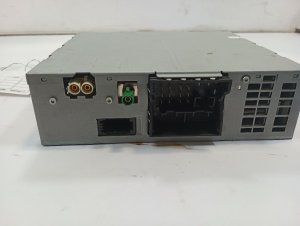
System Generation: MMI 3G+ (Audi) / RNS 850 (Volkswagen). Media Inputs: SD Card Slot(s), SIM Card Slot (on some models), DVD Drive, AMI (Audi Music Interface). Network: MOST fiber optic bus. Location: Glove compartment (Audi A6/S6/A7/S7/RS7), In-dash (VW Touareg).
We Have This Part in Stock





The information in this article is provided for general reference and educational purposes only. Vehicle specifications, procedures, and part compatibility can vary by production date, trim level, and region. Always consult your vehicle's factory service manual and verify part numbers before purchasing or performing repairs. Safety-critical components such as airbags, seat belts, and braking systems should be installed by a qualified professional.
- Audi A6:
- Audi S6:
- Audi S7:
- Audi RS7:
- Audi A7:
- Volkswagen Touareg:
- 🎬 Helpful Videos
- 🛍️ Shop This Part
- The #1 Thing to Know: Component Protection
- Symptoms of a Failing MMI / RNS Unit
- 1. Black or Blank Display Screen
- 2. Constant Rebooting or Freezing
- 3. Red Screen of Death
- 4. No Audio or Intermittent Sound
- 5. MMI Controls Not Working or Not Illuminated
- Buying a Used Stereo / Receiver: What to Look For
- Known Issues, TSBs, and Recalls
- Cost of Replacement
- Frequently Asked Questions (FAQ)
- 🎟️ Get 5% Off