

2018-2020 Acura MDX Satellite Tuner: Solving Audio Pops, Cracks, and No XM Signal
Learn why your entire audio system might be dead and why replacing this XM radio module isn't always the right fix.
- Audio issues like popping, crackling, or a blank screen are most often caused by loose MOST network connectors, not a failed tuner. Investigate Acura TSB 20-031 before buying parts.
- This tuner (part # 39800-TYR-A210) is only for 2018-2020 MDX models with Navigation (Tech, Advance, A-Spec, Hybrid). It will not work in a Base model.
- After installation, this module may require programming by an Acura dealer to function correctly. Factor this potential cost into your budget.
- A failed tuner can cause a total loss of audio from all sources because it breaks the fiber-optic (MOST) network loop connecting all audio components.
Known Issues, Recalls, and Technical Service Bulletins (TSBs)
The most widespread issue for this generation of Acura MDX is not a failure of the satellite tuner itself, but a problem with the MOST fiber-optic network that connects it. Many owners report speaker popping, crackling sounds, a complete loss of audio, or the infotainment screen going blank. These symptoms are often intermittent and can be caused by loose connections in the MOST bus network.
Pro Tip: Before replacing the tuner, investigate Acura Technical Service Bulletin (TSB) 21-009 or 20-031. These bulletins describe the popping/crackling audio and blank screen symptoms and point to faulty MOST bus connectors as the cause. Acura has extended the warranty for this specific issue on some vehicles, and the fix involves installing improved connectors or harnesses, not replacing the entire tuner module. Checking for loose connectors or having a dealer inspect for TSB compliance can save you from buying a part you don't need.
Recalls
As of mid-2024, there are no specific recalls for the satellite tuner unit or the audio system on the 2018-2020 Acura MDX. However, recalls have been issued for other components like the fuel pump and tailgate lights, so it's always wise to check for open recalls using your vehicle's VIN on the NHTSA website.
Symptoms of Failure
While many audio issues point to the MOST network, the tuner unit itself can fail. Here are the most common symptoms pointing to a bad satellite tuner.
- No Satellite Radio Signal: The most direct symptom is the inability to access any XM radio channels, often accompanied by an "Antenna Error" or "No Signal" message on the screen.
- Complete and Persistent Audio Loss: If the tuner fails internally, it can break the MOST network loop, causing a total loss of audio from all sources (FM, AM, Bluetooth, etc.).
- Infotainment System Freezes or Goes Blank: A fault in the tuner can disrupt the data stream, causing the main infotainment screen to freeze, reboot, or go completely black.
- Popping and Crackling Sounds: While often a connector issue, a failing electronic component within the tuner can also introduce noise like popping or crackling into the audio system.
- "Network Loss" Message: The dashboard may display a "Network Loss" message, indicating a break in the MOST bus communication.
A technician can use a professional scan tool to access the "Shutdown Reason" log in the vehicle's diagnostics, which can help pinpoint where the signal loss is occurring in the MOST network. For example, a "Meter:SUDDEN_SIGNAL_OFF" message might indicate a failure between the gauge cluster and the tuner unit.
Buying a Used Satellite Tuner
A used OEM tuner is a cost-effective alternative to a new part, but careful purchasing is key. This is the most important section for anyone considering a replacement.
Compatibility Check
Warning: This tuner, part number 39800-TYR-A210 or 39800TYRA21, is ONLY for 2018-2020 Acura MDX models with the factory navigation system. This includes trims like the Technology, Advance, A-SPEC, and Sport Hybrid packages. It will NOT work in a Base model without navigation. Always match the part number exactly before purchasing.
What to Inspect
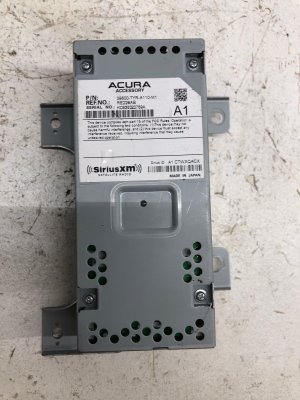
- Part Number Verification: Double-check that the part number on the unit you are buying matches 39800-TYR-A210.
- Connector Integrity: Closely inspect the electrical connector and the two fiber-optic (MOST) ports. Look for any signs of corrosion, bent pins, or physical damage to the plastic housings. A damaged connector will not function.
- Return Policy: Buy from a seller with a clear return policy. Because programming may be required, you need the option to return the part if it's not compatible or if a dealer determines it cannot be programmed.
Programming and Installation
Replacing the satellite tuner is a straightforward process physically, but it has electronic considerations.
Location
The satellite tuner is located in the right rear of the cargo area, behind the trim panel. Accessing it requires removing the cargo floor and the side trim panel.
Installation Steps
- Disconnect the negative terminal of the 12V battery.
- Remove the cargo area floor and trim panels on the right side to expose the module.
- Unbolt the tuner from its mounting bracket.
- Carefully disconnect the main electrical harness and the two fiber-optic MOST bus connectors. The MOST connectors (often red and green) are delicate; press the release tab and pull straight out without twisting.
- Install the new unit and reconnect all connectors.
- Reassemble the trim and reconnect the battery.
Programming Requirements
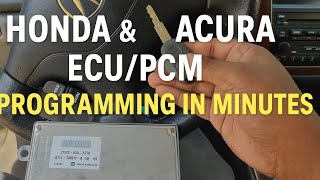
After installation, this part may require programming by an Acura dealer or a qualified independent shop with an Acura-specific diagnostic tool (like the Honda Diagnostic System - HDS). 🎬 Watch: How to program Acura modules using a scan tool While the vehicle may sometimes recognize the new module automatically, it's common for it not to work until it is electronically registered to the vehicle's MOST network. This is not an anti-theft measure but a network configuration step. Factor the potential cost of a dealer visit for programming into your budget.
Cost Comparison
| Part Type | Estimated Cost |
|---|---|
| New OEM | $550 - $750 |
| Used OEM | $100 - $250 |
| Shop Labor (Replacement) | $100 - $180 |
| Dealer Programming | $120 - $250 |
Frequently Asked Questions (FAQ)
Does this satellite tuner need to be programmed by a dealer?
Maybe. While it can sometimes be plug-and-play, it is common for the new unit to require programming with a dealer-level scan tool to be recognized by the vehicle's audio network. It's best to assume it will need programming and budget for it.
Why did my entire radio stop working if only the XM tuner is bad?
The audio components in your MDX are connected in a fiber-optic loop called the MOST network. If one component in the loop fails, it breaks the entire chain, causing all audio sources to stop working.
My speakers are popping and crackling. Is this tuner the cause?
It's possible, but unlikely. The most common cause for popping and crackling sounds is a loose connection in the MOST network, an issue covered by Acura TSB 20-031 and 21-009. You should have the MOST bus connectors checked before replacing this part.
Can I install a tuner from a Base model MDX?
No. This tuner is specifically for models with navigation. A tuner from a Base model will not be compatible with the wiring or system architecture of the higher trim levels.
Helpful Videos
Technical Specifications
OEM Part Numbers: 39800-TYR-A210 39800TYRA21
Connectors: 1x main electrical harness plug, 2x fiber-optic MOST bus network ports (FAKRA type).
We Have This Part in Stock




The information in this article is provided for general reference and educational purposes only. Vehicle specifications, procedures, and part compatibility can vary by production date, trim level, and region. Always consult your vehicle's factory service manual and verify part numbers before purchasing or performing repairs. Safety-critical components such as airbags, seat belts, and braking systems should be installed by a qualified professional.
- Acura MDX:
- 🎬 Helpful Videos
- 🛍️ Shop This Part
- Known Issues, Recalls, and Technical Service Bulletins (TSBs)
- Recalls
- Symptoms of Failure
- Buying a Used Satellite Tuner
- Compatibility Check
- What to Inspect
- Programming and Installation
- Location
- Installation Steps
- Programming Requirements
- Cost Comparison
- Frequently Asked Questions (FAQ)
- 🎟️ Get 5% Off