

2003-2017 Dodge Viper Steering Shaft: Diagnosing Noises and Sourcing a Discontinued Part
This guide covers the symptoms of a failing steering shaft in the Dodge Viper and explains how to inspect and purchase a used unit, as new OEM parts are no longer available.
- The OEM steering shaft (Mopar 4865588AC) for the 2003-2017 Viper is discontinued, making used parts the only option.
- The most common failure symptom is a clunking or popping noise when turning the wheel, caused by worn U-joints.
- When buying a used shaft, physically inspect the U-joints for any play, looseness, or binding; this is the most critical check.
- Replacement is moderately difficult; you must secure the steering wheel before starting to avoid breaking the clockspring.
Symptoms of a Failing Dodge Viper Steering Shaft
A worn steering shaft typically fails at its universal joints (U-joints). When the needle bearings inside the U-joint wear out, they create excessive play. This can lead to a number of noticeable symptoms while driving or turning the wheel.
- Clunking or Popping Noises: The most common symptom is a 'clunk' or 'pop' sound when you turn the steering wheel, especially when the vehicle is stationary or moving at low speeds. This noise is caused by the excess play in the worn U-joint being taken up as you change steering direction.
- Loose or Vague Steering: You may feel excessive play or a 'dead spot' in the steering wheel, particularly in the center position. This happens because the initial movement of the steering wheel is used up by the slop in the shaft before it actually begins to turn the wheels.
- Binding or Stiff Steering: In some cases, a failing U-joint can bind instead of moving freely. This can cause the steering to feel stiff or notchy in certain spots as you turn the wheel. 🎬 Watch: How to diagnose a noisy or sticking steering wheel
- Steering Wheel Doesn't Return to Center: A steering wheel should naturally return to its center position after a turn. If the U-joints are stiff or binding, it can prevent the wheel from returning smoothly.
Known Issues, TSBs, and Recalls
For the 2003-2017 Dodge Viper (Generations III, IV, and V), there are no major recalls or Technical Service Bulletins (TSBs) specifically related to widespread failure of the intermediate steering shaft. While the part can certainly wear out over time, especially on vehicles that are driven hard, it is not considered a common pattern failure for this model range.
It is important not to confuse this with other steering-related issues from different Viper generations:
- 1996-2000 Vipers: An earlier generation was subject to a recall (NHTSA #01V313) for potential frame cracks near the steering rack mounts, which is a separate issue from the shaft itself.
- 2003-2010 Vipers: NHTSA conducted an investigation into rear suspension knuckle failures after some crashes, but determined the failures were a result of the crashes, not the cause. No recall was issued.
Pro Tip: Before diagnosing the steering shaft, have an assistant turn the steering wheel back and forth about a quarter turn while the engine is off. Place your hand on the steering shaft's U-joints (one is near the firewall, the other is down by the steering rack). If you can feel the 'clunk' or see noticeable play in the joint, you have likely found the source of the problem.
🎬 Watch: How to diagnose clunking noises while turningBuying a Used 2003-2017 Viper Steering Shaft
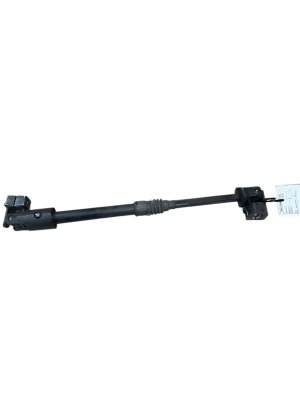
This is the most critical section for owners of these vehicles. The OEM Mopar steering shaft, part number 4865588AC, has been discontinued. Furthermore, there are no direct aftermarket replacements available. This means that finding a good-condition used OEM shaft is the only practical option for replacement.
What to Inspect on a Used Shaft
When buying a used steering shaft, a thorough physical inspection is essential. You cannot determine its condition from photos alone.
- Check the U-Joints: This is the most important check. Hold one end of the shaft and try to move the other end. The U-joints should pivot smoothly in all directions with no binding or notchiness.
- Feel for Play: While holding the shaft steady, try to twist the two halves connected by the U-joint. There should be absolutely no clicking, looseness, or play. Any perceptible movement means the joint is worn and will cause clunking noises.
- Inspect the Collapsible Section: The shaft is designed to telescope. Check this section for any signs of heavy corrosion or damage that might prevent it from collapsing smoothly in an accident.
- Verify Part Number: Ensure the part is a genuine Mopar 4865588AC. This single part number fits all Vipers from 2003 through 2017, including all SRT-10, ACR, and GTS models.
Replacement Overview & Difficulty
Replacing the intermediate steering shaft is a moderately difficult job that can be done by a skilled DIY mechanic. The process is straightforward, but access in the tight confines of a Viper can be challenging compared to a truck or standard passenger car.
- Installation Difficulty: 3/5 (Moderate)
- Estimated Time: 1.5 - 2.5 hours
- DIY Feasible: Yes, for experienced mechanics.
Warning: Before disconnecting the steering shaft, you MUST secure the steering wheel in the straight-ahead position. Use the seatbelt or a dedicated steering wheel holder. If the steering wheel spins freely while the shaft is disconnected, you will damage the clockspring (airbag spiral cable), leading to a costly repair and loss of airbag function and steering wheel controls.
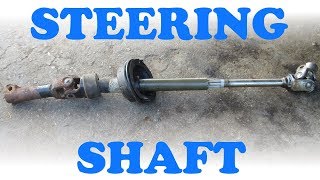
The general replacement steps involve removing two pinch bolts: one inside the car at the base of the steering column, and one in the engine bay where the shaft connects to the steering rack. After the bolts are removed, the shaft can be collapsed and maneuvered out. 🎬 See this walkthrough on how to replace a steering shaft Torque specs for the pinch bolts are critical; while some service documents for similar vehicles suggest 30-45 ft. lbs., consulting the official Dodge Viper factory service manual for your specific year is essential for safety.
Cost of Replacement
Understanding the cost is key, especially since your only option is a used part.
| Part Type | Estimated Cost | Notes |
|---|---|---|
| New OEM | N/A | Part number 4865588AC is discontinued by Mopar. |
| New Aftermarket | N/A | No direct replacements are currently manufactured. |
| Used OEM | $125 - $150 | This is the only available option. Price depends on condition and seller. |
| Shop Labor | $200 - $350 | Based on 1.5-2.5 hours at a typical independent shop labor rate. |
Frequently Asked Questions (FAQ)
Is a clunking steering shaft dangerous?
Yes, it can be. While a small amount of noise may seem minor, it indicates wear in a critical steering component. If the wear becomes severe, it could lead to excessive steering play or, in a worst-case scenario, a loss of steering control. It should be addressed as soon as possible.
Can I just replace the U-joint instead of the whole shaft?
Generally, no. The U-joints on these shafts are not designed to be serviced separately. The entire intermediate shaft is replaced as a single assembly.
Will my steering wheel be off-center after replacement?
If you lock the steering wheel in the straight position and install the new shaft correctly onto the splines of the steering rack and column, your alignment should not change. The shafts are keyed to only fit one way. However, it's always a good practice to check the steering wheel position after the repair.
Why can't I buy a new steering shaft for my Viper?
Mopar has discontinued production of the OEM part (4865588AC). Because the Dodge Viper has been out of production since 2017 and was a relatively low-volume vehicle, the aftermarket has not stepped in to produce a replacement, making used OEM parts the only source.
Helpful Videos

Technical Specifications
OEM Part Numbers: 4865588AC
The shaft is a collapsible, two-piece design connected by one or more universal joints (U-joints). It connects the steering column to the steering rack.
We Have This Part in Stock

The information in this article is provided for general reference and educational purposes only. Vehicle specifications, procedures, and part compatibility can vary by production date, trim level, and region. Always consult your vehicle's factory service manual and verify part numbers before purchasing or performing repairs. Safety-critical components such as airbags, seat belts, and braking systems should be installed by a qualified professional.
- Dodge Viper: