

Tesla Model S & X Steering Rack Guide: Noises, Failure Warnings, and Replacement Costs (2016-2025)
Diagnose common steering noises and failures in your 2016-2025 Model S or Model X and learn how to choose the correct replacement steering rack.
- Post-replacement calibration with Tesla's software is mandatory; this is not a simple DIY job.
- Verifying the exact OEM part number (e.g., 1070801-00-F) on your old rack is the only way to ensure compatibility.
- Symptoms range from clunking noises to a complete and sudden loss of power steering, which is a critical safety failure.
- Several recalls exist; one for a software glitch fixed over-the-air, and others for corroding bolts on pre-2017 models.
Known Issues, Recalls, and Technical Service Bulletins (TSBs)

Several official recalls and investigations have been issued for steering-related problems on the Model S and Model X. While some were fixed with software, others required physical part replacements.
NHTSA Campaign 22V818000: Loss of Power Steering After Hitting Bumps
This recall affects certain 2017–2021 Model S and Model X vehicles. A specific firmware update could misinterpret driving over rough roads or potholes, causing the system to cut power steering assist. Drivers would see a "Steering assist reduced" warning and the wheel would become very difficult to turn at low speeds. Tesla addressed this issue with an over-the-air (OTA) software update (version 2022.36.5 or later), which recalibrated the system. 🎬 See a breakdown of what causes steering assist reduced alerts. No hardware replacement was required if the vehicle received the update.
NHTSA Campaigns 18V-204 & 20V-062: Corroded Steering Rack Bolts
This issue affects earlier models: Model S vehicles built before April 2016 and Model X vehicles built before October 2016. On these vehicles, the aluminum bolts used to attach the electric motor to the steering gear could corrode and fracture, especially in cold climates where road salt is used. If the bolts failed, the motor could shift, causing a loss of power assist. The remedy was to replace the original aluminum bolts with coated steel bolts and apply a corrosion-preventative sealer. If the bolts were already broken, the entire steering rack was replaced free of charge.
Symptoms of a Failing Steering Gear Poppet Rack


A failing steering rack is a serious safety issue. If you experience any of these symptoms, have your vehicle inspected immediately.
- Sudden Heavy Steering: The most common symptom is a partial or complete loss of power steering assist. The steering wheel will become extremely difficult to turn, especially when parking or driving at low speeds. This can happen intermittently.
- Warning Messages: The dashboard will often display a "Steering assist reduced" alert before, during, or after the loss of steering control.
- Clunking or Clicking Noises: Owners report hearing a clunking sound from the front end when driving over uneven surfaces at low speeds. A "notchy" or "clicky" feeling can sometimes be felt through the steering wheel.
- Whining or Squealing Sounds: Unusual whining or squealing noises when turning the wheel can point to a problem with the electric motor or mechanical parts of the rack.
- Loose Steering or Poor Alignment: A feeling of looseness in the steering or the car pulling to one side can indicate a worn steering rack. Some owners have noted their alignment goes out of specification very quickly, requiring constant steering correction to drive straight.
Pro Tip: Since this is an electric power steering (EPAS) system, there is no power steering fluid to check. All symptoms are either mechanical (noises, looseness) or electrical (loss of assist, warning lights).
Buying a Used Steering Gear Poppet Rack
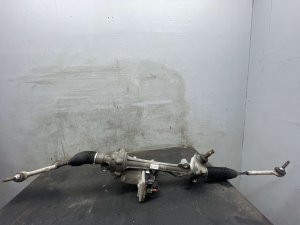
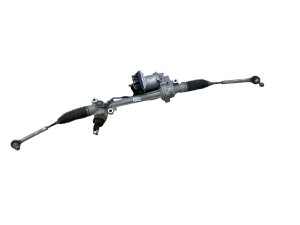
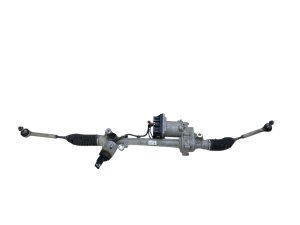
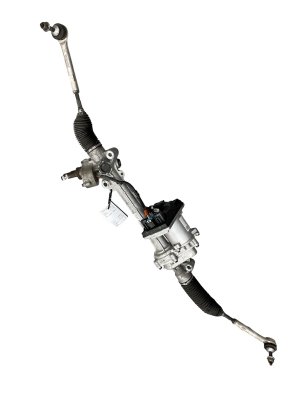
A used OEM steering rack can be a cost-effective solution, but careful inspection and verification are critical. Given the electronic complexity and safety-critical nature of this part, a high-quality recycled OEM part is often a better choice than a cheap, new aftermarket alternative.
1. Verify the Part Number Above All Else
The single most important step is to match the OEM part number from your vehicle's original steering rack to the replacement part. Tesla uses several revisions, including 1070801-00-D, 1070801-00-E, and 1070801-00-F. There are known fitment differences between early models (pre-2017), mid-generation models, and the 2021+ 'refresh' models. Do not rely on a seller's year range alone. Physically inspect your old part and buy the exact same number.
Warning: This part is confirmed to fit All-Wheel Drive (AWD) models only. Fitment information is often conflicting online, especially regarding the 2021+ refresh. Verifying the part number on your original rack is the only way to guarantee compatibility.
2. Physical Inspection
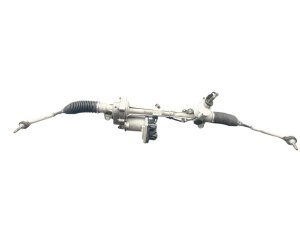
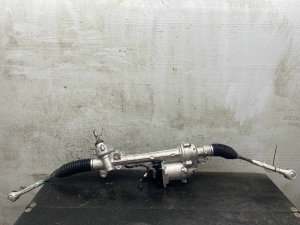
- Check Electrical Connectors: Inspect the main electrical connector for any signs of corrosion, bent pins, or damage to the housing.
- Inspect the Tie Rod Boots: While the rack may not come with inner or outer tie rods, check the condition of the rubber boots (bellows) on the rack itself. Torn boots allow dirt and water to enter, which will quickly destroy the internal components.
- Look for Impact Damage: Check the main housing for any cracks, deep gouges, or signs of a major collision. A bent rack is useless.
3. Mileage Considerations
Steering rack failure on these models is not always tied to high mileage. Failures have been reported on lower-mileage vehicles due to electrical faults or manufacturing defects. However, as with any mechanical part, lower mileage is generally better. A part from a vehicle with under 80,000 miles is preferable, but the physical condition and correct part number are more important than mileage alone.
Replacement and Calibration

Replacing the steering rack on a Model S or Model X is a complex job not recommended for most DIY mechanics.
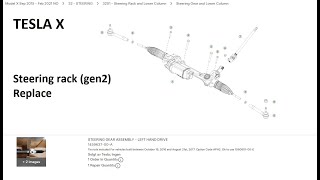
The process requires lowering or removing the entire front subframe assembly 🎬 Watch this walkthrough of a Gen 2 steering rack replacement. to access the rack. The three main bolts that attach the rack to the subframe must be torqued to 167 Nm (123.2 lbs-ft).
Critical: After the new rack is physically installed, it MUST be calibrated to the vehicle using Tesla's diagnostic software, often referred to as 'Toolbox'. This involves a "firmware redeploy" and calibrating the Steering Angle Sensor (SAS). Failure to perform this electronic calibration will result in error messages, disabled safety systems (like ESC and Autopilot), and improper steering feel. A full four-wheel alignment is also mandatory after replacement.
Cost to Replace a Tesla Model S / Model X Steering Rack
Replacing the steering rack is a significant expense. Labor costs are high due to the need to remove the front subframe and perform electronic calibration.
| Part / Service | Estimated Cost |
|---|---|
| New OEM (from Tesla) | $1,500 - $2,500+ (part only) |
| Remanufactured OEM | $700 - $1,200 |
| Used OEM | $500 - $900 |
| Shop Labor (including alignment & calibration) | $700 - $1,300 |
| Total Estimated Cost (Used OEM + Pro Install) | $1,200 - $2,200 |
Frequently Asked Questions
Can I perform a steering rack calibration myself?
No, not without access to Tesla's proprietary service software ('Toolbox') and the knowledge to use it. The calibration process electronically pairs the new rack to your car's computer and resets the steering angle sensor. This step is essential for safety and must be done by a qualified Tesla service center or an independent shop with the proper equipment.
Is a 'notchy' or 'clicking' steering wheel always the rack?
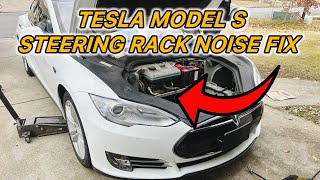
Not always, but it is a strong possibility. A clicking or notchy feeling could also be caused by a worn lower steering column I-shaft (intermediate shaft) U-joint, which was the subject of a separate service bulletin (SB-20-32-004). However, 🎬 Watch: How to diagnose and fix common steering clunking noises. drivers in NHTSA investigations have described a notchy or clicky feel just before a steering rack failure. A professional diagnosis is needed to be certain.
Will a used steering rack have the same software problem from the recall?
The main software-related recall (22V818000) was fixed by an over-the-air update to the vehicle, not the part itself. Therefore, as long as your car's software is up to date, a used rack will function correctly. The hardware recall for corroded bolts only applies to very early models (pre-April/October 2016), and most of those vehicles should have been serviced years ago.
What other parts should I inspect when replacing the steering rack?
While the subframe is out, it is a perfect time to inspect the outer tie rod ends, sway bar links, and lower control arm bushings for wear. Since a full alignment is required anyway, replacing any worn suspension or steering linkage components at the same time is highly cost-effective.
Helpful Videos
Technical Specifications
OEM Part Numbers: 1070801-00-D 1070801-00-E 1070801-00-F 1070801-99-D 1070806-99-D
Operating Mode: Electric (EPAS) Fitment: All-Wheel Drive (AWD) models only Mounting Bolt Torque: 167 Nm (123.2 lbs-ft)
We Have This Part in Stock

The information in this article is provided for general reference and educational purposes only. Vehicle specifications, procedures, and part compatibility can vary by production date, trim level, and region. Always consult your vehicle's factory service manual and verify part numbers before purchasing or performing repairs. Safety-critical components such as airbags, seat belts, and braking systems should be installed by a qualified professional.
- TESLA Model X:
- Tesla Model S:
- 🎬 Helpful Videos
- 🛍️ Shop This Part
- Known Issues, Recalls, and Technical Service Bulletins (TSBs)
- NHTSA Campaign 22V818000: Loss of Power Steering After Hitting Bumps
- NHTSA Campaigns 18V-204 & 20V-062: Corroded Steering Rack Bolts
- Symptoms of a Failing Steering Gear Poppet Rack
- Buying a Used Steering Gear Poppet Rack
- 1. Verify the Part Number Above All Else
- 2. Physical Inspection
- 3. Mileage Considerations
- Replacement and Calibration
- Cost to Replace a Tesla Model S / Model X Steering Rack
- Frequently Asked Questions
- 🎟️ Get 5% Off