

2005-2007 Cadillac CTS Steering Column: Diagnosing Clunks and Avoiding Incompatible Parts
This guide covers common steering column failures, from clunking noises to total failure, and explains the critical 'Active Brake Control' compatibility check you must perform before buying.
- You MUST check if your car has Active Brake Control (RPO code JL4) before buying; the columns are not interchangeable.
- Clunking or popping noises are very common but are often caused by the cheaper intermediate steering shaft, not the entire column.
- Replacement is a complex job (4/5 difficulty) that requires disabling the airbag system for safety.
- This column fits automatic transmission, floor-shift models only, and does not fit CTS-V models.
Compatibility Warning: The Most Important Check Before You Buy
Warning: Before purchasing a steering column for a 2005-2007 Cadillac CTS, you MUST verify if your vehicle is equipped with "Active Brake Control." This was an optional electronic stability control system that requires a different steering column. The columns are NOT interchangeable.
This part only fits 2005-2007 Cadillac CTS models with an Automatic Transmission, a floor-mounted shifter, and the standard base braking system. It is NOT compatible with vehicles equipped with Active Brake Control or any CTS-V models.
How to Check for Active Brake Control
The easiest way to check is to find the Service Parts Identification sticker on your vehicle. This white sticker is typically located in the trunk, often on the underside of the trunk floor panel or spare tire cover. Look for the three-character code JL4.
- If the code JL4 is ON the sticker, you HAVE Active Brake Control and this standard column will NOT fit your vehicle.
- If the code JL4 is NOT on the sticker, you have the standard braking system, and this column is the correct fit.
Symptoms of a Failing Steering Column or Shaft
Steering problems in the first-generation CTS can be caused by the steering column itself or the intermediate steering shaft that connects the column to the steering rack. It's important to distinguish between them.
1. Clunking, Popping, or Grinding Noises
This is the most common complaint for this vehicle. A distinct clunk, pop, or grinding sound when turning the steering wheel at low speeds, like in a parking lot, almost always points to a worn-out component. Often, this noise comes from the U-joints on the intermediate steering shaft, which can dry out or fail. A Technical Service Bulletin (TSB #3969) was issued by GM for a "steering bind or click noise on left turn," acknowledging this issue.
2. Loose Steering or Excessive "Play"
If you feel a dead spot in the center of the steering, where you can move the wheel slightly without the car responding, it indicates excessive play. This looseness can be caused by worn splines in the intermediate shaft's slip joint or worn bearings inside the steering column itself. This can make the car feel like it's wandering on the highway, requiring constant small corrections.
3. Stiff or Binding Steering
If the steering feels notchy, or stiff in some spots and easy in others, it's a serious safety concern. This is often caused by a U-joint in the intermediate shaft that is rusting and beginning to seize. In severe cases, the steering wheel may not return to center on its own after a turn.
4. Airbag Light or Failed Steering Wheel Controls
An illuminated airbag warning light on the dash, combined with the horn, cruise control, or radio buttons not working, points to a failed clockspring. The clockspring is a ribbon of wires inside the steering column that can break from age and repeated turning. Since it is part of the column assembly, replacing the column will resolve this issue.
5. "Service Stability System" Message
On models equipped with stability control (Active Brake Control), a fault in the steering angle sensor can trigger this warning. This sensor tells the computer how far and in which direction the steering wheel is turned. Because this sensor is integrated with the column, a fault may require column replacement or specific sensor replacement, which is an involved job.
Known Issues, Recalls, and Technical Service Bulletins (TSBs)
- No Recalls for the Steering Column: There have been no safety recalls issued by the NHTSA for the steering column assembly on 2005-2007 Cadillac CTS models. Recalls for this vehicle range address other issues like the passenger seat sensor and brake hoses.
- TSB #3969: This bulletin addresses a "steering bind or click noise on left turn." It confirms that GM is aware of the noise issues that many owners experience, which are often related to the intermediate steering shaft or column components.
- Intermediate Steering Shaft Wear: The most prevalent known issue is not the column itself, but the intermediate steering shaft connected to it. Its U-joints and slip-joint are common failure points that produce the clunks and looseness often blamed on the column. In many cases, replacing only the intermediate shaft can solve the problem.
Buying a Used Steering Column: What to Check
A used OEM steering column is often the only cost-effective solution, as new parts are discontinued or extremely expensive. Here’s what to look for to ensure you get a good part.
1. Verify Compatibility First
Before anything else, confirm the donor vehicle did NOT have Active Brake Control (RPO JL4). Ask the seller to check the RPO sticker or provide the VIN so you can verify its options. Also, ensure it came from a vehicle with an automatic transmission and floor shifter.
2. Physical Inspection
- Check for Damage: Inspect the entire assembly for cracks, bends, or heavy corrosion, especially around the mounting points and the lower shaft. Avoid any column that appears to have been in a major collision.
- Test the Tilt/Telescope Mechanism: If the column has tilt or telescoping features, operate them. The movement should be smooth and lock firmly in place. A column that won't lock is a failed part.
- Inspect Electrical Connectors: Check all wiring harnesses and connectors. Ensure they are not cut, cracked, or have broken locking tabs. Damaged wiring can be very difficult to repair.
- Examine the Ignition Lock Area: Look for pry marks or damage around the ignition lock cylinder housing. This can be a sign of a theft attempt, which may have damaged the internal mechanisms.
- Spin the Shaft: Turn the input shaft by hand. It should rotate smoothly without grinding or binding, though some resistance is normal.
Pro Tip: The clockspring is a delicate and critical part. When handling or installing a used steering column, make sure the front wheels are straight and the steering wheel is centered. Do not spin the column more than necessary, as you can break the internal clockspring ribbon, causing an immediate airbag light upon installation.
Replacement Overview
Replacing the steering column is a complex job that involves working directly with the airbag system. It is recommended for experienced DIY mechanics or professionals.
- Difficulty: 4 out of 5
- Estimated Time: 2-4 hours
- Key Steps: The process involves disconnecting the battery, disabling the SIR (airbag) system, removing the driver's knee bolster and lower dash panels, disconnecting numerous electrical connectors, unbolting the intermediate shaft from the column, and finally unbolting the column assembly from the main dash support structure.
- Special Tools: A steering wheel puller may be required if you are transferring your original steering wheel to the replacement column. A special tool (J 42640) is recommended to lock the column in the straight-ahead position during removal and installation to protect the clockspring.
Safety Warning: The SIR (airbag) system can cause serious injury if not handled correctly. Always disconnect the battery and wait for the system's capacitor to discharge (typically 5-10 minutes) before working on or near any yellow airbag connectors or components.
Cost Comparison
This table shows the estimated cost for a standard (non-Active Brake Control) steering column.
| Part Type | Estimated Cost |
|---|---|
| New OEM | $650 - $1,100 (Largely discontinued) |
| New Aftermarket | Not generally available |
| Used OEM | $75 - $250 |
| Remanufactured | Not generally available |
| Shop Labor Cost | $300 - $500 |
Frequently Asked Questions (FAQ)
Will replacing the steering column fix my steering clunk?
Not always. The most common cause of a clunking noise on these cars is the intermediate steering shaft, which is a separate part that connects the column to the steering rack. If your only symptom is a clunk, inspect the intermediate shaft first, as it is a cheaper and easier repair.
Does a replacement steering column need to be programmed?
For a standard base model, programming is typically not required for the column itself. However, if your vehicle has Active Brake Control (JL4), the steering angle sensor within the column is critical to the stability system and may require calibration after installation.
Can I just replace the bad part inside my column, like the clockspring or a bearing?
While some individual components like the clockspring or upper bearings can be purchased separately, replacing them requires a near-complete disassembly of the steering column. This is a very intricate and difficult job. For most DIY mechanics and even many shops, swapping the entire used column assembly is faster and more reliable.
What is the difference between the steering column and the steering rack?
The steering column is the assembly inside the car that you interact with, connecting the steering wheel to the firewall. The steering rack is the mechanical part under the hood that physically turns the wheels. The intermediate shaft connects the two. Problems inside the cabin (noises, loose tilt lever, airbag light) are usually column-related, while problems felt more in the front end (leaks, heavy steering in one direction) are often rack-related.
Technical Specifications
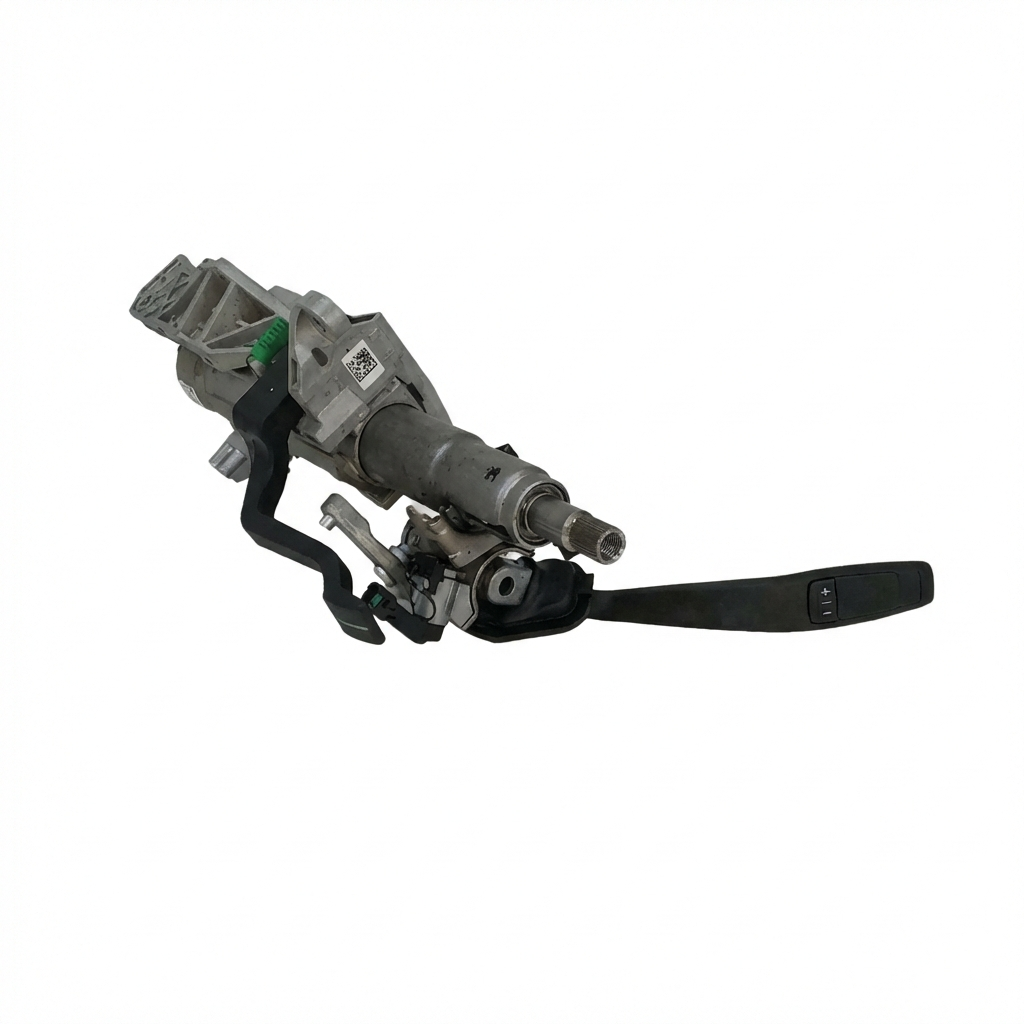
OEM Part Numbers: 25744456
Fits models with Automatic Transmission and floor shifter. For vehicles WITHOUT Active Brake Control (RPO JL4).
We Have This Part in Stock

The information in this article is provided for general reference and educational purposes only. Vehicle specifications, procedures, and part compatibility can vary by production date, trim level, and region. Always consult your vehicle's factory service manual and verify part numbers before purchasing or performing repairs. Safety-critical components such as airbags, seat belts, and braking systems should be installed by a qualified professional.
- Cadillac CTS:
- 🛍️ Shop This Part
- Compatibility Warning: The Most Important Check Before You Buy
- How to Check for Active Brake Control
- Symptoms of a Failing Steering Column or Shaft
- 1. Clunking, Popping, or Grinding Noises
- 2. Loose Steering or Excessive "Play"
- 3. Stiff or Binding Steering
- 4. Airbag Light or Failed Steering Wheel Controls
- 5. "Service Stability System" Message
- Known Issues, Recalls, and Technical Service Bulletins (TSBs)
- Buying a Used Steering Column: What to Check
- 1. Verify Compatibility First
- 2. Physical Inspection
- Replacement Overview
- Cost Comparison
- Frequently Asked Questions (FAQ)
- 🎟️ Get 5% Off