

Tesla Model 3, Y, S & X Speaker Guide: Fixing Rattles, Buzzing, and PWS Faults (2016-2025)
Your definitive guide to diagnosing and fixing common interior speaker rattles and replacing the external Pedestrian Warning Speaker (PWS).
- Interior speaker problems are most often rattles from trim, not blown speakers. These can usually be fixed with foam tape.
- The external Pedestrian Warning Speaker (PWS) is a separate part that fails due to moisture; check its connector for corrosion.
- A software reset (holding both steering wheel buttons) can often fix sudden audio issues like silent speakers.
- NHTSA recalls for the 'Boombox' feature were software-related and did not involve replacing the PWS hardware.
Is Your Speaker Problem Inside or Outside the Car?
Before troubleshooting, it's crucial to identify which speaker system is having an issue. The problems and solutions are completely different.
- Interior Audio Problem: You hear rattling, buzzing, popping, or distortion while playing music, or one of the speakers inside the cabin has no sound. The issue is most noticeable when you are sitting in the car.
- External PWS Problem: You see a 'Pedestrian Warning System Fault' message on your screen, or features like Boombox and the low-speed crawling sound don't work. The problem relates to a speaker on the outside of the car.
Interior Speaker Problems: Rattles, Buzzing, and Popping

By far, the most common audio-related complaint in the Tesla Model 3, Y, S, and X is not speaker failure, but rattles and vibrations from trim pieces. The powerful audio systems, especially the subwoofers, can cause parts of the car's interior to buzz at specific frequencies.
Common Rattle Sources & Fixes
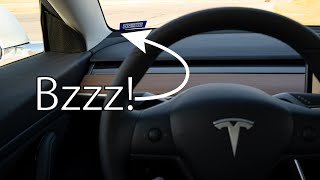
- Model 3/Y Dash Speaker Grille: The long speaker grille on the dashboard can vibrate against the dash itself. Owners often fix this by carefully inserting small pieces of adhesive foam weather stripping between the grille and the dashboard to dampen the vibration. 🎬 Watch this guide to fixing dashboard speaker grille rattles.
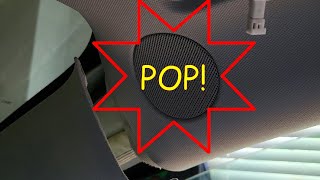
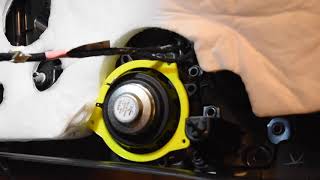
- Model 3/Y A-Pillar Tweeters: The small tweeter speakers in the A-pillars can sometimes be loose in their housing, causing a high-frequency buzz. A simple fix involves removing the tweeter, applying a small amount of superglue or a dab of silicone to the loose plastic tabs, and re-installing it. In other cases, the solder joints on the back of the speaker can ground against the metal A-pillar frame, causing an intermittent popping sound. Insulating these joints with electrical tape can resolve the issue. 🎬 See how to fix popping sounds in the A-pillar.
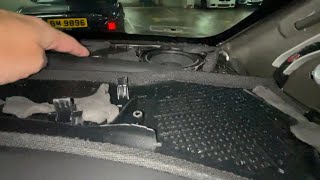
- Model Y Subwoofer Area: The subwoofer in the rear of the Model Y is a frequent source of rattles. The vibration can cause the interior quarter panel trim or the rear cabin pressure vent flaps to rattle. Pressing on the panel next to the subwoofer while the rattle is occurring can confirm the source. Service centers and owners often fix this by strategically placing foam tape or felt behind the panel to cushion it.
- Rear Deck Rattle (Model 3/S): On sedans, the rear deck where the parcel shelf sits can vibrate from bass frequencies. The fix is similar: identify the exact point of contact and apply foam or felt tape to eliminate the plastic-on-plastic or plastic-on-glass noise.
Pro Tip: To find a rattle, use a tone generator app or a YouTube video that plays a frequency sweep. Play it through the car's speakers and listen carefully as the frequency changes. This will excite the specific resonance causing the rattle, making it much easier to pinpoint.
External Pedestrian Warning Speaker (PWS) Failure

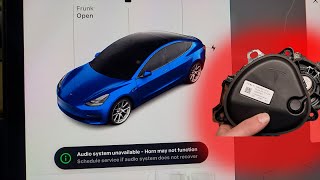
If you have a 'Pedestrian Warning System Fault' on your screen, the problem lies with the external speaker, part numbers 1299965-00-A (for earlier models, approx. 2017-2021) or 1671113-00-B (for later models, approx. 2022+).
This speaker is exposed to the elements at the front of the car. The most common cause of failure is moisture getting into the wiring connector, causing corrosion and loss of signal. In other cases, the speaker's internal components simply fail from water damage. A blown fuse can also be the culprit.
Diagnosis involves checking the fuse first, then visually inspecting the speaker and its connector for corrosion or damage. This often requires removing the front bumper or front undertray for access.
🎬 Watch a step-by-step pedestrian warning speaker installation.Symptoms of a Failed Speaker

While rattles are more common, traditional speaker failure can also occur. Here’s what to listen for.
- Distortion, Fuzz, or Crackling: Sound that is unclear, fuzzy, or crackles even at low volumes often points to a damaged speaker cone or a failing voice coil. This is a common symptom for the door woofers on older Model S vehicles where the foam surround deteriorates over time.
- No Sound From One Speaker: If a single speaker is completely silent, first use the on-screen audio controls to check the balance and fader settings. If the settings are centered, the speaker may be disconnected or blown. A software glitch can also cause this; performing a soft reset (holding both steering wheel scroll wheels) can sometimes restore function.
- Popping or Thumping: Loud pops can be caused by a short in the wiring or an issue with the amplifier. On A-pillar tweeters, this is a known issue of the speaker's electrical contacts touching the metal body of the car.
- Lack of Bass or Treble: If the audio sounds flat or 'tinny', a specific type of speaker (like a subwoofer or tweeter) may have failed, leaving the other speakers to handle frequencies they aren't designed for.
Buying a Used Tesla Speaker
Purchasing a used OEM speaker is a great way to save money, especially since many 'failures' are just rattles that can be easily fixed. Here’s what to check.
For Interior Speakers (Woofers, Mid-Range, Tweeters)
- Verify the Part Number: Tesla uses different speakers for its Standard and Premium audio systems, and they vary by location. Always match the part number from your old speaker exactly.
- Inspect the Cone and Surround: Look for any tears, cracks, or holes in the speaker cone (the main paper or plastic part that moves). Pay close attention to the flexible edge, called the surround. On older Model S speakers, this foam surround can become brittle and crack.
- Check the Connector: Ensure the plastic electrical connector and its pins are clean and free of any corrosion or damage.
- Press the Cone Gently: Gently and evenly press the center of the cone. It should move smoothly without any scratching or grinding sounds. A scratching noise indicates a damaged voice coil, and the speaker is bad.
For the External Pedestrian Warning Speaker (PWS)
- Check the Connector Pins: This is the most critical check. Look inside the electrical connector for any signs of green or white crusty corrosion. If the pins are corroded, the speaker is likely bad.
- Inspect the Housing: Check the plastic housing for any cracks that could let in more water.
- Match the Part Number: While 1299965-00-A and 1671113-00-B may be interchangeable, it's always best to match the part number from your vehicle's build year.
Replacement Cost & Difficulty
The cost and effort to replace a speaker vary wildly depending on its location.
| Speaker Type | DIY Difficulty (1-5) | New OEM Price | Used OEM Price | Shop Labor Cost |
|---|---|---|---|---|
| A-Pillar Tweeter | 1 (Easy) | $40 - $70 | $20 - $40 | $50 - $100 |
| Front Door Speaker | 3 (Moderate) | $60 - $120 | $30 - $60 | $150 - $250 |
| External PWS | 3 (Moderate) | $50 - $100 | $25 - $50 | $200 - $350 (Bumper removal) |
Prices are estimates and may vary based on location and availability.
Known Issues, Recalls, and TSBs
While there are no official recalls or Technical Service Bulletins (TSBs) for rattling interior speakers, the issue is widely documented by owners and frequently addressed by Tesla Service Centers under warranty, typically by applying foam or felt tape.
NHTSA Recall 22V-063: Pedestrian Warning Sound: This recall affects all vehicles in this guide. It addresses a software issue where the 'Boombox' feature could obscure the legally required pedestrian warning sound. This was not a hardware fault with the speaker itself. Tesla resolved this with an over-the-air (OTA) software update that disables Boombox when the vehicle is in Drive, Neutral, or Reverse. A second recall was issued to also disable it during the 'Summon' feature.
Frequently Asked Questions
My speakers stopped working after a software update. What should I do?
First, perform a soft reset by holding down both scroll wheels on the steering wheel until the center screen turns off and back on. This resolves many temporary software glitches, including audio problems. If that doesn't work, check the audio settings to ensure the balance and fader haven't been accidentally moved.
Can I upgrade just one speaker, or do I need to replace them all?
You can replace a single failed speaker. If buying a used OEM speaker, ensure it is from the same audio system (Standard or Premium) to maintain sound balance. If upgrading to aftermarket speakers, it's generally recommended to replace them in pairs (e.g., both front door speakers) to ensure a matched sound stage.
Is the 'Premium' audio system speaker compatible with a 'Standard' system?
Generally, no. The speakers have different impedance levels and are designed to work with different amplifiers. While it might physically fit, it will not sound correct and could potentially damage the amplifier. Always replace with a speaker intended for your car's specific audio package.
Tesla Service quoted a high price to fix a rattle. Can I do it myself?
Yes, most rattle fixes are very DIY-friendly. The most common solutions involve strategically placing inexpensive foam or felt tape to stop trim pieces from vibrating. There are many video guides online showing how to access common rattle spots like the dash speaker grille and A-pillars.
Helpful Videos
Technical Specifications
OEM Part Numbers: 1299965-00-A 1671113-00-B 1079744-00-E 1004833-02-A 1079742-00-C
Varies by speaker type. Interior speakers are typically 2-ohm or 4-ohm impedance. The PWS is an external, weather-resistant unit.

The information in this article is provided for general reference and educational purposes only. Vehicle specifications, procedures, and part compatibility can vary by production date, trim level, and region. Always consult your vehicle's factory service manual and verify part numbers before purchasing or performing repairs. Safety-critical components such as airbags, seat belts, and braking systems should be installed by a qualified professional.
- Tesla Model 3:
- Tesla Model Y:
- Tesla Model X:
- Tesla Model S:
- 🎬 Helpful Videos
- Is Your Speaker Problem Inside or Outside the Car?
- Interior Speaker Problems: Rattles, Buzzing, and Popping
- Common Rattle Sources & Fixes
- External Pedestrian Warning Speaker (PWS) Failure
- Symptoms of a Failed Speaker
- Buying a Used Tesla Speaker
- For Interior Speakers (Woofers, Mid-Range, Tweeters)
- For the External Pedestrian Warning Speaker (PWS)
- Replacement Cost & Difficulty
- Known Issues, Recalls, and TSBs
- Frequently Asked Questions
- 🎟️ Get 5% Off