

2024-2025 Lincoln Nautilus Seat Memory Module: Programming and Known Issues
This guide covers the essential replacement information for the driver's seat memory control module in the 2024-2025 Lincoln Nautilus, focusing on mandatory programming and early software bugs.
- Replacement requires mandatory programming with Ford's FDRS software; it is not a DIY-friendly part.
- Many early problems are software-related (like the Easy Entry/Exit bug) and may not require module replacement.
- Always match the OEM part number exactly. The primary service number is RU5Z-14C708-K.
- When buying used, budget for 1-2 hours of shop labor for professional programming.
Programming and Installation: A Dealer or Pro-Level Job
Warning: This module cannot be simply swapped. It requires mandatory programming with Ford's official diagnostic software to function correctly.
Replacing the Seat Memory Control Module in a 2024-2025 Lincoln Nautilus is not a simple plug-and-play task. The new module must be programmed to the vehicle using the Ford Diagnostic and Repair System (FDRS). This process, known as Programmable Module Installation (PMI), configures the new module to the specific options and network of your Nautilus. Without this step, the module will not know what vehicle it is in, and memory functions will not work.
While the physical replacement of the module is straightforward for a mechanic, the software programming is the critical step. This requires:
- A valid subscription to the Ford Service Info portal.
- A compatible Vehicle Communication Module (VCM), like the VCM II.
- The FDRS software running on a laptop.
Because of these requirements, replacement and programming must be performed by a Lincoln dealer or a well-equipped independent shop that has invested in OEM-level diagnostic tools. The average DIY mechanic or small shop will not have the necessary equipment.
Symptoms of a Failing Seat Memory Module
As the 2024-2025 Nautilus is a very new vehicle, widespread module failures are not yet common. However, issues can be broadly categorized into software glitches and potential hardware failure.
Software-Related Issues (Most Common)
Many reported problems are related to software bugs or user profile settings, not a faulty module. These often appear as unexpected behavior.
- Easy Entry/Exit Not Working Correctly: The seat may move to the driving position when the door is opened, making it difficult to get in, instead of moving to the exit position. This was identified as a software bug in the Driver Front Seat Module (DSM) on early models.
- Settings Not Saving or Recalling: The system may fail to recall the correct profile linked to a key fob or phone. This can sometimes be resolved by unlinking and relinking the key/profile in the SYNC settings.
Pro Tip: Before assuming the module is bad, try unlinking your key fob from your personal profile in the vehicle's settings. This was an official interim fix from Lincoln for early software bugs affecting the Easy Entry/Exit feature.
Hardware Failure Symptoms
A true hardware failure of the module itself would present more definitive symptoms:
- Complete Unresponsiveness: None of the memory buttons work, and the seat/mirrors/steering column cannot be adjusted at all (if their controls are routed through the module).
- Erratic Movement: The seat or other components move without being commanded, or move to incorrect positions.
- Communication (U-Code) DTCs: A professional scan tool may show U-codes (e.g., U0600-U0609), indicating the module is not communicating with the rest of the vehicle's network.
Known Issues, TSBs, and Recalls
For a new model, the focus is on early production issues and software updates.
- Special Service Message (SSM) 52462: Lincoln acknowledged an issue on some 2024 Nautilus vehicles where the driver's seat and steering column move to the saved memory position instead of the Easy Entry position upon approach. This is due to the module's software. The initial fix was to unlink the key fob from the profile, with a permanent software update planned for later in 2024.
- No Recalls for the Seat Memory Module: As of mid-2026, there are no specific NHTSA recalls for the Seat Memory Control Module itself. Other recalls for the 2024-2025 Nautilus exist for issues like door modules, pedestrian warning sounds, and engine block heaters, but these do not directly involve the seat module.
Buying a Used Seat Memory Control Module
Since the 2024-2025 Nautilus is so new, any "used" module is likely a low-mileage part salvaged from a vehicle that was in an accident. This can be a cost-effective option, but there are critical points to consider.
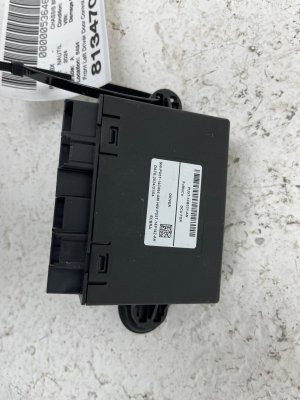
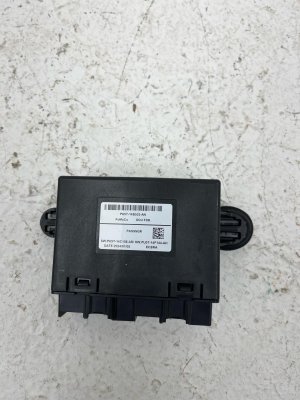
- Verify the Part Number: The most important step is to match the OEM part number exactly. The primary service part number is RU5Z-14C708-K. This number replaces older revisions like RU5Z-14C708-E and RU5Z-14C708-G. The engineering number printed on the unit itself may be RU5T-14C708-DF. Do not install a module with a different part number.
- Budget for Programming: A used module is a paperweight until it is programmed. Factor in the cost of a dealer or specialist shop visit for programming, which can range from one to two hours of labor.
- Physical Inspection: Inspect the module for any signs of damage. Check that all connector pins are straight and free of corrosion or melting. While water intrusion is a common failure mode for modules in older cars, it is unlikely to be an issue on these new models unless the salvaged vehicle had flood damage.
- Source Matters: Purchase from a reputable recycler that offers a warranty. This gives you protection in case the module is dead on arrival or cannot be programmed.
Cost of Replacement
The primary cost is the part itself, followed by the mandatory programming labor.
| Part or Service | Estimated Cost |
|---|---|
| New OEM Module | $370 - $805 |
| Used OEM Module | $150 - $300 |
| New Aftermarket / Remanufactured | Not yet available |
| Shop Labor (Physical Install) | $60 - $120 (approx. 0.5-1.0 hours) |
| Shop Labor (Programming) | $150 - $300 (approx. 1.0-1.5 hours) |
Frequently Asked Questions (FAQ)
Can I replace the seat memory module myself to save money?
While you can physically install the module yourself (it's typically under the driver's seat), the vehicle will not recognize it until it is professionally programmed with Ford's FDRS software. You will still need to take the vehicle to a dealer or equipped specialist, so the labor savings are minimal.
My seat memory isn't working. How do I know if it's the module or something else?
First, check for simple software issues. Try creating a new profile or unlinking your key fob as described in the TSB for Easy Entry/Exit problems. If the seat makes no noise and doesn't move at all with either the memory buttons or the regular power seat controls, the problem could be a fuse, wiring, or the seat motor itself. If only the memory function fails but the regular controls work, the module is a more likely suspect. A professional diagnosis with a scan tool is the only way to be certain.
Does the part number have to match exactly?
Yes. For modern electronic modules, the hardware and software must be correct for your vehicle's specific features. Using a module from a different model or one with the wrong part number will likely result in it not programming or functioning correctly. Always match the service part number, which is RU5Z-14C708-K for this application.
Will a used module from a higher trim level give me more features?
No. Features are enabled by the vehicle's central configuration, not just the module itself. The module must be programmed to the vehicle's VIN, and it will only enable the features your car was built with from the factory. You cannot add features by simply swapping modules.
Technical Specifications
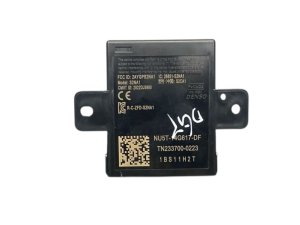
OEM Part Numbers: RU5Z-14C708-K RU5T-14C708-DF RU5Z-14C708-E RU5Z-14C708-G
Controls driver's seat, power mirrors, and power steering column memory functions. Located under the driver's seat. Requires programming via Ford Diagnostic and Repair System (FDRS).
We Have This Part in Stock


The information in this article is provided for general reference and educational purposes only. Vehicle specifications, procedures, and part compatibility can vary by production date, trim level, and region. Always consult your vehicle's factory service manual and verify part numbers before purchasing or performing repairs. Safety-critical components such as airbags, seat belts, and braking systems should be installed by a qualified professional.
- Lincoln Nautilus:
- 🛍️ Shop This Part
- Programming and Installation: A Dealer or Pro-Level Job
- Symptoms of a Failing Seat Memory Module
- Software-Related Issues (Most Common)
- Hardware Failure Symptoms
- Known Issues, TSBs, and Recalls
- Buying a Used Seat Memory Control Module
- Cost of Replacement
- Frequently Asked Questions (FAQ)
- 🎟️ Get 5% Off