

2019-2023 Mazda CX-9 Radio Tuner Failure: Diagnosing No Sound and Replacement Guide
If your CX-9's screen works but the speakers are silent, the radio tuner and amplifier unit is the likely culprit—but replacing it isn't a simple swap.
- The most common failure symptom is a total loss of sound while the infotainment screen still works.
- This part is ONLY for models with the 12-speaker Bose premium audio system.
- A replacement unit, whether new or used, MUST be programmed to the vehicle's VIN by a dealer or specialist to function.
- Check the audio-related fuses first before condemning the expensive module.
Symptoms of a Failing CX-9 Radio Control Unit
A failing Radio Control Unit, or Tuner and Amplifier Unit (TAU), often presents symptoms that can be confusing. The main infotainment screen may work perfectly, but the audio system will be silent. This is because the screen (Connectivity Master Unit) and the amplifier (TAU) are two separate components.
- Complete Loss of Sound: This is the most common and definitive symptom. You may see your music source (like Apple CarPlay or the radio) playing on the screen, but no sound comes from any of the speakers.
- Volume Control Inoperative: The volume knob may not bring up the volume slider on the screen, and steering wheel volume controls will not work.
- Inability to Select Radio Bands: The AM/FM or Satellite radio options may be grayed out or unresponsive, as the system cannot communicate with the tuner.
- Intermittent Audio: Before a complete failure, the audio may cut in and out.
- Diagnostic Trouble Code (DTC) U0184: A professional scan tool may find code U0184 stored, which indicates a "Communication error with tuner and amp unit (TAU)". This is a strong indicator that the TAU has failed or has a connection issue.
Important: Many owners experience issues with the touchscreen itself, such as "ghost touching" or unresponsiveness. These are almost always caused by a failing touchscreen digitizer, which is part of the display assembly, and are not related to the Radio Control Unit discussed here.
Known Issues, TSBs, and Recalls
As of this writing, there are no specific recalls or widespread Technical Service Bulletins (TSBs) from Mazda for the failure of the BDGG-66-DR0F Radio Control Unit itself. However, Mazda has issued numerous TSBs for the MAZDA CONNECT infotainment system to address software bugs, connectivity problems, and issues with the Telematics Communication Unit (TCU). Some of these TSBs involve software updates that can resolve unusual behavior. Before replacing hardware, it's always a good idea for a dealer to check if any infotainment software updates are available for your vehicle.
Buying a Used Radio Control Unit: What You MUST Know
Purchasing a used Radio Control Unit is a great way to save money, but it comes with critical considerations. This is not a plug-and-play part.
- Part Number Verification: Absolutely confirm the part number on the used unit matches what is required for your vehicle. The primary part number is BDGG-66-DR0F. It supersedes several older versions like BDGG-66-DR0, BDGG-66-DR0A, etc. Using an incompatible part will not work.
- Bose System ONLY: This specific module is for the 12-speaker Bose premium audio system. It will not work in vehicles with the standard, non-Bose audio system, which uses a different amplifier setup.
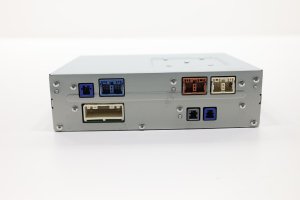
- Physical Inspection: When you receive the used part, inspect it for any signs of physical damage, especially to the connectors. Check for any indication of water intrusion, which is a common cause of failure for electronic modules mounted in the trunk area.
- The Programming Requirement: This is the most important factor. A used Radio Control Unit must be programmed to your vehicle's VIN. Mazda's electronic modules are often VIN-locked as a theft-deterrent measure and to ensure proper communication on the vehicle's data network. Attempting to install a used unit without programming will likely result in it not working at all. This procedure typically requires a Mazda dealer's diagnostic tool (MDARS) and a visit to a dealership or a specialized independent shop with dealer-level capabilities.
Pro Tip: Before buying a used module, call your local Mazda dealer's service department. Explain that you are replacing the Tuner and Amplifier Unit (part BDGG-66-DR0F) with a used OEM part and ask them for a quote to perform the "Mazda Module Installation (MMI)" or programming procedure. This will help you budget for the total cost of the repair.
Replacement and Programming Procedure
The Radio Control Unit is located in the trunk, not in the dashboard. In the similar Mazda 3, it is found behind the trim on the upper passenger side of the trunk area. Accessing it requires removing trunk liner panels and potentially the rear seat bolster.
Steps Overview:
- Disconnect the vehicle's battery.
- Remove the trunk floor and side trim panels on the passenger side to expose the module.
- Unbolt the module's mounting bracket.
- Carefully disconnect the electrical connectors.
- Install the new (or used) module, reconnect the connectors, and secure the bracket.
- Reassemble all trim panels.
- Reconnect the battery.
- Crucially, the vehicle must then be taken to a dealer or qualified specialist for programming. The audio system will likely remain inoperative until this step is completed.
Cost Comparison for CX-9 Radio Control Unit
| Part Type | Estimated Cost |
|---|---|
| New OEM (Dealer) | $590 - $970 |
| Used OEM (Recycled) | $100 - $200 |
| New Aftermarket / Remanufactured | Not commonly available |
| Shop Labor (Installation) | $120 - $200 (1.0-1.5 hours) |
| Dealer Programming | $150 - $250 (1.0-1.5 hours labor) |
Frequently Asked Questions (FAQ)
Can I replace the Radio Control Unit myself?
The physical replacement is feasible for a DIY mechanic with experience removing interior trim panels. However, the unit will not function until it is professionally programmed by a Mazda dealer or a specialist with the correct equipment. You cannot program it yourself.
Why is there no sound if the screen works?
The screen (Connectivity Master Unit) and the amplifier (Radio Control Unit) are separate parts. The screen can function perfectly while the amplifier, which produces the sound, has failed. This is the most common failure scenario for this part.
Will a used unit from another CX-9 work in my car?
Yes, provided it is the correct part number (BDGG-66-DR0F) for a Bose system and it is properly programmed to your vehicle's VIN after installation. It is not a plug-and-play part.
Could a blown fuse cause the no-sound issue?
Yes, a blown fuse for the audio system or amplifier could cause a complete loss of sound and is the first thing you should check. Inspect the fuses labeled "AUDIO" or "BOSE" in the vehicle's fuse panels before assuming the module has failed.
What is the difference between the Radio Control Unit and the Connectivity Master Unit (CMU)?
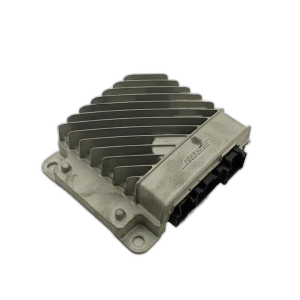
The Radio Control Unit (also called the TAU) is the tuner and amplifier, located in the trunk. The Connectivity Master Unit (CMU) is the computer behind the dashboard screen that runs the infotainment interface, navigation, and settings. They are two separate but connected parts of the same system.
Technical Specifications
OEM Part Numbers: BDGG-66-DR0F BDGG66DR0F BDGG-66-DR0E BDGG-66-DR0D BDGG-66-DR0C BDGG-66-DR0B BDGG-66-DR0A BDGG-66-DR0
For 12-speaker Bose audio systems only. Functions as the radio tuner (AM/FM/Satellite) and main sound amplifier.
We Have This Part in Stock




The information in this article is provided for general reference and educational purposes only. Vehicle specifications, procedures, and part compatibility can vary by production date, trim level, and region. Always consult your vehicle's factory service manual and verify part numbers before purchasing or performing repairs. Safety-critical components such as airbags, seat belts, and braking systems should be installed by a qualified professional.
- Mazda CX-9: