

2018-2023 Jaguar F-TYPE Radio Control Unit: Solving Reboots, Blank Screens, and Programming
This guide covers the common failures of the InControl Touch Pro system, critical part number details, and the mandatory programming required for replacement.
- A replacement unit MUST be programmed to the vehicle by a dealer or specialist with Jaguar-specific software.
- The full part number, including the suffix (e.g., -SD), must match your original unit exactly to ensure compatibility.
- Common symptoms like blank screens and rebooting are frequently caused by software glitches or a weak vehicle battery, which should be checked first.
- Widespread issues with this system led to a class action lawsuit, confirming that failures are a known problem.
Symptoms of a Failing Radio Control Unit
A problem with the radio control unit in the 2018-2023 F-TYPE often presents as a major software or screen issue. Because this module controls the entire infotainment system, symptoms are usually obvious and disruptive.
- Blank or Black Screen: The most common failure is the infotainment screen going completely black and becoming unresponsive. This can happen intermittently or become a permanent condition.
- Constant Rebooting Loop: The system may get stuck in a loop where it shows the Jaguar logo, goes black, and then restarts over and over without ever reaching the home screen. This is a classic sign of a software crash or a fault in a connected module.
- System Freezing: The screen may freeze on a single display, making it impossible to change settings, adjust the radio, or use navigation.
- No Audio or Unresponsive Controls: You may lose all sound from the speakers, or the volume knob and steering wheel controls may stop working, even if the screen appears normal.
- Backup Camera Failure: The screen may fail to display the reverse camera image or show a "camera not available" message.
Pro Tip: Before condemning the radio unit, check the vehicle's battery. These cars are highly sensitive to voltage, and a weak or dying battery is a frequent cause of random electronic glitches, including infotainment reboots and blank screens. Performing a hard reset by holding the power/volume knob for 15-30 seconds can also temporarily resolve software glitches.
Known Issues, TSBs, and Recalls
While there are no specific recalls for the radio control unit itself, Jaguar is aware of widespread issues with the InControl Touch Pro system.
- Technical Service Bulletins (TSBs): Jaguar has issued multiple TSBs related to infotainment problems. For example, TSB #SSM74171 directly addresses the "InControl Touch Pro system constantly restarting." Other bulletins cover software updates for navigation and connectivity problems.
- Class Action Lawsuit: A class action lawsuit was filed against Jaguar Land Rover for defective InControl Touch Pro systems in 2017-2020 models, including the F-TYPE. The lawsuit alleged that the systems were prone to freezing, blank screens, and were unable to receive promised Software-Over-The-Air (SOTA) updates.
- MOST Fiber Optic Ring: A rebooting loop can also be caused by a failure of any module on the MOST (Media Oriented Systems Transport) fiber optic network. This network connects the head unit, amplifier, and other media modules in a loop. A fault in one can bring down the entire system. Diagnosing this requires a special fiber optic bypass loop to test each component individually.
Programming and Installation Requirements
Warning: A replacement Radio Control Unit MUST be programmed to the vehicle. This is not a plug-and-play part. The module must be configured using Jaguar's proprietary diagnostic software (SDD or Pathfinder) to match your vehicle's specific options and VIN.
Failure to program a used or new unit will result in it not functioning correctly, if at all. This procedure involves modifying the Car Configuration File (CCF), which tells the car which modules and features are installed. This service must be performed by a Jaguar dealership or a qualified independent specialist with the correct JLR equipment. Most DIY mechanics and general repair shops do not have this capability.
Buying a Used Radio Control Unit
Given the high cost of a new unit from a dealer, a used OEM module is a popular choice. However, there are critical details to be aware of before purchasing.
- Verify the Full Part Number: The most important step is to match the part number exactly, including any suffix letters. The primary part number is KW93-19C211, but it is often followed by a suffix like -SD. This suffix indicates a specific hardware or software version. Installing a unit with a different suffix may cause compatibility issues. You must remove your original unit to verify the full number on its sticker before buying a replacement.
- Inspect for Damage: Check the used unit for any physical damage, especially to the connectors. Bent pins or cracked housings are major red flags.
- Understand the Risk: You are buying a used electronic part that is known to have software issues. While a used unit can be a cost-effective solution, there is an inherent risk that it could have the same problems as your old one. Purchase from a reputable seller with a warranty and return policy.
- Factor in Programming Costs: Remember that the price of the used part is not the final cost. You must budget for professional programming, which can add several hundred dollars to the total repair.
Cost Comparison
The cost to replace the F-TYPE's radio control unit can vary significantly based on the source of the part.
| Part Source | Estimated Cost |
|---|---|
| New OEM (Dealer) | $2,000 - $3,000+ |
| New Aftermarket | Not commonly available; screen upgrades run $600 - $1,500. |
| Used OEM | $400 - $900 |
| Shop Labor (Physical Install & Programming) | $300 - $600 |
Frequently Asked Questions (FAQ)
Does a used Jaguar F-TYPE radio unit need to be programmed?
Yes, absolutely. Any replacement radio control unit, whether new or used, must be professionally programmed to your car's VIN and specific configuration using Jaguar's diagnostic tools. It will not work correctly without this step.
What does the '-SD' suffix on part number KW93-19C211-SD mean?
The exact meaning isn't publicly documented, but the suffix on Jaguar electronic modules typically denotes a specific hardware revision, software version, or feature set (like satellite radio capability). It is critical to match the entire part number, including the suffix, to ensure compatibility with your vehicle's existing components and features.
Can a weak battery really cause the infotainment screen to go blank or reboot?
Yes. The F-TYPE's complex electronic systems are very sensitive to battery voltage. A weak battery is one of the most common causes of seemingly random infotainment system glitches, including reboots, freezing, and blank screens. Always test the battery before assuming the radio unit itself has failed.
Can I install an aftermarket radio instead?
Replacing the factory unit with a standard single or double-DIN radio is not feasible, as the original unit is deeply integrated with vehicle functions like climate control and settings. However, several companies offer aftermarket screen upgrades that retain the factory control unit but provide a modern interface with features like Apple CarPlay and Android Auto. These kits typically replace the screen and add a module that works with the original system.
Technical Specifications
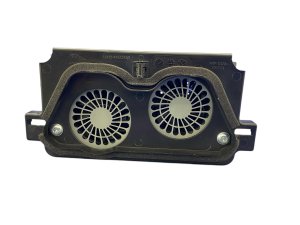
OEM Part Numbers: KW93-19C211 KW93-19C211-SD
Controls the InControl Touch Pro system. Connects to the vehicle via CAN bus and MOST fiber optic networks.
We Have This Part in Stock

The information in this article is provided for general reference and educational purposes only. Vehicle specifications, procedures, and part compatibility can vary by production date, trim level, and region. Always consult your vehicle's factory service manual and verify part numbers before purchasing or performing repairs. Safety-critical components such as airbags, seat belts, and braking systems should be installed by a qualified professional.
- Jaguar F-TYPE: