

2012-2015 Honda Pilot Radio Control Unit: Solving No Sound, Anti-Theft Codes & Navi Issues
This guide details common failures, compatibility requirements, and the critical anti-theft code process for the 2012-2015 Honda Pilot EX-L radio and navigation unit.
- This unit is ONLY for 2012-2015 Pilot EX-L models with factory navigation; it will not work in other trims.
- The unit does not require dealer programming, but it DOES require a 5-digit anti-theft code after installation.
- The anti-theft code can be retrieved for free from a Honda website or dealer using the radio's serial number and the vehicle's VIN.
- Common failure symptoms include no sound, a blank/rebooting screen, and popping noises.
Symptoms of a Failing Radio Control Unit
When the radio control unit in a 2012-2015 Honda Pilot begins to fail, it can cause a variety of frustrating issues. Because this unit controls both the audio and navigation systems, symptoms can affect either or both. Owners most commonly report the following problems:
- No Sound: The most frequent complaint is a complete and sudden loss of all audio. The display may appear to be working normally, showing the radio station or CD track, but no sound comes from any of the speakers.
- "ENTER CODE" on Display: If the vehicle's battery has been disconnected, replaced, or has died, the radio will display the words "CODE" or "ENTER CODE". This is the anti-theft system at work, and the radio will be unusable until the correct 5-digit code is entered.
- Popping or Crackling Noises: Loud, unpleasant popping or static-like sounds may come from the speakers, either intermittently or constantly. This can happen even when the volume is turned down.
- Blank or Rebooting Display: The main navigation and radio screen may go black, flicker, or repeatedly reboot on its own. This can make both the audio and navigation systems impossible to use.
- "No Audio Connection" or "Network Loss" Message: The display may show an error message like "No Audio Connection" or "Network Loss," indicating a communication failure between the control unit and other parts of the system.
- Unresponsive Buttons: Physical buttons on the unit may stop responding, making it impossible to change the station, adjust volume, or switch modes.
Pro Tip: Before assuming the unit has failed, check the simple things. Check the audio-related fuses in the vehicle's fuse box. Also, on some models, simply pressing and holding the radio's power button for about 3-5 seconds can reset and unlock the unit without needing a code.
Compatibility: EX-L with Navigation ONLY
Warning: This specific radio control unit is designed exclusively for the 2012-2015 Honda Pilot EX-L trim level equipped with both the factory navigation system and the 7-speaker premium audio system. It is not a simple, standalone radio. It is designed to communicate with the separate navigation screen, amplifier, and steering wheel controls specific to this trim. Installing this unit in a Pilot without factory navigation (like an LX or EX model) will not work, and a unit from a non-navigation model cannot be used in an EX-L with navigation.
Programming and Anti-Theft Requirements
This is the number one question for anyone replacing this part. Here is the clear answer:
- Does it need to be programmed by a dealer? No. Unlike an engine computer, this radio control unit does not need to be programmed or "flashed" to match your vehicle's VIN. A used unit from a compatible vehicle is plug-and-play.
- Is there an anti-theft system? Yes. This is the crucial part. The unit has a built-in anti-theft feature. Any time it loses power, it will lock itself and require a 5-digit security code to function again. You MUST have this code when installing a used unit.
How to Get the Anti-Theft Radio Code
If you are installing a used unit, you need the code from the vehicle it came from. If you are reinstalling your original unit after a battery change, you need your car's code. Here’s how to get it:
- Check the Glove Box: Honda dealers often placed a small white sticker with the 5-digit radio code and the radio's serial number inside the glove box. Check the sides of the glove box compartment itself.
- Retrieve the Serial Number from the Unit: Turn the ignition to the ON or ACC position. With the radio off, press and hold the number 1 and 6 preset buttons. While holding them, turn the radio on. The display will show an 8 or 10-digit serial number. Write this number down.
- Get the Code Online: Visit Honda's official Radio and Navigation Code website (radio-navicode.honda.com). You will need the radio's serial number (from the step above) and the vehicle's VIN. The website will provide the 5-digit unlock code.
- Call a Honda Dealer: Any Honda dealership's service department can provide the code for free over the phone if you give them the VIN and the radio's serial number.
Once you have the 5-digit code, simply turn the radio on so it displays "CODE" and enter the digits using the radio preset buttons (1-6). The radio will unlock and function normally.
Buying a Used Radio Control Unit
A used OEM unit is often the most cost-effective way to fix a failed radio. Here’s what to look for:
- Verify the Part Number: Match the part number on the used unit to your original one. Known part numbers include 39100-SZA-A71RM, 39100-SZA-A72RM, 39100-SZA-A73RM, and 39100-SZA-A74RM. The "RM" indicates it is a remanufactured part from Honda.
- Get the Donor VIN: This is extremely important. Ask the seller to provide the VIN of the vehicle the radio came from. With the donor VIN and the radio's serial number (which you can get after installing it), you can retrieve the anti-theft code online if the seller doesn't have it. Without the donor VIN, getting the code can be difficult or impossible.
- Inspect the Connectors: Check photos for any bent pins, corrosion, or damage to the connectors on the back of the unit. Damaged connectors are a major red flag.
- Why Used OEM is a Good Choice: For this specific part, a used OEM unit is often better than a new aftermarket one. It guarantees a perfect fit in the dashboard and seamless integration with the existing navigation screen, amplifier, and steering wheel controls without needing expensive adapters or custom wiring.
Known Issues, TSBs, and Recalls
There are no active recalls specifically for the radio control unit on the 2012-2015 Honda Pilot. However, service bulletins for later model years point to issues that can cause similar symptoms. TSB 20-058 for 2019-2021 Pilots addresses popping or crackling sounds caused by a loose connection in the MOST bus network. While for a newer generation, it highlights that connection issues are a common cause of audio problems in these complex systems. If you experience crackling or intermittent sound, checking all connections during replacement is a wise step.
Cost Comparison
| Part Type | Estimated Cost |
|---|---|
| New OEM (Dealer) | $700 - $1000+ (Often only available as remanufactured) |
| New Aftermarket (Head Unit + Install Kit) | $500 - $800+ |
| Used OEM (Recycled) | $100 - $250 |
| Remanufactured | $350 - $500 |
| Shop Labor to Install | $150 - $300 |
Frequently Asked Questions (FAQ)
Do I really need the anti-theft code?
Yes, absolutely. The radio will not work without it after being installed. It's a security feature that locks the radio when it loses power.
I installed a used radio and it says "CODE". What do I do?
You need to retrieve the radio's serial number. Turn the ignition on, turn the radio off, then press and hold presets 1 and 6 while turning the radio on. The serial number will display. Use this number and the VIN from the vehicle the radio came from to get the 5-digit unlock code from Honda's website or a dealer.
Can I install a modern aftermarket radio with Apple CarPlay?
Yes, but it is a more involved process. You will need a specific dash kit to fit the new radio, a wiring harness adapter, and an antenna adapter. Companies like Crutchfield sell kits, but be aware that retaining factory features like the navigation screen's integration and steering wheel controls may require additional, more expensive modules.
Will replacing this unit fix my blank navigation screen?
It might. The radio control unit and the navigation screen are separate parts, but they work together. If the radio unit fails, it can cause the screen to go blank or act erratically. However, the screen itself can also fail. Diagnosing which component is at fault is key, but if you are also having audio issues, the radio control unit is a likely suspect.
Technical Specifications
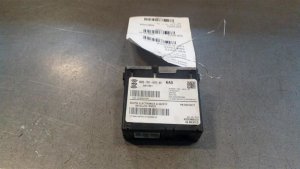
OEM Part Numbers: 39100SZAA71RM 39100SZAA72RM 39100SZAA73RM 39100SZAA74RM 39106SZAA71
Integrates with factory navigation screen and 7-speaker premium audio system. Features AM/FM, CD, and Satellite Radio capabilities. Controlled by faceplate buttons and steering wheel controls.
We Have This Part in Stock




The information in this article is provided for general reference and educational purposes only. Vehicle specifications, procedures, and part compatibility can vary by production date, trim level, and region. Always consult your vehicle's factory service manual and verify part numbers before purchasing or performing repairs. Safety-critical components such as airbags, seat belts, and braking systems should be installed by a qualified professional.
- Honda Pilot:
- 🛍️ Shop This Part
- Symptoms of a Failing Radio Control Unit
- Compatibility: EX-L with Navigation ONLY
- Programming and Anti-Theft Requirements
- How to Get the Anti-Theft Radio Code
- Buying a Used Radio Control Unit
- Known Issues, TSBs, and Recalls
- Cost Comparison
- Frequently Asked Questions (FAQ)
- 🎟️ Get 5% Off