

2022-2023 Genesis GV70 Radio Control Unit: Solving Reboots, Black Screens, and Replacement Programming
This guide covers the common software glitches, recall information, and mandatory programming steps for replacing the head unit in your Genesis GV70.
- A replacement head unit (new or used) absolutely requires programming ('Variant Coding') by a Genesis dealer to function.
- Many common issues like rebooting and black screens are caused by a software bug addressed by a free recall (NHTSA 26V019). Check for software updates before replacing the part.
- The correct part number for the 14.5-inch navigation system is 96560-AR650. Using a different number will not work.
- A temporary fix for the common rebooting issue is to disable the HD Radio feature in the settings menu.
Symptoms of a Failing GV70 Head Unit
When the radio control unit in a 2022-2023 Genesis GV70 begins to fail, it can cause a variety of frustrating issues. Many of these problems are intermittent and may seem random at first. Before assuming the unit is completely broken, it's important to check for software updates, as many symptoms can be resolved with a simple patch.
- Intermittent Rebooting: The most widely reported issue is the entire infotainment system, including the instrument cluster, suddenly rebooting while driving. The screens will go black for 5-10 seconds before the Genesis logo appears and the system restarts. This is often linked to a software bug related to the HD Radio.
- Blank or Black Screen: The 14.5-inch center display may go completely black and become unresponsive. Sometimes audio from the radio or a connected phone can still be heard, even with a black screen. This can sometimes be temporarily fixed by restarting the car or performing a soft reset.
- Screen Flickering: Some owners report thin, horizontal lines flickering across the display. This can be a precursor to the screen going completely black. In some cases, this has been traced to a poorly crimped coaxial cable connecting to the back of the screen, an issue that can be fixed by a dealer.
- Unresponsive Touchscreen or Controls: The system may freeze, with the touchscreen or physical control knob failing to register inputs.
- No Audio: Sound may cut out from all or some speakers, such as the front speakers, even though the head unit appears to be functioning correctly.
- Connectivity Problems: Frequent issues with Apple CarPlay or Android Auto disconnecting, or Bluetooth devices failing to pair or maintain a connection, can point to a problem with the head unit's software or hardware.
Pro Tip: Before taking it to a shop, try a soft reset. With the vehicle on, press and hold the MAP and SETUP buttons simultaneously for about 10 seconds until the screen goes black and the system reboots. This can clear temporary software glitches without erasing your settings.
Known Issues, Recalls, and Technical Service Bulletins (TSBs)
Many apparent "failures" of this head unit are actually software problems that Genesis has addressed through recalls and service bulletins.
NHTSA Recall 26V019 (Genesis Campaign 031G): Infotainment System Rebooting
This major recall addresses the issue of the instrument cluster and center infotainment screen intermittently rebooting. The cause was identified as a software logic error where the system attempts to write both HD and analog radio data into the same memory location, causing a data overwrite error and forcing a system reboot.
- Vehicles Affected: Includes certain 2022-2023 Genesis GV70 models, among others.
- The Fix: Genesis dealers will update the Audio-Video-Navigation (AVN) software free of charge. Many vehicles are also eligible for an Over-The-Air (OTA) software update that resolves the issue without a dealer visit.
- Temporary Solution: Until the update is performed, Genesis advises owners to disable the HD Radio feature in the radio settings to prevent the reboots from occurring.
Potential Loose Screen Connector
Some forum users have reported that screen flickering and blackouts were traced to a poorly crimped coaxial cable connector on the back of the display. A Technical Service Bulletin for a similar issue on the Hyundai Santa Fe was reportedly applied to the GV70, where a technician used a special tool to re-crimp the connector, resolving the problem. If you experience screen flickering, this is a known possibility to mention to your service advisor.
Warning: A blank or rebooting instrument cluster is a serious safety issue, as it temporarily hides the speedometer, fuel gauge, and critical warning lights. If your vehicle is exhibiting these symptoms, it is crucial to have the recall performed immediately.
Buying a Used 2022-2023 GV70 Radio Control Unit
If a software update doesn't fix your issues and you need a replacement, buying a used OEM unit can save you a significant amount of money. However, this is not a simple plug-and-play part. Careful verification is required.
1. Verify the Part Number: 96560-AR650
This is the most critical step. The part number on the replacement unit MUST exactly match your original unit. The number 96560-AR650 is specifically for 2022-2023 GV70 models equipped with the 14.5-inch screen and factory navigation. There are other similar part numbers for different model years or option packages that are not interchangeable. Some sellers also note this part is for Korea-built models (VIN starting with 'K'). Always confirm the part number on your original unit before ordering.
2. Plan for Dealer Programming
A used radio control unit cannot be simply swapped into your vehicle. The unit must be programmed to your car's specific Vehicle Identification Number (VIN) and options. Genesis service documents refer to this as "Variant Coding." If this procedure is not performed by a Genesis dealer with their GDS diagnostic tool, you will likely experience issues like a blank screen, a non-functional backup camera, or missing features. You must factor the cost of dealer programming into the total cost of the repair. An independent shop or locksmith will not have the proprietary software to perform this task.
3. Physical Inspection
When you receive the used unit, inspect it carefully before installation. Check for:
- Connector Damage: Look at all electrical connection ports for bent, broken, or corroded pins.
- Signs of Water Intrusion: Check for any white or green chalky residue, which indicates past water damage.
- Case Integrity: Ensure the housing is not cracked or damaged, which could indicate it was dropped or mishandled.
Replacement Cost Comparison
The cost to replace the GV70 head unit varies dramatically between new and used options. The mandatory dealer programming adds to the final cost of a used part.
| Part Type | Estimated Cost |
|---|---|
| New OEM (Dealer) | $2,300 - $3,400 |
| Used OEM (Online) | $350 - $500 |
| Shop Labor (Physical Swap) | $200 - $400 |
| Shop Labor (Dealer Programming) | $150 - $300 |
Frequently Asked Questions (FAQ)
Does a replacement GV70 radio unit need to be programmed?
Yes, absolutely. A replacement head unit, whether new or used, must be programmed to your vehicle's VIN and specific options. This procedure, called "Variant Coding," can only be done by a Genesis dealership using their proprietary GDS diagnostic system. Without this step, the unit will not function correctly.
Can I install a used radio unit myself?
While the physical installation (removing trim and swapping the unit) is possible for an experienced DIY mechanic, the unit will not work until it is programmed by a dealer. Therefore, a trip to the dealership is unavoidable. Most owners will find it more efficient to have the dealer perform the entire job.
My screen is black. Is the head unit definitely broken?
Not necessarily. First, check if your vehicle is part of the software recall (NHTSA 26V019) by entering your VIN on the NHTSA website. The issue could be a software bug that a free update will fix. It could also be a loose cable connection behind the screen. A full hardware failure is the last possibility after software and connections have been checked.
Are there any OBD-II codes for a bad radio?
Typically, a failing radio control unit will not trigger a standard Check Engine Light or store common OBD-II codes (like P-codes). It may store manufacturer-specific communication codes (U-codes) that can only be read by a dealership's advanced diagnostic tool, not by a standard consumer code reader.
Technical Specifications
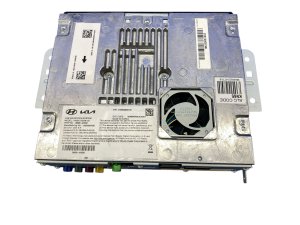
OEM Part Numbers: 96560-AR650
Controls 14.5-inch LCD with factory navigation. Integrates AM/FM, SiriusXM, HD Radio, Apple CarPlay, and Android Auto.
We Have This Part in Stock

The information in this article is provided for general reference and educational purposes only. Vehicle specifications, procedures, and part compatibility can vary by production date, trim level, and region. Always consult your vehicle's factory service manual and verify part numbers before purchasing or performing repairs. Safety-critical components such as airbags, seat belts, and braking systems should be installed by a qualified professional.
- Genesis GV70:
- 🛍️ Shop This Part
- Symptoms of a Failing GV70 Head Unit
- Known Issues, Recalls, and Technical Service Bulletins (TSBs)
- NHTSA Recall 26V019 (Genesis Campaign 031G): Infotainment System Rebooting
- Potential Loose Screen Connector
- Buying a Used 2022-2023 GV70 Radio Control Unit
- 1. Verify the Part Number: 96560-AR650
- 2. Plan for Dealer Programming
- 3. Physical Inspection
- Replacement Cost Comparison
- Frequently Asked Questions (FAQ)
- 🎟️ Get 5% Off