

2017-2019 Genesis G90 Radio Control Unit: VIN Lock, Programming, and Replacement Guide
This guide explains the critical anti-theft programming and VIN-locking for the 2017-2019 Genesis G90 radio head unit, a common source of confusion during replacement.
- A replacement radio control unit MUST be programmed by a Genesis dealer to your car's VIN due to an anti-theft system.
- Failure to program the unit will result in a locked, non-functional radio, even if it powers on.
- Always match the OEM part number exactly, as they are specific to engine size (3.3L vs. 5.0L) and options like rear entertainment.
- A faulty radio unit is a known cause of parasitic battery drain in the G90; if your battery keeps dying, the head unit is a prime suspect.
Symptoms of a Failing G90 Radio Control Unit
When the radio control unit in a first-generation G90 begins to fail, it can cause a variety of frustrating issues. Recognizing these symptoms is the first step in diagnosing the problem.
- Screen Freezes or is Unresponsive: The main infotainment display may freeze, stop responding to touch or physical button inputs, or lag significantly.
- Blank or Black Screen: The screen may fail to turn on, display a black screen intermittently, or get stuck on a message like 'Navigation Activation in Progress'. This is a common complaint for this generation.
- System Reboots Randomly: The entire infotainment system may shut down and restart on its own while driving.
- No Audio: Sound may cut out from all sources (radio, media, navigation), even if the screen appears to be working correctly. This can sometimes point to an issue with the external amplifier, but it is often related to the head unit itself.
- Bluetooth & Connectivity Failures: The unit may have trouble pairing with phones, or it may frequently drop existing Bluetooth connections.
- Parasitic Battery Drain: A faulty head unit can fail to shut down properly when the car is turned off, leading to a slow drain on the 12V battery. If your G90's battery repeatedly dies after sitting for a few days, the radio unit is a known potential cause.
- Navigation System Constantly Searching: The GPS may fail to lock onto a signal, leaving the navigation system perpetually searching and unusable.
Pro Tip: Before assuming the unit is broken, try a soft reset. On many Genesis models, pressing and holding the MAP and SETUP buttons simultaneously for about 10 seconds will reboot the system. Some models also have a small pinhole reset button near a knob that can be pressed with a paperclip. This can often resolve temporary software glitches.
Known Issues, TSBs, and Recalls
While there are no specific recalls for the 2017-2019 G90 radio unit itself, several Technical Service Bulletins (TSBs) and related issues are relevant.
- TSB for Connectivity Loss: Genesis has issued TSBs for various models, including the 2019 G90, related to loss of connectivity for Connected Car Services due to network issues. The fix involves a procedure to reset the AVN unit.
- Software Updates: Some issues, like a navigation system stuck searching, have been linked to failed software updates. A user reported that a faulty update file rendered their navigation useless and caused battery drain.
- Distinction from Later Recalls: It's important not to confuse issues on the 2017-2019 models with recalls for later G90s. For example, NHTSA campaign 25V474 (Hyundai recall 027G) addresses a blank instrument cluster on 2023-2025 models, which is a different part and issue.
Programming, VIN Lock, and Anti-Theft
Warning: This is the most critical section for anyone buying a used radio control unit. Failure to follow these guidelines will result in a non-functional part.
The radio control unit in the Genesis G90 is equipped with an anti-theft system that links it to the vehicle's Vehicle Identification Number (VIN). This means you cannot simply swap a unit from one car to another and expect it to work.
- Dealer Programming is Required: When a new or used radio unit is installed, it must be programmed by a Genesis dealership to match the car's VIN. Without this step, the unit will be locked and will not function.
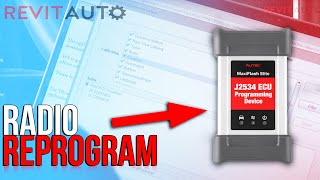
- Independent Shops and Locksmiths: Most independent shops and automotive locksmiths do not have access to the proprietary Genesis GDS SMART diagnostic software required for this programming. While some advanced diagnostic tools like Autel with a J2534 pass-thru device 🎬 Watch: How to reprogram a replacement radio using Autel J2534 can sometimes program modules, success on a Genesis-specific anti-theft system is not guaranteed and often requires a subscription to the manufacturer's service. For this specific part, a dealer visit is the most reliable and often only option.
- What Happens if You Don't Program It?: An unprogrammed unit will power on but will likely display a "Locked" message or have key features like navigation and audio disabled. It will not communicate properly with the other modules in the vehicle.
Buying a Used 2017-2019 G90 Radio Control Unit
Buying a used OEM radio is a great way to save money, but you must be careful to get the right part and understand the necessary steps after installation.
- Verify the Part Number: The most important step is to match the part number exactly. The existing data points to several numbers. Part number 96560-D2560-ZCA is frequently cited for the 3.3L Turbo engine. Another part, 96560-D2660-ZCA, is listed for G90 models with rear monitors. Always verify the correct part number for your specific vehicle's VIN and trim level before purchasing.
- Engine and Trim Level Matter: Listings often specify if the unit is for the 3.3L V6 Turbo or the 5.0L V8, and whether the vehicle has the rear seat entertainment system. Ensure the donor vehicle's specifications match your own.
- Factor in Programming Costs: Remember that the price of the used part is not the final cost. You must budget for a visit to a Genesis dealership for VIN programming. Call ahead to get a quote for this service, as labor rates vary.
- Physical Inspection: When you receive the part, inspect it for any signs of physical damage, especially to the connectors. Ensure all pins are straight and not corroded.
Cost of Replacement
The cost to replace the radio control unit can vary significantly depending on the path you choose.
| Part Source | Estimated Cost |
|---|---|
| New OEM | $3,400 - $5,000+ |
| Used OEM | $500 - $700 |
| Shop Labor (Installation) | $150 - $300 |
| Dealer Labor (Programming) | $150 - $300 (Typically 1-2 hours of labor) |
Note: Prices are estimates and can vary based on location, supplier, and vehicle specifics. Labor for installation and programming are separate costs.
Frequently Asked Questions (FAQ)
Can I install a used G90 radio myself?
Yes, the physical installation is a DIY-feasible task for someone comfortable with removing interior trim panels. However, the unit will not work until it is programmed by a Genesis dealer. You can save on labor by installing it yourself and then driving the vehicle to the dealer for the final programming step.
Why does my replacement radio say "Locked"?
This happens because of the anti-theft system. The radio is linked to the VIN of its original vehicle. When installed in a new car, it detects a VIN mismatch and locks itself to prevent theft. It must be reprogrammed by a dealer to work in your car.
Will a radio from a 5.0L G90 work in my 3.3L model?
Likely not. The part numbers are often specific to the engine and trim level, such as whether the car has a rear entertainment system. It is crucial to match the part number from your original unit to ensure compatibility with all vehicle features.
The seller says the radio is unlocked. Do I still need to go to the dealer?
Yes. The term "unlocked" can be misleading. A seller might mean the unit is not from a stolen vehicle, but it is still electronically tied to its original VIN. The anti-theft programming is a required step for installation in a different vehicle, regardless of the part's history.
Helpful Videos
Technical Specifications
OEM Part Numbers: 96560-D2560 96560-D2560-ZCA 96560-D2560-ZCAFL 96560D2560ZCA 96560-D2660-ZCA
Audio Video Navigation (AVN) Head Unit with integrated anti-theft and VIN-lock system. Controls navigation, media, and vehicle settings. Requires dealer programming via Genesis GDS SMART software.
We Have This Part in Stock




The information in this article is provided for general reference and educational purposes only. Vehicle specifications, procedures, and part compatibility can vary by production date, trim level, and region. Always consult your vehicle's factory service manual and verify part numbers before purchasing or performing repairs. Safety-critical components such as airbags, seat belts, and braking systems should be installed by a qualified professional.
- Genesis G90: