

2023-2025 BMW X1 Radio Head Unit: Programming, Faults, and Replacement Guide
This guide covers the critical programming, common software glitches, and replacement challenges for the iDrive head unit in the third-generation (U11) BMW X1.
- A replacement head unit MUST be programmed to the car's VIN by a dealer or specialist; it is not plug-and-play due to anti-theft component protection.
- Most common issues like screen freezing or CarPlay dropping are software glitches, not hardware failures. Try a soft reset or seek a dealer software update first.
- Buying a used unit is risky. You must verify the part number and ensure it's from a vehicle with a compatible iDrive version (iDrive 8 vs. iDrive 9 hardware is different).
- The total cost of replacement includes the part, physical installation labor, and a separate, mandatory programming fee which can be several hundred dollars.
Known Issues, Recalls, and Technical Service Bulletins (TSBs)
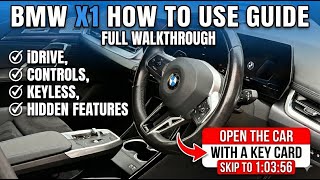
For the 2023-2025 (U11) BMW X1, most issues related to the head unit are software-based rather than hardware failures. Owners on forums report various glitches with the iDrive 8 and iDrive 9 systems 🎬 Watch: Full walkthrough of the iDrive system and controls, which can often be resolved with a software update from a dealer or via an over-the-air (OTA) update.
- Software Glitches: Common complaints include the system freezing or becoming unresponsive, Apple CarPlay/Android Auto disconnecting, lost radio presets, the screen not starting on the correct page, and a generally slow user interface. A soft reset (pressing and holding the volume knob for 25-70 seconds until the screen reboots) can often temporarily fix these issues.
- iDrive 8 vs. iDrive 9: Early 2023 models were equipped with iDrive 8. Later models received a new head unit hardware and iDrive 9. It is not possible to upgrade a vehicle from iDrive 8 to iDrive 9, as it requires the newer, physically different head unit.
- TSBs: BMW has issued several Technical Service Bulletins related to iDrive software. These bulletins address problems like missing displays, apps disappearing (like the Drive Recorder), and the Intelligent Personal Assistant deactivating. If you experience consistent software problems, a dealer can check for applicable TSBs and perform a software update.
- Recalls: While there are several recalls for the 2023-2025 X1, they primarily concern the integrated braking system, airbags, and seat belts. There are no widespread recalls specifically for head unit hardware failure as of mid-2026. Always check the NHTSA website with your vehicle's VIN for the most up-to-date recall information.
Warning: Many reported iDrive problems are software bugs. Do not assume you need a new head unit for issues like a frozen screen or CarPlay problems. Always attempt a soft reset first, and then check with a dealer for available software updates, which is a much cheaper solution than hardware replacement.
Symptoms of a Failing Head Unit
While many issues are software-related, a true hardware failure of the head unit can occur. Symptoms of a failed unit are typically more severe and persistent than simple software glitches.
- Black or Blank Screen: The screen is completely dark and does not respond to a soft reset.
- Constant Rebooting: The system gets stuck in a loop, showing the BMW logo before restarting, and never fully booting up.
- Complete Loss of Functions: No audio (including chimes and alerts), no radio, no navigation, and no access to vehicle settings menus.
- No Communication: A diagnostic scan by a technician may show that the head unit module is not communicating on the vehicle's network. This often results in 'U' (communication) fault codes.
Buying a Used Radio Control Unit
Purchasing a used head unit for a modern BMW like the U11 X1 is complex and requires careful consideration. Due to advanced anti-theft and vehicle integration systems, it is not a simple plug-and-play part.
CRITICAL: Component Protection & Programming. This head unit is tied to the original vehicle's VIN. Installing a used unit in a different car will trigger component protection, disabling most or all of its features. The replacement unit MUST be professionally programmed to your car's VIN and specific options list. Many sellers on eBay and forums explicitly state that coding is required.
What to Look For:
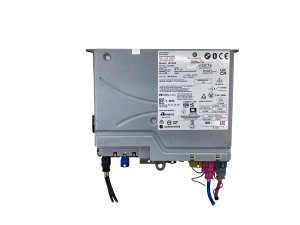
- Part Number Verification: Start by matching the OEM part number. The known number is 5B7787101, but multiple numbers may exist depending on the vehicle's features (e.g., with or without Head-Up Display). Always confirm the part number from your original unit.
- Hardware Version: Be aware of the hardware differences between units intended for iDrive 8 and iDrive 9. A unit from an iDrive 9 car cannot be used in an iDrive 8 car, and vice-versa.
- Reputable Seller: Buy from a seller who guarantees the unit is in good working condition and provides clear photos of the part number labels and connectors. Some specialized recyclers may even offer units that have been 'virginized' (reset to a factory state), making them easier to program.
- Physical Inspection: When you receive the part, check for any signs of water damage, corrosion on the connectors, or evidence that the casing has been opened.
Programming and Installation
Replacing the head unit is a two-stage process: physical installation and software programming.
- Physical Installation: This involves carefully removing dashboard trim to access and swap the unit. While technically possible for a skilled DIYer, the risk of damaging expensive trim pieces is high.
- Programming: This is not optional and cannot be done by most DIYers or general mechanics. It requires specialized BMW diagnostic software like ISTA. A BMW dealer or a qualified independent specialist with the proper tools must perform this step. They will code the unit to your car's VIN, mileage, and specific equipment (like the sound system, cameras, etc.). Some services specialize in this remote or mail-in programming.
Pro Tip: Before buying a used unit, get a quote for programming from a local BMW specialist or dealer. The cost of programming can be significant and should be factored into the total repair cost. Some independent shops may refuse to program a customer-supplied used part due to the risk of it being faulty or incompatible.
Cost Breakdown
The cost to replace the head unit can vary dramatically based on the path you choose. Programming costs are separate from the part itself.
| Part/Service | Estimated Cost | Notes |
|---|---|---|
| New OEM Unit (Part Only) | $2,000 - $8,000+ | Extremely expensive, as reported by owners for similar models. Price varies by vehicle options. |
| Used OEM Unit (Part Only) | $650 - $1,200 | Prices from online recyclers and eBay listings. Condition and compatibility vary. |
| Shop Labor (Installation) | $200 - $400 | Estimated 1.5-2.5 hours of labor to physically swap the unit. |
| Shop Labor (Programming) | $250 - $500+ | Can be a flat fee or based on 2-3 hours of labor. Some specialists offer this as a standalone service. |
Frequently Asked Questions (FAQ)
Can I just swap in a used head unit without programming?
No. The unit is linked to the original car's VIN through a feature called Component Protection. If you install it without programming, it will not function correctly. Key features like navigation, audio, and even vehicle settings will be disabled.
My screen is frozen. Do I need a new head unit?
Probably not. A frozen or unresponsive screen is a very common software glitch. First, try a 'soft reset' by pressing and holding the physical volume knob for about 30 seconds until the screen turns off and reboots. If the problem persists, contact a dealer about a software update, as this is the most likely solution.
Can an independent mechanic or locksmith program the new unit?
Only if they are a BMW specialist with the official ISTA diagnostic software and expertise in coding modules. A general mechanic or locksmith will not have the necessary tools or access. Some sellers recommend specific remote coding services.
What OBD-II codes are associated with a failed head unit?
A completely failed head unit will typically not generate standard 'P' (powertrain) codes. Instead, it will likely result in 'U' (network communication) codes, indicating a loss of communication with the head unit module. A BMW-specific scanner is needed to properly diagnose these module-level faults.
Helpful Videos

Technical Specifications
OEM Part Numbers: 5B7787101
Controls the BMW Curved Display running iDrive 8 or iDrive 9 (hardware dependent). Integrates navigation, audio, climate, and vehicle settings. Connects via the vehicle's CANBUS and MOST networks.
We Have This Part in Stock

The information in this article is provided for general reference and educational purposes only. Vehicle specifications, procedures, and part compatibility can vary by production date, trim level, and region. Always consult your vehicle's factory service manual and verify part numbers before purchasing or performing repairs. Safety-critical components such as airbags, seat belts, and braking systems should be installed by a qualified professional.
- BMW X1: