

2018-2021 Mazda 6 Radio: Fixing Ghost Touch, Screen Cracks & Replacement Programming
This guide covers the common screen delamination and "ghost touch" issues, and explains the critical programming required when replacing the main audio unit.
- The most common failure is "ghost touch" or screen cracks, which can often be fixed with a less expensive screen digitizer repair kit instead of replacing the entire unit.
- Replacing the entire radio unit (CMU) is NOT plug-and-play. It requires programming by a Mazda dealer or a specialized shop to function correctly.
- Before buying, you MUST verify if your car has the standard 6-speaker system or the premium Bose system. This part is only for the standard system.
- If your system is stuck in a reboot loop, try removing the navigation SD card first, as a corrupt card is a very common and simple-to-fix cause.
Understanding the Mazda 6 Audio System: The CMU

In the 2018-2021 Mazda 6, the part often called the 'radio' or 'head unit' is technically the Connectivity Master Unit (CMU). This single module is the central computer for the entire infotainment experience. When it or its connected components fail, it can lead to a range of frustrating issues, from a possessed-acting touchscreen to a completely blank screen.
Symptoms of a Failing Mazda 6 Radio / CMU

Failures in this system typically fall into two categories: problems with the display screen itself, or problems with the internal computer (the CMU). Here are the most common symptoms owners report.
1. Infotainment Screen "Ghost Touch" or Phantom Inputs
This is the most widely reported issue. The screen will register touches that you are not making, causing it to randomly change menus, make phone calls, switch radio stations, or zoom the navigation map. This behavior can range from a minor annoyance to making the system completely unusable. It is often worse in hot weather, as heat can exacerbate the underlying cause. This issue is frequently associated with Diagnostic Trouble Code (DTC) B105E:04 or B108E:04, which indicates an internal failure or abnormal input from the touchscreen.
2. Cracked or Delaminating Touchscreen ("Spider Cracks")
Many owners discover fine, web-like cracks forming on the screen, often starting from the corners. These are typically internal cracks in the digitizer (the touch-sensitive layer) and cannot be felt on the surface. In other cases, the top layer of the screen may look like it's peeling, bubbling, or melting. This physical degradation is caused by repeated heat cycles and is the root cause of the 'ghost touch' problem.
3. System Stuck in a Reboot Loop
The system may get stuck continuously rebooting, showing the Mazda logo over and over without ever reaching the main home screen. This can be caused by a software glitch, a hardware failure in the CMU, or, most commonly, a corrupted navigation SD card.
Pro Tip: If your system is stuck in a reboot loop, the very first thing you should do is eject the navigation SD card (located in the center console) and try starting the car again. A corrupt card is a frequent and easy-to-fix cause of this specific problem.
4. Blank or Black Screen
The screen may fail to turn on at all, remaining completely black. This can indicate a power delivery issue, a failed backlight in the display, or a critical hardware failure within the CMU itself. Before assuming the unit is dead, try a system reset by pressing and holding the Back, Nav, and Mute buttons simultaneously for about 10 seconds until the system reboots.
5. No Audio, or Bluetooth/USB Connectivity Issues
Less common symptoms include a total loss of audio from all speakers or the inability to connect or maintain a connection with phones via Bluetooth or USB. Sometimes these are software bugs that can be fixed with an update. On vehicles with the Bose sound system, a total loss of audio could also point to a failure of the external Bose amplifier rather than the head unit.
Known Issues & Technical Service Bulletins (TSBs)

Mazda has acknowledged the widespread screen issues. Instead of being a safety recall, the fix is documented in Technical Service Bulletins (TSBs) provided to dealerships.
- TSB for Screen Cracking/Delamination/Ghost Touch: Multiple service communications, including SA-027-24 and others, address the failing screen issue. Crucially, these bulletins instruct technicians not to replace the entire expensive display assembly. Instead, the official repair is to install a Media Display Lens Repair Kit. This kit replaces only the faulty outer touchscreen digitizer layer with an updated part designed to better resist heat.
- Software Update TSBs: Mazda regularly releases software updates for the CMU to fix bugs related to system stability, reboots, navigation errors, and Bluetooth connectivity. If you are experiencing glitches, checking for a software update is a key diagnostic step.
Warning: A TSB is not a recall. While it is an official repair procedure, the manufacturer is not required to perform the repair for free, especially if the vehicle is outside of its original warranty period. However, some dealers may offer a 'goodwill' repair or partial coverage due to the well-known nature of the defect.
Buying a Used 2018-2021 Mazda 6 Radio: What You MUST Know
A used OEM radio is an excellent value, but compatibility is complex. Follow these rules to avoid buying a part you can't use.
1. The #1 Rule: This Part REQUIRES Programming
You cannot simply swap a used CMU into your car. It is not plug-and-play. The replacement unit must be professionally programmed and configured to your vehicle's specific features and VIN. Without this step, the unit may not function correctly, or at all. This typically requires a Mazda dealership or a well-equipped independent shop with a subscription to Mazda's diagnostic software. Factor the cost of programming into your budget before buying a used part.
2. Compatibility Check: Bose vs. Standard Audio
The most important compatibility check is your vehicle's sound system. This part, GBEF-66-DRX, is for vehicles with the standard 6-speaker audio system. It will NOT work in a vehicle equipped with the premium 11-speaker Bose audio system. The Bose system uses an external amplifier and has different wiring and software configuration. Before ordering, check your car's speaker grilles for the 'Bose' logo to confirm which system you have.
3. Part Number Verification
Always match the part number from your original unit to the replacement. The primary OEM part number for this standard audio unit is GBEF-66-DRX. You may also see GMN466DRX, which can be an interchangeable or remanufactured equivalent. While units from other Mazda models of the same era might look identical, their internal configuration can differ, so sticking to a Mazda 6 part number is safest.
4. Physical Inspection
When buying a used unit, ask the seller for clear photos of the screen. Look for any signs of the spider cracks or delamination mentioned earlier. While a used unit is a great value, you don't want to buy one that is already exhibiting the most common failure mode.
Cost to Replace the Mazda 6 Radio Audio Unit
The cost can vary dramatically depending on the failure and the solution you choose.
| Repair/Replacement Option | Estimated Cost |
|---|---|
| New OEM Unit (Part Only) | $500 - $750 |
| Used OEM Unit (Part Only) | $150 - $350 |
| DIY Screen Digitizer Repair Kit | $70 - $100 |
| Shop Labor (Physical Swap) | $150 - $300 (1-2 hours) |
| Dealer Programming (For Swapped Unit) | $120 - $250 (approx. 1 hour labor) |
| Total Dealer Replacement (New Unit) | $1,500 - $2,400+ |
Frequently Asked Questions (FAQ)
Does a replacement Mazda 6 radio need to be programmed?
Yes, absolutely. A replacement Connectivity Master Unit (CMU) must be programmed by a Mazda dealer or a qualified independent shop. The unit is configured to the car's VIN and specific options (Bose vs. standard audio, navigation, etc.). It is not a plug-and-play part.
My screen has 'ghost touch' but otherwise works. Do I need to replace the whole radio?
No, you likely do not need to replace the entire unit. The ghost touch and spider cracks are a known failure of the screen's digitizer layer. Mazda's official repair is to install a lens repair kit, which only replaces the screen surface. This is a much cheaper repair than replacing the whole CMU assembly. DIY kits are also available for those comfortable with delicate electronic work.
Can I upgrade my standard 6-speaker system to a Bose system just by swapping the head unit?
No. The Bose system is completely different. It includes a separate external amplifier, different speakers, and additional wiring. Simply swapping the head unit (CMU) will not work and is not a feasible upgrade path.
What causes the screen to crack and have phantom touches?
According to Mazda, the issue is caused by heat expansion and contraction over time. This thermal stress causes the adhesive layers in the touchscreen to separate or deform, leading to internal cracks and faulty electrical signals that the CMU interprets as touches.
Technical Specifications
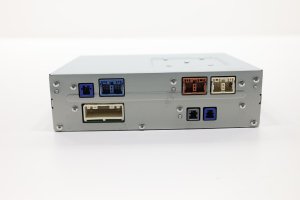
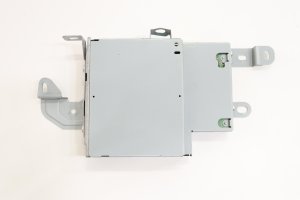
OEM Part Numbers: GBEF-66-DRX GMN466DRX
This unit is the Connectivity Master Unit (CMU) for the Mazda Connect system. It is designed for vehicles with the standard 6-speaker audio system and without factory satellite radio.
We Have This Part in Stock




The information in this article is provided for general reference and educational purposes only. Vehicle specifications, procedures, and part compatibility can vary by production date, trim level, and region. Always consult your vehicle's factory service manual and verify part numbers before purchasing or performing repairs. Safety-critical components such as airbags, seat belts, and braking systems should be installed by a qualified professional.
- MAZDA MAZDA 6:
- 🛍️ Shop This Part
- Understanding the Mazda 6 Audio System: The CMU
- Symptoms of a Failing Mazda 6 Radio / CMU
- 1. Infotainment Screen "Ghost Touch" or Phantom Inputs
- 2. Cracked or Delaminating Touchscreen ("Spider Cracks")
- 3. System Stuck in a Reboot Loop
- 4. Blank or Black Screen
- 5. No Audio, or Bluetooth/USB Connectivity Issues
- Known Issues & Technical Service Bulletins (TSBs)
- Buying a Used 2018-2021 Mazda 6 Radio: What You MUST Know
- 1. The #1 Rule: This Part REQUIRES Programming
- 2. Compatibility Check: Bose vs. Standard Audio
- 3. Part Number Verification
- 4. Physical Inspection
- Cost to Replace the Mazda 6 Radio Audio Unit
- Frequently Asked Questions (FAQ)
- 🎟️ Get 5% Off