

2022 BMW i4 Radio & Climate Control Panel: A Guide to Failures, Replacement, and Programming
This guide covers the common issues, programming requirements, and replacement costs for the central audio and climate control panel in your 2022 BMW i4.
- A replacement unit will most likely require programming by a dealer or specialist with BMW ISTA software to function correctly.
- Always match the OEM part number exactly. The current number is 61-31-5-A63-F19.
- Before replacing the unit, check the electrical connector on the back for a loose or corroded connection, as this can cause identical symptoms.
- Failure of this panel can disable the hazard warning lights, which is a critical safety issue requiring immediate attention.
Symptoms of a Failing Radio & Climate Control Panel
A failure in the 2022 BMW i4's central control panel can manifest in several ways, ranging from minor annoyances to a complete loss of function. Because this panel communicates with multiple vehicle systems, symptoms can sometimes appear to be unrelated.
1. Unresponsive or Dead Buttons
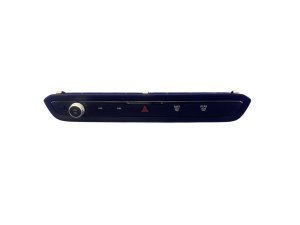
The most common symptom is when one or more buttons on the panel stop working. This can include the volume knob, radio preset buttons, track skip buttons, or the hazard light switch. The buttons may feel normal but produce no response on the iDrive screen or from the system. In severe cases, the entire panel, including its backlighting, may be completely dead.
2. Flashing Panel or Flickering Lights
Some owners report the backlighting on the control panel flashing or flickering intermittently. This often points to an electrical issue, such as a poor connection or an internal fault within the unit itself. This can be a precursor to total failure.
3. Climate Control Functions Unavailable
You may find that you are unable to turn on the A/C, adjust fan speed, or change air distribution using the physical buttons. When you navigate to the climate menu in the iDrive system, you might see that the options are 'greyed out' and cannot be selected. This indicates that the main iDrive system is not receiving valid signals from the control panel.
4. Hazard Warning Light Malfunction
A critical failure is when the hazard warning light button becomes inoperative. Pressing the button may do nothing, or the lights may not turn off. This is a significant safety concern and requires immediate attention.
Pro Tip: Before assuming the panel has failed, check the wiring. Some owners have found that a loose or corroded electrical connector behind the unit was the true cause of the problem. This can sometimes happen after the dashboard has been serviced for another issue.
Known Issues, TSBs, and Recalls
As of mid-2026, there are no specific recalls or Technical Service Bulletins (TSBs) from the National Highway Traffic Safety Administration (NHTSA) for this radio and climate control panel on the 2022 BMW i4. Existing recalls for this model year primarily concern the high-voltage battery system and software related to drive power.
Buying a Used Radio & Climate Control Panel
Purchasing a used OEM control panel is a cost-effective way to restore functionality. However, compatibility is everything with modern BMW electronics. Follow these guidelines to ensure you get the right part.
1. Match Part Numbers Exactly
This is the most important rule. The primary part number for this unit is 61-31-5-A63-F19. This number supersedes the older part number 61-31-5-A3F-6C6. You may also see a shorter version, 5A63F19, printed on the part label. Do not purchase a panel with a different part number, even if it looks identical, as it may not be compatible with your vehicle's software and wiring.
2. Physical Inspection
When buying a used unit, inspect it carefully:
- Button Wear: Look for excessive wear on the button graphics, which indicates high usage.
- Liquid Damage: Check for any sticky residue around the buttons or signs of corrosion on the electrical connectors. Spilled drinks are a common cause of failure for these panels.
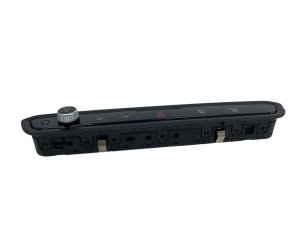
- Connectors: Ensure the connector pins on the back of the unit are straight and clean. Bent or corroded pins will cause connection issues.
3. The Programming Question: Be Prepared for a Specialist
This is the biggest variable when replacing BMW electronics. While some simple modules on BMWs are plug-and-play, many require programming (also called coding) to be recognized by the vehicle.
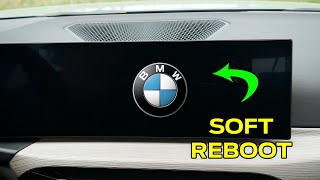
Warning: You should assume that a replacement control panel will require programming by a BMW dealer or a qualified independent specialist using dealer-level software like ISTA. While the physical swap is easy, the car's computer network may not recognize the new part until it is electronically coded to your vehicle's VIN. Failing to do this can result in a non-functional part. 🎬 Watch: How to reboot your BMW screen Do not expect this to be a simple plug-and-play swap.
DIY tools like BimmerCode are excellent for changing features but are generally not designed for programming a brand-new or used replacement module into the car's system.
Cost of Replacement
The cost to replace the radio and climate control panel can vary significantly based on the part source and labor.
| Item | Estimated Cost |
|---|---|
| New OEM Part (Dealer) | $145 - $190 |
| Used OEM Part | $75 - $150 |
| Shop Labor (Physical Swap) | $100 - $200 (approx. 1 hour) |
| Shop Labor (Programming) | $150 - $300 (approx. 1-2 hours) |
Frequently Asked Questions (FAQ)
Does a replacement radio control panel need to be programmed?
It is highly likely, yes. While not definitively confirmed for every situation, the standard procedure for replacing almost any electronic module in a modern BMW is to have it programmed or coded to the vehicle's VIN using dealer software (ISTA). You should budget for this and not assume it will be plug-and-play.
Can I fix my unresponsive buttons myself?
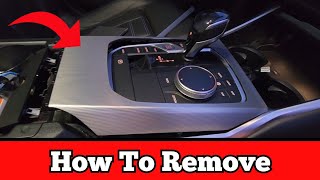
Possibly, if the cause is simple. Before buying a new part, you can try removing the trim and checking the electrical connector 🎬 See how to remove the center console panel on the back of the panel. Unplugging it, cleaning the contacts, and plugging it back in securely has solved the problem for some owners. However, the unit itself is sealed, and repairing individual buttons is not practical.
Will a control panel from a BMW 3 Series (G20) work in my i4 (G26)?
As long as the OEM part number (e.g., 61-31-5-A63-F19) is an exact match, the part is physically and electronically compatible. This specific control panel is used across a wide range of G-chassis BMWs, including the 3 Series, 4 Series, and i4.
My climate controls are greyed out on the screen, but the buttons light up. Is the panel bad?
This could still be the panel. The panel might be partially functional—powering up but failing to send proper communication signals to the main iDrive computer. This can result in the iDrive system disabling the on-screen controls. The first step in diagnosis would be to check for fault codes using a BMW-specific scanner.
Helpful Videos

Technical Specifications
OEM Part Numbers: 61-31-5-A63-F19 61315A63F19 5A63F19 61-31-5-A3F-6C6 61315A3F6C6
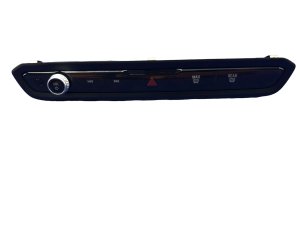
User interface control panel for audio, climate (HVAC), and hazard functions. Communicates with the vehicle's main head unit and body domain controller.
We Have This Part in Stock




The information in this article is provided for general reference and educational purposes only. Vehicle specifications, procedures, and part compatibility can vary by production date, trim level, and region. Always consult your vehicle's factory service manual and verify part numbers before purchasing or performing repairs. Safety-critical components such as airbags, seat belts, and braking systems should be installed by a qualified professional.
- BMW I4:
- 🎬 Helpful Videos
- 🛍️ Shop This Part
- Symptoms of a Failing Radio & Climate Control Panel
- 1. Unresponsive or Dead Buttons
- 2. Flashing Panel or Flickering Lights
- 3. Climate Control Functions Unavailable
- 4. Hazard Warning Light Malfunction
- Known Issues, TSBs, and Recalls
- Buying a Used Radio & Climate Control Panel
- 1. Match Part Numbers Exactly
- 2. Physical Inspection
- 3. The Programming Question: Be Prepared for a Specialist
- Cost of Replacement
- Frequently Asked Questions (FAQ)
- 🎟️ Get 5% Off