

2025-2026 Ford Maverick Radio Antenna Module: Programming, Failures, and Replacement Guide
Diagnose poor reception and GPS issues in your Maverick and understand the critical programming steps required for replacement.
- This module absolutely requires programming to the vehicle's VIN and options after installation using Ford's FDRS software; it is not a plug-and-play part.
- Verify compatibility carefully. This specific module is for Mavericks with Park Assist but WITHOUT the surround view camera system.
- Primary symptoms of failure are poor AM/FM/Satellite radio reception and GPS signal loss.
- A used OEM module is a viable, cost-saving option, but you must budget for professional programming costs.
Symptoms of a Failing Radio Antenna Module
When the Radio Antenna Module begins to fail, you will notice issues with features that rely on external signals. The truck will still run and drive, but these communication and entertainment features will be degraded or inoperative.
- Poor or No AM/FM Radio Reception: This is the most common symptom. Stations that were once clear may be full of static, or the radio may not be able to tune into any stations at all. This often affects AM stations first, as they are a weaker signal.
- Satellite Radio Issues: You may see a "No Signal" or "Check Antenna" message on your SYNC screen for SiriusXM. The audio may cut in and out frequently, even with a clear view of the sky.
- GPS Signal Loss or Inaccuracy: The vehicle's navigation system may struggle to find a GPS lock, show your vehicle in the wrong location, or lose the signal intermittently.
- Intermittent Electrical Problems: In some cases, a failing module can cause other strange electrical behavior due to communication errors on the vehicle's network.
A technician can scan the vehicle for Diagnostic Trouble Codes (DTCs). Failures in this module often store "U" (Network) or "B" (Body) codes. Common codes related to this module include:
- B2103: Antenna Not Connected
- U-codes for lost communication: Such as U0184 (Lost Communication With Radio), which indicate a network problem between the antenna module and the head unit.
Known Issues, TSBs, and Recalls
As of mid-2026, there are no specific recalls or widespread Technical Service Bulletins (TSBs) directly targeting the Radio Antenna Module for the 2025-2026 Ford Maverick. However, it's important to be aware of related issues:
- NHTSA Recall 24V-XXX (September 2024): While this recall for 2022-2024 Mavericks addresses a frozen rearview camera image, it involves a software update to the Connected Touch Radio (CTR), highlighting the importance of software in the Maverick's infotainment system.
- General Recalls: Several recalls exist for 2025-2026 Mavericks concerning issues like detaching instrument panel covers and moonroofs, but none are electronically related to this specific module.
The most common cause of failure for electronic modules like this is often water intrusion or corrosion on the electrical connectors, especially if the module is located near a window, headliner, or firewall.
Critical: Programming is Required. You cannot simply swap this module with a new or used one. The replacement module must be electronically programmed to your truck's specific Vehicle Identification Number (VIN) and factory options. Failure to program the module will result in it not functioning correctly.
Programming and Calibration
Replacing the Radio Antenna Module requires a specific procedure called Programmable Module Installation (PMI). This process uses specialized software to download the vehicle's unique "As-Built" data from Ford's servers and write it to the new module. This ensures the module knows which features your truck has (e.g., satellite radio, navigation) and can communicate with other systems correctly.
Who Can Program the Module?
- Ford Dealerships: They use the official Ford Diagnostic & Repair System (FDRS) software and have the training to perform the PMI process. This is the most reliable, albeit often most expensive, option.
- Qualified Independent Shops: Many independent auto repair shops that specialize in modern vehicles subscribe to the same FDRS software or use certified J2534 pass-thru devices to perform module programming.
- Advanced DIY with FORScan: It is technically possible for a knowledgeable DIY mechanic to perform the PMI using software called FORScan with an extended license and a high-quality OBD-II adapter. This is a complex procedure that carries the risk of "bricking" the module if done incorrectly. It requires a stable power supply connected to the vehicle's battery during the entire process. This method is not recommended for beginners.
Buying a Used Radio Antenna Module
A used OEM module is an excellent, cost-effective alternative to a new part, as it offers the same performance once programmed. However, careful verification is essential.
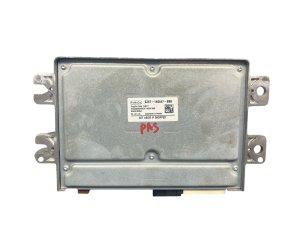
- Verify Compatibility by Part Number: The most critical step. The part numbers on the used module must match your original module or be a verified superseded number. The provided OEM part numbers (SZ6T-14G647-BBB, SZ6T-14G647-FDE, SZ6T-14G647-FE, SZ6Z-14G647-A, SZ6Z-14G647-G) are a good starting point.
- Check Vehicle Options: The module is specific to the vehicle's equipment. The initial data specifies this module fits vehicles with the Park Assist System but NOT equipped with the surround view camera. A module from a truck with the surround view camera (like part number SZ6Z-14G647-C) will not work correctly. Always confirm the donor vehicle's options if possible.
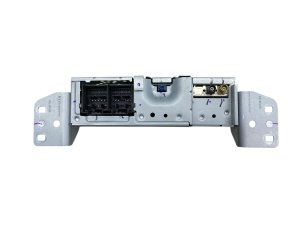
- Physical Inspection: When you receive the part, inspect the casing for cracks or signs of being opened. Check the electrical connector pins for any corrosion (green or white powder), which indicates past water damage. Do not install a module that shows signs of moisture.
- Budget for Programming: Remember that the purchase price of the used module is not the final cost. You must factor in the expense of having it professionally programmed, which can range from $100 to $250.
Pro Tip: Before removing your old module, ask a technician (or use FORScan) to save the "As-Built" data file from it. This file can sometimes be loaded directly onto the replacement module, simplifying the programming process.
Cost to Replace the Radio Antenna Module
Prices can vary based on location and supplier. The following is an estimated breakdown of costs:
| Part / Service | Estimated Cost |
|---|---|
| New OEM Module | $750 - $1,050 |
| Used OEM Module | $150 - $400 |
| Shop Labor (Replacement & Programming) | $200 - $400 (approx. 1.5-2.0 hours) |
Frequently Asked Questions (FAQ)
Do I have to get this module programmed at a Ford dealer?
No, you are not required to go to a dealer. Many well-equipped independent repair shops have the necessary Ford FDRS software or J2534 tools to program the module. However, you must confirm they can perform a "Programmable Module Installation" (PMI) for a 2025+ Ford before committing to the service.
What's the difference between all the part numbers like SZ6T- and SZ6Z-?
Part numbers starting with 'SZ6T' are typically engineering numbers, used during the vehicle's manufacturing process. Part numbers starting with 'SZ6Z' are service part numbers, which are what you would order from a dealership parts counter. Often, a service number will replace several engineering numbers. The key is to match the service number when buying a replacement.
Will a bad radio antenna module stop my truck from starting?
No. A failing radio antenna module is not linked to the vehicle's immobilizer or starting system. Your Maverick will start and drive normally, but you will experience the symptoms of poor reception for radio, GPS, and other connected services.
Can I just replace the antenna on the roof instead of this module? 🎬 Watch: How to determine if you need a new antenna
The antenna on the roof and the Radio Antenna Module are two separate components. The roof antenna is a passive receiver that captures the signals, while the module is an electronic brain that processes them. If your roof antenna is physically damaged (bent, broken, corroded), replacing it might solve your problem. However, if the antenna itself is fine, the issue is likely with this internal module.
Helpful Videos

Technical Specifications
OEM Part Numbers: SZ6T14G647BBB SZ6T14G647FDE SZ6T14G647FE SZ6Z-14G647-A SZ6Z-14G647-G
Processes AM/FM, GPS, SiriusXM, and Cellular signals. Communicates with the vehicle over the CAN bus network. Requires VIN-specific programming via Ford FDRS.
We Have This Part in Stock



The information in this article is provided for general reference and educational purposes only. Vehicle specifications, procedures, and part compatibility can vary by production date, trim level, and region. Always consult your vehicle's factory service manual and verify part numbers before purchasing or performing repairs. Safety-critical components such as airbags, seat belts, and braking systems should be installed by a qualified professional.
- Ford Maverick: