

2021-2025 Tesla Model X Steering Rack: 'Assist Reduced' Warning and Replacement Guide
Learn to diagnose the common 'Steering Assist Reduced' warning, understand relevant software recalls, and see if a used steering rack is a smart buy for your Model X.
- The most common failure symptom is the 'Steering Assist Reduced' warning on the display, which makes steering heavy and disables Autopilot/FSD.
- A November 2022 recall addressed loss of power steering on 2017-2021 models with an over-the-air (OTA) software update; ensure your vehicle's software is current before suspecting hardware failure.
- Replacement is not a simple DIY job as it requires mandatory software calibration using Tesla's Service Mode to initialize the part and clear faults.
- Part numbers can be confusing; always verify compatibility with the vehicle's VIN before purchasing a used rack, as multiple revisions exist.
Known Issues and Software Recalls

While the 2021-2025 Model X has not been subject to a hardware recall for the steering rack itself, earlier models within this year range were included in a significant software-related recall.
NHTSA Campaign 22V825: Loss of Power Steering (November 2022)
Tesla recalled over 40,000 Model S and Model X vehicles from 2017-2021 due to an issue where power steering assist could be lost after driving over rough roads or hitting a pothole. The problem was caused by a specific firmware update (version 2022.36) that changed the system's calibration values, making it misinterpret sharp impacts as a system fault. This would trigger the 'Steering Assist Reduced' warning and make the steering very heavy. The fix was a subsequent over-the-air (OTA) software update, and Tesla stated that over 97% of affected vehicles had already received the corrective update by the time the recall was formally announced. Owners of 2021 models should ensure their vehicle's software is up to date.
Symptoms of a Failing Rack and Pinion

Failure in the Model X steering rack can present both electronic and physical symptoms. Because the system is electric, there are no fluids to leak or check.
1. 'Steering Assist Reduced' Warning
🎬 Watch: Owner demonstrates Model X steering rack issueThis is the most common and definitive sign of a problem. A message will appear on the main display indicating that power steering assistance is limited. This warning can be triggered by software glitches, intermittent electrical issues, or a genuine hardware failure in the rack's motor or sensors.
2. Autopilot and FSD Disabled
When the vehicle detects a fault in the steering system, it will disable safety-critical features like Autopilot, Autosteer, and Full Self-Driving (FSD) as a precaution. For many owners, this is the first noticeable symptom, even if the steering feels normal during manual driving.
3. Heavy or Stiff Steering
With reduced or no electric assistance, the steering will feel extremely heavy, especially at low speeds or when parking. The effort required to turn the wheel increases significantly, which can be a safety concern in emergency maneuvers.
4. Unusual Noises
🎬 See how Tesla front suspension noises sound in practiceMechanical wear inside the rack can cause distinct noises. Listen for grinding, clunking, or popping sounds coming from the front of the vehicle, particularly when turning the steering wheel at a stop or at low speeds. These sounds often point to worn gears or bearings within the rack assembly.
Pro Tip: Before assuming the rack has failed, try a system restart. Hold down both scroll buttons on the steering wheel until the touchscreen turns black. If the warning persists, a full power-off from the service menu may also be attempted. If the warning returns, a hardware issue is more likely.
Buying a Used 2021-2025 Model X Steering Rack

A used OEM steering rack can be a cost-effective alternative to a brand-new unit from Tesla, but careful purchasing is essential.
Verifying Compatibility
Warning: Part number compatibility is critical and often confusing. The part number 1070801-00-F is frequently listed for 2021-2025 models, but older revisions like 1070801-00-E and 1070801-00-D also exist and are sometimes incorrectly listed for newer vehicles. The 2021 model year was a transition period to the 'Palladium' refresh, so variations are common. Always provide your Vehicle Identification Number (VIN) to the seller to confirm an exact match before purchasing.
What to Inspect
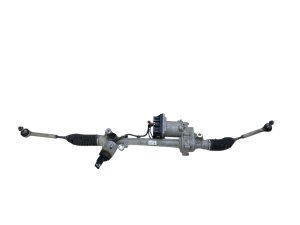
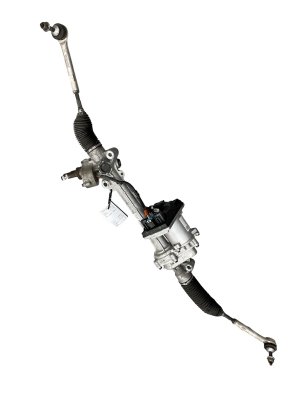
- Electrical Connectors: Check the main motor and logic connectors for any signs of corrosion, bent pins, or damage to the plastic housings.
- Boots: The rubber boots on either end of the rack protect the inner tie rods. Ensure they are not torn or cracked. Damaged boots allow water and debris to enter, which will quickly destroy the internal components.
- Tie Rods: Check that the inner and outer tie rods move smoothly. While outer tie rod ends are often replaced during the job anyway, excessive play in the inner rods (where they enter the rack) indicates significant wear.
- Physical Damage: Inspect the main housing and motor for any cracks, dents, or signs of a major impact, which could indicate internal damage.
Replacement Overview
DIY Feasibility
Replacing the steering rack on a Model X is considered a difficult job for a DIY mechanic. While one owner successfully completed the job in about four hours, it required bypassing the official service manual procedure of dropping the high-voltage battery. More importantly, a software calibration step is mandatory after installation. Without access to Tesla's Service Mode to reinstall firmware and calibrate the steering angle sensor, the system will not function correctly and may remain in a fault state.
Required Calibration and Alignment
After the new or used rack is physically installed, several software procedures must be performed using the vehicle's Service Mode or Tesla's Toolbox software:
- Firmware Reinstallation/Update: The vehicle must recognize and initialize the 'new' component.
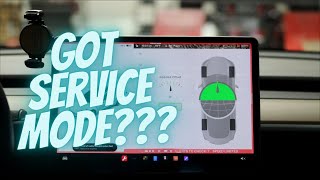
- Steering Angle Sensor Calibration: 🎬 Watch: How to enable Tesla service mode and reset steering angle The system needs to know the exact center position of the steering wheel.
- Clear Offsets: Any stored fault codes or learned values from the old rack must be cleared.
Finally, a full four-wheel alignment is mandatory to ensure the vehicle tracks straight and to prevent premature tire wear.
Cost Comparison
Prices can vary significantly between buying a used part and having the dealer perform the entire job.
| Part/Service | Estimated Cost | Notes |
|---|---|---|
| New OEM (Installed at Tesla) | $4,000 - $5,000 | Based on an owner quote of $4,600 for a complete replacement. This is the most expensive but most straightforward option. |
| Used OEM (Part Only) | $190 - $700 | Prices from online marketplaces like eBay show a wide range depending on condition and seller. |
| New Aftermarket | Not Available | Complete aftermarket steering racks for this model are not commonly available. Only minor components like boot kits may be found. |
| Shop Labor for Installation | $800 - $1,800+ | Independent shop labor can be cheaper than the dealer, but you must ensure the shop has the proper Tesla software and experience to perform the final calibration. General estimates range from $517-$759, but Tesla-specific work is typically more. |
Frequently Asked Questions (FAQ)
Can I drive my Model X with the 'Steering Assist Reduced' warning?
Yes, but with extreme caution. The vehicle remains steerable, but the effort required, especially at low speeds, is significantly higher. This can make parking difficult and reacting in an emergency challenging. It is recommended to have the vehicle serviced as soon as possible.
Does a software update always fix the power steering issue?
Not always. The November 2022 recall was for a specific software bug. If your software is up to date and the warning persists after a reboot, it likely indicates a hardware failure in the steering rack's motor, sensors, or control module, which will require physical replacement.
Do I need to program a used steering rack?
Yes. At a minimum, the vehicle needs to have its steering angle sensor calibrated and firmware re-initialized through Service Mode. Simply swapping the part without performing the software steps will likely result in continued warnings and disabled features like Autopilot.
Is a leaking fluid a sign of a bad steering rack on a Tesla?
No. The Tesla Model X uses an Electric Power Steering (EPS) system that does not contain any power steering fluid. If you see fluid under the front of your car, it is likely coolant from the battery/drivetrain cooling system or washer fluid, not from the steering system.
Helpful Videos
Technical Specifications
OEM Part Numbers: 1070801-00-F 1070801-00-E 1070801-00-D
Electric Power Steering (EPS) Rack and Pinion with integrated motor and control module. All Model X vehicles are All-Wheel Drive.
We Have This Part in Stock

The information in this article is provided for general reference and educational purposes only. Vehicle specifications, procedures, and part compatibility can vary by production date, trim level, and region. Always consult your vehicle's factory service manual and verify part numbers before purchasing or performing repairs. Safety-critical components such as airbags, seat belts, and braking systems should be installed by a qualified professional.
- Tesla X:
- 🎬 Helpful Videos
- 🛍️ Shop This Part
- Known Issues and Software Recalls
- NHTSA Campaign 22V825: Loss of Power Steering (November 2022)
- Symptoms of a Failing Rack and Pinion
- 1. 'Steering Assist Reduced' Warning
- 2. Autopilot and FSD Disabled
- 3. Heavy or Stiff Steering
- 4. Unusual Noises
- Buying a Used 2021-2025 Model X Steering Rack
- Verifying Compatibility
- What to Inspect
- Replacement Overview
- DIY Feasibility
- Required Calibration and Alignment
- Cost Comparison
- Frequently Asked Questions (FAQ)
- 🎟️ Get 5% Off