

2017-2026 Tesla Model 3 Brake Booster: Pre-Highland vs. Highland Parts Guide
This guide explains the critical differences between brake boosters for the first-generation (2017-2023) and 'Highland' (2024+) Tesla Model 3, how to diagnose failure, and what to know before buying a used part.
- There are two incompatible brake boosters: one for 2017-2023 models (part numbers starting with 1044671) and one for 2024+ 'Highland' models (part numbers starting with 1344671). You must match the part number.
- The primary symptom of failure is a very hard brake pedal accompanied by a 'Power Braking Assist Reduced' or red 'Brake System' warning on the screen. The car is unsafe to drive in this condition.
- Replacement is not a DIY job. It requires special software (Tesla Toolbox) to perform the brake bleed and calibration procedures correctly.
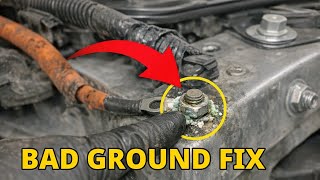
- Before replacing the booster, always check the 12V/16V auxiliary battery and chassis grounds, as electrical issues can mimic a booster failure.
Critical Compatibility: First-Generation (2017-2023) vs. 'Highland' (2024+)

The most important factor when replacing a Tesla Model 3 power brake booster is the vehicle's generation. The parts are not interchangeable between the original and the refreshed 'Highland' models. Installing the wrong part will result in system incompatibility and failure.
Warning: These parts are confirmed to fit Left Hand Drive (LHD) vehicles. Fitment for Right Hand Drive (RHD) vehicles has not been confirmed and likely requires a different part.
2017-2023 First-Generation Models
These early Model 3s use a distinct brake booster assembly. When searching for a replacement, you must match it to the original part number found on your car.
- Known Part Numbers: 1044671-00-D, 1044671-99-F, 1044671-00-G
2024-2026 'Highland' Models
The updated Model 3, known as the 'Highland' refresh, introduced a new brake booster design. These parts are not backward compatible with earlier models.
- Known Part Numbers: 1344671-00-A, 1344671-50-B
Symptoms of a Failing Brake Booster

A failing brake booster in a Model 3 presents serious safety risks. The symptoms are usually clear and should be addressed immediately.
1. Hard or Stiff Brake Pedal
This is the most common and dangerous symptom. The brake pedal becomes extremely difficult to push, requiring significant leg strength to slow the car down. This indicates a loss of electromechanical assistance, and your stopping distance will be much longer. In some cases, owners report a stiff pedal feel even on newer cars, particularly when regenerative braking is limited by cold weather, but a sudden change accompanied by warnings indicates a failure.
2. Dashboard Warning Lights
Your car's main screen will display specific alerts when a fault is detected. These are direct indicators of a problem.
- 'Power Braking Assist Reduced' (Amber): This message indicates the iBooster's electric motor is not providing full assistance.
- Red 'Brake System' Alert: This is the most critical warning. It often appears with a hard pedal and may indicate a complete booster failure or low brake fluid.
- ABS and Traction Control Lights: Since the systems are integrated, a booster failure can also trigger faults in the Anti-lock Braking System (ABS) and stability control.
Pro Tip: Before assuming the booster has failed, check the health of the 12V/16V auxiliary battery and look for corroded chassis ground points. Low voltage or a bad ground can cause the brake controller to shut down power assist as a precaution, mimicking a booster failure.
🎬 See how to fix ground and battery issuesKnown Issues, Recalls, and Technical Service Bulletins (TSBs)

As of early 2026, there are no official NHTSA recalls specifically for the power brake booster unit on the Tesla Model 3. However, other brake-related issues and investigations are relevant:
- NHTSA Recall SB-21-33-002: Issued for 2019-2021 Model 3s, this recall addressed loose brake caliper bolts that could contact the wheel rim, potentially causing a loss of tire pressure. This was an assembly issue, not a booster failure.
- Phantom Braking Investigation: The NHTSA has investigated complaints of "phantom braking" in 2021-2022 Model 3 and Y vehicles, where the driver-assist system unexpectedly applies the brakes. This is considered a software/sensor issue, not a mechanical fault with the booster itself.
- Warning Light Size Recall: In early 2024, Tesla recalled nearly 2.2 million vehicles because the brake, park, and ABS warning light icons on the display were smaller than federal regulations required. This was fixed with an over-the-air software update and did not relate to the function of the brake system itself.
Buying a Used Tesla Model 3 Brake Booster

Given the high cost of new OEM parts, a used brake booster is a practical option. However, careful inspection and verification are essential.
1. Verify Compatibility Above All Else
The single most important step is to match the part number. A booster from a 2022 Model 3 will not work in a 2024 'Highland' model, and vice-versa. Cross-reference the part number on the used unit with your original part number before purchasing.
2. Physical Inspection Checklist
- Electrical Connectors: Check the main ECU connector and other sensor connectors for any bent pins, corrosion, or cracks in the plastic housing.
- Master Cylinder Area: Inspect the area where the master cylinder mounts. Look for any signs of brake fluid leaks or staining. Leaking brake fluid can contaminate and destroy the booster's internal electronics.
- Housing Integrity: Examine the entire assembly for cracks or damage from the donor vehicle's collision.
- Fluid Reservoir: Ensure the brake fluid reservoir is intact with no cracks.
3. Mileage and Part Viability
Unlike purely mechanical parts, the iBooster's failure is often electronic. While lower mileage is generally better, a part's age and history are just as important. Failures are not strictly tied to a specific mileage range and can occur at any time. Avoid parts from flood-damaged vehicles, as water intrusion is a guaranteed cause of failure.
Replacement Overview and Calibration
Warning: This is not a recommended DIY repair for most home mechanics. The replacement requires special software (Tesla's Toolbox 3) to properly bleed the brake system and calibrate the new component. Failure to perform the software-guided bleed procedure can leave air in the ABS module, leading to a spongy pedal or complete brake failure.
The replacement process is complex and involves several key stages:
- Disconnecting the 12V/16V low-voltage power.
- Removing the frunk, cowl panel, and wiper assembly to gain access to the booster, which is mounted on the firewall.
- Draining the brake fluid from the reservoir and disconnecting the hydraulic lines.
- From inside the cabin, disconnecting the booster's pushrod from the brake pedal.
- Unbolting the booster assembly from the firewall and removing it.
Installation is the reverse of removal, followed by the critical software-driven brake bleed and calibration routines. A road test with several aggressive stops is required to confirm proper pedal feel and performance.
Torque Specifications
- Booster to Bulkhead Nuts: 23 Nm
- Hydraulic Lines to Master Cylinder: 18 Nm
Cost of Replacement
Costs can vary based on your location and the source of the part. Aftermarket options are virtually non-existent, making used OEM the most common alternative to new.
| Part Source | Estimated Cost |
|---|---|
| New OEM (from Tesla) | $600 - $800+ |
| Used OEM (Recycled) | $175 - $400 |
| Shop Labor | $277 - $450+ |
Frequently Asked Questions (FAQ)
Can I drive my Model 3 if the brake booster has failed?
No, it is not safe to drive. When the booster fails, the brake pedal becomes extremely hard to press, and your stopping distance increases dramatically. The car has entered a fail-safe mode, and you should have it towed to a service center.
Will a brake booster from a 2023 Model 3 fit my 2024 'Highland' Model 3?
No. The parts are completely different between the first generation (2017-2023) and the 'Highland' refresh (2024+). You must match the part number exactly to your vehicle's original component.
Does a replacement brake booster need to be programmed?
Yes, a specific procedure is required. While it's not programming in the traditional sense, a new booster requires a software-guided brake bleed and calibration using Tesla's diagnostic software (Toolbox 3). This ensures all air is removed from the hydraulic system and the pedal travel sensor is correctly calibrated.
My brake pedal feels hard, but there are no warning lights. Is it the booster?
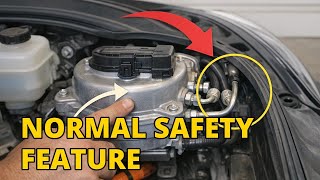
It might be a normal function. If the pedal feels firm during slow, complex maneuvers (like merging in dense traffic), it could be the Automatic Emergency Braking (AEB) system pre-charging the brakes. The system anticipates a potential collision and builds pressure, which feels like a hard pedal. However, if the pedal is consistently hard during normal braking, it indicates a problem.
Helpful Videos
Technical Specifications
OEM Part Numbers: 1044671-00-D 1044671-99-F 1044671-00-G 1344671-00-A 1344671-50-B
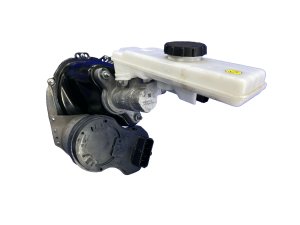
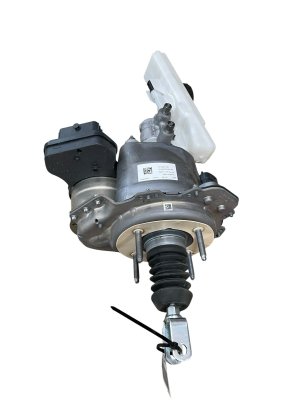
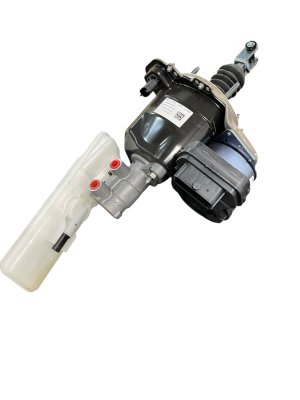
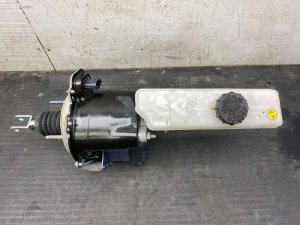
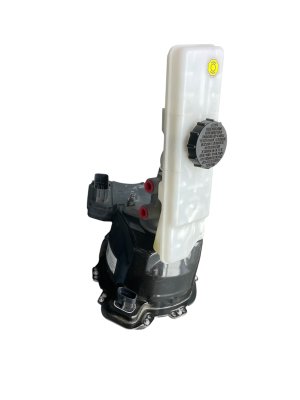
Electromechanical iBooster with integrated master cylinder and control unit. Requires software-guided bleeding and calibration upon replacement.
We Have This Part in Stock

The information in this article is provided for general reference and educational purposes only. Vehicle specifications, procedures, and part compatibility can vary by production date, trim level, and region. Always consult your vehicle's factory service manual and verify part numbers before purchasing or performing repairs. Safety-critical components such as airbags, seat belts, and braking systems should be installed by a qualified professional.
- Tesla 3:
- 🎬 Helpful Videos
- 🛍️ Shop This Part
- Critical Compatibility: First-Generation (2017-2023) vs. 'Highland' (2024+)
- 2017-2023 First-Generation Models
- 2024-2026 'Highland' Models
- Symptoms of a Failing Brake Booster
- 1. Hard or Stiff Brake Pedal
- 2. Dashboard Warning Lights
- Known Issues, Recalls, and Technical Service Bulletins (TSBs)
- Buying a Used Tesla Model 3 Brake Booster
- 1. Verify Compatibility Above All Else
- 2. Physical Inspection Checklist
- 3. Mileage and Part Viability
- Replacement Overview and Calibration
- Torque Specifications
- Cost of Replacement
- Frequently Asked Questions (FAQ)
- 🎟️ Get 5% Off