

2019-2024 Ford Edge Park Assist Camera: Decoding the Blue Screen of Death
This guide explains the common causes of rear camera failure on the Ford Edge, focusing on symptoms, recalls, and how to choose a reliable used replacement.
- The most common failure symptom is a solid blue or black screen when in reverse, often accompanied by a "Camera Unavailable" message.
- Failure is frequently caused by moisture intrusion leading to internal corrosion; it is a widespread issue on many Ford vehicles.
- Before buying a replacement, check Fuse #23 under the hood and inspect the camera's electrical connector for corrosion or bent pins.
- When buying used, verify the OEM part number is K2GZ-19G490-K and ensure the wiring harness matches your vehicle's options (with or without auto park).
Symptoms of a Failing Park Assist Camera
When the park assist camera on a 2019-2024 Ford Edge begins to fail, the symptoms are usually obvious and consistent. Understanding these signs can help you determine if the camera itself is the problem or if there's an issue elsewhere in the system.
Common Failure Symptoms:
- Blue or Black Screen: The most common symptom is the SYNC display turning to a solid blue or black screen when you put the vehicle in reverse. A blue screen typically indicates that the display is powered on but is not receiving a video signal from the camera. A black screen can mean the camera has lost power entirely or the SYNC system has a software glitch.
- "Camera is Unavailable" Message: The screen may display a message like "Rear view camera currently not available, contact dealership." This error explicitly states the system cannot communicate with the camera module.
- Intermittent Operation: The camera may work perfectly one day and fail the next. This often points to a loose connection or a failing internal component within the camera that is sensitive to temperature or vibration.
- Distorted or Flickering Image: The video feed might appear grainy, distorted, upside down, or flicker rapidly, making it unusable.
Known Issues, Recalls, and Technical Service Bulletins (TSBs)
While there isn't a specific recall that exclusively targets the 2019-2024 Ford Edge for this part, Ford has had widespread issues with rear cameras across many models. Some of these issues and service bulletins may apply or provide diagnostic clues.
- Ford Recall 23S23: This recall addresses a blue or black screen on various Ford models. It describes the exact symptoms many Edge owners experience: an intermittent blue or black image when in reverse, which may persist for the entire ignition cycle. The remedy is a dealer replacement of the rearview camera.
- General Camera-Related Recalls: Ford has issued multiple large-scale recalls for rearview camera failures on vehicles from 2015-2019 and beyond, often due to issues with the camera hardware or internal corrosion. While the 2019 Edge is on the cusp of these recalls, it shares technology and likely suppliers with affected models.
- TSB 21-2411: This Technical Service Bulletin addresses various SYNC 3 performance issues, including a "Solid blue screen when moving forward at speeds above 16 km/h (10 mph)" for 2019 models. While this describes a slightly different scenario, it indicates that software updates to the Accessory Protocol Interface Module (APIM) can resolve some camera-related screen issues.
- Wiring Harness Issues: Forum discussions often point to problems with the wiring harness or connectors. A bent pin in a connector in the tailgate has been identified as a cause for the "camera unavailable" message. The constant opening and closing of the liftgate can also lead to wire fatigue or loose connections over time.
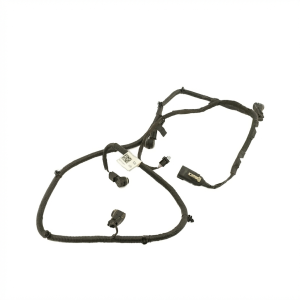
Warning: The wiring harness is a critical component. Different harnesses were used depending on whether the vehicle is equipped with the 'auto park' feature. Ensure any replacement part, especially a used one, has the correct harness for your vehicle's specific options.
Buying a Used Park Assist Camera
A used OEM camera can be a cost-effective solution, but careful inspection is key to avoiding a bad part. Here’s what to check:
- Verify the Part Number: The most reliable way to ensure compatibility is to match the part number. The primary OEM part number is K2GZ-19G490-K, which replaces the older part number k2gz19g490d. Always confirm this number before purchasing.
- Inspect the Lens: Check the camera lens for deep scratches, haziness, or any signs of moisture intrusion behind the lens. A cloudy lens indicates the seal has failed and the camera will not produce a clear image.
- Check the Connector Pins: Look at the electrical connector. The pins should be straight, clean, and free of any green or white corrosion. A bent or corroded pin is a major red flag.
- Ask for the Donor Vehicle's VIN: If possible, get the Vehicle Identification Number (VIN) of the car the part came from. This can help you or a dealer verify the vehicle's options (like Active Park Assist) to increase the chances of compatibility.
- Why Used OEM is Often Better: For a sensitive electronic part like this, a used OEM camera is often a safer bet than a cheap new aftermarket one. OEM parts are built to Ford's original specifications for image quality, durability, and fitment. Many aftermarket cameras suffer from poor image quality, incorrect gridlines, or premature failure.
Replacement Information
Replacing the rear camera on a 2019-2024 Ford Edge is a moderately easy DIY project for someone with basic tools.
- Difficulty: 2/5
- Estimated Time: 1 hour
- Tools Needed: Trim removal tools, socket set (11mm socket is common), Phillips screwdriver.
- Process Overview: The camera is located in the liftgate's exterior trim piece (the applique above the license plate). The process generally involves removing the interior trim panel of the liftgate, disconnecting wiring, unbolting the exterior applique, and then accessing the camera itself. 🎬 Watch: Step-by-step Ford Edge backup camera replacement guide
- Calibration: According to I-CAR, simply removing, installing, or replacing the rear camera does not typically require a manual calibration procedure unless a specific Diagnostic Trouble Code (DTC) indicates it's necessary. However, some sources mention a "Rear Vehicle Camera Configuration" may be needed, which can be done with a capable scan tool. It's best to test the camera after installation; if it works, no further steps are usually needed.
Pro Tip: Before you replace the camera, check the fuse. On the second-generation Ford Edge, the relevant fuse is typically Fuse #23 (a 15A fuse) in the under-hood fuse box. 🎬 See: How to find the backup camera fuse Also, try cleaning the camera's electrical connector with contact cleaner and applying dielectric grease before plugging it back in; a poor connection is a common and free-to-fix problem.
Cost Comparison
| Part Type | Estimated Cost |
|---|---|
| New OEM (Dealer) | $60 - $90 |
| New OEM (Online) | $40 - $50 |
| New Aftermarket | $30 - $70 |
| Used OEM | $50 - $100 |
| Shop Labor Cost | $128 - $188 |
Frequently Asked Questions
My screen is blue. Is the camera definitely broken?
Not necessarily. A blue screen means the display isn't getting a video signal. While this is often a failed camera, it could also be a blown fuse, a damaged wire, or a loose/corroded connector between the camera and the car. Always check the simple things like the fuse and connector first.
Do I need to have the dealer program a new camera?
Usually, no. For a simple replacement, the camera should be plug-and-play. However, if issues persist or if you have features like 360-degree view or active park assist, a configuration or calibration might be necessary. Most DIY installers find that it works immediately after installation.
Why did my camera fail? Is there a design flaw?
The most common cause of failure is exposure to the elements. The camera is located on the outside of the vehicle, where it's subjected to rain, car washes, and temperature extremes. Over time, moisture can get past the seals and corrode the internal electronics, leading to failure. Ford has had numerous recalls for this exact issue on other models.
Can I just replace the wiring harness instead of the whole camera?
The camera and its short pigtail harness are typically sold as a single unit. The main vehicle harness that it plugs into is a separate, more complex part. If a technician has diagnosed a bad pin or connector on the camera side, you will need to replace the camera assembly. If the damage is in the vehicle's body harness, that is a much more involved repair.
Helpful Videos
Technical Specifications
OEM Part Numbers: K2GZ-19G490-K k2gz19g490d
N/A
We Have This Part in Stock

The information in this article is provided for general reference and educational purposes only. Vehicle specifications, procedures, and part compatibility can vary by production date, trim level, and region. Always consult your vehicle's factory service manual and verify part numbers before purchasing or performing repairs. Safety-critical components such as airbags, seat belts, and braking systems should be installed by a qualified professional.
- Ford Edge: