

U3000 on 2019-2024 Mazda3, CX-30, & More: Causes and Fixes for Telematics & Camera Faults
Code U3000 on a 2019-2024 Mazda3 and its platform-mates (CX-30, CX-5, etc.) most often points to a software glitch in the Telematics Control Unit (TCU), which is fixed with a dealer software update. This is often triggered by an expired connected services subscription. Less commonly, it can indicate a failed Forward Sensing Camera (FSC) that requires replacement and calibration.
- U3000 on a 2019-2024 Mazda3 is not a single fault; it means a specific module (usually TCU or FSC) has an internal error.
- The most likely cause is a software glitch in the Telematics Control Unit (TCU), often appearing after a connected service subscription ends. A Mazda dealer can fix this by reprogramming it.
- If the fault is in the Forward Sensing Camera (FSC), it usually requires an expensive replacement and calibration, though goodwill warranty outside the normal period may be possible.
- This issue is common across the platform, affecting the CX-30, CX-5, and others in the same way.
- A professional diagnosis with a Mazda-specific scan tool is necessary to determine which module is at fault and avoid unnecessary repairs.
- Driving is possible, but be aware that important safety and communication features may be offline.
What's Unique About the 2019-2024 Mazda MAZDA3

The fourth-generation Mazda3 (2019+) and its platform-mates (CX-30, CX-5, CX-9, MX-30) heavily integrate advanced driver-assistance systems (ADAS) and connected services. This reliance makes them particularly susceptible to module-specific faults like U3000. Many of these issues are not due to hardware failure but are software-related, sometimes triggered by events as simple as the expiration of a connected services subscription, as documented in multiple Mazda Technical Service Bulletins.
Diagnostic Flowchart

Tap your situation to follow the diagnostic path that matches what you're seeing on this vehicle.
Symptoms You May Notice

- "Telematics Malfunction" message in the instrument cluster.
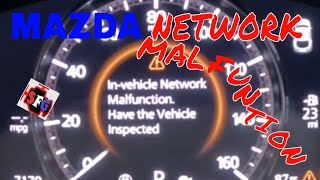
- "In Vehicle Network Malfunction" message in the instrument cluster.
- i-ACTIVSENSE or other ADAS-related warning lights on.
- Master warning light illuminated.
- Smart Brake Support (SBS), Lane Departure Warning (LDWS), or High Beam Control (HBC) warning lights on.
- Loss of Lane-Keep Assist (LKA), Adaptive Cruise Control (ACC), or Traffic Sign Recognition (TSR) functions.
- eCall / SOS system warning light or malfunction message.
- Replacing the main 12V battery. While a weak battery can cause various electronic issues, and the U3000 code may appear after a battery change, the root cause on this platform is very specifically tied to module software or hardware failures documented in TSBs that require a specific update or replacement to resolve.
Most Likely Causes

- Telematics Communication Unit (TCU) Software Malfunction 🔴 High Probability Multiple TSBs (e.g., 09-001-23a, 09-001-24c) confirm that improper software logic in the TCU can cause it to set a U3000 fault, most commonly triggered when a connected services contract is discontinued.
How to confirm: A Mazda dealer or a properly equipped independent shop will use the Mazda Diagnostic and Repair Software (MDARS) to check the TCU for codes and verify the installed software version. For example, TSB 09-001-24c instructs dealers to update the software using file 'TCU_7000T11-0501_8013.kwi' to bring the unit to version 10019 or newer.
Typical fix: The TCU's software must be updated via USB. This is a reprogramming procedure performed by the dealer. The process involves putting the infotainment system into a service mode and running the update.
Est. part cost: $0 - Forward Sensing Camera (FSC) Internal Failure 🟡 Medium Probability TSB 15-001-25 addresses a known hardware failure inside the FSC on vehicles like the Mazda3 built before May 24, 2023 (Japan built) or Sept 12, 2023 (Mexico built). High temperatures can also cause the FSC to overheat and temporarily set this code.
How to confirm: A diagnostic scan will show the U3000:04-FSC code being stored by the FSC module specifically. If the code cannot be cleared, it points to a hard fault. The TSB applies to Japan-built Mazda3s with VINs lower than JM1BP**623995 and Mexico-built Mazda3s with VINs lower than 3MZBP**385904.
Typical fix: The Forward Sensing Camera, located on the windshield, must be replaced with a modified part. After installation, the new camera must be precisely calibrated for the ADAS systems to function correctly. The warranty labor time for this repair is listed as 0.4 hours.
Est. part cost: $600-$900
Rare But Worth Checking
- Telematics Communication Unit (TCU) Hardware Failure: While most TCU-related issues are software-based, TSB 09-001-24g acknowledges the possibility of an internal malfunction. In some cases, a software update may fail, leading the dealer to recommend a full TCU replacement, which can be very expensive ($1600+). It is also possible for only one function, like the eCall system, to fail, prompting a replacement quote.
Diagnosis Steps
- Perform a full vehicle scan with an advanced, Mazda-capable scan tool (like MDARS) to identify which specific control module has stored the U3000 code (e.g., TCU, FSC, etc.).
- If the code is U3000:04-TCU or U3000:00-TCU, check for relevant TSBs regarding a software update. The most common fix is reprogramming the TCU.
- If the code is U3000:04-FSC, check the area in front of the camera on the windshield for obstructions, dirt, or damage. Also check if your vehicle's VIN falls within the range specified in TSB 15-001-25.
- If the FSC is clear, attempt to clear the code. If it returns immediately, it indicates a hard fault, likely requiring camera replacement as per TSB 15-001-25.
- IMPORTANT: Before attempting any module reprogramming, connect a stable battery charger (10-15A) to the vehicle to prevent voltage drops that can cause the update to fail and potentially damage the module.
- If a module is replaced (either TCU or FSC), follow the manufacturer's procedure for programming and/or calibration. After reprogramming, lock the vehicle and let it sit for at least 5-10 minutes to enter 'sleep mode' to prevent setting other communication codes.
Parts You'll Likely Need
- Forward Sensing Camera (FSC)
(OEM #BHSC-67-RC0 (Mexico built), BDGF-67-XCX (Base P/N))— This is the most common hardware failure associated with code U3000 on this vehicle, as documented in TSB 15-001-25. Replacement with a modified part is required.
Trusted brands: Mazda (OEM)
OEM price range: $600-$900
Aftermarket price range: Not generally available - Telematics Communication Unit (TCU) — In the rare event a software update does not fix a TCU-related U3000 code or the update fails, the unit itself may have an internal hardware failure and require replacement. Note: TCUs are VIN-locked and cannot be swapped from other vehicles.
Trusted brands: Mazda (OEM)
OEM price range: $400-$1600
Aftermarket price range: Not generally available
Technical Service Bulletins (TSBs) & Recalls
- 09-001-24g: Mentions DTC U3000:00-TCU or U3000:04-TCU causing a "Telematics Malfunction" message.
- 09-001-24c: Cites improper TCU software as the cause for U3000:04-TCU. Provides specific software file names (e.g., TCU_7000T11-0501_8013.kwi) for the update.
- 09-001-23a: Links U3000:04-TCU and an "In Vehicle Network Malfunction" message to discontinued service contracts, caused by a software issue.
- SA-027-23c: Connects U3000:04 in the TCU to an "In-Vehicle Network Malfunction" error message.
- 15-001-25: Points to hardware failure in the Forward Sensing Camera (FSC) as a cause for U3000:04. Provides specific VIN ranges of affected Mazda3 and CX-30 vehicles and states that parts made after April 2021 are modified.
Platform-Specific Known Issues
- A known software issue can cause the "In Vehicle Network Malfunction" message and DTC U3000:04-TCU to appear after the owner's connected service contract has been discontinued. This is resolved with a TCU software update and affects not only the Mazda3 but also the CX-30, CX-5, and other models.
Hidden / Shadow Codes Worth Checking
- U3000:00: Indicates a generic internal malfunction, often used for the Telematics Communication Unit (TCU) related to the emergency call system. (see via Mazda MDARS or equivalent advanced diagnostic scan tool.)
- U3000:04: Indicates an internal malfunction. This is the most common suffix for both TCU software issues and FSC hardware failures. (see via Mazda MDARS or equivalent advanced diagnostic scan tool.)
- U3000:49: Indicates an internal electronic failure, often related to the module's power supply circuit. While less common for the TCU/FSC on this platform, it is a defined failure type. (see via Mazda MDARS or equivalent advanced diagnostic scan tool.)
- U3000:98: Indicates the Forward Sensing Camera (FSC) has entered a thermal protection mode due to high temperatures. This is a protective function, not a hardware failure, but it may cause U3000:04 to be stored subsequently. (see via Mazda MDARS or equivalent advanced diagnostic scan tool.)
Scan Tool Commands That Help
- Mazda MDARS: TCU Software Update (via USB) — This is the primary repair for U3000:04-TCU, especially when related to an expired connected services subscription. The update is loaded via USB but initiated and verified with MDARS.
- Manual / Infotainment Screen: Enter Factory/Service Inspection Screen — To manually initiate a USB software update, press and hold the Volume knob, then press and hold the Entertainment and Favorites buttons simultaneously for 3-5 seconds. This provides access to the 'Device Program Update' menu.
- Mazda MDARS: FSC Aiming (Dynamic or Static) — This calibration is mandatory after replacing the Forward Sensing Camera (FSC) to ensure ADAS functions operate correctly. Dynamic aiming involves driving the vehicle, while static aiming uses physical targets.
- Mazda MDARS: Set Connection Limited Mode — Before performing a TCU software update, this function should be activated to prevent the system from sending unnecessary malfunction notifications to the owner's MyMazda app during the repair process.
Wiring & Ground Locations
- Telematics Communication Unit (TCU) — On many Mazda3 models, the TCU is located under the battery and battery tray assembly in the engine bay.. Physical access is required for replacement. A technician may need to check for power, ground, and communication line integrity at the module's connector if a software update fails and a hardware issue is suspected.
- Forward Sensing Camera (FSC) — Located at the top of the front windshield, typically integrated into the rearview mirror mount assembly.. This is the location of the module that fails and sets U3000:04-FSC. Physical access is required for replacement and the windshield area in front of it must be kept clean and free of obstructions.
OEM Part Supersession History
BDGF-67-CM0, BDGF-67-CM0A, BDGF-67-CM0B, BDGF-67-CM0C, BDGF-67-CM0D, BDGF-67-CM0E, BDTS-67-CM0A→BDGF-67-CM0F— Supersession due to hardware or software revisions to address faults.
Heads up: On early 2019 models, updating the TCU to a newer software version (e.g., on part BDGF-67CK2-B) requires a corresponding software update to the BCM and CMU to prevent communication errors (DTC U2050:55).
Model Year Variations Within This Range
- 2019 (built before June 29, 2019): When replacing or reprogramming the Telematics Communication Unit (TCU), the Body Control Module (BCM) and Connectivity Master Unit (CMU) must also be reprogrammed to prevent setting DTC U2050:55.
- 2024: The specific TCU software update files differ depending on the vehicle's manufacturing plant. For example, TSB 09-001-24c specifies file
TCU_7000T11-0901_10006.kwifor Japan-built (JM1) Mazda3s andTCU_7000T11-1201_10007.kwifor Mexico-built (3MZ) Mazda3s.
Helpful Videos


We Have This Part in Stock

The information in this article is provided for general reference and educational purposes only. Vehicle specifications, procedures, and part compatibility can vary by production date, trim level, and region. Always consult your vehicle's factory service manual and verify part numbers before purchasing or performing repairs. Safety-critical components such as airbags, seat belts, and braking systems should be installed by a qualified professional.
- Mazda MAZDA3:
- 🎬 Helpful Videos
- 🛍️ Shop This Part
- What's Unique About the 2019-2024 Mazda MAZDA3
- Diagnostic Flowchart
- Symptoms You May Notice
- Most Likely Causes
- Rare But Worth Checking
- Diagnosis Steps
- Parts You'll Likely Need
- Technical Service Bulletins (TSBs) & Recalls
- Platform-Specific Known Issues
- Hidden / Shadow Codes Worth Checking
- Scan Tool Commands That Help
- Wiring & Ground Locations
- OEM Part Supersession History
- Model Year Variations Within This Range
- 🎟️ Get 5% Off