

U2100 on 2018-2025 Ford F-150: Initial Configuration Not Complete Explained
Code U2100 on a 2018-2025 Ford F-150 indicates a software or configuration issue in a specific module like the Telematics (TCU) or Cruise Control (CCM). The fix is almost always a software update or module reconfiguration performed by a dealer using FDRS software, not a hardware replacement. It is often triggered by failed OTA updates, low battery voltage, or improper module replacement.
- U2100 on a modern F-150 is almost always a software or configuration problem, not a broken part.
- This code is not DIY-friendly. The fix requires dealer-level tools (FDRS) or advanced aftermarket software (FORScan) and specific knowledge.
- Do not replace any control modules unless a qualified technician has exhausted all software update and reconfiguration options.
- Always check the battery first. A simple low voltage condition can trigger this complex-looking code.
- A full-system scan is essential to know which module is affected, as this determines the correct diagnostic path.
What's Unique About the 2018-2025 Ford F-150

The 14th generation F-150 (2021-2025) is particularly susceptible to this code due to its highly complex, software-dependent architecture and frequent use of Over-The-Air (OTA) updates. A failed or incomplete update can leave a module in an unconfigured state. Ford has issued numerous Technical Service Bulletins (TSBs) that point to software glitches in modules like the TCU, CCM, and blind spot monitors. These issues typically require dealer-level diagnostic tools (FDRS) to reconfigure or update the module software, making it distinct from a simple part failure.
Diagnostic Flowchart

Tap your situation to follow the diagnostic path that matches what you're seeing on this vehicle.
Generation note: This year range covers the end of the 13th Gen (2018-2020) and the 14th Gen (2021-2025). The U2100 code is most frequently documented in TSBs for the 14th generation, often related to the Telematics Control Unit (TCU), Cruise Control Module (CCM), and Side Obstacle Detection (SOD) modules. The 13th Gen also experiences the issue, commonly in the TCU.
Symptoms You May Notice

- FordPass or Lincoln Way app features are inoperative (remote start, lock/unlock, vehicle location).
- Unable to connect to wireless Android Auto or Apple CarPlay.
- In-vehicle WiFi hotspot is unavailable.
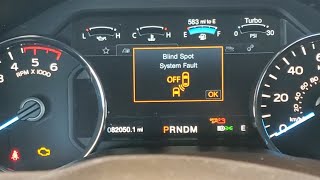
- Malfunction message for adaptive cruise control, pre-collision assist, or blind spot monitoring.
- Check Engine Light or Wrench light may be illuminated on the dashboard.
- "Blind Spot System Fault" or "Cross Traffic System Fault" message after taillight replacement or repair.
- Trailer brake controller malfunction message after installing an accessory TBC kit.
- Replacing a control module without first attempting a software update or reconfiguration. TSBs and forum reports confirm that simply swapping the hardware often does not fix the issue, as the new module still needs to be programmed to the vehicle.
Most Likely Causes

- Module Software/Configuration Error 🔴 High Probability Modern F-150s are software-intensive. Updates, whether over-the-air (OTA) or at the dealer, can sometimes fail or corrupt memory, leaving a module in an unconfigured state. This is the most common cause, as documented in multiple TSBs.
How to confirm: A professional scan tool is needed to identify which module has the U2100 code. The fix is to use Ford's diagnostic software (FDRS) to perform a module reconfiguration or software update as per the relevant TSB.
Typical fix: Re-flashing or re-configuring the affected module (TCU, CCM, SODL, etc.) using dealer-level tools. Specific FDRS routines like 'TCU Configuration' or 'Vehicle Identification Number (VIN) Write' are often required.
Est. part cost: $0 - Weak or Recently Replaced Battery 🟡 Medium Probability A low voltage event during startup can prevent one or more modules from completing their initialization sequence correctly, leading to a temporary U2100 code. Owners on Reddit report that OEM batteries can fail prematurely, causing a host of electrical gremlins.
How to confirm: Test the battery's state of charge and health. A voltage below 12.4V at rest is a sign of a weak battery. Also, check terminal connections for tightness and corrosion. The issue often appears after a jump-start or battery replacement.
Typical fix: Charge or replace the battery and clear the codes. If the code does not return, the battery was the cause. A Battery Management System (BMS) reset using a tool like FORScan may be required after replacement.
Est. part cost: $150-$400 - Aftermarket Programming or Modifications ⚪ Low Probability Using tools like FORScan to alter vehicle settings ('as-built data') can sometimes lead to configuration conflicts if not done correctly, especially after official software updates overwrite custom parameters.
How to confirm: If the code appeared after making changes with an aftermarket tool, this is the likely cause.
Typical fix: The module's 'as-built' data may need to be forcibly rewritten using the same tool. A common FORScan procedure is to go to the module's As-Built configuration, select 'Restore All' (which changes nothing yet), and then 'Write All' to force a rewrite of the current values, followed by a module reset.
Est. part cost: $0
Rare But Worth Checking
- Failed Control Module: While rare, the module itself (e.g., TCU, CCM) could have an internal hardware fault preventing it from retaining its configuration. This should only be considered after all software and configuration-based solutions have been attempted by a qualified technician.
- Improperly Installed Accessory: TSB 21-2179 specifically notes that code U2100 can appear in the Trailer Module (TRM) after the installation of a Ford accessory trailer brake controller kit. This is due to an error in the configuration data needed to update the TRM and Instrument Panel Cluster (IPC).
Diagnosis Steps
- Read codes from ALL vehicle modules using a high-quality scan tool (like FORScan or a professional shop tool) to identify which specific module is storing the U2100 code.
- Check and verify battery health. Ensure battery voltage is stable and above 12.4V. Test the charging system. A weak battery is a common cause of communication codes.
- Consult Technical Service Bulletins (TSBs). Check for TSBs related to the specific module that has logged the code (e.g., CCM, TCU, SODL, TRM).
- Perform Module Reconfiguration. Using Ford's FDRS software, run the specific routine called for in the TSB, such as 'Telematics Control Unit (TCU) Configuration', 'Vehicle Identification Number (VIN) Write', or the PMI process. For advanced DIYers, a forced 'as-built' rewrite using FORScan may resolve issues caused by custom programming.
- Update Module Software. If reconfiguration fails, the next step is to update the module's software to the latest version available from Ford using FDRS.
- Inspect Module Connections. If software fixes fail, inspect the wiring and connectors at the affected module for any signs of damage, corrosion, or loose pins, especially if a related part (like a taillight assembly containing a SOD module) was recently serviced. 🎬 Watch: How to install and reprogram a side obstacle detection module.
- Diagnose the Module for Hardware Failure. This is the final step. If the module will not accept programming and all connections are good, the module itself has likely failed and requires replacement, followed by programming.
Parts You'll Likely Need
- No Parts Usually Needed — This is typically a software or configuration issue resolved with diagnostic tools, not by replacing parts. Parts like the TCU or CCM should only be replaced as a last resort.
OEM price range: $0
Aftermarket price range: $0 - Telematics Control Unit (TCU)
(OEM #ML3T-14G229-A (example, exact PN varies by year/options))— Only replaced if it is diagnosed with an internal hardware failure after all software and configuration attempts have failed. TSBs 50567 and 50346 address software issues within this module.
Trusted brands: Motorcraft
OEM price range: $300-$600
Aftermarket price range: $200-$450 - Cruise Control Module (CCM)
(OEM #ML3Z-9E731-F (example, exact PN varies by year/options))— Only replaced if it is diagnosed with an internal hardware failure after all software and configuration attempts have failed. TSBs 53569, 53018, and 51903 point to software issues here.
Trusted brands: Motorcraft
OEM price range: $250-$500
Aftermarket price range: $150-$350
Related Codes That Often Appear With This One
- U3002 — This code for 'Vehicle Identification Number Not Programmed' often appears with U2100. TSBs 53569, 53018, and 51903 list them together, strongly indicating a module has lost its identity and configuration and needs to be reprogrammed, often after a module was swapped from another vehicle.
- B156D — This code is mentioned alongside U2100 in TSB 50346 and SSM 49292 regarding the Telematics Control Unit (TCU). It specifically relates to the TCU not being configured, leading to FordPass app issues.
- P163F — This code, indicating a corrupt or unprogrammed Transmission ID block, can appear with U2100 if the Transmission Control Module (TCM) is the source of the configuration error.
Technical Service Bulletins (TSBs) & Recalls
- SSM 53569: Addresses U2100/U3002 in CCM/SOD modules on 2021-2025 vehicles.
- SSM 53018: Addresses U2100/U3002 in CCM/SOD modules on 2021-2024 vehicles.
- SSM 51903: Addresses U2100/U3002 in CCM/SOD modules on 2021-2023 vehicles, fix is 'VIN Write' application in FDRS.
- SSM 50567: For 2021-2022 F-150s, addresses inoperative FordPass, wireless CarPlay/Android Auto, and WiFi with U2100 in TCU. Fix is running the 'TCU Configuration' app in FDRS.
- SSM 50346: For 2018-2020 models with FordPass app issues and U2100/B156D in TCU. Fix is a PMI procedure.
- TSB 21-2179: For 2021 F-150s, addresses U2100 in the Trailer Module (TRM) after installing the accessory trailer brake control kit.
- SSM 49690: Warns technicians that installing a new module before starting a scan tool session may result in incomplete configuration and DTC U2100.
Platform-Specific Known Issues
- On 2021-2025 models, U2100 is frequently stored in the Cruise Control Module (CCM) or Side Obstacle Detection Modules (SODL/SODR), often with DTC U3002. This is documented in TSBs SSM 53569, SSM 53018, and SSM 51903, with the prescribed fix being a 'Vehicle Identification Number (VIN) Write' procedure in FDRS.
- For 2018-2020 models, U2100 in the Telematics Control Unit (TCU) is a known issue that causes FordPass app connectivity problems. Ford addressed this in SSM 49292 and TSB 50346, which detail a module reconfiguration process (PMI) to fix it.
Mechanic-Grade Diagnostic Values
- CAN Bus Network Resistance — expected: Approximately 60 Ohms. Failure: A reading of 120 Ohms indicates an open circuit or a missing terminating resistor in one of the main modules. A reading significantly less than 60 Ohms suggests a short between the CAN High and CAN Low wires.
- CAN Bus Voltage (Key On, Engine Off) — expected: CAN High (Pin 6 to ground): ~2.7V. CAN Low (Pin 14 to ground): ~2.3V.. Failure: Voltages that are stuck high, stuck low, or equal to each other indicate a short or open on the network.
Hidden / Shadow Codes Worth Checking
- U2100:00: No Sub Type Information. This is a generic version of the code where the main description is considered sufficient. (see via Professional scan tools like Ford FDRS or advanced tools like FORScan.)
- U2100:46: Calibration or Parameter Memory Failure. This sub-code specifically indicates a failure within the module's FLASH or EEPROM memory where configuration data is stored. (see via Professional scan tools like Ford FDRS or advanced tools like FORScan.)
- U2100:57: Invalid or Incompatible Software Component. This indicates the module has identified a piece of software (like a calibration file) that is not compatible with its hardware or other software components. (see via Professional scan tools like Ford FDRS or advanced tools like FORScan.)
Scan Tool Commands That Help
- Ford FDRS: Vehicle Identification Number (VIN) Write — Used when U2100 is present with U3002 in the CCM or SOD modules, as specified in TSBs 51903, 53018, and 53569. This function rewrites the VIN into a new or corrupted module.
- Ford FDRS: Programmable Module Installation (PMI) — This is the standard procedure for replacing a module. It downloads the correct software and configuration from Ford's servers and programs it to the new module. It's often the fix for U2100 after a module replacement.
- Ford FDRS: Telematics Control Unit (TCU) Configuration — Specifically used to resolve U2100 in the TCU, which causes FordPass app issues, as per TSB 50567.
- FORScan: As-Built 'Force Rewrite' — To fix a persistent U2100 code after an OTA update or user modification. The procedure involves loading the module's As-Built configuration, selecting 'Restore All' (which loads the values but doesn't write them), and then 'Write All' to force a rewrite of the existing data, followed by a module reset. This can clear memory corruption.
Wiring & Ground Locations
- TCU (Telematics Control Unit) — On 2021 and newer F-150s, the TCU is located on the back wall of the cab, behind the rear passenger-side seat back and insulation.. The TCU is a frequent source of the U2100 code, causing FordPass app failures. Knowing its location is critical for inspection of connectors or replacement.
- SODL / SODR (Side Obstacle Detection Left/Right) — These modules are integrated into the rear taillight assemblies on most models. On some configurations with front obstacle detection, additional SOD modules (SODMC/SODMD) are located ahead of the front wheel arch, under the bumper cover trim.. U2100 often appears in these modules after a taillight is replaced or damaged. The code indicates the new module hasn't been configured to the truck.
- CCM (Cruise Control Module) — Mounted at the front of the vehicle, typically in the lower grille area or behind the bumper, to provide a clear view of the road for the radar.. This module is a common source for U2100 on 2021+ models. Physical damage or misalignment after a minor front-end impact can cause communication issues, though U2100 is almost always a configuration problem.
- G303 (Ground Point) — Located on the passenger side back wall of the cab.. This is a potential grounding point for the TCU. While U2100 is rarely a ground issue, a poor ground can cause intermittent module power loss and lead to configuration corruption.
Real Owner Repair Stories
- VXdiagshop.com technical write-up (Ford F-150 (year not specified, but applies to modern models with OTA updates)) — Persistent U2100 code in a module after an Over-The-Air (OTA) or dealer (FDRS) update.
❌ Tried (didn't work) Clearing DTCs normally., Attempting to restore a known-good As-Built backup file (fails due to checksum errors after an update).
✅ What actually fixed it Using FORScan, the technician performed a forced rewrite of the module's current As-Built data. This involved going to the module's configuration, selecting 'Restore All' (which changes nothing), then 'Write All' to force the rewrite. This was followed by a module reset and a Gateway Module (GWM) reset to re-establish communication. - YouTube video by 'EAD automotive' (2018 Ford F-150) — "Blind Spot System Fault" message on the dash. DTC U2100 (Initial configuration not complete) in the Side Obstacle Detection Control Module.
❌ Tried (didn't work) The previous shop had replaced the taillight assembly (which contains the module) but did not program it.
✅ What actually fixed it Using the Ford IDS scan tool, the technician performed a 'Programmable Module Installation' (PMI) for the Side Obstacle Detection Control Module Left. Since the original module was not available, the tool was instructed to set up a new module, which successfully configured it and cleared the code. - YouTube video by 'Pine Hollow Auto Diagnostics' (2021 Ford F-150 (from a body shop)) — Multiple codes including U2100 in SODCMD (Side Obstacle Detection Module D - front passenger side) and U024E (Lost communication with SODMC - front driver side).
❌ Tried (didn't work) The body shop had replaced the passenger side SOD module but did not configure it, causing the U2100., Clearing codes did not resolve the lost communication with the driver's side module.
✅ What actually fixed it For the U2100, the technician used FORScan to load the factory As-Built data into the new SODCMD module, which configured it and cleared the code. The U024E was fixed by discovering the electrical connector on the driver's side SODMC module was not fully seated. Plugging it in correctly restored communication.
Model Year Variations Within This Range
- 2021-2025: These 14th Gen models are most affected by U2100 in the CCM and SODL/SODR modules, often paired with U3002. The fix is typically the 'VIN Write' function in FDRS as per multiple TSBs. The TCU is located behind the rear seat.
- 2018-2020: These 13th Gen models more commonly log U2100 in the TCU, leading to FordPass app failures. The fix is often a PMI procedure as described in SSM 49803. The TCU on these models is typically located behind the passenger glovebox.
Helpful Videos

The information in this article is provided for general reference and educational purposes only. Vehicle specifications, procedures, and part compatibility can vary by production date, trim level, and region. Always consult your vehicle's factory service manual and verify part numbers before purchasing or performing repairs. Safety-critical components such as airbags, seat belts, and braking systems should be installed by a qualified professional.
- Ford F-150:
- 🎬 Helpful Videos
- What's Unique About the 2018-2025 Ford F-150
- Diagnostic Flowchart
- Symptoms You May Notice
- Most Likely Causes
- Rare But Worth Checking
- Diagnosis Steps
- Parts You'll Likely Need
- Related Codes That Often Appear With This One
- Technical Service Bulletins (TSBs) & Recalls
- Platform-Specific Known Issues
- Mechanic-Grade Diagnostic Values
- Hidden / Shadow Codes Worth Checking
- Scan Tool Commands That Help
- Wiring & Ground Locations
- Real Owner Repair Stories
- Model Year Variations Within This Range
- 🎟️ Get 5% Off