

U2018 on 2021-2024 Ford Mustang Mach-E: BlueCruise Failure Causes and Fixes
On a 2021-2024 Ford Mustang Mach-E, code U2018 almost always indicates a software glitch after an Over-the-Air (OTA) update, causing BlueCruise and lane centering to fail. The fix is typically a software update performed by a Ford dealer and is not a do-it-yourself repair.
- Code U2018 on a Mustang Mach-E is almost certainly a software problem, not a broken part.
- The primary symptoms are the failure of BlueCruise and lane centering, but the vehicle remains safe to drive.
- This is not a DIY fix. You must take the vehicle to a Ford dealer for a module software update using their FDRS tool.
- Before paying for any repairs, ask the service advisor if the fix is covered under warranty or by a Technical Service Bulletin (TSB), as it often is per TSB 24-2251 and its successors.
What's Unique About the 2021-2024 Ford MUSTANG MACH E
The Ford Mustang Mach-E's heavy reliance on Over-the-Air (OTA) software updates for new features and fixes is what makes it prone to this specific issue. While OTA updates are convenient, they can sometimes fail to apply correctly across all interdependent modules, particularly after updates like Ford Power-Up 6.13.0 which was cited by many owners as the trigger. This can create a software mismatch, where the Rear Camera Module (CMR) is no longer on the same software level as the Image Processing Module (IPMA), triggering code U2018 and disabling BlueCruise. Initially, Ford advised waiting for a future OTA fix (SSM 52350), but this proved unreliable, leading to the issuance of TSBs requiring a dealer visit.
Diagnostic Flowchart
Tap your situation to follow the diagnostic path that matches what you're seeing on this vehicle.
Symptoms You May Notice
- Inoperative BlueCruise hands-free driving
- Inoperative lane centering assist
- Warning messages on the instrument cluster related to driver-assist system faults, such as 'Driver Assist System Fault' or 'Front-facing camera fault'.
- BlueCruise icon does not appear on the instrument cluster on designated highways
- Adaptive cruise control may revert to standard cruise control with no lane keeping.
- Replacing the rear view camera without addressing the module software.
- Assuming the issue is with the main infotainment screen (APIM) or the BlueCruise subscription status.
- Attempting to fix the issue by performing a 12V battery disconnect, which forum users report does not resolve this specific software mismatch.
Most Likely Causes
- Module Software Incompatibility After Over-the-Air (OTA) Update 🔴 High Probability The vehicle's architecture uses frequent OTA updates. A partial or failed update, such as the widely reported Ford Power-Up 6.13.0, can cause a software mismatch between the Rear Camera Module (CMR) and the Image Processing Module (IPMA).
How to confirm: A professional scan tool will show U2018:51 in the CMR and U0565:86 in the IPMA, without a U3000:49 code in the CMR. This specific combination is detailed in multiple Ford Technical Service Bulletins.
Typical fix: A Ford dealer must reprogram the Camera Module - Rear (CMR) using the Ford Diagnostic & Repair System (F 🎬 Watch: How to set up and use Ford FDRS softwareDRS). This synchronizes the software across the necessary modules. The repair typically takes 0.4 hours and is covered under warranty per TSB 25-2104.
Est. part cost: $0
Rare But Worth Checking
- Faulty Camera Module - Rear (CMR): While far less common than a software issue, the module itself can fail. This would be suspected if software reprogramming repeatedly fails to resolve the code. One owner on a forum reported a CMR replacement was ultimately needed after multiple software updates failed, though this is an outlier case.
- Poor wiring or connection to the CMR: In some cases, especially on early-build vehicles, a loose coaxial cable to the IPMA camera has been known to cause similar ADAS faults, though this typically presents with different or additional DTCs.
Diagnosis Steps
- Read all Diagnostic Trouble Codes (DTCs) from all vehicle modules using a professional scan tool capable of reading Ford-specific codes (like FDRS).
- Confirm the presence of DTC U2018:51 in the Camera Module - Rear (CMR).
- Confirm the presence of DTC U0565:86 in the Image Processing Module A (IPMA).
- Verify that DTC U3000:49 is NOT present in the CMR, as this would indicate a different problem requiring different diagnostics.
- Check for open Technical Service Bulletins (TSBs) or recalls related to U2018 and the vehicle's VIN. Specifically, look for TSB 25-2104 or its predecessors.
- If a relevant TSB exists, follow the prescribed procedure. Connect a 12-volt battery charger to a chassis ground, not the battery negative terminal. Do NOT have the high-voltage charger connected during programming.
- Using the Ford Diagnostic & Repair System (FDRS), reprogram the CMR. If a standard update fails or the module status is negative, perform the 'Programmable Module Installation' (PMI) function for the CMR.
- After reprogramming, clear all DTCs and perform a CMR self-test using FDRS. Then, perform a road test to verify that BlueCruise and lane centering are functional and the codes do not return.
- If reprogramming fails, further diagnosis of the CMR module, its wiring, and network connections is necessary. In rare cases, the CMR module itself may need replacement.
Parts You'll Likely Need
- No parts usually needed — The most common fix is a software update performed by a dealer. No parts are replaced.
OEM price range: $0
Aftermarket price range: $0 - Camera Module - Rear (CMR)
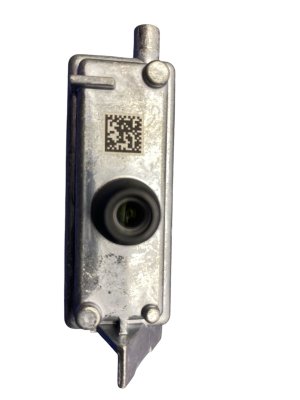
(OEM #ML3Z-19G490-C (example, verify by VIN))— In the rare event that software reprogramming does not work, the module itself may have failed and require replacement. This part number is an example and must be verified with the vehicle's VIN before ordering.
Trusted brands: Motorcraft
OEM price range: $450-$600
Related Codes That Often Appear With This One
- U0565:86 — This code is set in the Image Processing Module A (IPMA) and indicates it is receiving invalid data from the Camera Module - Rear (CMR). Ford TSBs explicitly state that these two codes appear together for this specific fault condition.
Technical Service Bulletins (TSBs) & Recalls
- TSB 25-2104: Supersedes 24-2251. Confirms the issue, affected vehicles, and repair procedure (CMR reprogram). Primarily updates labor times.
- TSB 24-2251: Details the service procedure to reprogram the CMR to correct the condition for a wide range of Ford/Lincoln vehicles.
- TSB 24-2087: An earlier bulletin, superseded by 24-2251, linking the issue to software updates delivered over-the-air (OTA).
- SSM 52350: An early Special Service Message that informed dealers a fix for the OTA-induced fault was expected via a future Ford Power-Up OTA update, a plan that was later replaced by the TSBs requiring a dealer visit.
- TSB 24-2062: Another bulletin acknowledging the issue is caused by software levels after OTA updates and prescribing the FDRS reprogram fix.
Platform-Specific Known Issues
- This issue is well-documented by Ford through numerous Technical Service Bulletins (TSBs). The problem arises specifically from software mismatches following Over-the-Air (OTA) updates, affecting not just the Mach-E but other Ford vehicles with BlueCruise.
- Owner Experience: The OTA-to-Dealer Pipeline: A common story shared by owners on forums involves receiving a Ford Power-Up update, followed by the immediate loss of BlueCruise and a 'Driver Assist Fault' message. One owner on MachEForum.com described their experience: 'Got the 6.4.0 update... a day later I get the Driver Assist System Fault... Took it to the dealer, mentioned the TSB, and they had it fixed in about an hour and a half. They just had to reprogram the camera module.' This highlights the typical, straightforward repair process once the vehicle is at a dealership aware of the TSB.
Mechanic-Grade Diagnostic Values
- 12V Battery State of Charge (SOC) before programming — expected: 50% or higher. Failure: Below 50% may cause programming failure.
Hidden / Shadow Codes Worth Checking
- U3000:49: Internal Electronic Failure. The presence of this code in the CMR alongside U2018:51 indicates a different fault. The TSB for the OTA software issue explicitly does NOT apply if U3000:49 is stored. (see via Ford Diagnostic & Repair System (FDRS) or equivalent professional scan tool.)
Scan Tool Commands That Help
- Ford Diagnostic & Repair System (FDRS): Programmable Module Installation (PMI) — This function is required when a standard module reprogram fails to correct the U2018:51 code, especially after a failed OTA update. Forum reports indicate the module may show a 'Responded Negatively' status in FDRS, necessitating a PMI to restore the module's base configuration before it can accept updates.
- Ford Diagnostic & Repair System (FDRS): CMR Self-Test — After clearing DTCs or performing a reprogram/PMI, this self-test is used to confirm that the module is functioning correctly and that the fault codes are resolved.
Wiring & Ground Locations
- Chassis Ground (for programming) — Any bare metal point on the vehicle's chassis or frame, NOT the 12V battery negative terminal post.. TSBs 25-2104 and 24-2087 explicitly state that when connecting a 12V battery charger for module programming, the negative clamp must be on a chassis ground to prevent the vehicle's battery saver mode from activating, which could interrupt the programming process.
- Accessory Ground Point — A metal frame piece located in the side compartment below the A-pillar, accessible after removing the passenger side kick panel/fuse box cover.. While not directly related to the factory harness, this is a confirmed, accessible bare metal ground location that can be used for testing circuits or connecting diagnostic equipment.
Real Owner Repair Stories
- MachEForum.com user 'jayadelson' (2023 Mach-E Premium) — Inoperative BlueCruise and lane centering after a failed OTA update (24-PU0105-CMR-FX).
❌ Tried (didn't work) A standard software update via FDRS was not the correct procedure.
✅ What actually fixed it The user noted the CMR module had a purple 'Responded Negatively' status in FDRS. The fix was to perform a 'Programmable Module Installation (PMI)' on the CMR, which successfully restored function. This is a more in-depth procedure than a simple reprogram. - MachEForum.com user 'MME premium' (2022 Mustang Mach-E) — Inoperative BlueCruise after an OTA update in December, with codes U2018:51 and U0565:86.
❌ Tried (didn't work) The vehicle was at the dealer for a month, implying that initial software-only fixes were unsuccessful.
✅ What actually fixed it The dealer replaced the Camera Module - Rear (CMR). In addition, they had to perform software updates on the GWM, IPC, PSCM, IPMA, and APIM modules to get BlueCruise working again. The repair also wiped all personal profile settings.
When the Usual Fixes Don't Work
- While the overwhelming majority of U2018:51 faults are fixed with a dealer software procedure (specifically a CMR reprogram or PMI), there are documented owner experiences where this was not sufficient. In one case, the vehicle was at the dealership for a month, and the final resolution required replacing the CMR hardware and then updating the software on five other related control modules. This indicates that while rare, a hardware failure of the module can present with the exact same codes as the common software glitch, and technicians should consider it a possibility if reprogramming repeatedly fails.
Model Year Variations Within This Range
- 2021-2024: The series of Technical Service Bulletins addressing this issue has expanded over time. Early bulletins (like TSB 24-2087) focused on 2022-2023 models, while the latest bulletin (TSB 25-2104) has expanded the affected range to include 2021-2024 model years, indicating the software issue is not year-specific but tied to the OTA update process across the generation.
Helpful Videos
We Have This Part in Stock




The information in this article is provided for general reference and educational purposes only. Vehicle specifications, procedures, and part compatibility can vary by production date, trim level, and region. Always consult your vehicle's factory service manual and verify part numbers before purchasing or performing repairs. Safety-critical components such as airbags, seat belts, and braking systems should be installed by a qualified professional.
- Ford MUSTANG MACH E:
- 🎬 Helpful Videos
- 🛍️ Shop This Part
- What's Unique About the 2021-2024 Ford MUSTANG MACH E
- Diagnostic Flowchart
- Symptoms You May Notice
- Most Likely Causes
- Rare But Worth Checking
- Diagnosis Steps
- Parts You'll Likely Need
- Related Codes That Often Appear With This One
- Technical Service Bulletins (TSBs) & Recalls
- Platform-Specific Known Issues
- Mechanic-Grade Diagnostic Values
- Hidden / Shadow Codes Worth Checking
- Scan Tool Commands That Help
- Wiring & Ground Locations
- Real Owner Repair Stories
- When the Usual Fixes Don't Work
- Model Year Variations Within This Range
- 🎟️ Get 5% Off