

U1518 on 2019-2023 Cadillac XT4: Head-Up Display (HUD) Failure Causes and Fixes
On a 2019-2023 Cadillac XT4, code U1518 almost always means there's a software glitch causing the Head-Up Display (HUD) to go blank. A GM Technical Service Bulletin recommends a simple fuse pull to reset the module or a software update at the dealership for a permanent fix.
- U1518 on your XT4 means the Head-Up Display has lost communication and gone blank.
- Before paying for any repairs, try the simple fix first: remove the HUD fuse from the driver's side interior fuse panel for one minute and reinstall it. This often restores function temporarily.
- The most common permanent fix is a software update for the Instrument Panel Cluster, which must be done at a dealership per TSB 21-NA-127.
- It is very unlikely that you will need to replace the expensive HUD unit itself; the problem is almost always software-related.
What's Unique About the 2019-2023 Cadillac XT4
This is a well-documented issue on this generation of Cadillac XT4 and other similar GM vehicles built on the E2XX and C1XX platforms. The problem is so common that General Motors issued a specific Technical Service Bulletin (TSB #21-NA-127) to address it. The cause is often not a failed part, but a software timing issue that causes the HUD module to get stuck in standby mode until it is power-cycled.
Diagnostic Flowchart
Tap your situation to follow the diagnostic path that matches what you're seeing on this vehicle.
Symptoms You May Notice
- The Head-Up Display (HUD) is completely blank or inoperative.
- HUD controls for brightness, aim, or page selection are unresponsive.
- The HUD may start working again after turning the car off and on again (a full ignition cycle).
- In some cases, the HUD may recover on its own during a drive.
- Replacing the Instrument Panel Cluster. The cluster is usually just the messenger; the problem lies in its software or the HUD itself, not the cluster hardware.
- Assuming the HUD is broken when wearing polarized sunglasses, which can make the display invisible or very faint.
Most Likely Causes
- Instrument Panel Cluster (IPC) Software Glitch 🔴 High Probability A known software issue can cause a timing error on the LIN bus network as the HUD enters standby mode, effectively locking it up. This is explicitly stated as the cause in GM's TSB #21-NA-127.
How to confirm: Check for TSB #21-NA-127. A dealership can verify if the software update specified in the bulletin has been applied. If the update hasn't been performed, this is the most likely cause.
Typical fix: Reprogram the Instrument Panel Cluster (IPC) with the latest software using the dealership's Service Programming System (SPS).
Est. part cost: $0 - Temporary HUD Module Lock-up 🟡 Medium Probability This is a direct result of the software glitch mentioned above. The module gets stuck in standby and needs a power cycle to reset.
How to confirm: Follow the procedure in TSB #21-NA-127 to cycle power to the module. If the HUD begins working, this was the cause.
Typical fix: Turn the ignition off. Locate the HUD fuse in the instrument panel fuse block (driver's side of the dash), remove it for at least 30 seconds (some versions of the TSB recommend up to 10 minutes), and then reinstall it.
Est. part cost: $0 - Faulty Head-Up Display (HUD) Module ⚪ Low Probability In some earlier cases or if software fixes don't work, the internal electronics of the HUD unit itself may have failed. An older TSB (#18-NA-224) for similar models pointed to HUD replacement as the fix for an internal software concern within the HUD itself.
How to confirm: If reprogramming the IPC and cycling power via the fuse does not restore function, and the wiring is confirmed to be good, the HUD unit is the likely culprit. 🎬 See this walkthrough for removing the dashboard display and trim. This should be the last step after all software-related fixes have been exhausted.
Typical fix: Replace the Head-Up Display unit.
Est. part cost: $277-$496
Diagnosis Steps
- Verify the symptoms: Check if the HUD is blank and unresponsive to controls.
- Scan for DTCs to confirm U1518 is present in the Instrument Cluster, either as a current or history code.
- Check for applicable TSBs. TSB #21-NA-127 is the primary document for this issue on 2019-2022 models.
- Attempt the simplest fix first: Perform a power cycle reset. Turn the ignition off.
- Locate the HUD fuse in the interior fuse panel on the driver's side of the instrument panel.
- Remove the fuse for at least 30 seconds. TSB #21-NA-127 was updated to suggest a 10-minute removal if the 30-second pull doesn't work. Reinstall the fuse.
- Verify if the HUD is now operational. If so, the issue is temporarily resolved. For a permanent fix, the software update is still recommended.
- If the fuse pull does not work, the vehicle should be taken to a dealer to have the Instrument Panel Cluster (IPC) reprogrammed per TSB #21-NA-127.
- If reprogramming the IPC does not resolve the issue, the technician should then follow standard diagnostic procedures in the service manual to check wiring and connectors between the IPC and the HUD for damage or corrosion.
- If all other steps fail, suspect a faulty Head-Up Display unit and replace it, as suggested by the older TSB 18-NA-224.
Parts You'll Likely Need
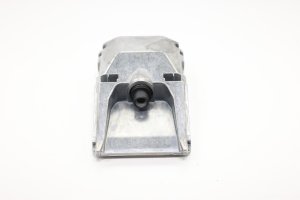
- Head-Up Display Unit
(OEM #84899011 (replaces 84472901, 84572645 for 2019-23 models), 42851426 (for 2024+ models))— This part is only needed if software updates and power cycling fail to resolve the issue, indicating an internal hardware or software failure of the unit itself.
Trusted brands: ACDelco, GM Genuine Parts
OEM price range: $277-$496
Aftermarket price range: $250-$400
Technical Service Bulletins (TSBs) & Recalls
- 21-NA-127: Head Up Display (HUD) Blank, Non-Responsive to Brightness, Aim, or Page Controls, DTC U1518 Set. This is the primary TSB for this issue, recommending a software update or fuse pull. It was updated several times, expanding the model years and refining the fuse pull duration.
- 18-NA-224: An older TSB for other GM models that suggested replacing the HUD for this code, indicating that in some cases, hardware failure can be the root cause. This bulletin superseded PIC6310A.
- PIC6310 / PIC6310A: An earlier preliminary bulletin showing the history of this issue on GM vehicles, also recommending a fuse pull to reset the module. This was superseded by 18-NA-224.
- PIE0582: An engineering information request from GM to gather data on this exact issue from the field before a final fix was developed. This was later superseded by TSB 21-NA-127.
Platform-Specific Known Issues
- TSB #21-NA-127 was issued by GM specifically to address DTC U1518 and a blank HUD on the 2019-2022 XT4 (and other models). The bulletin confirms the cause is often a software timing issue and the primary fix is to reprogram the Instrument Panel Cluster. A temporary fix of pulling the fuse is also documented.
- The interior fuse panel containing the HUD fuse is located behind a cover on the driver's side of the instrument panel.
Mechanic-Grade Diagnostic Values
- LIN Bus Voltage — expected: When testing with a multimeter (like a Fluke 87) set to 'peak min/max', a healthy, communicating LIN bus will show voltage toggling between a minimum of approximately 1V and a maximum of approximately 1V below battery system voltage (e.g., ~11.5-13V on a running vehicle). At rest, the voltage should be steady at about 1V less than system voltage.. Failure: A voltage reading stuck at full system voltage could indicate a short to power. A reading of 0V could indicate an open or short to ground. Using a multimeter NOT on a peak-capture setting may show a misleading average voltage of 7-9V, which is not an indicator of a fault.
Scan Tool Commands That Help
- GDS2 (GM Global Diagnostic System 2): Instrument Panel Cluster Programming / Module Setup — The primary fix for U1518 is reprogramming the Instrument Panel Cluster (IPC), which is the master module for the HUD, per TSB 21-NA-127. While no specific bidirectional test for the HUD is publicly documented, if the K43 HUD module itself is replaced, a 'Module Setup' or 'Configuration' function within GDS2 would almost certainly be required to link the new part to the vehicle, similar to procedures for other modules.
Wiring & Ground Locations
- Instrument Panel Grounds (General) — Various locations under the dashboard and behind kick panels. The specific ground point for the K43 HUD module is not identified in publicly available documents.. A poor ground connection can cause communication loss. While the software issue is the primary cause of U1518, if wiring is suspected, checking grounds is a key step. TSBs for other Cadillac models frequently cite ground G218 as a source of various electrical problems. A TSB for an XT6 (20-NA-134) warns technicians to use a specific ground stud (G206) for a console component and to avoid nearby grounds used for the inflatable restraint system, highlighting that not all ground points are interchangeable.
OEM Part Supersession History
84535932→84601743— This is for the related Front Floor Console Wiring Harness, not the HUD itself, but serves as a critical example of part incompatibility.
Heads up: This harness is only for 2019-2022 Cadillac XT4 models WITHOUT the wireless phone charging option and WITHOUT rear heated seats. Installing this part on a vehicle with those options will result in incompatible connectors and non-functioning features, demonstrating the need to verify vehicle options before ordering any wiring components.
Model Year Variations Within This Range
- 2019-2023: The exact fuse number and position for the Head-Up Display in the instrument panel fuse block can vary by model year. TSB #21-NA-127 explicitly advises technicians to refer to the vehicle-specific Head-Up Display Schematics in the service manual rather than assuming a single location for all years.
Helpful Videos
We Have This Part in Stock


The information in this article is provided for general reference and educational purposes only. Vehicle specifications, procedures, and part compatibility can vary by production date, trim level, and region. Always consult your vehicle's factory service manual and verify part numbers before purchasing or performing repairs. Safety-critical components such as airbags, seat belts, and braking systems should be installed by a qualified professional.
- Cadillac XT4:
- 🎬 Helpful Videos
- 🛍️ Shop This Part
- What's Unique About the 2019-2023 Cadillac XT4
- Diagnostic Flowchart
- Symptoms You May Notice
- Most Likely Causes
- Diagnosis Steps
- Parts You'll Likely Need
- Technical Service Bulletins (TSBs) & Recalls
- Platform-Specific Known Issues
- Mechanic-Grade Diagnostic Values
- Scan Tool Commands That Help
- Wiring & Ground Locations
- OEM Part Supersession History
- Model Year Variations Within This Range
- 🎟️ Get 5% Off